
1. Producte acabatview
The Ricoh P 501 B (Model 418363) is a high-performance A4 monochrome laser printer designed for efficient document production. It offers robust features including LAN and USB connectivity, and supports PCL5e and PCL6 printer languages, making it suitable for various office environments. This manual provides essential information for setting up, operating, maintaining, and troubleshooting your printer.

Figura 1: Ricoh P 501 B A4 Monochrome Laser Printer. This image shows the printer from an angled perspective, highlighting its compact design and control panel.
2. Configuració i instal·lació
2.1 Desembalatge de la impressora
- Traieu amb cura la impressora de l'embalatge.
- Remove all protective tapes and packing materials from the exterior and interior of the printer. Refer to the quick setup guide included in the box for specific locations.
- Col·loqueu la impressora sobre una superfície estable i anivellada amb una ventilació adequada.
2.2 Instal·lació del cartutx de tòner
- Obriu la coberta frontal de la impressora.
- Unpack the new toner cartridge. Gently shake it horizontally several times to distribute the toner evenly.
- Introduïu el cartutx de tòner a la impressora fins que encaixi al seu lloc.
- Tanqueu la coberta frontal.
2.3 Càrrega de paper
- Pull out the paper tray located at the bottom front of the printer.
- Adjust the paper guides to match the size of the paper you are loading (e.g., A4).
- Carregueu la pila de paper a la safata, assegurant-vos que estigui plana i per sota de la línia d'ompliment màxim.
- Empenyeu suaument la safata de paper cap a dins de la impressora fins que quedi bloquejada.
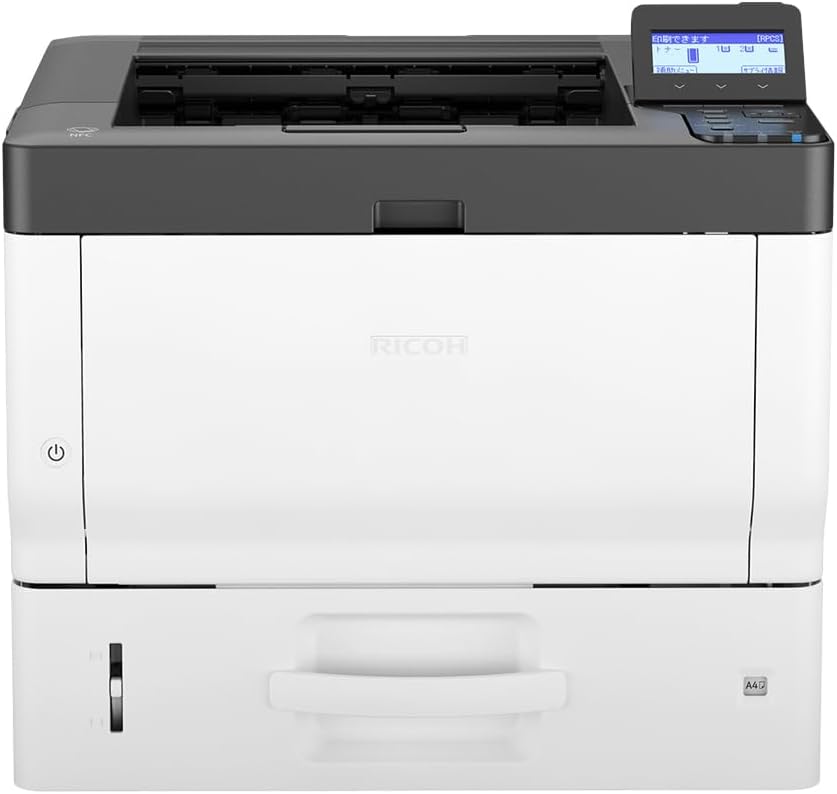
Figura 2: Davant view of the Ricoh P 501 B printer, showing the main paper input tray.
2.4 Connexió de la impressora
- Connexió d'alimentació: Connecteu el cable d'alimentació a la impressora i després a una presa de corrent amb connexió a terra.
- Connexió USB: Per a una connexió directa, feu servir un cable USB per connectar la impressora a l'ordinador.
- Connexió de xarxa (LAN): Connecteu un cable Ethernet des del port LAN de la impressora al vostre encaminador o commutador de xarxa.
2.5 Instal·lació del controlador
After connecting the printer, turn it on. Your operating system may automatically detect and install the necessary drivers. If not, insert the driver CD (if provided) or download the latest drivers from the official Ricoh support weblloc. Seguiu les instruccions que apareixen a la pantalla per completar la instal·lació.
3. Funcionament de la impressora
3.1 Impressió bàsica
- Assegureu-vos que la impressora estigui engegada i connectada a l'ordinador o a la xarxa.
- Obriu el document que voleu imprimir a l'ordinador.
- Seleccioneu "Imprimeix" al menú de l'aplicació (per exemple, File > Imprimeix).
- Choose the "Ricoh P 501 B" from the list of available printers.
- Ajusteu la configuració d'impressió segons calgui (per exemple, nombre de còpies, mida del paper, qualitat d'impressió).
- Feu clic a "Imprimeix" per enviar la feina a la impressora.
3.2 Ús del tauler de control
The printer features a control panel with a display screen and navigation buttons. Use these to check printer status, configure network settings, or perform maintenance tasks. Refer to the on-screen menus for specific options.

Figura 3: En angle view of the Ricoh P 501 B, highlighting the control panel with its display and buttons for printer operation.
4. Manteniment
4.1 Substitució del cartutx de tòner
When the toner level is low or empty, the printer's display will indicate that the toner cartridge needs replacement. Follow these steps:
- Obriu la coberta frontal de la impressora.
- Traieu amb cura el cartutx de tòner antic estirant-lo cap a fora.
- Unpack the new Ricoh-compatible toner cartridge and gently shake it.
- Introduïu el cartutx nou fermament fins que encaixi al seu lloc.
- Tanqueu la coberta frontal.
4.2 Neteja de la impressora
- Exterior: Netegeu l'exterior de la impressora amb un drap suau i secamp, drap sense borrissol. No utilitzeu productes de neteja abrasius ni dissolvents.
- Interior: Periodically open the front cover and gently remove any dust or paper debris from accessible areas using a dry, lint-free cloth or a small vacuum cleaner designed for electronics.
5. Solució De Problemes
This section addresses common issues you might encounter with your Ricoh P 501 B printer.
- La impressora no respon:
- Check if the printer is powered on and all cables (power, USB/Ethernet) are securely connected.
- Assegureu-vos que la impressora correcta estigui seleccionada al quadre de diàleg d'impressió de l'ordinador.
- Reinicieu tant la impressora com l'ordinador.
- Verify that the printer drivers are correctly installed and up to date.
- Slow Startup from Sleep:
Some users report slow startup times from sleep mode. Ensure the printer's firmware is up to date. Check printer settings for power-saving modes that might affect wake-up speed.
- Embussos de paper:
- Apagueu la impressora i desconnecteu-la.
- Open all covers and carefully remove any jammed paper, pulling in the direction of the paper path to avoid tearing.
- Assegureu-vos que el paper estigui carregat correctament i que no estigui massa ple a la safata.
- Problemes de qualitat d'impressió:
- Check toner levels and replace the cartridge if necessary.
- Assegureu-vos que feu servir el paper adequat per a la impressió làser.
- Perform a print head cleaning or calibration from the printer's control panel or driver settings if available.
- Automatic Landscape/Portrait Switching Issues:
If the printer struggles with automatic orientation switching, try manually setting the orientation in your application's print settings or the printer driver preferences before sending the print job.
For more detailed troubleshooting or issues not covered here, please refer to the comprehensive online support resources provided by Ricoh or contact their customer service.
6. Especificacions
| Característica | Especificació |
|---|---|
| Marca | Ricoh |
| Nom del model | 418363 (P 501 B) |
| Tecnologia de connectivitat | USB, LAN (Ethernet) |
| Tecnologia d'impressió | Làser |
| Característica especial | Portable (as per manufacturer listing) |
| Sortida de color | Monochrome (Black and White) |
| Mida màxima del suport | A4 |
| Dimensions del producte (P x A x A) | 30P x 40L x 30H cm (aprox. 30 x 40 x 30 cm) |
| Max Input Paper Capacity | 100 fulls |
| Capacitat màxima de fulls de sortida | 100 fulls |
| Resolució màxima de còpia (blanc i negre) | 1200 ppp |
| Resolució de l'escàner | 1200 x 1200 dpi (Note: Product is listed as "Print Only" in some specs, scanner resolution might refer to internal component or a related model feature) |
| Impressió dúplex | Simplex (No automatic duplex) |
7. Garantia i Suport
For warranty information, please refer to the documentation included with your printer or visit the official Ricoh website. Ricoh provides customer support for product inquiries, technical assistance, and service requests.
It is recommended to register your product on the Ricoh weblloc web per rebre actualitzacions i notificacions de suport.
Contacte amb l'assistència: For specific issues or technical support, please visit the Ricoh support portal or contact their customer service directly. Have your printer model (P 501 B) and serial number ready when contacting support.