
1. Introducció
Thank you for choosing the VEGER W2019 20000 mAh Lithium Polymer Power Bank. This device is designed to provide reliable and efficient portable charging for a wide range of electronic devices. Please read this manual carefully to ensure proper use and to maximize the lifespan of your power bank.

Figura 1: Producte principal view of the VEGER W2019 Power Bank, showing its sleek black design with a digital display indicating "100%" charge and input/output specifications.
2. Contingut del paquet
Assegureu-vos que tots els elements siguin presents al paquet:
- 1 x VEGER W2019 20000 mAh Lithium Polymer Power Bank
- 1 x cable de càrrega micro USB
3. Característiques del producte
The VEGER W2019 Power Bank incorporates several features for optimal performance and user convenience:
- Alta capacitat: 20000 mAh Lithium Polymer battery, capable of charging a 3000mAh phone approximately 6.6 times or a 4000mAh phone 5 times.
- Pantalla digital: An integrated LCD screen clearly shows the remaining battery percentagi en temps real.
- Ports d'entrada dual: Recharge the power bank using either a Micro USB or Type-C cable, eliminating the need for multiple cables.
- Ports de sortida dual: Simultaneously charge two devices with intelligent power output adjustment for efficient charging.
- Compatibilitat universal: Compatible with a wide range of USB-powered devices including smartphones, tablets, Bluetooth speakers, earphones, headsets, and fitness bands.
- Seguretat avançada: Features 9 layers of chipset protection, including high-voltage protection, current regulation, and temperature control, to safeguard your devices.
- Disseny compacte: Despite its high capacity, the power bank maintains a portable form factor.

Figure 2: VEGER W2019 Power Bank alongside icons representing key features: BIS Certificate, Lithium Polymer battery, and Smart Protection (IC chip).

Figura 3: Detallada view of the VEGER W2019 Power Bank highlighting its "Smart Charging" capabilities, including 2A Fast Charging, Dual USB Output, Micro/Type-C Input, On/Off Button, Digital Display, and 20000mAh High Capacity.

Figure 4: Size comparison of the VEGER W2019 Power Bank with a credit card, showing its dimensions (147mm length, 67mm width, 27mm thickness) to illustrate its "Small Body, Big Capacity".
4. Configuració
4.1 Càrrega inicial
Before first use, fully charge your VEGER W2019 Power Bank. Connect the provided Micro USB cable or a Type-C cable (not included) to one of the input ports on the power bank and the other end to a USB power adapter (e.g., wall charger, computer USB port). The digital display will show the charging progress, indicating 100% when fully charged.
4.2 Comprensió de la pantalla digital
The LCD display activates when the power bank is in use or when the power button is pressed. It shows the current battery percentage, allowing you to monitor the remaining charge accurately.
5. Instruccions de funcionament
5.1 Càrrega dels vostres dispositius
- Connecta el cable de càrrega del dispositiu a un dels ports de sortida USB del banc d'alimentació.
- Connecteu l’altre extrem del cable al dispositiu.
- The power bank will automatically begin charging your device. The digital display will show the power bank's remaining charge.
- Per aturar la càrrega, simplement desconnecteu el dispositiu.
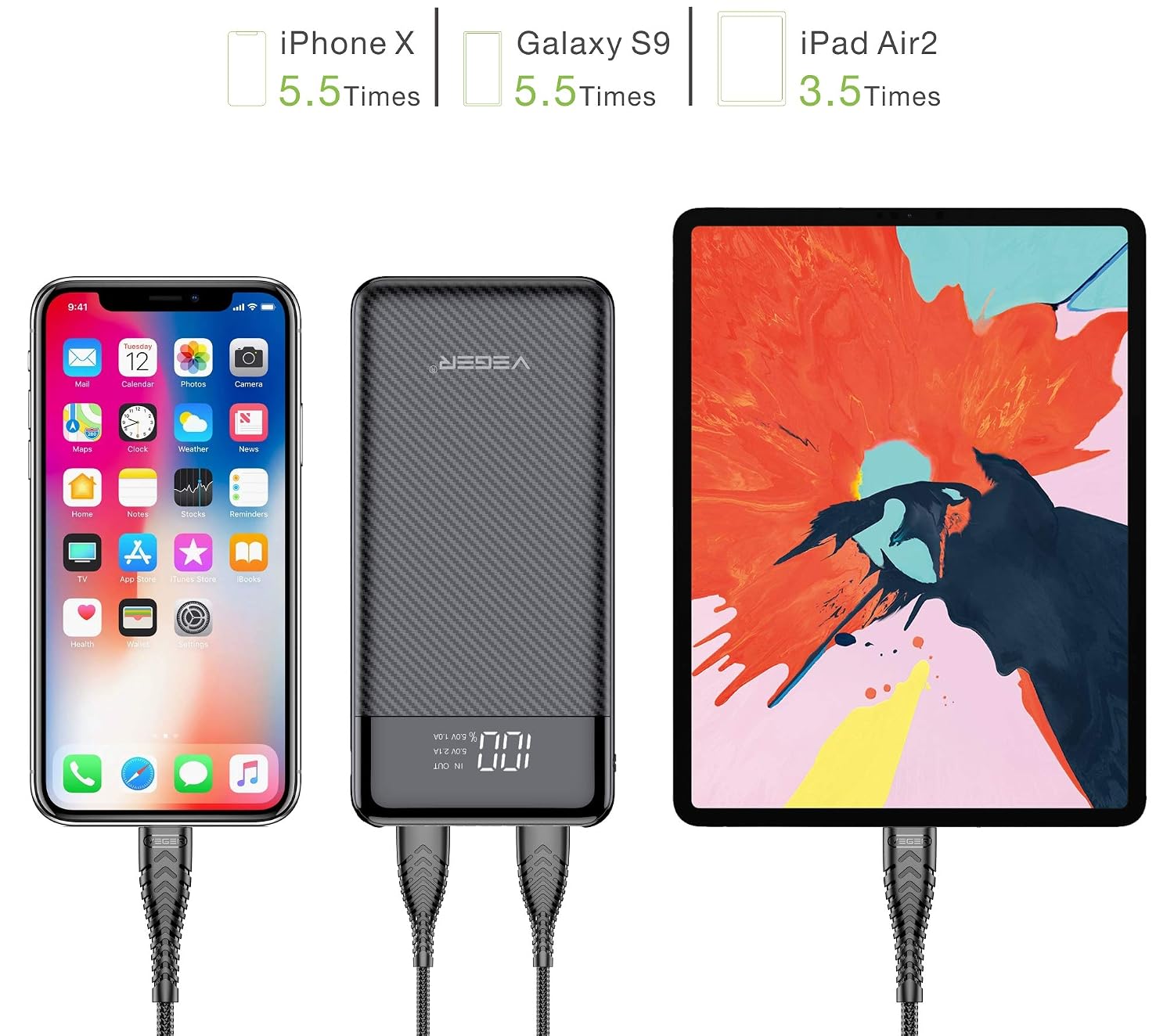
Figure 5: Illustration of the VEGER W2019 Power Bank charging an iPhone X, a Galaxy S9, and an iPad Air 2, indicating approximate charge cycles (5.5 times for phones, 3.5 times for iPad).
5.2 Recàrrega del banc d'energia extern
- Use the provided Micro USB cable or a Type-C cable to connect the power bank's input port to a USB power source.
- The digital display will show the charging status.
- Un cop la pantalla mostri el 100%, el banc d'energia està completament carregat i llest per al seu ús.
5.3 Càrrega simultània
The VEGER W2019 Power Bank supports charging two devices simultaneously. When two devices are connected, the power bank intelligently adjusts the power output to match each device's requirements, ensuring efficient charging speed for both.

Figure 6: Diagram illustrating the "Universal Compatibility" of the VEGER W2019 Power Bank, showing it connected to headphones, a fitness band, a smartphone, a tablet, and a Bluetooth speaker.
6. Manteniment
6.1 Emmagatzematge
- Guardeu el banc d'energia en un lloc fresc i sec, allunyat de la llum solar directa i de temperatures extremes.
- Eviteu emmagatzemar en ambients amb molta humitat.
- For long-term storage, charge the power bank to approximately 50-75% every three months to maintain battery health.
6.2 Neteja
- Use a soft, dry cloth to clean the exterior of the power bank.
- No utilitzeu productes químics ni productes de neteja abrasius.
- Mantingueu els ports nets de pols i deixalles.
6.3 Cura de la bateria
- Avoid fully discharging the power bank frequently, as this can reduce battery lifespan.
- Do not expose the power bank to fire or water.
- No intenteu desmuntar ni modificar el banc d'energia.
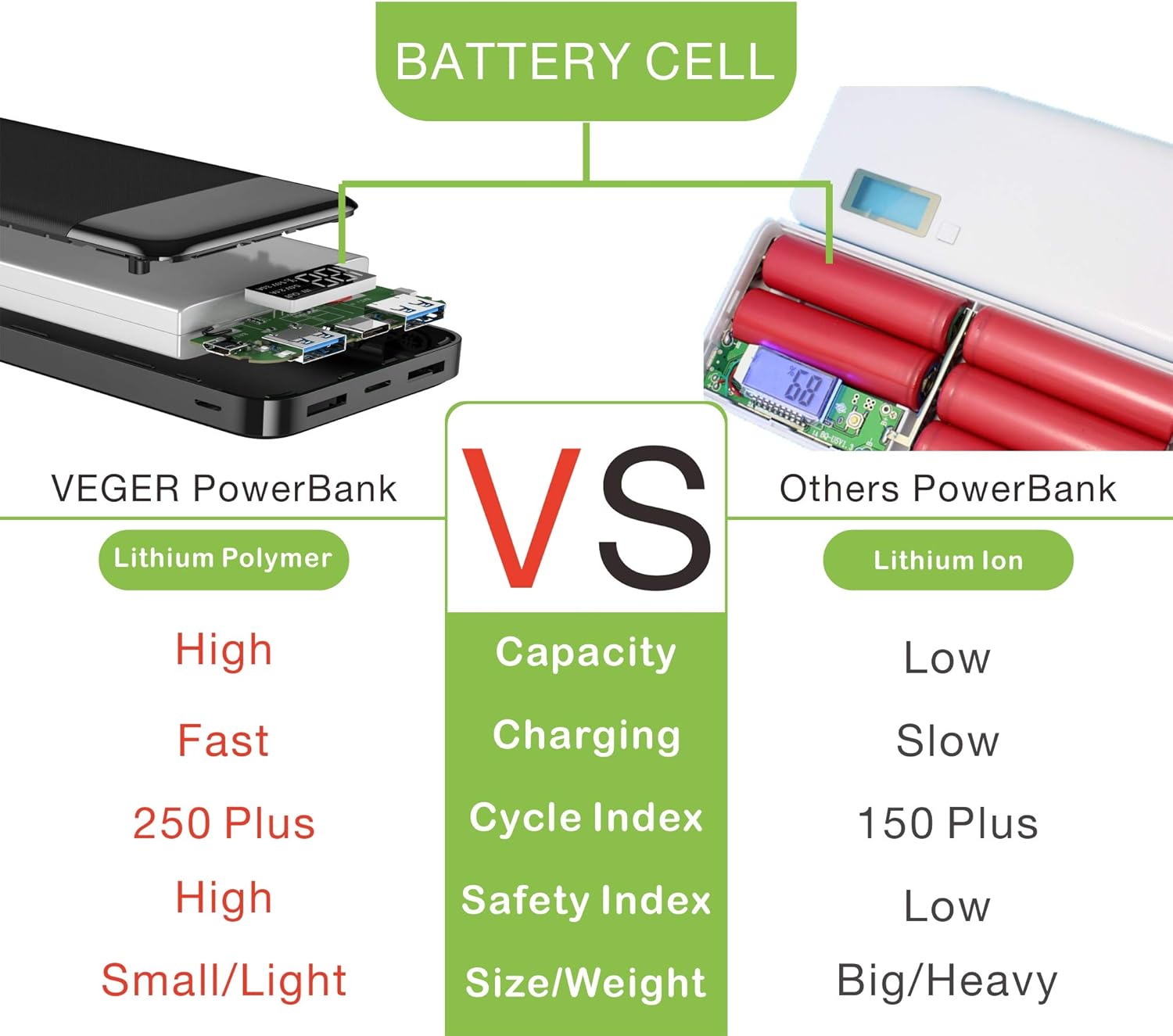
Figure 7: Comparison diagram between VEGER Power Bank (Lithium Polymer) and "Others PowerBank" (Lithium Ion), highlighting advantages of Lithium Polymer in capacity, charging speed, cycle index, safety index, and size/weight.
7. Solució De Problemes
If you encounter issues with your VEGER W2019 Power Bank, refer to the following common solutions:
- El banc d'energia no es carrega:
- Ensure the charging cable is securely connected to both the power bank's input port and the power source.
- Prova un cable de càrrega o un adaptador de corrent diferent.
- Verifiqueu que la font d'alimentació estigui activa.
- El dispositiu no es carrega des del banc d'alimentació:
- Assegureu-vos que el banc d'energia tingui prou càrrega (comproveu la pantalla digital).
- Verify the charging cable connecting the power bank to your device is functional and securely connected.
- Prova un port de sortida diferent al banc d'energia.
- Premeu el botó d'engegada del banc d'energia extern per activar la càrrega si no s'inicia automàticament.
- Càrrega lenta:
- Assegureu-vos que feu servir un cable de càrrega d'alta qualitat.
- If charging two devices simultaneously, the output current is shared, which may result in slower charging for each device.
- Alguns dispositius poden tenir requisits de càrrega específics; assegureu-vos de ser compatibles.
- La pantalla digital no funciona:
- Premeu el botó d'encesa per activar la pantalla.
- Si el banc d'energia està completament descarregat, és possible que la pantalla no s'il·lumini fins que no rebi una mica de càrrega.
8. Especificacions
| Marca | VEGER |
| Model | W2019 |
| Capacitat de la bateria | 20000 mAh |
| Composició de les cèl·lules de la bateria | Polímer de liti |
| Ports d'entrada | Micro USB, USB Type-C (5V/2.1A) |
| Ports de sortida | 2 x USB-A (5V/2.1A, 5V/1.0A) |
| Voltage | 5 Volts |
| Dimensions del producte | 6.7 x 2.7 x 14.7 cm |
| Pes de l'article | 450 g |
| Característiques especials | Digital Display, Compact Design, Intelligent Power Output, Two Way Fast Charging, 9-Layer Protection |
| Dispositius compatibles | Smartphones, Tablets, BT Speakers, Earphones, Headsets, Fitness Bands, etc. |
9. Garantia i Suport
9.1 Informació de la garantia
The VEGER W2019 Power Bank comes with a 6 mesos de garantia des de la data de compra. Aquesta garantia cobreix els defectes de fabricació i els problemes derivats de l'ús normal. No cobreix els danys causats per un mal ús, accidents, modificacions no autoritzades o desastres naturals.
Si us plau, conserveu el rebut de compra com a comprovant de compra per a reclamacions de garantia.
9.2 Atenció al client
For any questions, technical assistance, or warranty claims, please contact VEGER customer support through the retailer where the product was purchased or refer to the official VEGER weblloc per obtenir informació de contacte.