
Firstech 900AS
Firstech Max It 900AS Vehicle Remote Start + Security Module User Manual
Model: 900AS
Producte acabatview
The Firstech Max It 900AS is a comprehensive remote start and security module designed for vehicle integration. This kit includes essential components for enhancing vehicle security and convenience.
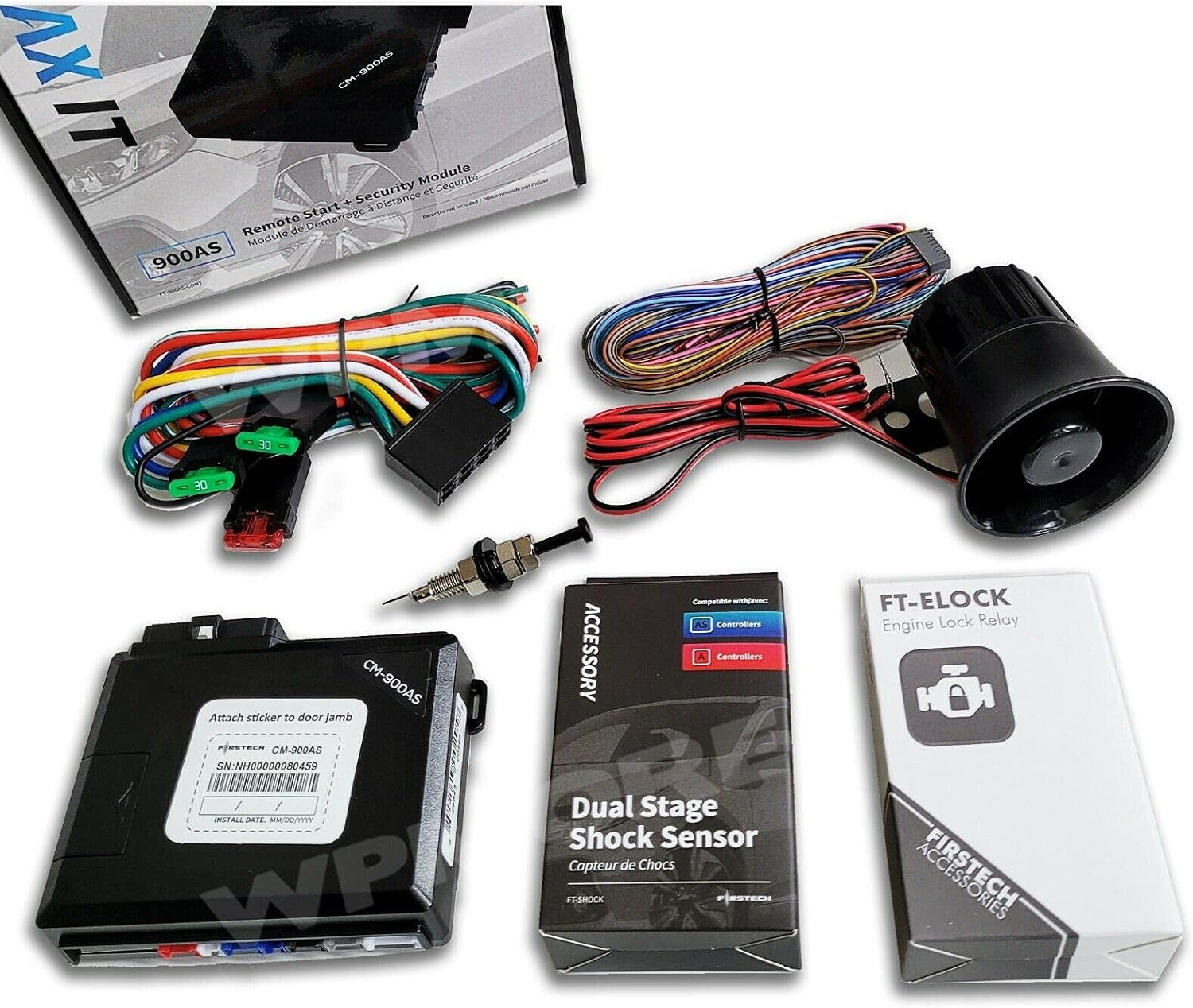
Figura 1: Acabatview of the Firstech Max It 900AS kit components. This image displays the CM900-AS controller, various wiring harnesses, the FT-Siren, the FT-Shock sensor, and the FT-LED Blue theft deterrent, along with their packaging.
El kit normalment inclou:
- CM900-AS Controller
- FT-Siren: Alarm Siren
- FT-Shock: Security Shock Sensor
- FT-LED Blue: LED Theft Deterrent
- CM900-AS Wiring
This system is compatible with various Firstech and related platforms, including COMPUSTAR, ARCTIC START, iDATALINK, DRONE, and BLADE/FTX systems. It is designed for automatic transmission vehicles only and does not support manual transmission vehicles.
Notes importants d'instal·lació
The Max It 900AS is no a plug-and-play system. Professional installation is required. This manual provides general information, but detailed wiring diagrams and specific vehicle installation instructions are typically provided to certified installers. Some vehicles may require additional parts for complete integration.
Ensure that the installation is performed by a qualified technician to prevent damage to the vehicle's electrical system or the module itself.
Configuració i configuració inicial
Initial setup involves physical installation of the module and its components, followed by programming. Due to the complexity and vehicle-specific nature, only a high-level overview is provided here.
Col·locació de components:
- CM900-AS Controller: Typically mounted securely within the vehicle's dashboard or under the steering column, away from moisture and excessive heat.
- FT-Siren: Mounted in the engine bay, facing downwards to prevent water accumulation, and away from direct heat sources.
- FT-Shock Sensor: Mounted securely to a rigid part of the vehicle's chassis, typically under the dashboard, to accurately detect impacts.
- FT-LED Blue: Installed in a visible location on the dashboard or windshield to act as a visual deterrent.
Cablejat i connexions:
All wiring connections must be made according to the specific vehicle's wiring diagram and the CM900-AS installation guide provided to professional installers. This includes power, ground, ignition, accessory, starter, door triggers, trunk trigger, hood trigger, and parking light connections.
Mòdul de programació:
After physical installation, the CM900-AS module requires programming to communicate with the vehicle's immobilizer and other systems. This process often involves specific sequences using the vehicle's ignition key and/or a specialized programming tool. Refer to the professional installation guide for detailed programming steps.
Instruccions de funcionament
The Max It 900AS module functions as the core of your vehicle's remote start and security system. Operation is typically performed via compatible remote controls (sold separately) or smartphone applications (if a DroneMobile module is integrated).
Operació d'arrencada remota:
- Ensure the vehicle is in park and the parking brake is engaged (if applicable).
- Press the remote start button on your compatible remote control (e.g., the key icon or a specific sequence of button presses).
- The vehicle's engine will start, and the parking lights may illuminate to indicate remote start activation.
- To enter the vehicle after remote starting, unlock the doors, insert the key into the ignition, turn it to the ON/RUN position, and press the brake pedal. The engine will transfer control from the remote start system to the key.
- To turn off the remote start, press the remote start button again on your remote, or use the brake pedal if already inside the vehicle.
Security System Operation:
- Armat: Press the lock button on your compatible remote control. The vehicle's doors will lock, and the security system will arm. The FT-LED Blue will typically flash to indicate the system is armed.
- Desarmament: Press the unlock button on your compatible remote control. The vehicle's doors will unlock, and the security system will disarm.
- Activador d'alarma: If the security system detects an unauthorized entry (e.g., door opening, shock sensor activation), the FT-Siren will sound, and the vehicle's lights may flash.
- Mode de pànic: On most compatible remotes, pressing and holding a specific button (often the lock or unlock button) will activate the siren and lights for emergency signaling.
Manteniment
The Firstech Max It 900AS module is designed for long-term reliability and typically requires minimal user maintenance. However, periodic checks can ensure optimal performance.
- Inspecció del cablejat: Periodically, or during other vehicle maintenance, have a qualified technician inspect the wiring connections for any signs of wear, corrosion, or loose connections.
- Shock Sensor Adjustment: If the shock sensor (FT-Shock) is too sensitive (false alarms) or not sensitive enough, its sensitivity can be adjusted by a professional installer. This is typically done via a small dial on the sensor itself or through programming.
- Actualitzacions de firmware: From time to time, Firstech may release firmware updates for the CM900-AS controller to improve performance or add features. These updates must be performed by a certified installer using specialized tools.
- Bateries de control remot: Ensure your compatible remote controls have fresh batteries for reliable operation. Refer to your remote's specific manual for battery replacement instructions.
Resolució de problemes
If you experience issues with your Max It 900AS system, consider the following common troubleshooting steps. For complex issues, professional diagnosis is recommended.
| Problema | Causa possible | Solució |
|---|---|---|
| Remote start does not activate. |
|
|
| L'alarma s'activa inesperadament. |
|
|
| L'abast del comandament a distància és baix. |
|
|
If these steps do not resolve the issue, contact a certified Firstech installer or technical support.
Especificacions
| Característica | Detall |
|---|---|
| Model | Max It 900AS (CM900-AS Controller) |
| Marca | Firstech |
| Components del kit | CM900-AS Controller, FT-Siren, FT-Shock, FT-LED Blue, CM900-AS Wiring |
| Compatibilitat | COMPUSTAR, ARCTIC START, iDATALINK, DRONE, BLADE, FTX systems |
| Suport a la transmissió | Automatic Transmission Vehicles Only |
| Comandament a distància inclòs | No (Sold Separately) |
| Pes de l'article | 2.88 lliures |
| Dimensions del paquet | 7.32 x 7.09 x 2.95 polzades |
| UPC | 753359651569 |
| Data de primera disponibilitat | 29 de gener de 2020 |
Garantia i Suport
Firstech products, including the Max It 900AS, are typically covered by a manufacturer's warranty. Warranty terms and conditions can vary and are usually provided with the product or available on the Firstech official website. It is recommended to register your product after professional installation.
For technical support, warranty claims, or to locate a certified installer, please refer to the official Firstech website or contact their customer service. Due to the nature of this product requiring professional installation, direct end-user support for installation issues may be limited, and you will likely be directed to your installer.
Fabricant: Firstech
Ask a question about this manual
Ask about setup, troubleshooting, compatibility, parts, safety, or missing instructions. Manuals+ will review the question and use this page’s manual context to help answer it.