1. Producte acabatview
The QFX SB-2037D is a 38-inch slim Bluetooth soundbar designed to enhance your audio experience. It features multiple connectivity options including Bluetooth, FM radio, optical, coaxial, and auxiliary inputs, providing versatile audio playback for your television, smartphone, tablet, or laptop.
Característiques principals:
- Bluetooth 5.0 per a la transmissió d'àudio sense fil
- Integrated 4 x 10-watt 2-channel speaker system
- Entrada d’àudio òptica
- Sintonitzador de ràdio FM
- Entrada d'àudio coaxial
- USB input for media playback

This image displays the front of the QFX SB-2037D soundbar, showcasing its sleek, black design and integrated speaker grille.
2. Configuració
2.1 Contingut del paquet:
Before beginning setup, ensure all items are present in the package:
- QFX SB-2037D Soundbar Unit
- Control remot
- Adaptador d'alimentació
- Cable d'àudio de 3.5 mm
- Cable d'àudio RCA a 3.5 mm
- Manual d'usuari

This image shows the accessories provided with the soundbar: an RCA to 3.5mm audio cable, a 3.5mm audio cable, a power adapter, and the remote control unit.
2.2 Col·locació:
The soundbar can be placed on a flat, stable surface, such as a TV stand or entertainment center. It can also be wall-mounted using compatible brackets (not explicitly stated as included, but mentioned in product description as 'soportes incluidos'). Ensure adequate ventilation around the unit.
2.3 Connecting the Soundbar:
2.3.1 Connexió d'alimentació:
Connect the power adapter to the 'DC IN' port on the rear of the soundbar. Then, plug the power adapter into a standard electrical outlet.
2.3.2 Audio Connections:
The soundbar offers several audio input options:
- Entrada òptica: For digital audio from your TV or other compatible devices. Use an optical cable (not included) to connect.
- Entrada coaxial: For digital audio from compatible devices. Use a coaxial cable (not included) to connect.
- AUX Input (Line In): For analog audio from devices with a 3.5mm headphone jack or RCA outputs. Use the provided 3.5mm audio cable or RCA to 3.5mm audio cable to connect.

This image illustrates the rear panel of the soundbar, highlighting the various input ports: DC IN for power, Optical, Coaxial, AUX, and Line In for audio connections.
3. Instruccions de funcionament
3.1 Funcionament bàsic:
3.1.1 Encès/apagat:
Press the 'POWER' button on the soundbar's top panel or the remote control to turn the unit on or off.
3.1.2 Input Selection:
Press the 'INPUT' button on the soundbar's top panel or the remote control to cycle through available input sources: Bluetooth, FM, Optical, Coaxial, AUX, USB.
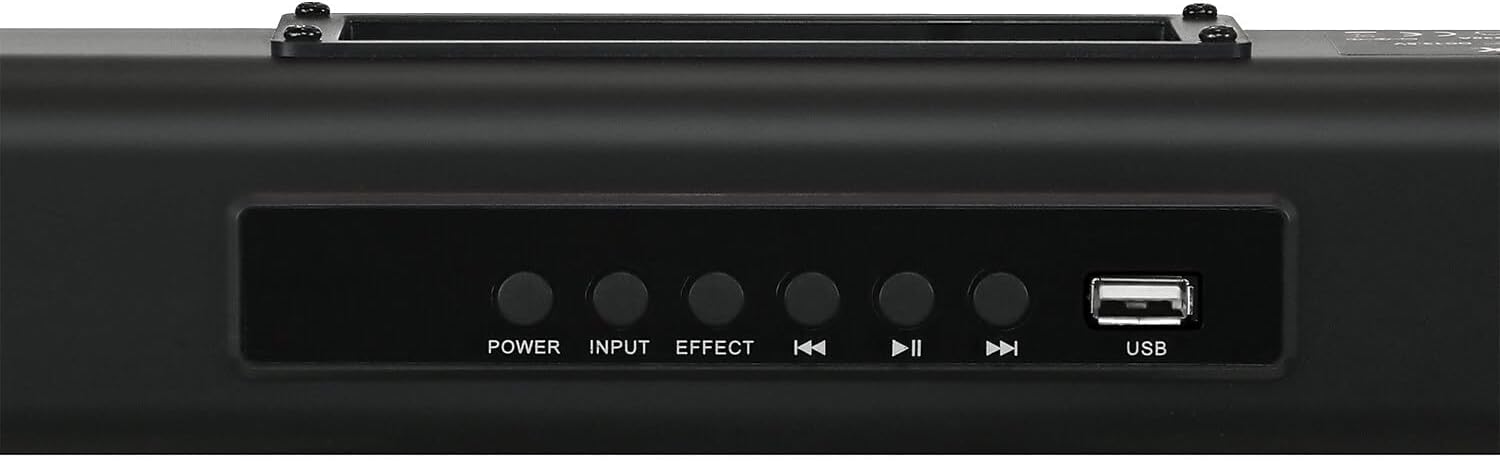
This image shows the control panel located on the top of the soundbar, featuring buttons for Power, Input selection, Sound Effect, track navigation, Play/Pause, and a USB port.
3.1.3 Vinculació Bluetooth:
- Select 'Bluetooth' as the input source using the 'INPUT' button. The soundbar will enter pairing mode, indicated by a flashing light or display.
- On your mobile device (smartphone, tablet, laptop), navigate to its Bluetooth settings and search for available devices.
- Select 'QFX SB-2037D' from the list to pair. Once connected, you can stream audio wirelessly.
3.1.4 FM Radio Operation:
- Select 'FM' as the input source.
- Use the track skip buttons (◀◀ / ▶▶) on the soundbar or remote control to scan for available radio stations.
3.1.5 USB Playback:
Insert a USB flash drive into the USB port on the top panel of the soundbar. The soundbar will automatically detect and begin playing compatible audio files de la unitat.
3.1.6 Control de volum:
Adjust the audio volume using the 'VOL+' and 'VOL-' buttons on the remote control.
3.1.7 Efectes de so:
Press the 'EFFECT' button on the soundbar or the 'MOVIE' / 'MUSIC' buttons on the remote control to select different pre-set sound modes for an optimized listening experience.
4. Manteniment
4.1 Neteja:
To clean the soundbar, gently wipe its surface with a soft, dry cloth. Avoid using liquid cleaners, abrasive materials, or solvents, as these can damage the finish or internal components.
4.2 Remote Control Battery Replacement:
If the remote control's responsiveness decreases, it may be time to replace its batteries. Open the battery compartment on the back of the remote and insert new alkaline batteries (typically AAA or AA, refer to the remote for specific type), ensuring correct polarity.
5. Solució De Problemes
If you encounter issues with your QFX SB-2037D soundbar, refer to the following common problems and solutions:
5.1 Sense alimentació:
- Ensure the power adapter is securely connected to the 'DC IN' port on the soundbar and a functional electrical outlet.
- Verifiqueu que la presa de corrent estigui activa provant-la amb un altre dispositiu.
5.2 No Sound:
- Check that the correct input source (Bluetooth, FM, Optical, Coaxial, AUX, USB) is selected on the soundbar.
- Verify that all audio cables are properly and securely connected between the soundbar and your audio source device.
- Increase the volume on both the soundbar and the connected audio source device.
- Ensure the soundbar is not in 'MUTE' mode (check the remote control).
5.3 Bluetooth Pairing Fails:
- Ensure the soundbar is set to 'Bluetooth' input mode and is in pairing mode (indicated by a flashing light).
- Apropa el dispositiu Bluetooth a la barra de so per assegurar-te que estigui dins del seu abast.
- Disable and then re-enable Bluetooth on your mobile device.
- If previously paired, try 'forgetting' or 'unpairing' the soundbar from your device's Bluetooth list and then re-pairing.
5.4 Poor FM Reception:
- Adjust the soundbar's physical position to improve signal reception.
- Ensure there are no strong interference sources (e.g., other electronic devices) nearby.
6. Especificacions
| Nom del model | SB-2037D |
| Marca | QFX |
| Tipus d'altaveu | Barra de so |
| Tecnologia de connectivitat | Bluetooth 5.0 |
| Sistema d'altaveus | 4 x 10-watt 2-channel (40W RMS, 400W Max Output) |
| Mode de sortida d'àudio | estèreo |
| Entrades | Optical, Coaxial, AUX (Line In), USB |
| Característiques especials | Ràdio FM |
| Mètode de control | Control remot |
| Dimensions (L x A x A) | 96 cm x 6 cm x 6.1 cm |
| Pes | 3.25 lliures |
| Material | Metall |
| Font d'alimentació | Elèctric amb cable |
| Dispositius compatibles | Telèfon intel·ligent, tauleta, ordinador portàtil, televisió |
7. Garantia i atenció al client
For warranty information, technical assistance, or customer support inquiries regarding your QFX SB-2037D soundbar, please refer to the contact details provided in your product packaging or visit the official QFX weblloc per obtenir la informació més actualitzada.