
Introducció
The Power Dynamics PPA30 is a versatile 30W 100V amplifier designed for small to medium-sized public address and background music applications. This amplifier features multiple input options including microphone inputs, stereo line inputs, Bluetooth connectivity for wireless streaming, and a built-in MP3 player with USB and SD card support. A remote control is included for convenient operation.
Informació de seguretat
Please read these instructions carefully before using the device. Keep this manual for future reference. Always observe the following safety precautions:
- No exposeu el dispositiu a la pluja o la humitat.
- Do not open the housing. There are no user-serviceable parts inside. Refer all servicing to qualified personnel.
- Assegureu-vos que la font d'alimentació voltage compleix els requisits especificats al dispositiu.
- Eviteu que el cable d'alimentació sigui trepitjat o pessigat.
- Disconnect the device from the mains during lightning storms or when unused for long periods.
- Place the device on a stable, level surface with adequate ventilation.
Contingut del paquet
Si us plau, comproveu que tots els articles estiguin presents i en bon estat en obrir el paquet:
- Power Dynamics PPA30 Ampmés viu
- Cable d'alimentació
- Control remot
- Manual d'usuari
Producte acabatview
Panell frontal
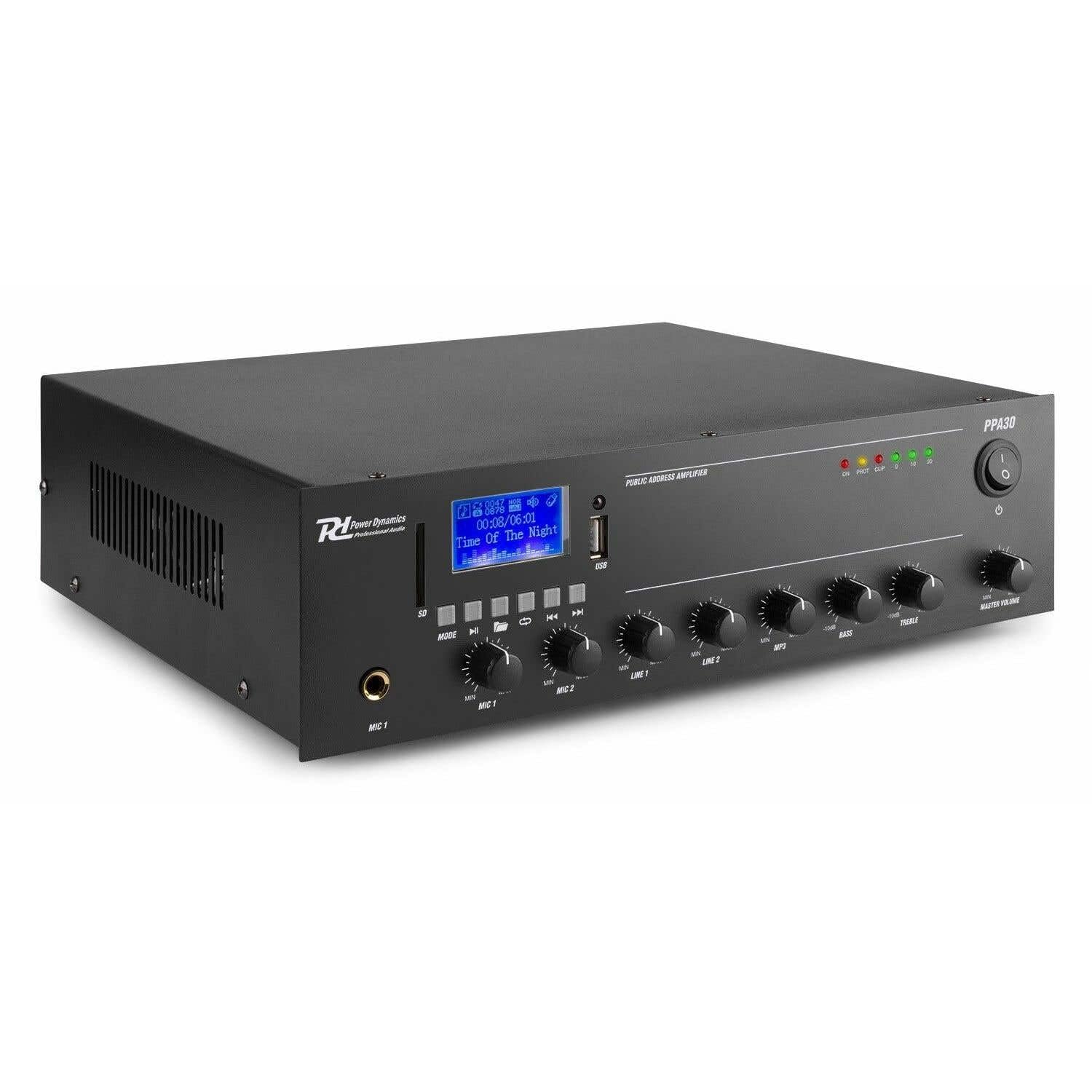
Figure 1: Front Panel Layout of the PPA30 Amplificador. Aquesta imatge mostra el amplifier's front face, including the display screen, USB/SD card slots, control buttons for media playback, input volume controls for microphones and line inputs, bass and treble adjustments, and the master volume knob. The power switch and indicator lights are also visible.
The front panel provides access to all primary controls and indicators:
- Interruptor d'alimentació: Gira el ampmés viu encès o apagat.
- Pantalla de visualització: Shows current mode, track information, and other status indicators.
- Ranures per a targetes USB/SD: For connecting USB drives or SD cards for MP3 playback.
- Botó de mode: Switches between input sources (Bluetooth, USB, SD, Line 1, Line 2).
- Controls de reproducció multimèdia: Play/Pause, Previous, Next, Repeat.
- MIC 1 & MIC 2 Inputs: 6.3mm jack inputs for microphones.
- MIC 1 & MIC 2 Volume Controls: Adjusts the volume for each microphone input.
- LINE 1 & LINE 2 Volume Controls: Adjusts the volume for line inputs.
- MP3 Volume Control: Adjusts the volume for USB/SD/Bluetooth playback.
- Bass & Treble Controls: Adjusts the low and high frequencies of the audio output.
- Volum mestre: Controla el volum de sortida general del ampmés viu.
- Llums indicadores: Power (ON), Protection (PROT), Clip, and Output Level (0, 10, 20).
Panell posterior

Figure 2: Rear Panel Connections of the PPA30 Amplifier. This image illustrates the back of the amplifier, detailing the AC power input, DC input, speaker output terminals (COM, 8Ω, 70V, 100V), and RCA line inputs (LINE OUT, LINE 1, LINE 2, MIC 2). Safety warnings and product information are also visible.
The rear panel houses the power input, speaker outputs, and additional audio inputs:
- Entrada d'alimentació de CA: Es connecta a la font d'alimentació principal.
- Entrada de corrent continu: Optional 12V DC power input.
- Terminals de sortida d'altaveus: Connections for 100V, 70V, and 8 Ohm speakers. Ensure correct impedance matching.
- FORMA DE LÍNIA: RCA output for connecting to another ampmés elevat o dispositiu de gravació.
- LINE 1 & LINE 2 Inputs: RCA stereo inputs for external audio sources (e.g., CD player, mixer).
- Entrada MIC 2: Additional 6.3mm jack input for a microphone.
Control remot

Figure 3: Remote Control for the PPA30 Amplifier. This image shows the handheld remote control with buttons for power, mode selection, volume adjustment, track navigation, EQ settings, and direct number input for track selection.
The remote control allows for convenient operation from a distance. Functions include power on/off, mode selection, volume control, track navigation, and EQ settings.
Configuració
- Col·locació: Col·loca el amplifier on a flat, stable surface. Ensure adequate ventilation around the unit to prevent overheating.
- Connexió de l'altaveu: Connect your 100V, 70V, or 8 Ohm speakers to the appropriate terminals on the rear panel. Ensure correct polarity (+ to + and - to - or COM). For 100V/70V systems, ensure your speakers are compatible and correctly wired for constant voltage.
- Connexió de font d'àudio:
- Micròfons: Plug microphones into the MIC 1 or MIC 2 inputs on the front panel.
- Dispositius de línia: Connect external audio sources (e.g., CD player, mixer) to the LINE 1 or LINE 2 RCA inputs on the rear panel.
- Targeta USB/SD: Insert a USB drive or SD card into the respective slot on the front panel for MP3 playback.
- Connexió d'alimentació: Connect the supplied power cable to the AC power input on the rear panel and then to a suitable mains outlet.
- Encesa inicial: Enceneu el amplifier using the power switch on the front panel. The 'ON' indicator light should illuminate.
Instruccions de funcionament
Selecció de la font d'entrada
Premeu el botó MODE button on the front panel or remote control to cycle through available input sources: Bluetooth, USB, SD, Line 1, Line 2.
Funcionament Bluetooth
- Seleccioneu el mode Bluetooth amb el botó MODE button. The display will indicate Bluetooth mode.
- Al telèfon intel·ligent, la tauleta o l'ordinador, activeu el Bluetooth i cerqueu els dispositius disponibles.
- Select "PPA30" from the list of devices to pair. Once paired, you can stream audio wirelessly to the ampmés viu.
- Adjust the MP3 volume control on the front panel or the volume buttons on the remote control.
Reproducció de targetes USB/SD
- Insert a USB drive or SD card containing MP3 audio files a la ranura corresponent.
- El amplifier should automatically switch to USB or SD mode and begin playback. If not, select the correct mode using the MODE botó.
- Use the Play/Pause, Previous, Next, and Repeat buttons on the front panel or remote control to manage playback.
- Adjust the MP3 volume control.
Ús del micròfon
- Connect your microphone(s) to the MIC 1 or MIC 2 inputs.
- Slowly increase the corresponding MIC 1 or MIC 2 volume control until the desired level is reached.
- Avoid setting the volume too high to prevent feedback or clipping (indicated by the 'CLIP' light).
Ús d'entrada de línia
- Connect your external audio source to the LINE 1 or LINE 2 RCA inputs.
- Select the appropriate line input using the MODE botó.
- Adjust the corresponding LINE 1 or LINE 2 volume control.
Control de to
Utilitza el BASS i AGUTS knobs on the front panel to adjust the low and high frequencies of the overall audio output to suit your preference or room acoustics.
Volum mestre
El MÀSTER VOLUM knob controls the overall output level of all active audio sources. Adjust this to achieve the desired listening volume.
Manteniment
- Neteja: Utilitzeu un drap suau i sec per netejar l'exterior ampNo utilitzeu productes de neteja abrasius ni dissolvents.
- Ventilació: Assegureu-vos que les obertures de ventilació no estiguin bloquejades per evitar el sobreescalfament.
- Emmagatzematge: Si guardeu la unitat durant un període prolongat, desconnecteu-la de l'alimentació i guardeu-la en un lloc fresc i sec.
Resolució de problemes
| Problema | Causa possible | Solució |
|---|---|---|
| Sense poder | Cable d'alimentació no connectat; interruptor apagat; no hi ha alimentació de la presa de corrent. | Check power cable connection; Turn power switch on; Test outlet with another device. |
| Sense sortida de so | Incorrect input selected; Volume too low; Speaker connections loose; Speakers faulty. | Select correct input (MODE button); Increase Master Volume and input specific volume; Check speaker wiring; Test with different speakers. |
| So distorsionat | Volume too high (clipping); Incorrect tone settings; Faulty audio source. | Reduce Master Volume or input volume until 'CLIP' light is off; Adjust Bass/Treble controls; Test with a different audio source. |
| Bluetooth no connectat | Bluetooth mode not selected; Device not in pairing mode; Interference. | Assegureu-vos amplifier is in Bluetooth mode; Make sure your device's Bluetooth is on and searching; Move closer to the amplifier; Restart both devices. |
| Problemes de reproducció amb USB/SD | Incorrecte file format; Corromput files; La targeta USB/SD no s'ha inserit correctament. | Assegureu-vos files are MP3 format; Try a different USB/SD card; Reinsert the card/drive. |
Especificacions
| Característica | Especificació |
|---|---|
| Marca | Dinàmica de potència |
| Model | PPA30 |
| Potència de sortida | 30 watts |
| Nombre de canals | 2 |
| Voltage (AC) | 220-230 Volt (AC) |
| Dimensions de l'article (LxWxH) | 27 x 32 x 8.6 cm |
| Pes de l'article | 3.25 quilos |
| Tipus de muntatge | Autònom |
| Temperatura de funcionament | Fins a 40 graus centígrads |
| Certificacions | CE, RoHS |
Garantia i Suport
This product is covered by a standard manufacturer's warranty. Please refer to the warranty card included in your package for specific terms and conditions. For technical support, service, or warranty claims, please contact your retailer or the Power Dynamics customer service department. Keep your proof of purchase for warranty validation.
For more information, visit the official Power Dynamics weblloc: www.power-dynamics.eu