
1. Introducció
Thank you for choosing the FLEXISPOT EG1 Electric Height Adjustable Desk. This manual provides essential information for the safe assembly, operation, and maintenance of your new desk. Please read these instructions carefully before use and retain them for future reference.

Image 1.1: The FLEXISPOT EG1 Electric Height Adjustable Desk in use, demonstrating its standing functionality.
2. Informació de seguretat
- Llegeix totes les instruccions: Ensure you understand all assembly and operating instructions before using the desk.
- Capacitat de càrrega: Do not exceed the maximum load capacity of 70 kg (dynamic) / 85 kg (static) on the desktop. Overloading can cause damage or injury.
- Muntatge: Assemble the desk carefully according to the instructions. It is recommended that dues persones realitzar el muntatge.
- Font d'alimentació: Use only the provided power adapter. Ensure the power cord is not damaged or pinched.
- Liquidació: Keep the area around the desk clear during height adjustments to prevent obstructions or collisions.
- Nens i animals de companyia: Mantingueu els nens i les mascotes allunyats de l'escriptori durant el funcionament per evitar accidents.
- Sistema anticol·lisió: The desk is equipped with an anti-collision system. However, always exercise caution during adjustments.
- Manteniment: Desconnecteu l'alimentació abans de netejar o realitzar qualsevol manteniment.
Avís: Assemble the desk carefully according to the instructions and do not exceed the load capacity of 70 kg without the desktop to prevent risk of injury or damage to the desk.
3. Contingut del paquet
Verify that all components are present and undamaged before beginning assembly. All necessary assembly tools are included in the package.
- Desktop (120 x 60 cm, White)
- Desk Frame (White)
- Motorized Lifting Columns
- Tauler de control
- Adaptador d'alimentació i cable
- Safata de gestió de cables
- Ganxos laterals
- Maquinari i eines de muntatge
- Manual d'usuari
4. Instruccions de muntatge
Follow the included assembly manual for detailed, step-by-step instructions. Ensure all connections are secure before use. Assembly is required and recommended for two people.
4.1 Cable Management Tray Installation
The desk includes a small drawer under the desktop for cable management, helping to keep your workspace tidy and safe. Install this tray as indicated in the assembly guide.

Image 4.1: Under-desk cable management tray, designed to organize power strips and cables.
4.2 Side Hooks Attachment
Attach the provided hooks to either side of the desk frame. These hooks are useful for hanging laptop bags, headphones, or other accessories, optimizing your workspace.

Image 4.2: The desk features dual side hooks for accessories, anti-slip foot pads for stability, and a wheel-compatible design for mobility.
5. Instruccions de funcionament
The FLEXISPOT EG1 desk features a motorized lifting mechanism for easy height adjustments and a smart control panel for personalized settings.
5.1 Ajust d'alçada
The motorized lifting mechanism allows for smooth height adjustments from 71 cm to 121 cm. The adjustment speed is approximately 2.5 cm/s, with a low noise level of less than 50 dB during operation.

Image 5.1: The desk offers a comfortable height range from 73.5 cm to 118 cm, suitable for various users and activities.
5.2 Smart Control Panel
The control panel features up/down buttons for manual adjustment and four memory presets to save your preferred sitting and standing heights. The LED display shows the current desk height.
- Botons amunt / avall: Press and hold the ▲ (Up) or ▼ (Down) buttons to manually adjust the desk height. Release to stop.
- Preajustos de memòria (1, 2, 3, 4): To save a height, adjust the desk to your desired position, then press the 'M' button followed by one of the number buttons (1, 2, 3, or 4). To recall a saved height, simply press the corresponding number button.
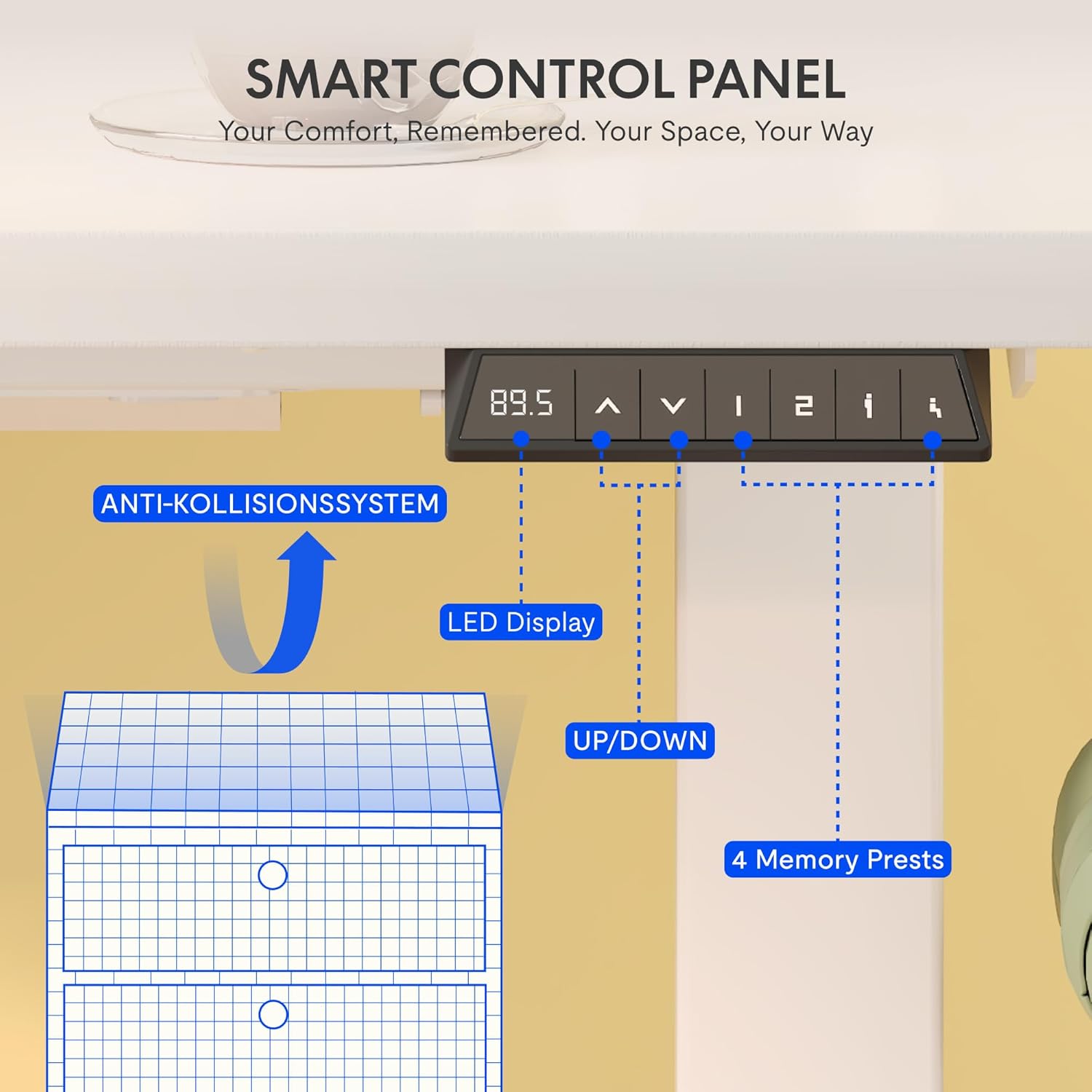
Image 5.2: The smart control panel features an LED display, up/down controls, and four programmable memory presets.
5.3 Anti-Collision System
The desk is equipped with an anti-collision rebound function. If the desk encounters an obstacle during height adjustment, it will automatically stop and reverse slightly to prevent damage or injury.

Image 5.3: The anti-collision system detects obstacles and reverses desk movement to prevent damage.
6. Manteniment
- Neteja: Wipe clean with a dry cloth. Avoid using abrasive cleaners or harsh chemicals that may damage the surface.
- Inspeccions: Reviseu periòdicament tots els cargols i connexions per assegurar-vos que estiguin ben ajustats. Torneu a apretar-los si cal.
- Gestió de cables: Regularly check power cables for any signs of wear or damage. Ensure they are properly routed in the cable management tray.
7. Solució De Problemes
If you encounter any issues with your FLEXISPOT EG1 desk, please refer to the following common troubleshooting steps:
- L'escriptori no es mou:
- Comproveu si el cable d'alimentació està ben connectat tant a l'escriptori com a la presa de corrent.
- Ensure there are no obstructions preventing movement.
- Prova de reiniciar l'escriptori (consulta el manual de muntatge complet per conèixer els procediments de reinici específics, si n'hi ha).
- Moviment desigual:
- Assegureu-vos que l'escriptori no estigui sobrecarregat i que el pes estigui distribuït uniformement.
- Check for any loose connections in the frame or lifting columns.
- El tauler de control no respon:
- Comproveu la font d'alimentació.
- Unplug the desk for 10 seconds and plug it back in to perform a soft reset.
If the problem persists, please contact FLEXISPOT customer support for assistance.
8. Especificacions
Detailed technical specifications for the FLEXISPOT EG1 Electric Height Adjustable Desk.

Imatge 8.1: acabatview of key technical specifications and dimensions of the FLEXISPOT EG1 desk.
| Característica | Especificació |
|---|---|
| Número de model | EC1+PR1206 Bianco |
| UPC | 810000747115 |
| Dimensions del producte (L x A x A) | 120D x 60B x 123H cm |
| Pes de l'article | 29.4 kg |
| Recomanació de pes màxim | 85 kg (Static) / 70 kg (Dynamic) |
| Altura mínima | 71 cm |
| Altura màxima | 121 cm |
| Mecanisme d'elevació | Electric (Mono-motor) |
| Material base | Acer d'aliatge |
| Tipus de material superior | Engineered Wood (MDF with high-pressure laminate) |
| Tipus d'acabat | Recobert de pols |
| Característiques especials | Height Adjustable, Anti-Collision System, Cable Management Tray, Side Hooks |
| Muntatge obligatori | Sí |
| Persones recomanades per al muntatge | 2 |
| All Assembly Tools Included | Sí |
| Instruccions de manteniment | Netegeu amb un drap sec |
9. Garantia i Suport
FLEXISPOT is committed to providing high-quality ergonomic products. Our desks undergo rigorous testing to meet international industry standards (CE / BIFMA / ROHS certified).
- Garantia del marc: 5 anys
- Motor and Controller Warranty: 3 anys
- Suport tècnic: Suport tècnic gratuït durant tota la vida
For any technical assistance, warranty claims, or product inquiries, please contact FLEXISPOT customer support through the official FLEXISPOT weblloc web o el vostre minorista.