
1. Introducció
This manual provides instructions for the KIMEX HDMI 2.0 HDCP 2.2 1x16 Splitter. This device allows a single HDMI source to be simultaneously displayed on up to sixteen HDMI-compatible monitors or projectors. It supports HDMI 2.0 and HDCP 2.2 standards, offering resolutions up to 3840x2160 at 60Hz. The splitter also features EDID management and RS232 control for enhanced flexibility in various professional audio-visual setups.
The splitter can also function as a signal regenerator, extending the reach of long HDMI cables.
2. Característiques
- Admet HDMI 2.0 i HDCP 2.2.
- Distributes one HDMI input to sixteen HDMI outputs simultaneously.
- Supports video resolutions up to 4K (3840x2160) at 60Hz.
- Supports data rates up to 6Gbps per TMDS clock, totaling 600MHz.
- Admet color profund de 8/10/12 bits.
- Integrated EDID management for optimal display compatibility.
- RS232 control port for external system integration.
3. Contingut del paquet
Si us plau, verifiqueu que tots els elements siguin presents al paquet:
- KIMEX HDMI 2.0 HDCP 2.2 1x16 Splitter
- Adaptador d'alimentació
- Manual d'usuari
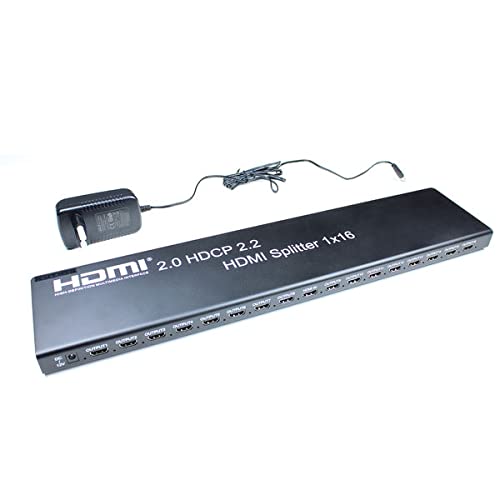
Image 3.1: KIMEX HDMI 1x16 Splitter with its power adapter.
4. Instruccions de seguretat
- No exposeu aquest dispositiu a l'aigua o la humitat.
- No col·loqueu el dispositiu a prop de fonts de calor.
- Utilitzeu només l'adaptador d'alimentació subministrat.
- No intenteu obrir ni reparar el dispositiu vosaltres mateixos. Encarregueu totes les tasques de manteniment a personal qualificat.
- Assegureu-vos una ventilació adequada al voltant del dispositiu per evitar el sobreescalfament.
5. Configuració
5.1 Diagrama de connexió
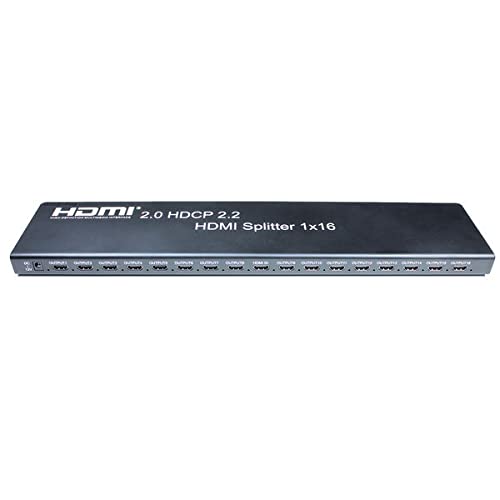
Image 5.1: Front panel of the HDMI Splitter, illustrating the input and sixteen output ports.
5.2 Passos d'instal·lació
- Apagueu els dispositius: Ensure all source devices (e.g., DVD player, computer) and display devices (e.g., monitors, projectors) are powered off before making connections.
- Connecteu la font HDMI: Connect an HDMI cable from your source device to the HDMI INPUT port on the splitter.
- Connecteu pantalles HDMI: Connect HDMI cables from the sixteen HDMI OUTPUT ports on the splitter to your display devices.
- Connectar l'alimentació: Plug the provided power adapter into the DC 5V port on the splitter, then plug the adapter into a power outlet.
- Dispositius d'encesa: Power on the display devices first, then the HDMI source device.
- Verifica el senyal: Check that the video and audio signals are correctly displayed on all connected monitors.

Imatge 5.2: Un example of a multi-display setup, demonstrating the application of a video splitter.
6. Instruccions de funcionament
Once all connections are made and devices are powered on, the HDMI splitter will automatically detect the input signal and distribute it to all connected output displays. No additional configuration is typically required for basic operation.
6.1 Gestió EDID
The splitter features EDID (Extended Display Identification Data) management to ensure compatibility between the source and various displays. The device will typically read the EDID from the lowest numbered output port (Output 1) and apply it to the source. If there are compatibility issues, ensure that the primary display connected to Output 1 supports the desired resolution and features.
6.2 Control RS232
The RS232 port allows for external control of the splitter by a control system. This feature is typically used in professional installations for integrated system management. Refer to the RS232 command set documentation (usually provided separately or available from the manufacturer) for detailed control protocols.
7. Manteniment
- Mantingueu el dispositiu net netejant-lo amb un drap suau i sec.
- Eviteu utilitzar productes químics aggressivs o netejadors abrasius.
- Ensure the device is placed in a well-ventilated area to prevent dust accumulation and overheating.
- Comproveu regularment les connexions dels cables per assegurar-vos que estiguin ben fixades.
8. Solució De Problemes
8.1 No Picture on Display
- Comproveu la potència: Ensure the splitter and all connected devices are powered on.
- Comproveu els cables: Verify that all HDMI cables are securely connected to both the splitter and the displays/source. Try replacing cables if necessary.
- Input/Output Selection: Confirm that the correct HDMI input is selected on your display devices.
- Compatibilitat de resolució: Ensure your source device's output resolution is supported by all connected displays. The splitter will attempt to match the EDID of the first connected display.
- Reinicieu els dispositius: Power cycle the source, splitter, and displays in sequence (displays first, then splitter, then source).
8.2 Intermittent Signal
- Qualitat del cable: Use high-quality HDMI 2.0 certified cables, especially for 4K60Hz signals and longer distances.
- Longitud del cable: Excessive cable length can cause signal degradation. Consider using shorter cables or active HDMI cables if issues persist.
- Font d'alimentació: Ensure the power adapter is providing stable power to the splitter.
8.3 EDID Issues
- If a display is not showing the correct resolution or features, try connecting a display with the desired capabilities to Output 1.
- Some advanced splitters may have EDID modes; consult specific product documentation if available.
9. Especificacions
| Característica | Especificació |
|---|---|
| Número de model | KIMEX 130-2016 |
| Versió HDMI | HDMI 2.0 |
| Versió HDCP | HDCP 2.2 |
| Ports d'entrada | 1 x HDMI |
| Ports de sortida | 16 x HDMI |
| Resolució màxima | 3840x2160 @ 60Hz |
| Velocitat de dades màxima | 6Gbps per TMDS clock (600MHz total) |
| Suport de color profund | 8/10/12 bits |
| Port de control | RS232 |
| Dimensions (L x A x A) | 48 x 11 x 2.5 cm |
| Pes | 1.8 quilos |
| Font d'alimentació | 5V CC (adaptador inclòs) |
| Dispositius compatibles | DVD Player, Computer, etc. |
10. Informació de la garantia
This KIMEX product is covered by a standard manufacturer's warranty. Please retain your proof of purchase for warranty claims. The availability of spare parts is typically 3 years from the date of purchase. For specific warranty terms and conditions, please refer to the documentation provided with your purchase or contact KIMEX customer support.
11. Suport
For technical assistance, troubleshooting, or further information regarding your KIMEX HDMI Splitter, please contact KIMEX customer support. Contact details can typically be found on the official KIMEX weblloc web o a l'embalatge del producte.