
GIORDON One Way Start Without PKE
GIORDON Universal Remote Engine Starter User Manual
Model: One Way Start Without PKE
1. Introducció
This manual provides comprehensive instructions for the installation, operation, and maintenance of your GIORDON Universal Remote Engine Starter. This system allows you to remotely start your vehicle, control door locks, and open the trunk using a remote key or a smartphone application. It is designed to enhance convenience and security for your vehicle.

Imatge 1.1: acabatview of the GIORDON Universal Remote Engine Starter system, including the main control unit, remote keys, wiring harnesses, engine start button, and a smartphone displaying the control app.
2. Informació de seguretat
- Instal·lació professional recomanada: Due to the complexity of vehicle electrical systems, professional installation is strongly recommended to ensure proper function and prevent damage to your vehicle.
- Compatibilitat de vehicles: This system is designed for 95% of DC12V cars, including compacts, sedans, coupes, SUVs, and pick-ups. Verify compatibility with your specific vehicle model before installation.
- Engine Start Safety: Ensure the vehicle is in a safe, well-ventilated area before using the remote engine start function. Do not use remote start in enclosed spaces.
- Fre d'estacionament: Always engage the parking brake when parking your vehicle, especially when using the remote start feature.
- Nens i animals de companyia: Never leave children or pets unattended in a vehicle, especially when the remote start feature is active.
3. Contingut del paquet
Si us plau, verifiqueu que tots els components siguin presents al vostre paquet:
- Unitat de control principal
- Remote Keys (x2)
- Botó d'arrencada/parada del motor
- Arnès de cablejat
- Manual d'usuari (Aquest document)
- Other necessary accessories (e.g., antenna, cables)
4. Configuració i instal·lació
Installation of the GIORDON Universal Remote Engine Starter requires knowledge of automotive electrical systems. It is highly recommended to have this system installed by a qualified professional.
4.1. Comprovació prèvia a la instal·lació
- Ensure your vehicle is a DC12V model.
- Confirm that your vehicle does not have a keyhole design that prevents the use of a push-button start system. Some vehicles (e.g., certain Buick and Volkswagen models) may not be compatible if their original keyhole design interferes with the installation of the new engine start button.
- If your car has an original remote start button, it must be removed and replaced with the provided engine start/stop button.

Image 4.1: The included Engine Start/Stop button and a notice regarding vehicle keyhole compatibility. Vehicles with specific keyhole designs (e.g., certain Buick and Volkswagen models) may not be suitable for this product.
4.2. Remote Start Activation Procedure (Important)
Without completing this step, the remote start function will not operate.
- For Automatic Transmission Vehicles:
- With the car in a running state, place the gear selector in "P" (Park) or "N" (Neutral) position.
- Engage the handbrake.
- Press the engine start button for 2 seconds. The LED indicator inside the remote transmitter will flash slowly.
- Exit the vehicle, shut down the engine, and lock the car. The remote start function is now activated.
- For Manual Transmission Vehicles:
- Step on the footbrake.
- Long press the third and fourth buttons on the remote key simultaneously for 4 seconds.
- Follow any additional vehicle-specific instructions for manual transmission remote start preparation.
5. Instruccions de funcionament
5.1. Remote Engine Start
This feature allows you to start your vehicle's engine from a distance, enabling pre-warming or pre-cooling of the interior.
- Ensure the air conditioning system was left on when you exited the vehicle.
- Use the designated button on your remote key or the corresponding function in the smartphone app to initiate remote start.
- The engine will start, and the air conditioner will activate automatically, based on its last setting.
- Remote key start sensing distance is approximately 50-150 meters.
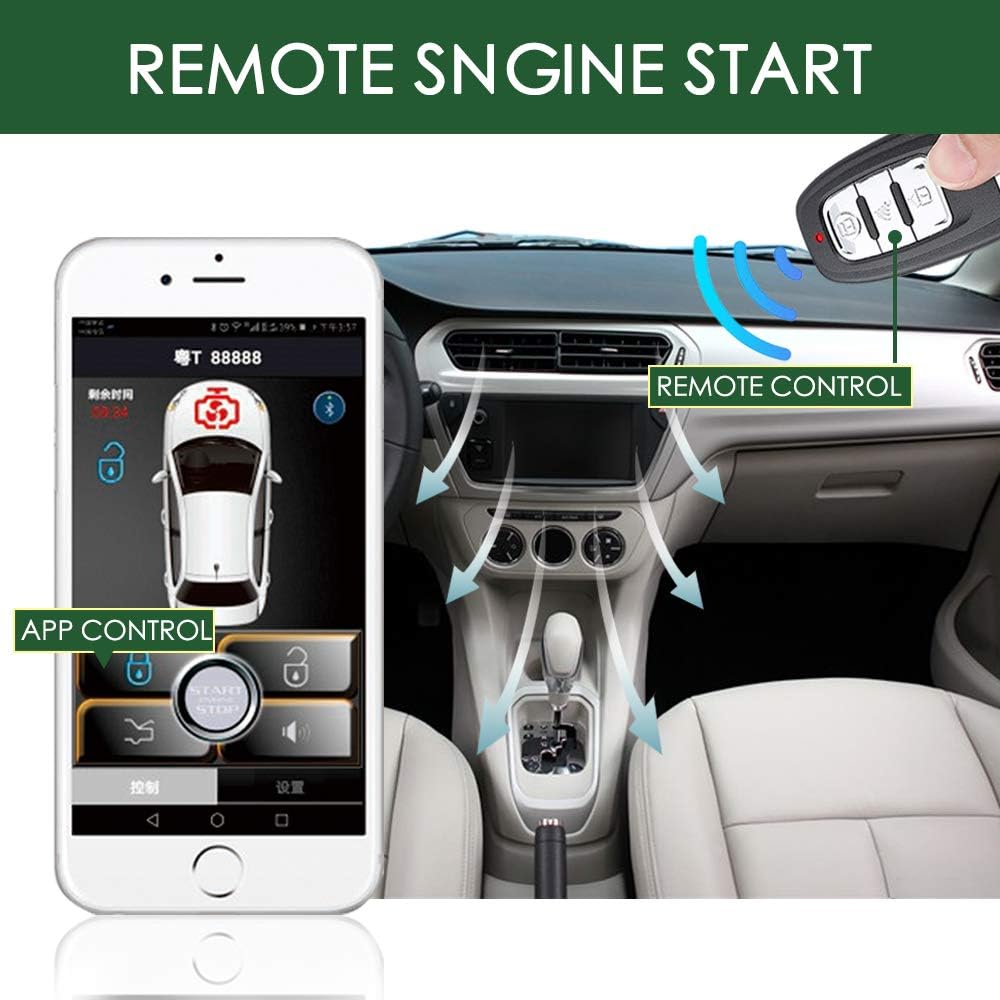
Image 5.1: Illustration of remote engine start functionality using both the smartphone application and the physical remote control, showing air circulation within the car.

Image 5.2: A hand interacting with the smartphone app to initiate remote engine start, with a car visible in the background.
5.2. One Key Start/Stop
After installation, your vehicle will utilize the provided push-button for engine start and stop.
- To start the engine: Press the "ENGINE START STOP" button while depressing the brake pedal.
- To stop the engine: Press the "ENGINE START STOP" button.
5.3. Keyless Entry (Phone Control)
The system allows your smartphone to act as a key for unlocking the vehicle.
- Ensure the smartphone app is running and Bluetooth is enabled.
- When your phone approaches the car (typically within 2-5 meters), the car doors will automatically unlock.
5.4. Remote Key and App Control Functions
Both the remote key and the smartphone app offer various control functions:
- Engegada del motor a distància: Initiate engine start from a distance.
- Lock/Unlock Car: Secure or open vehicle doors.
- Open Trunk: Remotely release the trunk latch.
- Car Locator: Helps locate your vehicle (functionality may vary by app version).
- Reservation Mode: Specific mode for preparing the vehicle for remote start (refer to Section 4.2 for details).
6. Smartphone Application Control
The GIORDON remote engine starter can be controlled via a dedicated smartphone application, compatible with both Android and iOS devices.
6.1. Main Page Interface
The application's main interface provides access to key functions. The layout may vary slightly between iOS (Apple) and Android versions.

Image 6.1: Comparison of the main control interface for the GIORDON app on Apple (left) and Android (right) smartphones, highlighting key function icons.
Common icons and their functions:
- 1. Bluetooth Icon: Indicates Bluetooth connection status between the phone and the vehicle.
- 2. Lock Icon: Locks the vehicle doors.
- 3. Unlock Icon: Unlocks the vehicle doors.
- 4. Trunk Release Icon: Opens the vehicle's trunk.
- 5. Car Locator Icon: Activates the car locator feature (e.g., flashing lights, horn chirp).
Additional options such as "control," "setting," "about," and "news" may be available for further customization and information.
7. Manteniment
- Keep Components Dry: Protect the main control unit and remote keys from moisture and extreme temperatures.
- Substitució de la bateria: Replace batteries in remote keys as needed. Refer to the remote key's specific instructions for battery type and replacement procedure.
- Actualitzacions de programari: Periodically check for updates to the smartphone application to ensure optimal performance and access to new features.
- Inspecció professional: If you experience any issues, it is recommended to have the system inspected by a professional installer.
8. Solució De Problemes
| Problema | Causa possible | Solució |
|---|---|---|
| Remote start not working. | Remote start activation procedure not completed. Vehicle not in Park/Neutral or handbrake not engaged (for auto). Low remote key battery. | Review and complete the remote start activation procedure (Section 4.2). Ensure proper gear and handbrake. Replace remote key battery. |
| Keyless entry via phone not functioning. | Bluetooth disabled on phone. App not running in background. Phone too far from vehicle. | Enable Bluetooth. Ensure app is running. Move closer to the vehicle (within 2-5 meters). |
| Remote key range is poor. | Low remote key battery. Interference from other electronic devices. Obstructions between remote and vehicle. | Replace remote key battery. Move away from sources of interference. Ensure clear line of sight if possible. |
| Engine start button unresponsive. | Wiring issue. System malfunction. | Contact a professional installer for diagnosis and repair. |
9. Especificacions
- Model: One Way Start Without PKE
- ASIN: B0852LHKKT
- Fabricant: GIORDÓ
- Pes de l'article: 13.7 unces (aproximadament 388 grams)
- Dimensions del paquet: 7.72 x 7.56 x 3.27 polzades (aprox. 19.6 x 19.2 x 8.3 cm)
- Compatibilitat: Designed for 95% of DC12V cars.
- Remote Start Range: 50-150 meters (key start).
- Keyless Entry Range: 2-5 meters (phone app proximity).
- Mètodes de control: Remote Key, Smartphone Application (Android/iOS).
10. Garantia i Suport
For warranty information, technical support, or service inquiries, please refer to the documentation provided with your purchase or contact GIORDON customer service through their official channels. Keep your proof of purchase for warranty claims.
Per a més ajuda, podeu visitar el GIORDON Store on Amazon.
Ask a question about this manual
Ask about setup, troubleshooting, compatibility, parts, safety, or missing instructions. Manuals+ will review the question and use this page’s manual context to help answer it.