
Aqualung Kalm Plus
AQUALUNG Kalm Plus Dive Computer User Manual
Model: Kalm Plus (WT/GN/GN)
Brand: Aqualung
Introducció
The Aqualung Kalm Plus dive computer is a solar-powered, 'Made in Japan' device equipped with Bluetooth Smart technology. This advanced dive computer offers excellent running costs due to its solar charging capability, eliminating the need for frequent battery replacements. It allows for wireless transfer of log data to a dedicated smartphone application, enabling easy review of dive details such as date, entry/exit times, maximum depth, average depth, and deepest water temperature. The app also facilitates convenient adjustment of most Kalm Plus unit settings directly from your smartphone. Additionally, the Kalm Plus features a unique 'Anniversary Function' that displays a special message upon reaching a specific number of logged dives, enhancing the diving experience.
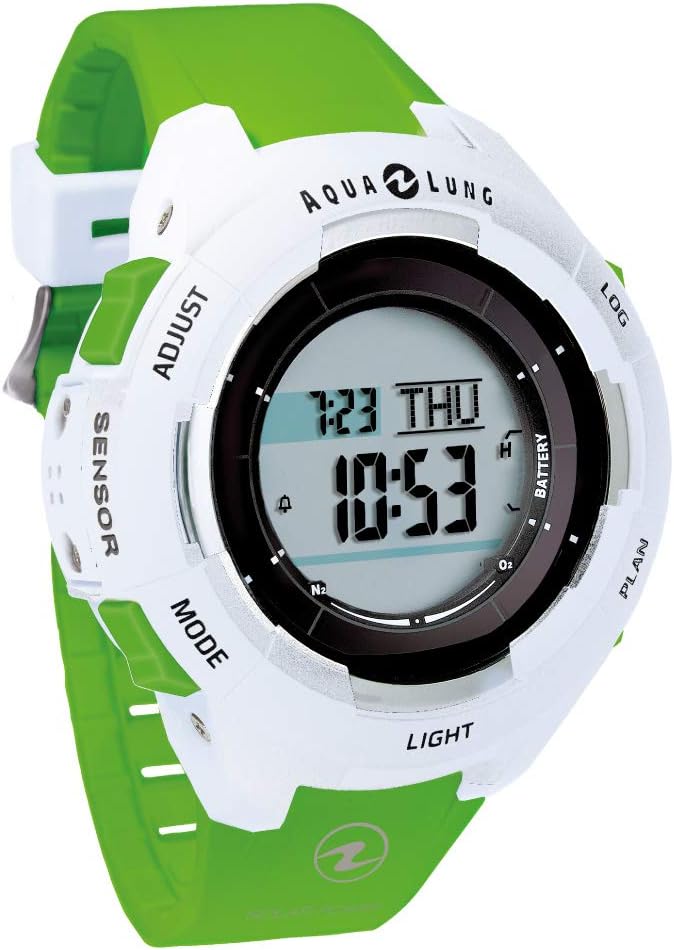
Imatge: Frontal view of the AQUALUNG Kalm Plus Dive Computer. The watch-style computer features a white casing with a vibrant green strap. The digital display shows time, date, and dive-related indicators. Buttons for 'ADJUST', 'SENSOR', 'MODE', 'LIGHT', 'PLAN', 'LOG', and 'BATTERY' are visible around the bezel.
Configuració
Before your first dive, ensure the Kalm Plus is properly set up. This includes initial charging, time synchronization, and configuring essential dive parameters.
- Càrrega solar inicial: Place the dive computer in direct sunlight or under strong artificial light for several hours to ensure a full charge. The solar panel is located on the watch face.
- Configuració de data i hora:
- Premeu el botó MODE button to navigate to the time setting mode.
- Utilitza el AJUSTAR button to change values and the LLUM botó per confirmar i passar a la configuració següent.
- Set the current time, date, and year.
- Configuració de la unitat: Configure units for depth (meters/feet) and temperature (Celsius/Fahrenheit) according to your preference. This can typically be done in the settings menu accessible via the MODE botó.
- Download Dedicated App: Download the "Diver LOG" app from your smartphone's app store. This app is essential for wireless data transfer and advanced settings configuration.
- Emparella amb telèfon intel·ligent: Follow the instructions in the "Diver LOG" app to pair your Kalm Plus dive computer via Bluetooth. Ensure Bluetooth is enabled on both devices.
En funcionament
The Kalm Plus dive computer is designed for intuitive operation during and after your dives.
Mode d'immersió
- Activació automàtica: The computer automatically switches to dive mode when submerged to a certain depth (typically 1.2 meters / 4 feet).
- During Dive: The main display will show critical information such as current depth, dive time, and no-decompression limit. Use the MODE or LLUM buttons to cycle through additional information like maximum depth, water temperature, and average depth.
- Ascent Rate Indicator: Pay attention to the ascent rate indicator to ensure safe ascent speeds.
- Parada de seguretat: The computer will prompt for a safety stop at 5 meters (15 feet) for 3 minutes.
Mode de superfície
- Desactivació automàtica: The computer automatically returns to surface mode when out of water for a specified period.
- Surface Interval: Displays the surface interval time, which is crucial for planning repetitive dives.
- No-Fly Time: Shows the recommended no-fly time to ensure safe travel after diving.
Log Mode and Data Transfer
- Accessing Logs: Premeu el botó REGISTRE button to enter log mode and review past dive data directly on the computer.
- Transferència de dades sense fil: Open the "Diver LOG" app on your paired smartphone. The app will automatically synchronize with the Kalm Plus to transfer dive logs wirelessly via Bluetooth.
- Log Data Details: L’aplicació ho permet view detailed information for each dive, including date, entry/exit times, maximum depth, average depth, deepest water temperature, and allows for manual input of location information, images, and other notes.
Anniversary Function
- The Kalm Plus features a unique 'Anniversary Function'. When you reach a specific number of logged dives, a special message will be displayed on the computer's screen, celebrating your diving milestones.

Imatge: Detallada view of the AQUALUNG Kalm Plus features and specifications. This image highlights the unique 'Anniversary Function', the log button for quick mode transition, clear scroll display of information, large display of important underwater data, high-brightness LED illumination, and the inclusion of a watch guard. It also details the "Diver LOG" app's capabilities for wireless data transfer and smartphone control via Bluetooth Smart, along with product dimensions and weight.
Manteniment
Proper maintenance ensures the longevity and reliability of your Kalm Plus dive computer.
- Esbandida: After each dive, thoroughly rinse the dive computer with fresh water to remove salt, sand, and other debris. Operate the buttons while rinsing to flush out any trapped particles.
- Assecat: Dry the computer completely with a soft cloth before storage. Avoid direct sunlight for prolonged drying.
- Emmagatzematge: Store the Kalm Plus in a cool, dry place away from direct sunlight and extreme temperatures.
- Càrrega solar: Periodically expose the computer to light to maintain its charge, even when not in use. This prevents the internal battery from fully discharging.
- Inspecció: Regularly inspect the strap and casing for any signs of wear or damage.
Resolució de problemes
Here are solutions to common issues you might encounter with your Kalm Plus dive computer.
| Problema | Causa possible | Solució |
|---|---|---|
| La pantalla està tènue o en blanc. | Càrrega solar insuficient. | Expose the computer to strong light (sunlight or artificial) for several hours to fully charge. |
| Cannot pair with smartphone via Bluetooth. | Bluetooth not enabled, app not running, or computer not in pairing mode. | Ensure Bluetooth is on for both devices. Open the "Diver LOG" app. Follow app instructions to initiate pairing. Restart both devices if necessary. |
| Incorrect depth or temperature readings. | Sensor obstruction or unit setting error. | Rinse the computer thoroughly to clear any debris from the sensor. Check unit settings (meters/feet, Celsius/Fahrenheit) in the menu. |
| Els botons són rígids o no responen. | Salt or debris accumulation. | Rinse the computer thoroughly with fresh water, pressing the buttons repeatedly during rinsing to dislodge any foreign material. |
Especificacions
| Característica | Detall |
|---|---|
| Nom de marca | Aqualung |
| Model | Kalm Plus |
| ASIN | B0856WX84X |
| Ús de la bateria | No (Solar Powered) |
| Dimensions | 58.9 x 52.4 mm |
| Gruix | Aprox. 14.3 mm |
| Pes | 75 g |
| Connectivitat | Bluetooth intel·ligent |
| Origen | Fabricat al Japó |
| Data de primera disponibilitat a Amazon.co.jp | 18 de febrer de 2019 |
Garantia i Suport
For detailed warranty information and technical support, please refer to the official Aqualung weblloc web o contacteu directament amb el servei d'atenció al client. Conserveu el comprovant de compra per a reclamacions de garantia.
Official Aqualung Weblloc: www.aqualung.com
Ask a question about this manual
Ask about setup, troubleshooting, compatibility, parts, safety, or missing instructions. Manuals+ will review the question and use this page’s manual context to help answer it.