
1. Introducció
This manual provides detailed instructions for the setup, operation, and maintenance of your Crony ZXTL-13A Digital LED Table and Wall Clock. This device displays time, date, day, and temperature, and includes alarm and radio functions. Please read this manual thoroughly before using the product to ensure proper function and longevity.
2. Informació de seguretat
- No exposeu el dispositiu a temperatures extremes, llum solar directa ni humitat elevada.
- Eviteu deixar caure o sotmetre el dispositiu a forts impactes.
- No intenteu desmuntar ni reparar el dispositiu vosaltres mateixos. Encarregueu tot el manteniment a personal qualificat.
- Mantenir fora de l'abast dels nens.
- Use only the specified power adapter and battery type (AAA).
3. Producte acabatview
The Crony ZXTL-13A is a versatile digital clock designed for both desk and wall mounting. It features a clear LED display and multiple functions.
3.1 Característiques clau
- Digital LED Display for Time, Date, Day, and Temperature
- Built-in Alarm Function
- Built-in Radio Function
- Desk & Shelf or Wall Mountable
- Durable Metal Material Construction
- Battery Powered (AAA) and AC Power Option
3.2 Clock Components

Figura 1: Frontal View of the Crony ZXTL-13A Clock. This image shows the main display area with segments for AM/PM, current time, alarm status, day of the week, month, temperature in Celsius, and week number.
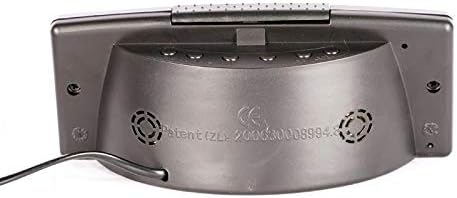
Figura 2: Esquena View of the Crony ZXTL-13A Clock. This image illustrates the rear panel, typically where control buttons for setting time, alarm, and mode selection are located, along with the power input port and possibly a battery compartment.
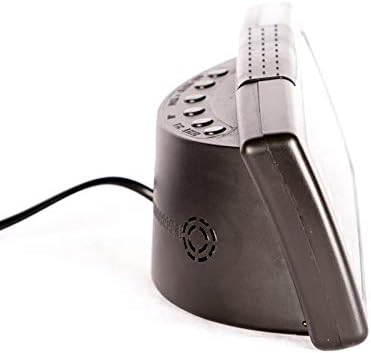
Figura 3: lateral View of the Crony ZXTL-13A Clock. This image highlights the clock's profile, demonstrating its integrated stand for desk placement and the connection point for the power cable.
4. Configuració
4.1 Engegar el rellotge
The Crony ZXTL-13A clock can be powered by either AAA batteries or an AC power adapter.
- Instal·lació de la bateria: Locate the battery compartment on the back of the clock (refer to Figure 2). Insert the required number of AAA batteries, ensuring correct polarity (+/-).
- Alimentació CA: Connect the provided power adapter to the DC input port on the back of the clock (refer to Figure 2 and 3). Plug the adapter into a standard wall outlet.
- For continuous operation and full functionality, it is recommended to use the AC power adapter. Batteries serve as a backup in case of power outage or for portability.
4.2 Opcions de muntatge
- Col·locació d'escriptori/prestatges: Utilize the integrated stand at the base of the clock for stable placement on any flat surface.
- Muntatge a la paret: The clock features mounting holes on the back for secure attachment to a wall. Use appropriate screws and wall anchors (not included) for installation.
5. Instruccions de funcionament
The control buttons are typically located on the back of the clock (refer to Figure 2). Common buttons include MODE, UP/+, DOWN/-.
5.1 Configuració de l'hora
- Manteniu premut el botó MODE fins que els dígits de les hores comencin a parpellejar.
- Utilitza el UP/+ or BAIX/- botons per ajustar l'hora.
- Premeu MODE again to move to the minute digits, then adjust with UP/+ or BAIX/-.
- Continueu prement MODE to cycle through 12/24-hour format and AM/PM settings (if applicable), adjusting each with UP/+ or BAIX/-.
- Premeu MODE one last time or wait a few seconds for the settings to save automatically.
5.2 Setting Date and Day
- Des de la visualització normal de l'hora, premeu la tecla MODE button repeatedly until the date or year digits flash.
- Ús UP/+ or BAIX/- to set the year, then press MODE.
- Adjust the month, then press MODE.
- Adjust the day, then press MODE. The day of the week should automatically update.
- Wait for the settings to save.
5.3 Configuració de l'alarma
- Premeu el botó MODE button until the alarm time is displayed (often indicated by an alarm icon or "AL").
- Mantén premut MODE until the alarm hour digits flash.
- Adjust the alarm hour with UP/+ or BAIX/-. Premeu MODE.
- Adjust the alarm minute with UP/+ or BAIX/-. Premeu MODE.
- To activate/deactivate the alarm, look for a dedicated alarm ON/OFF button or press UP/+ or BAIX/- while the alarm time is displayed (not flashing). An alarm icon will appear on the display when active.
5.4 Funció de ràdio
The clock includes a built-in radio. Specific operation details may vary, but generally:
- Premeu un botó dedicat RÀDIO button or cycle through modes using the MODE button until the radio frequency is displayed.
- Ús UP/+ or BAIX/- to tune to desired stations.
- Some models may have auto-scan or preset functions. Refer to on-screen prompts if available.
5.5 Visualització de la temperatura
The clock automatically displays the ambient temperature. Some models may allow switching between Celsius (°C) and Fahrenheit (°F). Look for a dedicated button or a setting within the MODE cycle to change the temperature unit.
6. Manteniment
6.1 Neteja
Per netejar el rellotge, netegeu suaument la pantalla iasing with a soft, dry, lint-free cloth. Do not use abrasive cleaners, solvents, or spray directly onto the clock.
6.2 Substitució de la bateria
If using batteries for backup, replace them when the display dims or functions become erratic. Ensure to use fresh AAA batteries and dispose of old batteries responsibly.
7. Solució De Problemes
| Problema | Causa possible | Solució |
|---|---|---|
| La pantalla està en blanc o tènue. | No power, low batteries, or power adapter issue. | Check AC power connection. Replace AAA batteries. Ensure power outlet is functional. |
| El rellotge no marca l'hora exacta. | Incorrect initial setting, power interruption. | Reset the time following Section 5.1. Ensure stable power supply. |
| L'alarma no sona. | Alarm not activated, incorrect alarm time, low volume. | Verify alarm is ON (alarm icon displayed). Check alarm time setting. Adjust volume if applicable. |
| Radio not working or poor reception. | Poor signal, antenna not extended (if applicable), incorrect frequency. | Adjust clock position. Extend any external antenna. Rescan for stations. |
8. Especificacions
| Característica | Detall |
|---|---|
| Model | ZXTL-13A |
| Marca | Amiga |
| Tipus de visualització | LED digital |
| Funcions | Time, Date, Day, Temperature, Alarm, Radio |
| Font d'alimentació | Battery Powered (AAA), AC Adapter |
| Material | Metall |
| Tipus de muntatge | Wall Mount, Desk/Shelf |
| Dimensions del paquet | 20 x 9 x 8.6 cm |
| Pes | 420 g |
9. Garantia i Suport
For warranty information or technical support, please refer to the documentation included with your purchase or contact Crony customer service directly. Keep your proof of purchase for warranty claims.
For further assistance, please visit the manufacturer's official weblloc web o contacteu amb els seus canals d'assistència.