
1. Introducció
Gràcies per la compraasing the Vonyx CVB215 Active Speaker. This powerful 1600W speaker features dual 15-inch woofers, Bluetooth connectivity, and MP3 playback capabilities, making it ideal for various audio applications including music playback, parties, and public announcements. This manual provides essential information for safe operation, setup, and maintenance of your speaker. Please read it thoroughly before use and retain it for future reference.
2. Instruccions de seguretat
- Font d'alimentació: Assegureu-vos que l'altaveu estigui connectat a una presa de corrent amb el volum correctetage (230V AC / 50Hz).
- Humitat: Do not expose the speaker to rain or moisture to prevent electric shock.
- Ventilació: Assegureu-vos que hi hagi una ventilació adequada al voltant de l'altaveu. No bloquegeu les obertures de ventilació.
- Fonts de calor: Mantingueu l'altaveu allunyat de fonts de calor com ara radiadors, registres de calor, estufes o altres aparells que produeixin calor.
- Neteja: Disconnect from power before cleaning. Use a dry cloth.
- Manteniment: No intenteu fer la reparació de l'altaveu vosaltres mateixos. Envieu totes les tasques de manteniment a personal de servei qualificat.
- Col·locació: Col·loqueu l'altaveu sobre una superfície estable i plana per evitar que caigui.
3. Producte acabatview
The Vonyx CVB215 is a robust active speaker designed for high-quality audio output. It features a durable enclosure with a metal grille protecting the dual 15-inch woofers and tweeters. Integrated handles allow for easier transport.
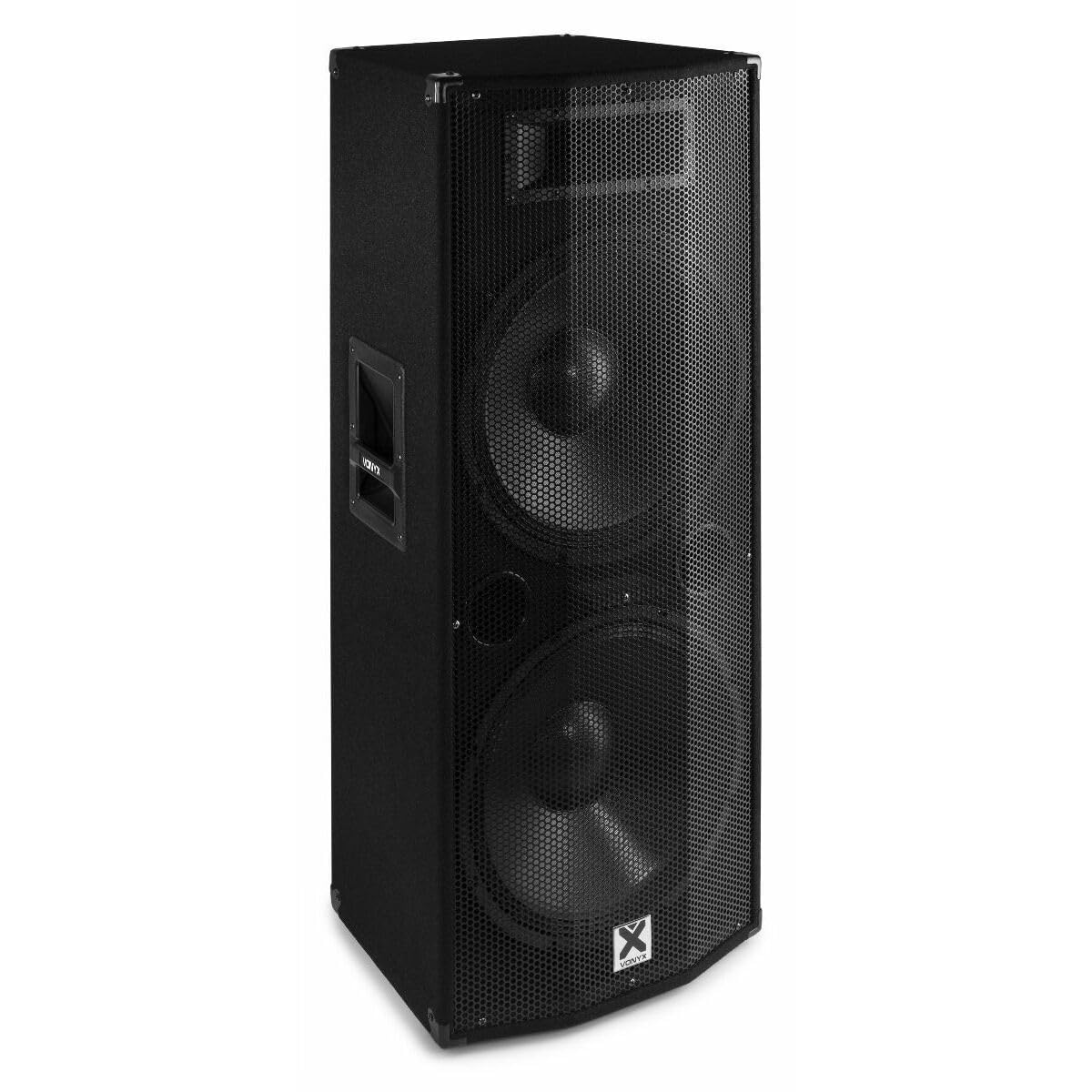
Imatge 3.1: Davant view of the Vonyx CVB215 active speaker. This image displays the speaker's front, highlighting the protective metal grille and the Vonyx logo.
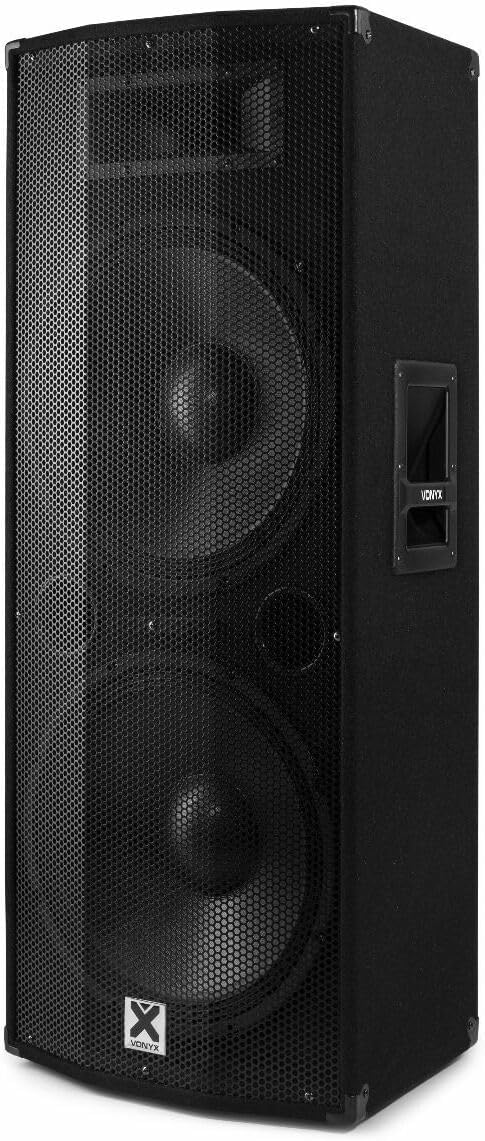
Imatge 3.2: En angle view of the Vonyx CVB215 active speaker. This perspective shows the speaker's side with an integrated handle, designed for portability.
Controls i connexions del panell posterior
The rear panel houses all input/output connections and control knobs for audio adjustment.

Imatge 3.3: Rear panel of the Vonyx CVB215 active speaker. This image provides an overview of all connections and controls located on the back of the unit.
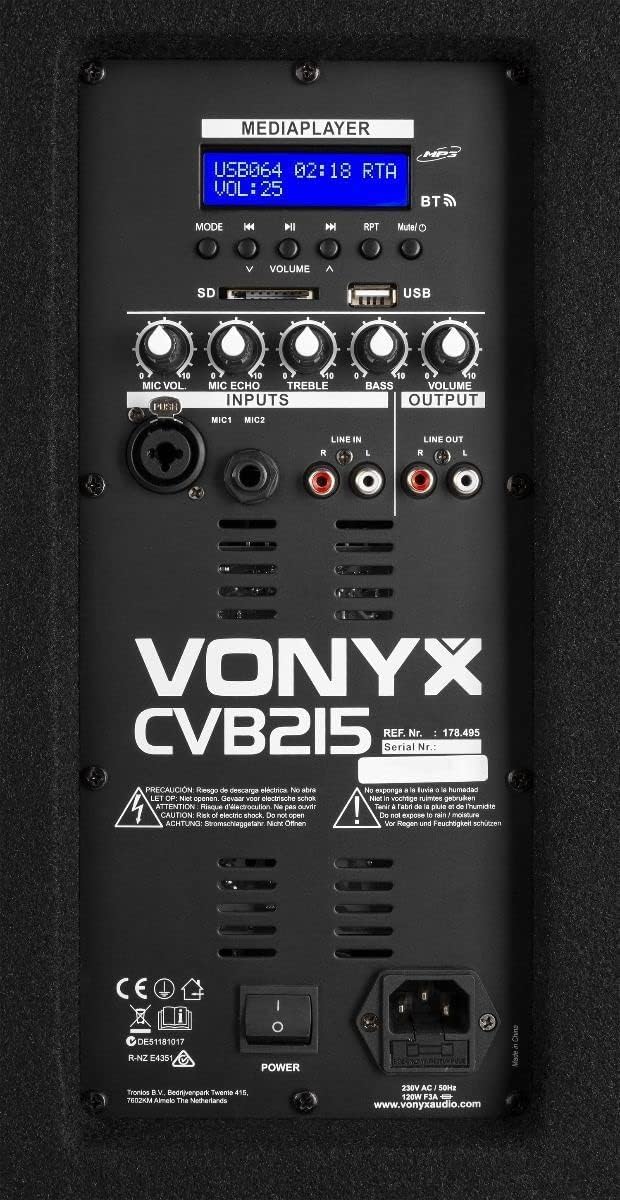
Imatge 3.4: Detallada view of the Vonyx CVB215 rear panel controls. This close-up highlights the media player interface, USB and SD card slots, microphone inputs (MIC1, MIC2), Line In (RCA), Line Out (RCA), and various adjustment knobs.
- MEDIAPLAYER Display: Shows current mode, track information, and volume level.
- Ranures per a targetes USB/SD: For MP3 playback from USB drives or SD cards.
- Botó MODE: Switches between Bluetooth, USB, SD, and Line-in modes.
- Botons de VOLUM: Adjusts overall volume, microphone volume (MIC VOL), microphone echo (MIC ECHO), treble, and bass.
- Entrades MIC1/MIC2: 6.3mm jack inputs for microphones.
- ENTRADA DE LÍNIA (RCA): Stereo RCA inputs for connecting external audio sources (e.g., mixer, CD player).
- SORTIDA DE LÍNIA (RCA): Stereo RCA outputs for connecting to another active speaker or ampmés viu.
- Interruptor d'alimentació: Encén/apaga l'altaveu.
- AC IN: Connexió del cable d'alimentació.
Control remot
The speaker comes with a remote control for convenient operation of the media player functions.

Imatge 3.5: Remote control for the Vonyx CVB215 speaker. This image displays the layout of the remote control, including buttons for media playback, volume adjustment, and mode selection.
4. Configuració
- Desembalatge: Traieu amb cura l'altaveu del seu embalatge. Conserveu l'embalatge per a futurs transports o emmagatzematge.
- Col·locació: Place the speaker on a stable, level floor. Ensure there is sufficient space around the speaker for proper ventilation. The speaker is designed for floorstanding use.
- Connexió d'alimentació: Connect the supplied power cable to the AC IN socket on the rear panel of the speaker and then to a suitable power outlet.
- Encesa inicial: Ensure all volume controls are set to minimum before turning on the speaker using the POWER switch.
5. Funcionament
5.1. Connexió Bluetooth
- Enceneu l'altaveu.
- Premeu el botó MODE button on the rear panel or remote control until "BT" (Bluetooth) appears on the MEDIAPLAYER display. The speaker will enter pairing mode.
- On your Bluetooth-enabled device (smartphone, tablet, laptop), search for available Bluetooth devices.
- Select "Vonyx" or a similar name from the list.
- Once paired, you will hear a confirmation sound, and the display will indicate a successful connection.
- You can now play audio from your device through the speaker. The Bluetooth range is approximately 10 meters (33 feet).
5.2. MP3 Playback (USB/SD)
- Insert a USB flash drive or SD card (containing MP3 files) into the corresponding slot on the rear panel.
- L'altaveu canviarà automàticament al mode USB o SD i començarà a reproduir la primera pista. Si no, premeu el botó MODE botó per seleccionar el mode USB o SD.
- Use the playback controls (Play/Pause, Previous, Next) on the rear panel or remote control to manage your music.
- Ajusteu el VOLUM knob to control the playback level.
5.3. Line-in Connection (RCA)
- Connect your external audio source (e.g., mixer, CD player, TV) to the ENTRADA DE LÍNIA (RCA) inputs on the rear panel using appropriate RCA cables.
- Premeu el botó MODE button until "LINE" or "AUX" appears on the display.
- Play audio from your connected device and adjust the main VOLUM knob on the speaker.
5.4. Ús del micròfon
- Connect your microphone(s) to the MIC1 or MIC2 6.3mm jack inputs.
- Ajusteu el MIC VOL botó per controlar el volum del micròfon.
- Utilitza el MIC ECO knob to add an echo effect to the microphone signal, if desired.
5.5. Control de to
- Utilitza el AGUTS knob to adjust the high frequencies of the audio.
- Utilitza el BASS knob to adjust the low frequencies of the audio.
6. Manteniment
- Neteja: Disconnect the speaker from the power supply before cleaning. Use a soft, dry cloth to wipe the exterior surfaces. Do not use abrasive cleaners or solvents.
- Emmagatzematge: If not in use for an extended period, store the speaker in a dry, dust-free environment. It is recommended to use the original packaging for protection.
- Inspecció: Comproveu periòdicament el cable d'alimentació per detectar qualsevol signe de danys. Si està malmès, substituïu-lo immediatament per un cable homologat.
7. Solució De Problemes
| Problema | Causa possible | Solució |
|---|---|---|
| Sense poder | Power cable not connected; Power switch off; Outlet fault | Check power cable connection; Turn power switch on; Test outlet with another device |
| Sense sortida de so | Volume too low; Incorrect input mode selected; Audio source issue; Cables not connected properly | Increase master volume; Select correct input mode (Bluetooth, USB, Line); Check audio source; Ensure all cables are securely connected |
| Bluetooth no connectat | Speaker not in pairing mode; Device too far; Bluetooth off on source device | Ensure speaker is in BT mode; Move device closer (within 10m); Enable Bluetooth on your device and re-scan |
| Àudio distorsionat | Volume too high (clipping); Poor audio source quality; Damaged cables | Reduce volume on speaker and source; Use high-quality audio files; Replace damaged cables |
| Problemes de reproducció d'MP3 | Sense suport file format; Corrupt USB/SD card; Incorrect mode | Assegureu-vos files are MP3 format; Try a different USB/SD card; Select USB/SD mode |
8. Especificacions

Imatge 8.1: Dimensions of the Vonyx CVB215 active speaker. This diagram illustrates the height, width, and depth of the speaker for placement planning.
- Marca: Vonyx
- Número de model: 178.495
- Potència de sortida màxima: 1600 watts
- Tipus d'altaveu: Multimedia, Active, Floorstanding
- Diàmetre del woofer: 2 x 15 polzades
- Mode de sortida d'àudio: estèreo
- Tecnologia de connectivitat: Bluetooth, RCA, USB
- Rang Bluetooth: 10 metres
- Total USB 2.0 Ports: 1
- Dispositius compatibles: Laptop, MP3-player, Smartphone, Tablet, Television
- Mètode de control: Control remot
- Font d'alimentació: Corded Electric (230V AC / 50Hz)
- Dimensions del producte (L x A x A): 46.5 x 40 x 112.5 cm
- Components inclosos: Handles, metal grille, remote control
9. Garantia i Suport
Per obtenir informació sobre la garantia i assistència tècnica, consulteu la documentació que s'inclou amb la compra o poseu-vos en contacte amb el vostre distribuïdor. Conserveu el comprovant de compra per a qualsevol reclamació de garantia.