
1. Introducció
Thank you for choosing the Technoline WS 6767 Wireless Weather Station. This device provides comprehensive weather information including indoor and outdoor temperature and humidity, barometric pressure, and a weather forecast. It also features a DCF-77 radio-controlled clock, date, weekday, moon phase, sunrise, and sunset times. This manual will guide you through the setup, operation, and maintenance of your new weather station.
2. Informació de seguretat
- Llegiu atentament totes les instruccions abans d'utilitzar el dispositiu.
- Conserveu aquest manual com a referència futura.
- Do not expose the main unit or sensor to extreme temperatures, direct sunlight, or moisture.
- Use only the specified battery types (AA for main unit, AAA for sensor) and ensure correct polarity.
- No barregeu piles velles i noves, o diferents tipus de piles.
- Eliminar les bateries usades d'acord amb la normativa local.
- No intenteu reparar o modificar el dispositiu vosaltres mateixos. Poseu-vos en contacte amb personal qualificat per al servei tècnic.
3. Contingut del paquet
Si us plau, comproveu el contingut del paquet per assegurar-vos que hi hagi tots els elements:
- 1x Technoline WS 6767 Main Unit
- 1x Wireless Outdoor Sensor (TX 960-TH)
- 1x Manual d'usuari (aquest document)
Nota: Les piles no estan incloses i s'han de comprar per separat.
4. Producte acabatview
The Technoline WS 6767 weather station consists of a main display unit and a wireless outdoor sensor. The main unit features a clear LCD display showing various weather parameters and time information.

Image 4.1: Technoline WS 6767 Main Unit Display. This image shows the front display of the weather station, featuring indoor and outdoor temperature and humidity, time, date, weekday, moon phase, sunrise/sunset times, barometric pressure, and weather forecast icons.
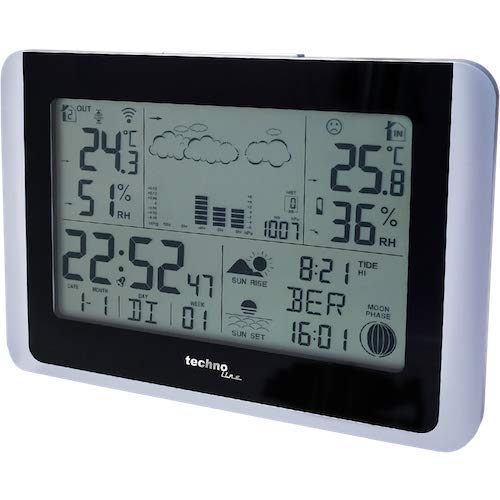
Image 4.2: Technoline WS 6767 Main Unit. Aquesta imatge proporciona una altra view of the main unit, highlighting its sleek design and silver contrasting edge.

Image 4.3: Technoline WS 6767 Size Comparison. This image illustrates the compact size of the main unit, held in hands for scale, with a height of approximately 11.8 cm.
5. Configuració
5.1 Instal·lació de la bateria
Before initial use, install batteries in both the main unit and the outdoor sensor.
- Unitat principal: Open the battery compartment on the back of the main unit. Insert 2 x AA LR06 batteries, observing the correct polarity (+/-). Close the compartment.
- Sensor exterior: Open the battery compartment on the back of the outdoor sensor. Insert 2 x AAA LR03 batteries, observing the correct polarity (+/-). Close the compartment.
Note: It is recommended to insert batteries into the outdoor sensor first, then the main unit, to ensure proper synchronization.
5.2 Col·locació del sensor
- Sensor exterior: Place the outdoor sensor in a sheltered location, away from direct sunlight and rain, to ensure accurate temperature and humidity readings. Ensure it is within the wireless range of the main unit (typically up to 30 meters in open air).
- Unitat principal: Position the main unit indoors, away from direct heat sources (e.g., radiators, direct sunlight) or cold drafts, which could affect indoor readings. For optimal DCF-77 signal reception, place it near a window and away from electronic devices that may cause interference. The unit can be wall-mounted or placed on a table using its integrated stand.
5.3 Initial Setup and DCF-77 Signal Reception
After battery installation, the main unit will automatically begin searching for the DCF-77 radio signal to set the time and date. This process may take several minutes to a few hours, depending on your location and signal strength. A tower icon will flash on the display during signal search and become solid once the signal is received.
- If the signal is not received after 24 hours, try repositioning the main unit.
- You can manually set the time and date if the DCF-77 signal is consistently unavailable. Refer to Section 6.1 for manual settings.
6. Instruccions de funcionament
6.1 Configuració de data i hora
The time and date are usually set automatically via the DCF-77 signal. If manual adjustment is needed:
- Press and hold the 'SET' button (or similar, refer to button labels on your unit) to enter time setting mode.
- Feu servir els botons '+' o '-' per ajustar el valor intermitent (per exemple, hora, minut, any, mes, dia).
- Premeu 'SET' de nou per confirmar i passar a la configuració següent.
- Repeat until all settings are complete.
- You can also switch between 12-hour and 24-hour format.
6.2 Visualització de temperatura i humitat
The main unit displays both indoor and outdoor temperature and humidity. You can switch between Celsius (°C) and Fahrenheit (°F) by pressing a dedicated button (often labeled '°C/°F' or similar).
6.3 Pressió baromètrica
The weather station displays the current barometric pressure and often includes a trend indicator (e.g., rising, falling, stable) to help predict short-term weather changes.
6.4 Previsió meteorològica
Based on changes in barometric pressure, the station provides a weather forecast using intuitive icons (e.g., sunny, partly cloudy, cloudy, rainy). This is a prediction and may not always be 100% accurate.
6.5 Moon Phase, Sunrise/Sunset
The display includes information on the current moon phase and the sunrise/sunset times for selected cities. These values are typically updated automatically via the DCF-77 signal or can be manually configured if your location is not automatically detected.
6.6 Frost Alarm
The frost alarm feature can be activated to alert you when the outdoor temperature drops to a level where frost is possible. Consult your unit's specific button layout for activating and deactivating this function.
6.7 MIN/MAX Records
The weather station records the minimum and maximum indoor and outdoor temperature and humidity values over a period. Press the 'MIN/MAX' button (or similar) to cycle through these records. Hold the button to reset the recorded values.
6.8 Connexió de sensors addicionals
The Technoline WS 6767 can receive data from up to three wireless outdoor sensors (model TX 960-TH). To add additional sensors, ensure they are on different channels (1, 2, or 3) and follow the pairing instructions provided with the additional sensors. The main unit will automatically detect and display data from active sensors.
7. Manteniment
7.1 Substitució de la bateria
When the low battery indicator appears on the display, replace the batteries in the respective unit (main unit or sensor) promptly. Follow the battery installation steps in Section 5.1.
7.2 Neteja
Netegeu la unitat principal i el sensor exterior amb un drap suau i sec.amp drap. No utilitzeu productes de neteja abrasius ni dissolvents, ja que poden danyar la pantalla o laasing. Ensure the units are dry before re-inserting batteries or operating.
8. Solució De Problemes
- No hi ha lectura de temperatura/humitat exterior:
- Comproveu si les piles del sensor exterior estan correctament instal·lades i no estan esgotades.
- Ensure the outdoor sensor is within range of the main unit and not blocked by large metal objects or thick walls.
- Verify that the sensor channel matches the main unit's selected channel (if applicable).
- Try resetting both units by removing and re-inserting batteries.
- Visualització de l'hora incorrecta:
- Ensure the main unit is in a location with good DCF-77 signal reception.
- Manually set the time if the DCF-77 signal cannot be received consistently.
- Lectures de temperatura/humitat inexactes:
- Ensure the outdoor sensor is not in direct sunlight or exposed to rain.
- Ensure the main unit is not near heat sources or air conditioning vents.
- La pantalla està en blanc o parpelleja:
- Replace the batteries in the affected unit.
- Comproveu la polaritat correcta de la bateria.
9. Especificacions
| Característica | Especificació |
|---|---|
| Número de model | WS6767 |
| Dimensions de la unitat principal (amplada x alçada x profunditat) | 173 x 118 x 22 mm |
| Potència de la unitat principal | 2 piles AA LR06 (no incloses) |
| Outdoor Sensor Dimensions (W x H x D) | 28 x 98 x 24 mm |
| Potència del sensor exterior | 2 x AAA LR03 batteries (not included) |
| Connectivitat | Sense fil |
| Tipus de visualització | LCD |
| Precisió de la temperatura | ±1 °C |
| Material | Metall (casing) |
| Opcions de muntatge | Suport de paret o suport de taula |
| Expandabilitat | Supports up to 3 outdoor sensors (TX 960-TH) |
10. Informació de la garantia
Warranty information for the Technoline WS 6767 Wireless Weather Station is not provided within the available product data. Please refer to the retailer or manufacturer's official weblloc web per obtenir més informació sobre els termes i condicions de la garantia.
11. Suport
Specific customer support contact information for the Technoline WS 6767 Wireless Weather Station is not provided within the available product data. For technical assistance or further inquiries, please visit the official Technoline weblloc web o poseu-vos en contacte amb el vostre punt de venda.


