
Prtukyt Prtukyt 8S
Manual d'usuari dels auriculars Bluetooth sense fil Prtukyt 8S
Model: Prtukyt 8S (PT-1088)
1. Introducció
Thank you for choosing the Prtukyt 8S Wireless Bluetooth Headset. This manual provides detailed instructions on how to set up, operate, and maintain your new headset. Please read this manual carefully before use to ensure optimal performance and longevity of your device.
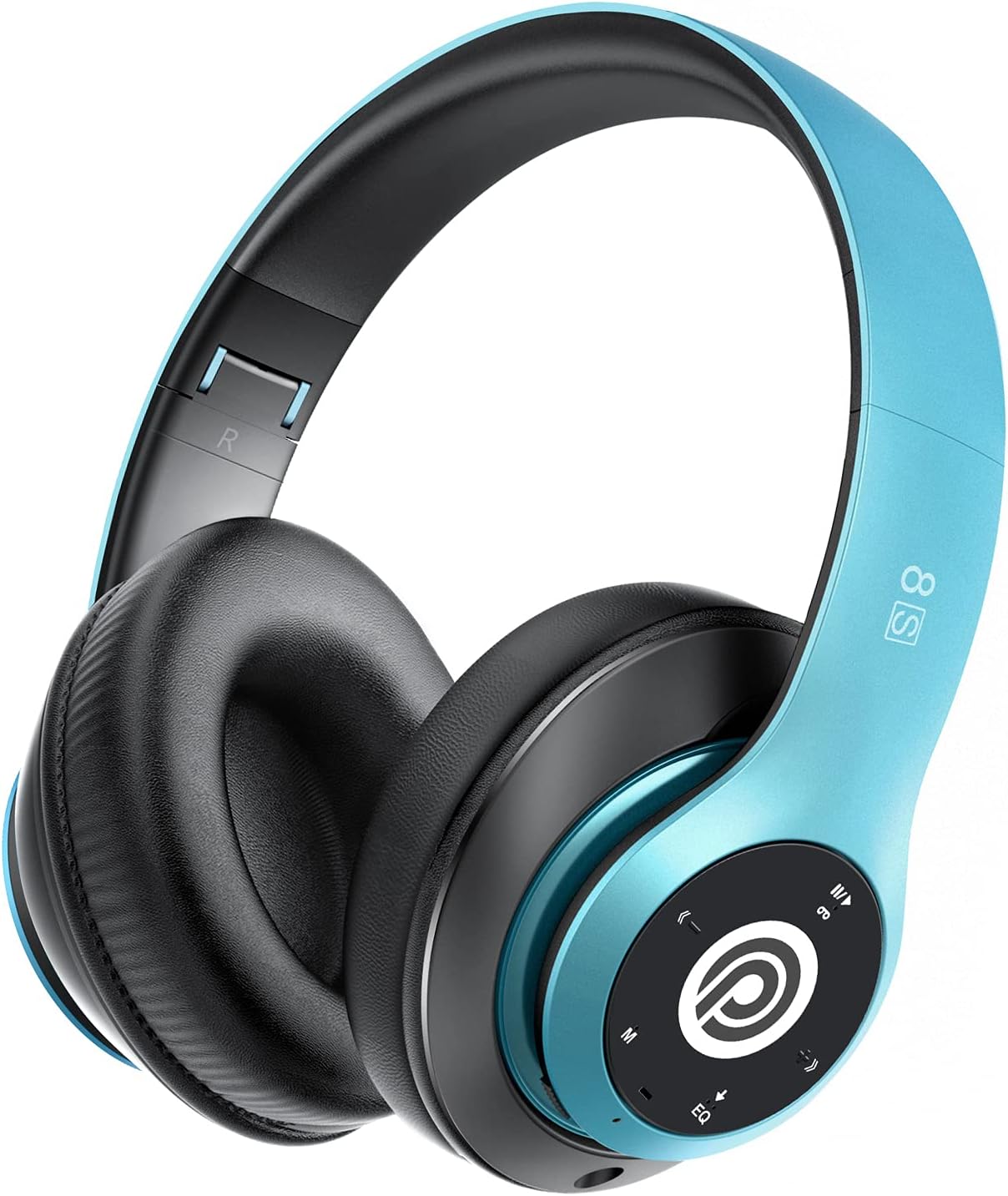
Image: The Prtukyt 8S Wireless Bluetooth Headset in blue, showcasing el seu disseny elegant i els seus còmodes auriculars.
2. Informació de seguretat
To ensure safe and proper use, please observe the following guidelines:
- No exposeu els auriculars a temperatures extremes, humitat ni substàncies corrosives.
- Eviteu deixar caure els auriculars ni sotmetre'ls a impactes forts.
- Do not disassemble or modify the headset. This will void the warranty and may cause damage.
- Keep the headset away from water and liquids as it is not waterproof.
- Escoltar durant molt de temps a nivells de volum alts pot causar danys auditius. Ajusteu el volum a un nivell moderat.
- Desfeu-vos del producte i de la bateria de manera responsable d'acord amb la normativa local.
3. Contingut del paquet
Si us plau, comproveu el paquet per veure si hi ha els elements següents:
- 1 x Prtukyt 8S Wireless Bluetooth Headset
- 1 x Audio Cable (3.5mm Jack)
- 1 x cable de càrrega USB
- 1 x Manual d'usuari
4. Producte acabatview
Familiarize yourself with the various parts and controls of your Prtukyt 8S headset.
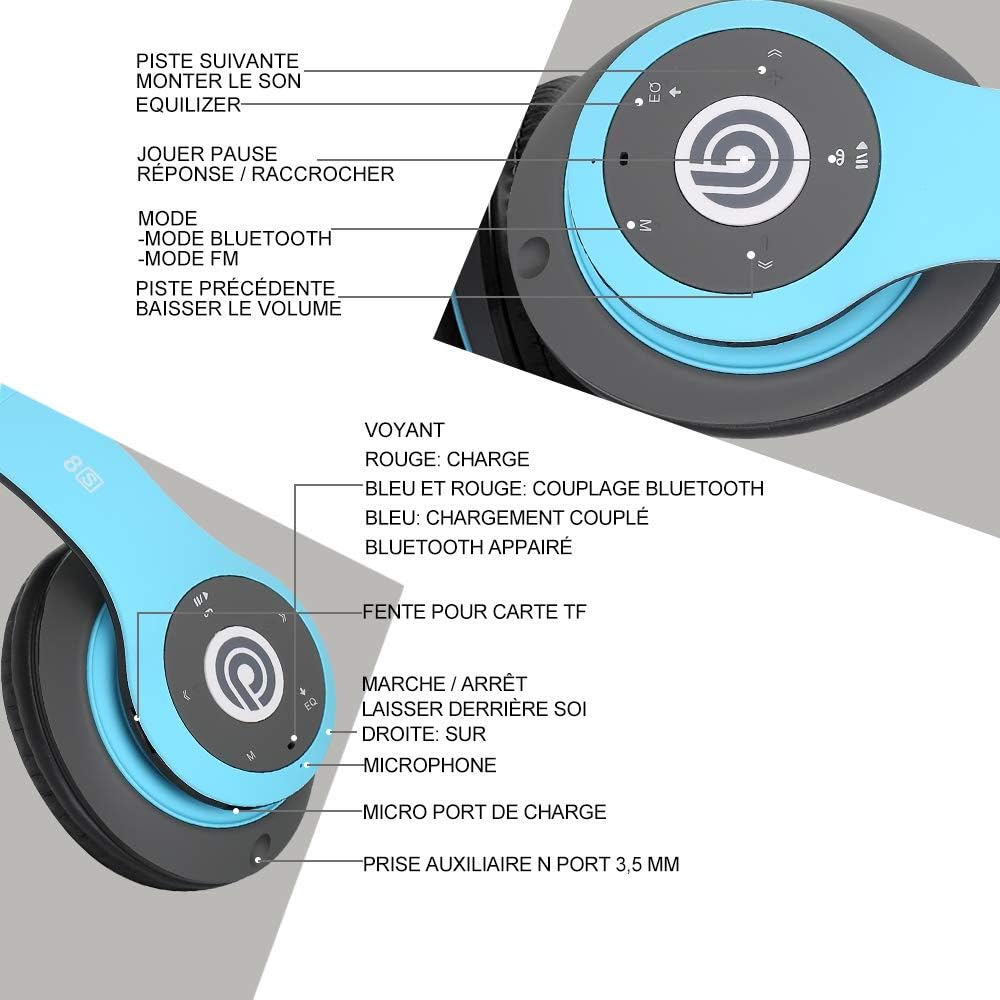
Imatge: Detallada view of the Prtukyt 8S headset's control panel and ports, including buttons, indicator light, TF card slot, microphone, charging port, and 3.5mm AUX port.
Tauler de control i ports:
- 1. Next Track / Volume Up: Premeu curt per a la següent pista, premeu llargament per augmentar el volum.
- 2. EQ Button: Press to cycle through equalizer sound effects.
- 3. Play / Pause / Answer / Hang Up: Multi-function button for music and calls.
- 4. Mode Button (M): Short press to switch between Bluetooth, FM Radio, and TF Card modes.
- 5. Previous Track / Volume Down: Premeu curt per a la pista anterior, premeu llargament per baixar el volum.
- 6. Llum indicador: Shows charging status, Bluetooth pairing, and connection status.
- 7. Ranura per a targetes TF: Insert a Micro SD/TF card for direct music playback.
- 8. Power On/Off Switch: Feu lliscar per encendre o apagar els auriculars.
- 9. Micròfon: Per trucades mans lliures.
- 10. Port de càrrega micro USB: Connecteu el cable de càrrega USB aquí.
- 11. 3.5mm AUX Port: Per a la connexió per cable a dispositius d'àudio.
Característiques del disseny:
- Disseny plegable: The headset features a unique foldable design for easy portability and storage, saving space.

Image: The Prtukyt 8S headset demonstrating its multi-angle rotation and adjustable headband for ultimate comfort.
- Comfortable Earcups: Super soft foam earcups and an adjustable headband ensure a comfortable fit for extended listening sessions.
- Àudio d'alta fidelitat: Equipped with powerful 57mm stereo drivers and Bluetooth 5.0 chip for deep bass and clear sound.

Imatge: Una imatge interna view highlighting the large aperture drivers and Bluetooth 5.0 chip for powerful performance.
5. Configuració
5.1 Càrrega inicial
Before first use, fully charge the headset. Connect the USB charging cable to the Micro USB charging port on the headset and the other end to a USB power adapter (not included) or a computer's USB port.
- El llum indicador serà VERMELL durant la càrrega.
- El llum indicador s'encén BLAU quan s'hagi completat la càrrega.
- Una càrrega completa sol trigar aproximadament 2-3 hores.

Image: The Prtukyt 8S headset illustrating its impressive 52-hour battery life on a single charge.
6. Instruccions de funcionament
6.1 Encès/Apagat
- Encès: Slide the Power On/Off switch to the "ON" position. The indicator light will flash blue, indicating it's ready for pairing or connecting.
- Apagar: Slide the Power On/Off switch to the "OFF" position. The indicator light will turn off.
6.2 Vinculació Bluetooth
- Assegureu-vos que els auriculars estan apagats.
- Slide the Power On/Off switch to the "ON" position. The headset will enter pairing mode, and the indicator light will flash BLAU i VERMELL alternativament.
- Activa el Bluetooth al teu dispositiu (telèfon intel·ligent, tauleta, ordinador, etc.).
- Cerca "Prtukyt 8S" or "PT-1088" in the list of available Bluetooth devices.
- Select "Prtukyt 8S" to connect. Once successfully paired, the indicator light will flash BLAU lentament.
- Si se us demana una contrasenya, introduïu "0000".
Note: The headset will automatically attempt to reconnect to the last paired device when powered on.
Reproducció de música 6.3 (mode Bluetooth)
- Reproduir/pausa: Premeu breument Reproduir/Pausa botó.
- Pista següent: Premeu breument Següent seguiment / augment de volum botó.
- Pista anterior: Premeu breument Pista anterior / Baixada de volum botó.
- Pujar el volum: Premeu llargament el botó Següent seguiment / augment de volum botó.
- Baixar el volum: Premeu llargament el botó Pista anterior / Baixada de volum botó.
6.4 Funcions de trucada
- Respon a la trucada: Premeu breument Reproduir/Pausa/Resposta/Penjar botó quan sona una trucada entrant.
- Finalitzar la trucada: Premeu breument Reproduir/Pausa/Resposta/Penjar botó durant una trucada.
- Rebutja la trucada: Premeu llargament el botó Reproduir/Pausa/Resposta/Penjar botó quan sona una trucada entrant.
- Torna a marcar l'últim número: Premeu dues vegades el botó Reproduir/Pausa/Resposta/Penjar botó.
6.5 Mode de ràdio FM
- Enceneu els auriculars.
- Premeu breument Mode (M) button to switch to FM Radio mode. You will hear a voice prompt indicating the mode change.
- Premeu breument Reproduir/Pausa per escanejar i desar automàticament les emissores de FM disponibles.
- Utilitza el Pista següent i Pista anterior botons per navegar entre les emissores desades.
6.6 Mode de targeta TF
- Insert a Micro SD/TF card (with MP3 audio files) into the TF Card Slot.
- Turn on the headset. It should automatically switch to TF Card mode and begin playing music. If not, short press the Mode (M) button to select TF Card mode.
- Utilitza el Reproduir/Pausa, Pista següent, Pista anterior, and volume buttons as in Bluetooth mode.
6.7 Funció EQ
The headset features an equalizer function to customize your listening experience.
- Premeu breument EQ button to cycle through different equalizer presets (e.g., Pop, Rock, Jazz, Classic, Bass, Normal).
6.8 Mode amb cable (AUX)
You can use the headset with non-Bluetooth devices via the included 3.5mm audio cable.
- Connect one end of the 3.5mm audio cable to the 3.5mm AUX Port on the headset.
- Connect the other end to the audio output jack of your device (e.g., computer, MP3 player).
- In wired mode, the headset's buttons (except volume control on some devices) will not function. Control playback and volume directly from your connected device.
7. Manteniment
- Netegeu els auriculars regularment amb un drap suau i sec. No utilitzeu productes de neteja abrasius ni dissolvents.
- Store the headset in a cool, dry place when not in use. The foldable design helps save space.
- Eviteu l'exposició prolongada a la llum solar directa o a temperatures extremes.
- Do not expose the headset to water or moisture.
8. Solució De Problemes
| Problema | Causa possible | Solució |
|---|---|---|
| Els auriculars no s'encenen. | La bateria està baixa o morta. | Carregueu completament els auriculars. |
| No es pot emparellar amb un dispositiu Bluetooth. | Bluetooth is off on device; headset not in pairing mode; too far from device. | Ensure Bluetooth is enabled on your device. Put headset in pairing mode (flashing blue/red). Keep devices within 10 meters. Clear previous pairings on your device. |
| Sense so o amb un volum baix. | Volume too low on headset or device; incorrect mode selected; loose cable in wired mode. | Increase volume on both headset and connected device. Ensure correct mode (Bluetooth, FM, TF, AUX) is selected. Check 3.5mm cable connection. |
| La recepció de ràdio FM és deficient. | Senyal feble; interferències ambientals. | Try moving to a different location. The audio cable can act as an antenna; ensure it's connected if using FM. |
| La targeta TF no funciona. | Targeta no inserida correctament; no compatible file format; targeta corrupta. | Reinsert TF card firmly. Ensure music files are in MP3 format. Try a different TF card. |
9. Especificacions
| Nom del model | Prtukyt 8S |
| Número de model | PT-1088 |
| Tecnologia de connectivitat | Sense fil (Bluetooth 5.0), amb cable (connector de 3.5 mm) |
| Interval de freqüència | 20 Hz - 20,000 Hz |
| Mida del controlador | 57mm Stereo Drivers |
| Característiques | Integrated Microphone, FM Radio, TF Card Playback, EQ Function, Foldable Design |
| Durada de la bateria (aprox.) | Up to 52 hours (Music/Talk time) |
| Port de càrrega | Micro USB |
| Resistència a l'aigua | No impermeable |
| Color | Blau |
10. Garantia i assistència
Prtukyt is committed to providing an excellent customer experience. If you encounter any quality issues with your product, please contact us immediately. Our customer support team is ready to assist you with any questions or concerns regarding your Prtukyt 8S Wireless Bluetooth Headset.
For support, please refer to the contact information provided on your purchase platform or the official Prtukyt weblloc.
Ask a question about this manual
Ask about setup, troubleshooting, compatibility, parts, safety, or missing instructions. Manuals+ will review the question and use this page’s manual context to help answer it.