
1. Introducció
Thank you for choosing the Kaiser KSW-5004 Rechargeable Bluetooth Speaker. This portable speaker is designed to deliver clear audio with versatile connectivity options, including Bluetooth, USB, Micro SD, and AUX input. It also features an auxiliary RGB light and KSR-Link technology for wireless stereo pairing. This manual provides essential information for safe and efficient use of your speaker.
2. Informació de seguretat
- Llegiu totes les instruccions abans d'utilitzar el dispositiu.
- Keep the speaker away from water, moisture, and high temperatures.
- No intenteu desmuntar, reparar o modificar l'altaveu. Això anul·larà la garantia.
- Feu servir només el cable de càrrega proporcionat o un equivalent certificat.
- Eviteu exposar la bateria a temperatures extremes o a la llum solar directa.
- Netegeu l'altaveu amb un drap suau i sec. No utilitzeu netejadors líquids ni aerosols.
3. Contingut del paquet
Si us plau, comproveu el paquet per veure si hi ha els elements següents:
- Kaiser KSW-5004 Rechargeable Bluetooth Speaker
- Cable de càrrega USB
- Manual d'usuari
4. Producte acabatview
Davant View

Figura 4.1: Frontal view of the KSW-5004 speaker, showcasing the speaker grille and RGB light ring.
Tauler de control superior

Figure 4.2: Top panel controls including buttons for 'LUCES' (Lights), 'MODO LINK' (Mode/Link), Play/Pause, and Volume/Track navigation.
Rear Connection Panel
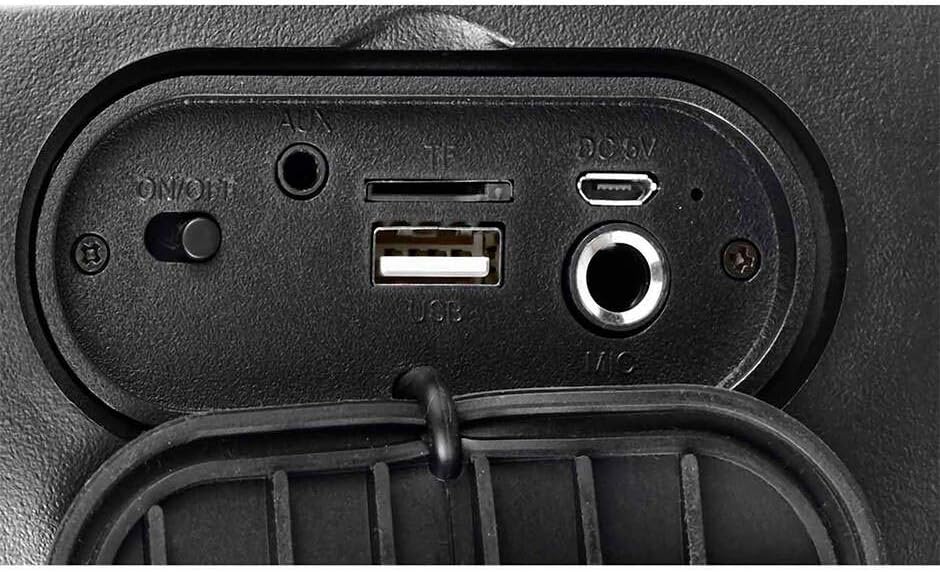
Figure 4.3: Rear connection panel with ON/OFF switch, AUX input, TF (Micro SD) card slot, USB port, DC 5V charging port, and Microphone input.
5. Configuració
5.1 Càrrega de l'altaveu
Before first use, fully charge the speaker. Connect the provided USB charging cable to the DC 5V port on the speaker and the other end to a USB power adapter (not included) or a computer's USB port. The charging indicator will illuminate during charging and turn off when fully charged.
5.2 Engegada/apagada
Localitza el ON/OFF switch on the rear connection panel. Slide the switch to the ON position to power on the speaker. Slide it to the OFF posició per apagar-lo.
6. Instruccions de funcionament
6.1 Vinculació Bluetooth
- Engegueu l'altaveu. Entrarà automàticament en mode d'emparellament Bluetooth, cosa que s'indicarà amb una llum intermitent o un missatge audible.
- Activa el Bluetooth al teu dispositiu mòbil (telèfon intel·ligent, tauleta, ordinador portàtil).
- Cerca dispositius Bluetooth disponibles i seleccioneu "KSW-5004" de la llista.
- Once connected, the speaker will emit a confirmation tone, and the light indicator will become solid.
6.2 KSR-Link (True Wireless Stereo - TWS)
To pair two KSW-5004 speakers for a stereo sound experience:
- Ensure both KSW-5004 speakers are powered on and not connected to any Bluetooth device.
- En un dels altaveus, premeu i manteniu premut el botó "MODO LINK" button. The speaker will emit a pairing tone.
- Els dos altaveus es connectaran automàticament entre si. Un cop connectats, sonarà un to de confirmació.
- Now, enable Bluetooth on your device and connect to the primary speaker (the one you pressed the 'MODO LINK' button on). Both speakers will play audio in stereo.
Reproducció amb USB 6.3 / Micro SD
Insert a USB flash drive or a Micro SD card (TF card) into the corresponding port on the rear connection panel. The speaker will automatically detect the storage device and begin playing audio files. Utilitzar el Anterior/Abaixar el volum i Següent / Augment de volum botons per navegar per pistes.
6.4 Entrada AUX
Connect an external audio device (e.g., MP3 player, laptop) to the AUX port using a 3.5mm audio cable (not included). The speaker will automatically switch to AUX mode. Use the connected device to control playback.
6.5 Control de llum RGB
Premeu el botó "LUCES" button on the top control panel to cycle through different RGB light modes or to turn the light off.
6.6 Control de volum i pista
- Premeu el botó Anterior/Abaixar el volum botó (K-) to decrease volume. Press and hold to go to the previous track.
- Premeu el botó Següent / Augment de volum botó (K+) to increase volume. Press and hold to go to the next track.
- Premeu el botó Reproduir/Pausa botó (||) to play or pause audio.
7. Manteniment
- Netegeu l'altaveu amb un drap suau, sec i sense borrissol.
- No utilitzeu netejadors abrasius, ceres ni dissolvents.
- Guardeu l'altaveu en un lloc fresc i sec quan no l'utilitzeu durant períodes prolongats.
- Recharge the battery periodically if not used for a long time to maintain battery health.
8. Solució De Problemes
| Problema | Causa possible | Solució |
|---|---|---|
| L'altaveu no s'encén. | La bateria està esgotada. | Carregueu l'altaveu completament. |
| No hi ha so de l'altaveu. | Volume is too low or muted. Incorrect input source. | Increase volume on speaker and connected device. Ensure correct mode (Bluetooth, USB, SD, AUX) is selected. |
| El dispositiu Bluetooth no es pot emparellar. | Speaker not in pairing mode. Bluetooth is off on device. Device is too far. | Ensure speaker is in pairing mode. Turn on Bluetooth on your device. Move device closer to speaker (within 10m). |
| KSR-Link (TWS) not working. | Speakers already paired to other devices. | Ensure both speakers are unpaired from any other Bluetooth devices before initiating KSR-Link pairing. |
| Problemes de reproducció amb USB/Micro SD. | Sense suport file format. Suports corruptes. | Assegureu-vos l'àudio files are in a supported format (e.g., MP3). Try a different USB drive or Micro SD card. |
9. Especificacions
| Característica | Especificació |
|---|---|
| Model | KSW-5004 |
| Potència de sortida | 10W RMS |
| Mida de l'altaveu | 4 polzades |
| Versió Bluetooth | 5.0 |
| Interval Bluetooth | Fins a 10 metres |
| Connectivitat | Bluetooth, USB, Micro SD (TF), AUX (3.5mm) |
| Font d'alimentació | Funciona amb bateria |
| Durada de la bateria | Fins a 10 hores (a un volum moderat) |
| Dimensions (L x A x A) | 16.2 x 14.7 x 24.3 cm |
| Pes | 1.16 kg |
| Color | Negre |
| Característiques especials | RGB Light, KSR-Link (TWS), Water Resistant |
| Dispositius compatibles | Ordinador portàtil, reproductor MP3, telèfon intel·ligent, tauleta |

Figure 9.1: KSW-5004 speaker with indicated dimensions.
10. Garantia i Suport
For warranty information or technical support, please refer to the warranty card included with your product or contact Kaiser customer service directly. Keep your purchase receipt as proof of purchase.