
1. Producte acabatview
The cimetech Bluetooth Numeric Keypad is a slim, wireless 18-key device designed to extend the functionality of your laptop, desktop, or notebook. It connects via Bluetooth 3.0, offering a cable-free experience. Its ergonomic design provides comfort for extended use, particularly for data entry in spreadsheets and financial applications.

Image 1.1: The cimetech Bluetooth Numeric Keypad in a typical workspace setup, demonstrating its compact size next to a laptop, mouse, and tablet.
2. Contingut del paquet
- 1 x cimetech Bluetooth Numeric Keypad (Model G1MINI-BK)
Nota: 1 AAA battery is required for operation and is not included in the package.
3. Configuració i emparellament
3.1 Instal·lació de la bateria
- Locate the battery compartment on the back of the numeric keypad.
- Obriu la tapa del compartiment de la bateria.
- Insert one (1) AAA battery, ensuring correct polarity (+/-).
- Tanqueu bé la tapa del compartiment de la bateria.

Imatge 3.1: Detallada view of the battery compartment on the back of the keypad, illustrating the process of inserting a single AAA battery.
3.2 Vinculació Bluetooth
The keypad uses Bluetooth 3.0 for connection and does not require a USB dongle.
- Ensure the keypad has a fresh AAA battery installed.
- On the keypad, simultaneously press and hold the BLOC NUM clau i la Entra tecla durant aproximadament 3 segons.
- The green indicator light on the keypad will begin to flash, indicating it is in pairing mode.
- On your device (laptop, desktop, tablet, or smartphone), navigate to the Bluetooth settings.
- Cerca available Bluetooth devices. The keypad should appear as "digital Keypad" or similar.
- Select "digital Keypad" from the list to initiate pairing.
- Once paired, the green indicator light on the keypad will stop flashing and remain solid for a moment, then turn off.
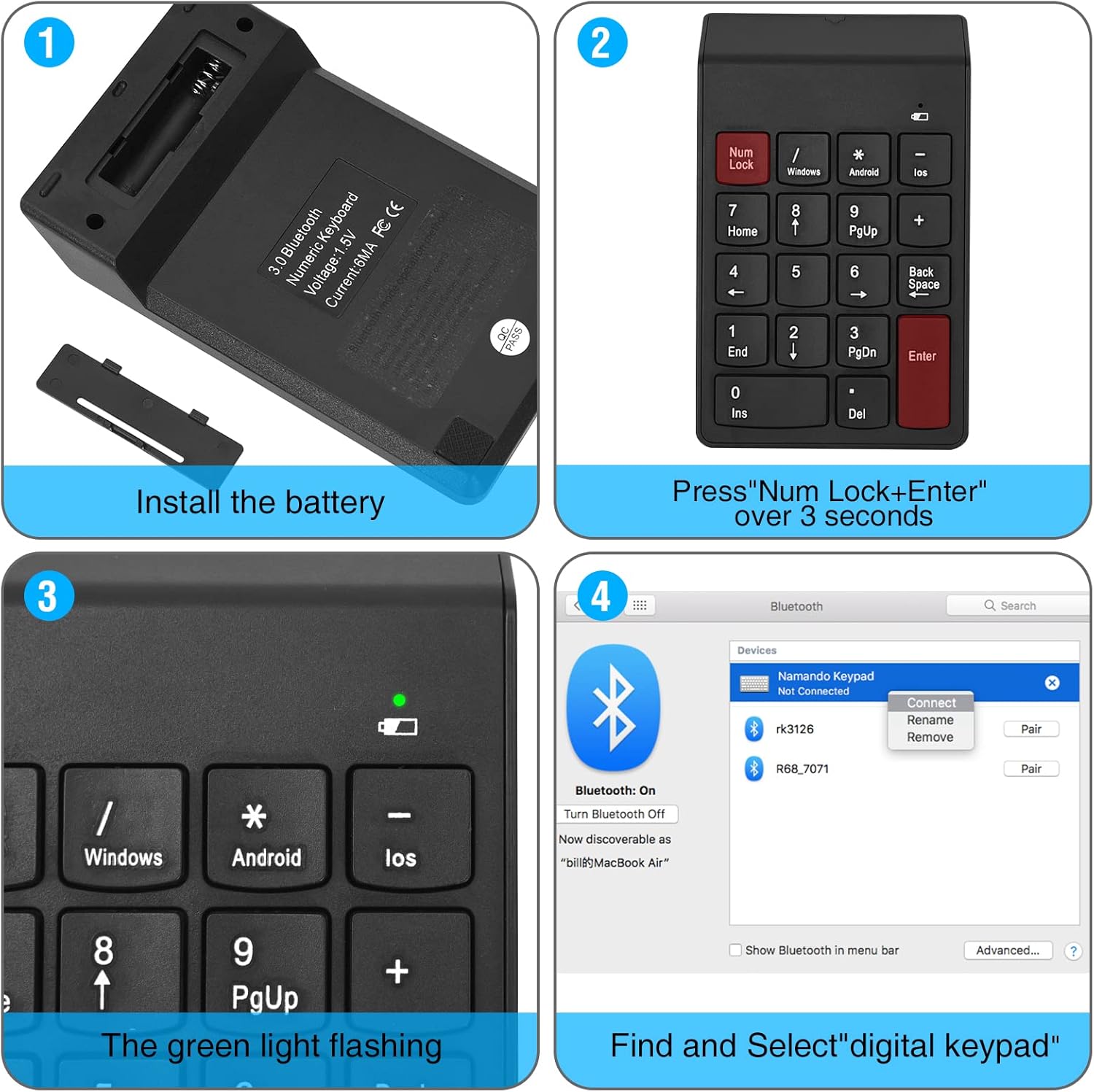
Image 3.2: Step-by-step visual guide for installing the battery and pairing the numeric keypad via Bluetooth to a computer.

Image 3.3: The keypad connects directly via Bluetooth, eliminating the need for a USB dongle for a clean, wireless setup.
4. Funcionament
4.1 Basic Keypad Use
After successful pairing, the numeric keypad functions like a standard 18-key numeric pad. Use the number keys for data entry and arithmetic operations. The Bloq num key toggles the numeric function of the keys.
4.2 Operating System Switching
The keypad supports Windows, Android, and iOS operating systems. To switch between modes, use the following key combinations:
- Per Windows: Premeu Entra + / simultàniament.
- Per Android: Premeu Entra + * simultàniament.
- Per iOS: Premeu Entra + - simultàniament.
Per reiniciar el Bloq num funció, premeu Entra + Bloq num simultàniament.

Image 4.1: Key combinations for switching operating system modes and resetting Num Lock on the keypad.
4.3 Indicador d'estat de la bateria
The keypad features a low voltage alarm. A red light will flash when the battery voltage drops below 0.9V, indicating that the AAA battery needs to be replaced soon.
4.4 Sleep Mode and Wake-up
To conserve battery life, the keypad enters standby mode after 3 seconds of inactivity and sleep mode after 10 minutes of inactivity. To wake the keypad from sleep mode, press any button.
5. Manteniment
5.1 Substitució de la bateria
Quan el vol baixtage indicator flashes, replace the AAA battery promptly to ensure uninterrupted operation. Refer to section 3.1 for battery installation instructions.
5.2 Neteja
To clean the keypad, gently wipe the surface with a soft, dry cloth. Avoid using harsh chemicals or abrasive materials.
6. Solució De Problemes
- Keypad not pairing:
- Assegureu-vos que la bateria estigui instal·lada correctament i que tingui prou càrrega.
- Confirm the keypad is in pairing mode (green light flashing) by pressing BLOC NUM + Entra durant 3 segons.
- Assegureu-vos que el Bluetooth estigui habilitat al dispositiu i que es pugui detectar.
- Try removing any previous pairings of "digital Keypad" from your device's Bluetooth list and attempt to pair again.
- Ensure the keypad is within the 10-meter operating range of your device.
- Les tecles no responen:
- Check if the keypad is properly paired and connected to your device.
- Verify the battery level; replace if low.
- Ensure the correct operating system mode is selected (Windows, Android, iOS) using the key combinations described in section 4.2.
- Si el Bloq num function is not working as expected, try resetting it by pressing Entra + Bloq num.
- Keypad frequently disconnects:
- Substituïu la bateria per una de nova.
- Ensure there are no significant obstructions or sources of interference between the keypad and your device.
- Keep the keypad within the recommended 10-meter operating distance.
7. Especificacions
| Número de model | G1MINI-BK |
| Tecnologia de connectivitat | Bluetooth 3.0 |
| Nombre de claus | 18 |
| Tipus de canvi | Membrana |
| Font d'alimentació | 1 pila AAA (no inclosa) |
| Volum baixtage Alarma | Red light flashes below 0.9V |
| Temps d'espera | Keyboard enters standby after 3 seconds of inactivity |
| Mode de repòs | Després de 10 minuts d'inactivitat |
| Wake Method | Premeu qualsevol botó |
| Distància de treball | Fins a 10 metres (33 peus) |
| Dimensions (L x A x A) | 5.51" x 3.39" x 0.39" (140 mm x 86 mm x 10 mm) |
| Material | Plàstic |
| Color | BT-Black |
7.1 Compatibilitat
- Windows: Suggested above Windows 8.0
- macOS: Suggested above macOS 10.10
- Android: Suggested above Android 4.3

Image 7.1: The keypad features a 15-degree ergonomic tilt designed for comfortable use during extended periods of data entry.
8. Informació de la garantia
For detailed warranty information, please refer to the product packaging or contact cimetech customer support directly. Warranty terms may vary by region and retailer.
9. Atenció al client
If you encounter any issues or have questions regarding your cimetech Bluetooth Numeric Keypad, please visit the official cimetech website or contact their customer service department for assistance. Contact information can typically be found on the product packaging or the manufacturer's weblloc.