
Maxxter Maxxter Web Cam ACT-BCAM-01 USB
Maxxter Web Cam ACT-BCAM-01 USB User Manual
Model: ACT-BCAM-01 | Brand: Maxxter
Introducció
This user manual provides comprehensive instructions for the Maxxter Web Cam ACT-BCAM-01 USB. This compact and versatile camera is designed for various recording needs, offering high-definition video capture and ease of use. Please read this manual thoroughly before operating the device to ensure proper functionality and safety.
Informació de seguretat
- No exposeu el dispositiu a temperatures extremes, humitat o llum solar directa.
- Eviteu deixar caure o sotmetre el dispositiu a forts impactes.
- Mantingueu el dispositiu allunyat de l'aigua i altres líquids. No és impermeable.
- No intenteu desmuntar ni modificar el dispositiu. Això anul·larà la garantia.
- Feu servir només el cable USB proporcionat per carregar i transferir dades.
Contingut del paquet
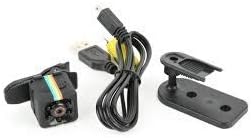
Image: Maxxter Web Cam ACT-BCAM-01 USB, USB cable, and mounting accessories.
Please check the package contents upon unboxing. The standard package should include:
- Maxxter Web Cam ACT-BCAM-01 USB Unit
- Cable USB
- Manual d'usuari (aquest document)
- Mounting Bracket/Clip
Producte acabatview

Imatge: Frontal i lateral view of the Maxxter Web Cam ACT-BCAM-01 USB, showing the lens and control buttons.

Imatge: De dalt a baix view of the Maxxter Web Cam ACT-BCAM-01 USB, highlighting the button layout.

Image: Diagram illustrating key features such as 140-degree wide viewing angle, night vision, motion detection, support for storage cards, and the 360-degree adjustable bracket. Dimensions are also shown.
Components clau:
- Lent: High-definition camera lens for video recording.
- Port USB: Per a càrrega i transferència de dades.
- Ranura per a targeta MicroSD: For expandable storage (card not included).
- Botó d'alimentació / mode: To turn the device on/off and switch between modes.
- Botó de gravació: To start and stop recording.
- Llums indicadores: Provide status feedback (e.g., power, recording, charging).
Configuració
1. Càrrega del dispositiu:
- Connecteu l'extrem petit del cable USB al port USB de la càmera.
- Connecteu l'altre extrem del cable USB a un adaptador de corrent USB (no inclòs) o al port USB d'un ordinador.
- El llum indicador mostrarà l'estat de càrrega (per exemple, vermell fix mentre es carrega, apagat quan estigui completament carregat).
2. Inserting a MicroSD Card:
- Assegureu-vos que la càmera estigui apagada.
- Localitza la ranura per a targetes MicroSD al lateral de la càmera.
- Gently insert a MicroSD card (Class 10 or higher, up to 32GB recommended) into the slot until it clicks into place.
- Per treure-la, empenyeu lleugerament la targeta fins que surti.
Instruccions de funcionament
Encès/apagat:
- Per encendre: Press and hold the Power/Mode button for 2-3 seconds. The indicator light will illuminate.
- Per apagar: Press and hold the Power/Mode button for 5-6 seconds until the indicator light turns off.
Gravació de vídeo:
- Ensure the camera is powered on and a MicroSD card is inserted.
- Press the Record button once to start video recording. The indicator light will flash.
- Press the Record button again to stop recording. The indicator light will stop flashing and return to standby mode.
Gravació de detecció de moviment:
This feature allows the camera to record only when motion is detected, conserving battery and storage space.
- While in standby mode, press the Power/Mode button twice quickly to enter motion detection mode. The indicator light will change (refer to device specific light pattern).
- The camera will automatically start recording when motion is detected and stop when motion ceases.
- To exit motion detection mode, press the Power/Mode button once.
Connexió a l'ordinador:
Per accedir gravat files, connect the camera to your computer using the provided USB cable. The camera will appear as a removable disk drive.
Manteniment
- Neteja: Use a soft, dry cloth to clean the camera body. For the lens, use a specialized lens cleaning cloth. Do not use liquid cleaners or solvents.
- Emmagatzematge: Guardeu la càmera en un lloc fresc i sec, allunyat de la llum solar directa i de temperatures extremes quan no la feu servir.
- Cura de la bateria: Per a una durada òptima de la bateria, eviteu descarregar-la completament amb freqüència. Carregueu el dispositiu regularment, fins i tot si no l'utilitzeu durant períodes prolongats.
Resolució de problemes
| Problema | Causa possible | Solució |
|---|---|---|
| La càmera no s'encén. | Bateria baixa; Mal funcionament del dispositiu. | Charge the camera for at least 2 hours. If still unresponsive, contact support. |
| No es pot gravar vídeo. | No MicroSD card; Card full or corrupted; Incorrect card format. | Insert a MicroSD card. Check card capacity. Format the card (FAT32) on a computer. Try a different card. |
| Computer does not recognize the camera. | Faulty USB cable; Driver issue; Incorrect connection mode. | Try a different USB port or cable. Restart your computer. Ensure the camera is powered on when connected. |
| Poca qualitat de vídeo. | Low light conditions; Dirty lens; Incorrect settings. | Ensure adequate lighting. Clean the camera lens. |
Especificacions
| Característica | Detall |
|---|---|
| Model | Maxxter Web Cam ACT-BCAM-01 USB |
| Marca | Maxxter |
| Tecnologia de connectivitat | USB |
| Resolució de vídeo | 720p o 1080p |
| Distància focal màxima | 22 mil·límetres |
| Característiques especials | Low light capability, Motion detection |
| Dimensions (L x A x A) | 20 x 30 x 20 cm |
| Pes | 40 grams |
| Emmagatzematge compatible | MicroSD (SDHC) |
| Format de captura de vídeo | MP4 |
| Format d'àudio | PCM, AAC |
| Tipus d'enfocament | Enfocament manual |
| Resistència a l'aigua | No impermeable |
Garantia i Suport
For warranty information and technical support, please refer to the official Maxxter weblloc web o poseu-vos en contacte amb el vostre distribuïdor local. Conserveu el rebut de compra com a comprovant de compra.
Nota: La informació sobre la disponibilitat de recanvis i actualitzacions de programari no està disponible en aquest moment.
Ask a question about this manual
Ask about setup, troubleshooting, compatibility, parts, safety, or missing instructions. Manuals+ will review the question and use this page’s manual context to help answer it.