
1. Introducció
Thank you for choosing the havit KB488L USB Wired Keyboard. This manual provides essential information for setting up, operating, and maintaining your keyboard. Please read it carefully to ensure optimal performance and longevity of your device.
The havit KB488L is designed for both office and gaming use, featuring a quiet typing experience, ergonomic wrist rest, and vibrant rainbow LED backlighting. It offers a 105-key UK layout for comfortable and efficient input.

Image 1.1: The havit KB488L keyboard, highlighting its quiet operation and integrated wrist rest.
2. Característiques del producte
- Funcionament silenciós: Designed for smooth and silent typing, suitable for office and home environments.
- Disseny ergonòmic: Features a 15° tilt capability and an integrated wrist rest to reduce fatigue during extended use.
- Retroiluminació LED arc de Sant Martí: Enhances visibility in low-light conditions and provides an aesthetic appeal. The backlight can be toggled on/off.
- 12 tecles de drecera multimèdia: Provides quick access to common functions for entertainment and productivity.
- Construcció duradora: Keys tested for 5 million clicks, ensuring long-term reliability.
- Connectivitat per cable: Reliable USB connection for consistent performance.
- Àmplia compatibilitat: Supports Windows 2000/XP/Vista/7/8/10, Mac, and Linux operating systems. (Note: Multimedia keys function only on Windows).

Image 2.1: The integrated wrist rest of the havit KB488L keyboard, designed for ergonomic comfort.
3. Contingut del paquet
- havit KB488L USB Wired Keyboard with integrated wrist rest
- Manual d'usuari (aquest document)
4. Instruccions de configuració
- Descomprimir el teclat: Traieu amb cura el teclat del seu embalatge.
- Connexió a l'ordinador: Plug the USB connector of the keyboard into an available USB port on your computer (desktop PC or laptop).
- Instal·lació del controlador: The keyboard is plug-and-play. Your operating system will automatically detect and install the necessary drivers. No additional software installation is required.
- Adjust Tilt (Optional): Flip out the adjustable feet on the underside of the keyboard to set your preferred typing angle.

Image 4.1: The havit KB488L keyboard set up and connected to a computer.
5. Instruccions de funcionament
5.1 Funcions bàsiques del teclat
The havit KB488L functions as a standard 105-key UK layout keyboard. All standard alphanumeric keys, function keys (F1-F12), navigation keys, and numeric keypad operate as expected.
5.2 Tecles de drecera multimèdia
The keyboard features 12 multimedia shortcut keys accessible by pressing the Fn key in combination with the corresponding F1-F12 keys. These shortcuts are designed to enhance productivity and entertainment. Note: Multimedia keys are ONLY functional on Windows operating systems.
| Combinació de tecles | Funció |
|---|---|
| Fn + F1 | Reproductor de música |
| Fn + F2 | Baixa el volum |
| Fn + F3 | Puja el volum |
| Fn + F4 | Silenciar |
| Fn + F5 | Cançó anterior |
| Fn + F6 | Següent Cançó |
| Fn + F7 | Reproduir/Pausa |
| Fn + F8 | Atureu-vos |
| Fn + F9 | Web/ Inici |
| Fn + F10 | Correu electrònic |
| Fn + F11 | El meu ordinador |
| Fn + F12 | Preferits |
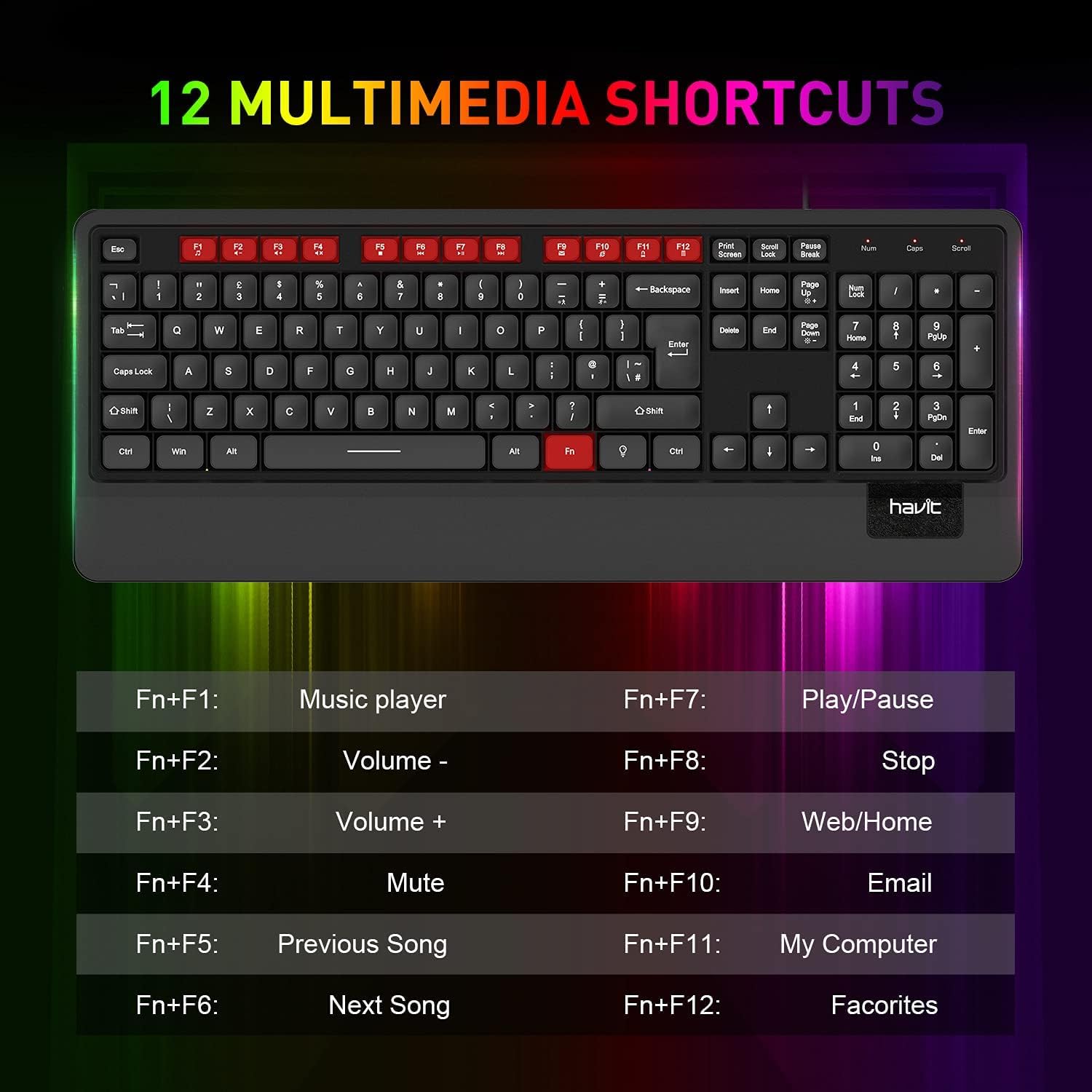
Imatge 5.1: acabatview of the 12 multimedia shortcut keys and their functions.
Control de retroiluminació 5.3
The keyboard features a rainbow LED backlight. To control the backlight:
- Activar/Desactivar: Premeu el botó Bloqueig de desplaçament key to toggle the backlight on or off.

Image 5.2: The havit KB488L keyboard with its rainbow LED backlight active, illustrating key visibility in low light.
6. Manteniment
To ensure the longevity and proper functioning of your havit KB488L keyboard, follow these maintenance guidelines:
- Neteja: Feu servir un drap suau i sec per netejar la superfície del teclat. Per a la brutícia persistent, netegeu lleugerament.amp cloth can be used, ensuring no liquid enters the keycaps or internal components. Avoid harsh chemicals or abrasive cleaners.
- Eliminació de pols: Feu servir aire comprimit per eliminar la pols i les restes que hi ha entre les tecles.
- Eviteu els vessaments: Keep liquids away from the keyboard to prevent damage. In case of a spill, immediately disconnect the keyboard from your computer and allow it to dry completely before reconnecting.
- Emmagatzematge: Quan no l'utilitzeu durant períodes prolongats, guardeu el teclat en un lloc net i sec, allunyat de la llum solar directa i de temperatures extremes.
7. Solució De Problemes
If you encounter issues with your havit KB488L keyboard, please refer to the following common solutions:
- El teclat no respon:
- Assegureu-vos que el cable USB estigui ben connectat a un port USB que funcioni de l'ordinador.
- Prova de connectar el teclat a un port USB diferent.
- Reinicieu l'ordinador.
- Prova el teclat en un altre ordinador per determinar si el problema és del teclat o de l'ordinador.
- La llum de fons no funciona:
- Premeu el botó Bloqueig de desplaçament key to ensure the backlight is toggled on.
- Assegureu-vos que el teclat estigui connectat correctament i que rebi alimentació.
- Les tecles multimèdia no funcionen:
- Remember that multimedia keys only work on Windows operating systems.
- Assegureu-vos que esteu prement el botó Fn simultàniament amb la tecla de funció desitjada (F1-F12).
- Tecles enganxades o no registrades:
- Clean the affected keys using compressed air to remove any debris.
- Eviteu fer servir una força excessiva en escriure.
If these steps do not resolve your issue, please contact havit customer support for further assistance.
8. Especificacions
| Característica | Detall |
|---|---|
| Número de model | KB488L |
| Connectivitat | USB per cable |
| Disseny de claus | 105 Keys, UK Layout |
| Llum de fons | LED arc de Sant Martí |
| Característiques especials | Backlit, Ergonomic, Integrated Wrist Rest |
| Dispositius compatibles | Portàtil, PC |
| Compatibilitat de sistemes operatius | Windows 2000/XP/Vista/7/8/10, Mac, Linux |
| Dimensions del producte | 1.08 x 17.52 x 6.89 polzades (27.5 x 445 x 175 mm) |
| Pes de l'article | 1.63 lliures (0.74 kg) |
| Fabricant | haver |

Image 8.1: Detailed dimensions of the havit KB488L keyboard.
9. Garantia i Suport
havit products come with a standard manufacturer's warranty. For specific warranty details, terms, and conditions, please refer to the warranty card included with your purchase or visit the official havit weblloc.
For technical support, troubleshooting assistance, or any inquiries regarding your havit KB488L keyboard, please contact havit customer service through their official weblloc web o la informació de contacte que es proporciona a l'embalatge del producte.