
Introducció
Thank you for choosing the Zopsc Portable Radio Multifunctional MP3 Player. This device combines FM/MW radio reception with MP3 playback capabilities via USB and TF card inputs. It features a built-in speaker, alarm function, and a clear display for time, date, week, and month. This manual provides essential information for the safe and efficient operation of your device.
Producte acabatview
Familiarize yourself with the components and overall design of your Zopsc Portable Radio.
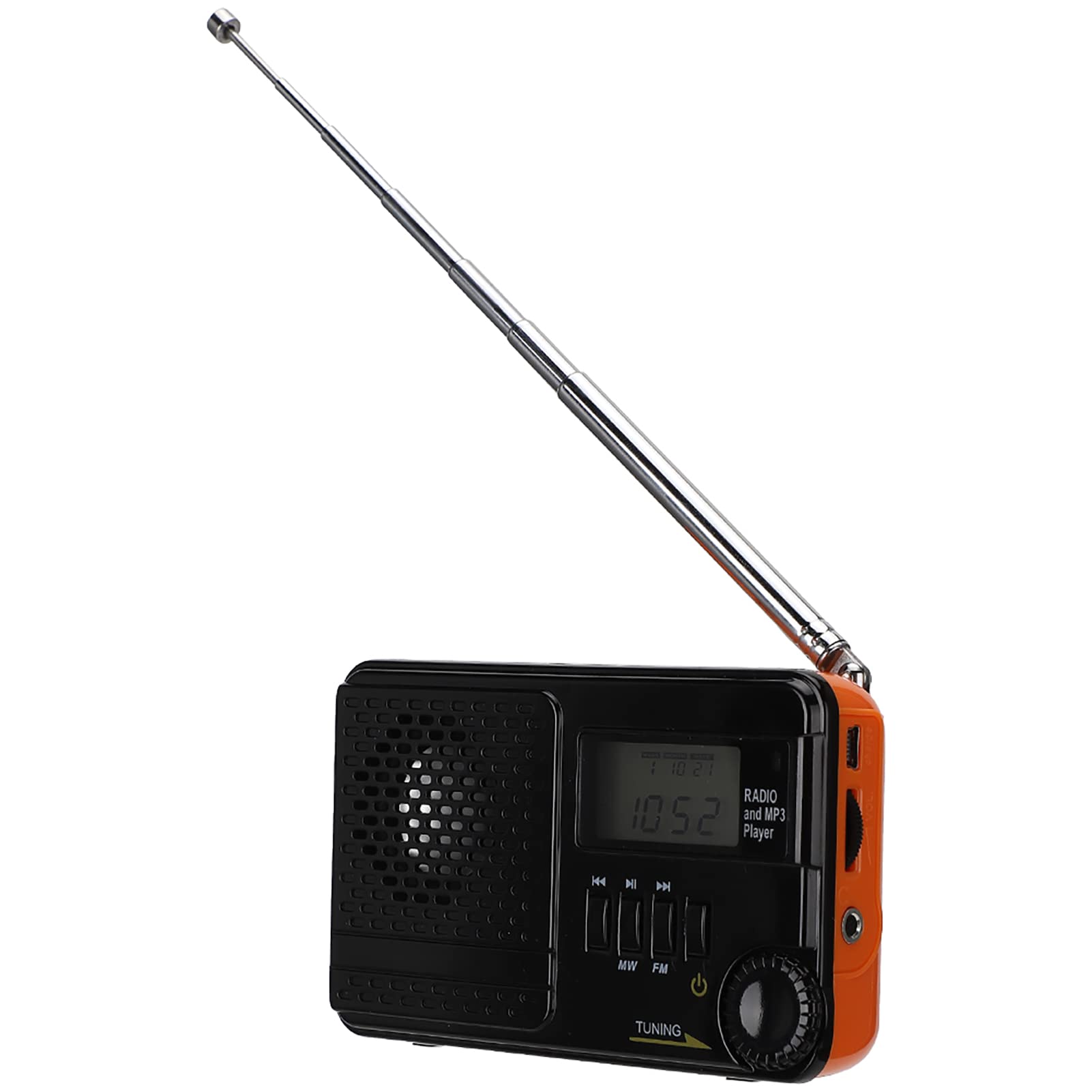
Imatge: The Zopsc Portable Radio, showcasing its front panel with the speaker, display, and main control buttons.

Imatge: Davant i darrere view of the Zopsc Portable Radio. The front features a speaker grille, digital display, and control buttons for MW, FM, and tuning. The back shows the battery compartment and product labels.

Imatge: Un detallat view of the built-in speaker, emphasizing its design for clear audio output.
Configuració
1. Càrrega del dispositiu
Before first use, fully charge the radio's built-in 850mAh battery. Use the provided charging cable to connect the device to a standard USB power source (e.g., computer USB port, USB wall adapter).

Imatge: The radio connected to its charging cable, illustrating the charging process.
2. Inserting USB/TF Card (for MP3 Playback)
Per reproduir MP3 files, insert a USB flash drive or a TF (microSD) card into the designated slots on the side of the radio. Ensure the card is inserted correctly to avoid damage.

Imatge: Un detallat view of the USB and TF card input ports on the side of the radio, ready for media insertion.
Instruccions de funcionament
1. Encendre/apagar
Manteniu premut el botó Botó d'encesa (usually marked with a circle and a vertical line) to turn the device on or off.
2. Radio Operation (FM/MW)
- Selecciona la banda: Premeu el botó MW or FM button to switch between Medium Wave and Frequency Modulation bands. The display will show the selected band and frequency.
- Emissores de sintonització: Gira el Pom de sintonització (typically on the side) to scan for radio stations. Extend the telescopic antenna for better FM reception.
- Rangs de freqüència:
- FM1: 70-88MHz
- FM: 87-108MHz
- MW: 522-1710KHz

Imatge: The radio with its telescopic antenna fully extended, indicating readiness for radio reception. The display shows a frequency.
3. Reproducció d'MP3
After inserting a USB drive or TF card with MP3 files, the device should automatically switch to MP3 playback mode. Use the Botons de pista anterior/següent (often marked with arrows) to navigate through your music. The display may show track information or playback time.

Imatge: The radio displaying time, with graphic elements of musical notes, illustrating its MP3 playback capability.
4. Time, Date, and Alarm Settings
The radio supports displaying time, date, week, and month. Refer to the specific buttons on your device (e.g., MODE, SET) to adjust these settings and configure the alarm function. The display provides visual feedback during adjustment.

Imatge: The radio's digital display showing the current time and date, demonstrating its multi-display feature.
5. Control de volum
Ajusteu el volum d'escolta amb el botó Maneta de volum, typically located on the side of the device.
Manteniment
- Neteja: Use a soft, dry cloth to clean the exterior of the radio. Do not use liquid cleaners or abrasive materials, as they may damage the surface.
- Cura de la bateria: To prolong battery life, avoid fully discharging the battery frequently. Recharge the device when the battery indicator is low. If storing for an extended period, charge the battery to about 50% and recharge every few months.
- Emmagatzematge: Guardeu la ràdio en un lloc fresc i sec, allunyat de la llum solar directa, de temperatures extremes i d'alta humitat.
- Exposició a l'aigua: Aquest dispositiu no és impermeable. Eviteu l'exposició a l'aigua o a una humitat excessiva.
Resolució de problemes
| Problema | Causa possible | Solució |
|---|---|---|
| El dispositiu no s'encén. | La bateria està esgotada. | Carregueu el dispositiu amb el cable USB proporcionat. |
| Mala recepció de ràdio. | Senyal feble; antena no estesa. | Esteneu completament l'antena telescòpica. Intenteu reposicionar la ràdio. |
| MP3 fileno està jugant. | USB/TF card not inserted correctly or no MP3 files. | Ensure the USB drive or TF card is properly inserted. Verify that MP3 files are present on the storage device. |
| La pantalla està en blanc o congelada. | Error temporal de programari. | Turn the device off and then on again. If the issue persists, allow the battery to fully discharge and then recharge. |
Especificacions
- Model: Zopsc5d6fgn2exa
- Bandes de freqüència:
- FM1: 70-88MHz
- FM: 87-108MHz
- MW: 522-1710KHz
- Capacitat de la bateria: 850 mAh
- Sortida de l'altaveu: 0.5W 8Ω
- Connectivitat: USB, targeta TF
- Font d'alimentació: Alimentat amb bateria (recarregable mitjançant USB)
- Pes de l'article: 0.19 quilos
Garantia i Suport
For warranty information or technical support, please refer to the documentation included with your purchase or contact the retailer/manufacturer directly. Keep your proof of purchase for warranty claims.