
1. Introducció
Thank you for choosing the DELUX M625BU(3050) RGB Wired Gaming Mouse. This manual provides detailed instructions for setting up, operating, and maintaining your gaming mouse to ensure optimal performance and an enhanced gaming experience. Please read this manual thoroughly before use.
2. Contingut del paquet
- DELUX M625BU(3050) RGB Wired Gaming Mouse
- Manual d'usuari
3. Producte acabatview
The DELUX M625BU(3050) is an ergonomic wired gaming mouse designed for precision and customization. It features a high-performance A3050 PixArt optical sensor, 7 programmable buttons, and customizable RGB lighting.
3.1 Mouse Layout and Buttons
Familiarize yourself with the buttons and their default functions:

Image: DELUX M625BU(3050) Gaming Mouse Button Layout
- Botó esquerre: Funció de clic principal.
- Botó dret: Funció de clic secundari.
- Roda de desplaçament: Desplaça't amunt/avall, fes clic amb el botó central.
- Botó DPI: Passa ciclísticament pels paràmetres de DPI.
- Botó Endavant: Navega cap endavant web navegadors/aplicacions.
- Botó enrere: Navega cap enrere web navegadors/aplicacions.
- Botó de foc: Rapid-fire function (default).
3.2 Disseny ergonòmic
The mouse features an ergonomic streamline structure and non-slip rubber sides, designed to fit comfortably in your palm for extended gaming sessions.
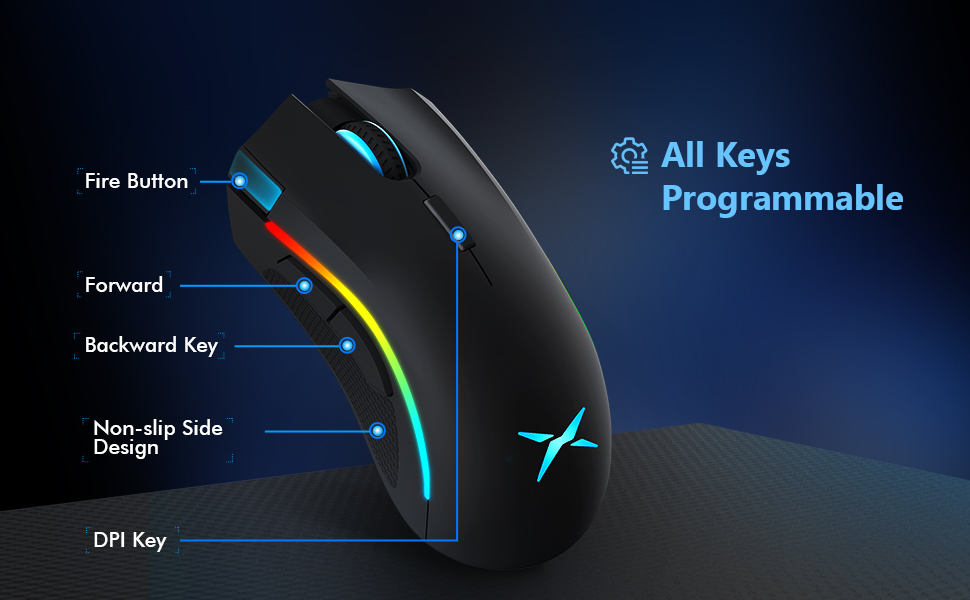
Image: Ergonomic Design Features
4. Configuració
The DELUX M625BU(3050) mouse is a plug-and-play device, requiring no additional drivers for basic functionality.
- Connecteu el ratolí: Plug the USB connector of the mouse's 1.8m braided cable into an available USB port on your computer.
- Reconeixement del sistema: Your operating system (Windows XP, Vista, 7, 8, or 10) will automatically detect and install the necessary drivers.
- Instal·lació de programari opcional: For advanced customization of buttons, DPI, and RGB lighting, download and install the DELUX Pro Game Software from the official DELUX weblloc.

Image: Plug and Play Connectivity
5. Instruccions de funcionament
5.1 Adjusting DPI (Dots Per Inch)
The mouse features an A3050 PixArt optical sensor with adjustable DPI settings. You can cycle through preset DPI levels by pressing the DPI button located behind the scroll wheel.

Image: DPI Adjustment Levels
- Available DPI levels: 800, 1600, 3200, 4000.
- Each press of the DPI button will switch to the next level.
- The current DPI level may be indicated by a specific LED color or pattern (refer to software for detailed customization).
5.2 efectes d'il·luminació RGB
The mouse features customizable RGB lighting with various effects.
- Canvi de modes d'il·luminació: Press the Left Button, Scroll Wheel, and Right Button simultaneously for 3 seconds to cycle through different lighting modes (e.g., full lighting, breathing, floating).
- Customization via Software: Use the DELUX Pro Game Software to customize RGB backlight effects from 16.8 million colors, adjust lighting direction, and speed.
5.3 Botons i programari programables
All 7 buttons on the M625BU(3050) mouse are programmable using the DELUX Pro Game Software.
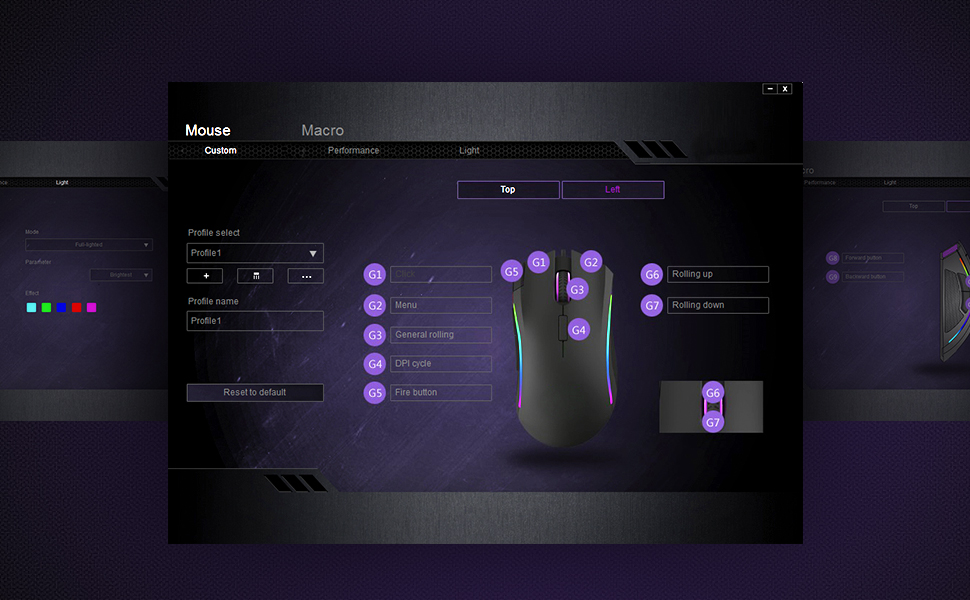
Image: Pro Game Software Interface for Customization
- Funcions del botó: Reassign any button to perform different functions, including keyboard keys, multimedia controls, or specific file execució.
- Macros: Create and assign complex macro sequences to buttons for automated actions.
- Sensitivity and Polling Rate: Fine-tune pointer speed, DPI sensitivity, and polling rate (125/250/500/1000Hz) for precise control.
6. Manteniment
To ensure the longevity and optimal performance of your DELUX M625BU(3050) gaming mouse, follow these maintenance guidelines:
- Neteja: Feu servir un drap suau i sec per netejar la superfície del ratolí. Per a la brutícia persistent, netegeu lleugeramentampNetegeu el drap amb aigua o una solució de neteja suau. Eviteu productes químics agressius.
- Cura del sensor: Keep the optical sensor on the underside of the mouse clean and free from dust or debris. Use a cotton swab if necessary.
- Cura del cable: Avoid sharp bends or excessive pulling on the braided cable to prevent damage.
- Emmagatzematge: Guardeu el ratolí en un entorn net i sec quan no l'utilitzeu.
7. Solució De Problemes
If you encounter issues with your DELUX M625BU(3050) mouse, refer to the following common solutions:
| Problema | Possible solució |
|---|---|
| El ratolí no respon |
|
| Cursor movement is erratic or imprecise |
|
| La il·luminació RGB no funciona o és incorrecta |
|
| Programmable buttons not functioning |
|
| Scroll wheel behaves erratically (e.g., scrolls opposite direction) |
|
8. Especificacions
| Característica | Detall |
|---|---|
| Número de model | M625BU(3050) |
| Connectivitat | Wired (1.8m Braided Cable) |
| Sensor | A3050 PixArt Optical Sensor |
| Configuració de DPI | 800/1600/3200/4000 DPI |
| Taxa de votació | 125/250/500/1000Hz |
| Botons | 7 Botons programables |
| Il·luminació | Customizable RGB Lighting Effects |
| Ergonomia | Ergonomic Streamline Structure, Non-slip Rubber Side |
| Dimensions del producte | 5.14 x 2.71 x 1.67 polzades |
| Pes de l'article | 3.53 unces |
| Compatibilitat | Windows XP, Vista, 7, 8, 10 |
9. Garantia i Suport
Tots els productes DELUX inclouen una 12 mesos de garantia from the date of purchase. Additionally, DELUX provides assistència tècnica gratuïta de per vida per aquest producte.
For warranty claims, technical assistance, or further inquiries, please contact DELUX customer support through the official DELUX weblloc web o el vostre minorista.


