
1. Introducció
The Axtel Prime Duo is a professional on-ear headset designed for clear and effective communication in business environments. This bundle includes the Prime Duo headset and the AXC-01 Quick Disconnect (QD) cable, providing compatibility with various office phone systems. The headset features Acoustic Protection Technology for high-definition sound and advanced noise cancellation for both the microphone and speakers, ensuring optimal audio quality in noisy settings.
2. Contingut del paquet
Comproveu que el vostre paquet contingui els elements següents:
- Axtel Prime Duo Professional Headset
- AXC-01 Quick Disconnect (QD) Cable
3. Producte acabatview
The Axtel Prime Duo headset is engineered for comfort and performance. Key features include:
- Double Ear (Duo) Design: Provides immersive audio and improved focus.
- Acoustic Protection Technology: Delivers HD quality sound while protecting hearing.
- Micròfon amb cancel·lació de soroll: Filters out background noise for clear voice transmission.
- Soundproofing Speakers: Reduces ambient noise for the user.
- Universal Axtel QD Plug Connection: Allows for quick disconnection and compatibility with various Axtel cables.
- Modern and Ergonomic Design: Garanteix la comoditat durant un ús prolongat.
- Construcció lleugera i duradora: Built for daily professional use.
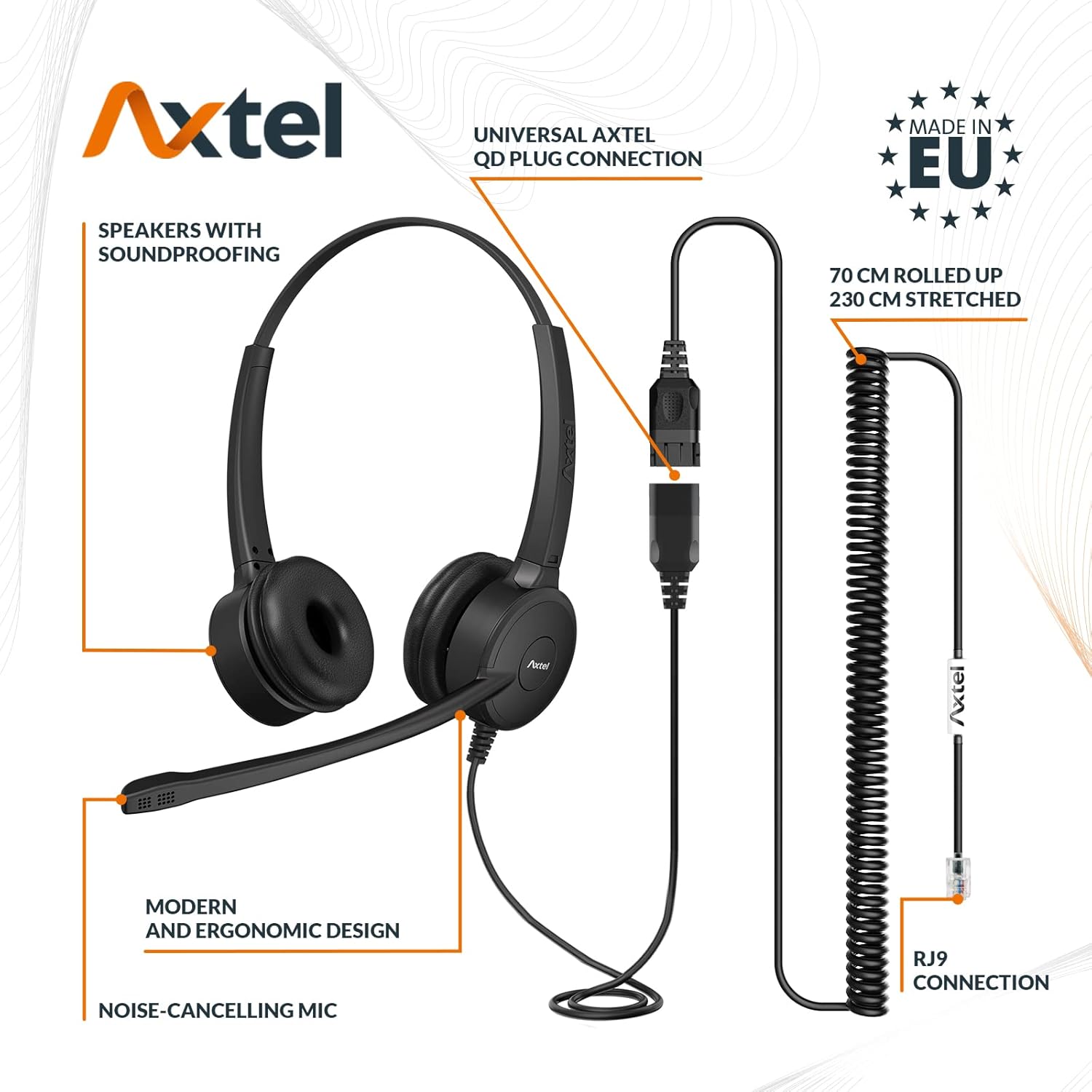
Figura 1: Diagram illustrating the Axtel Prime Duo headset components, including soundproofing speakers, noise-cancelling microphone, ergonomic design, universal Axtel QD plug connection, and the AXC-01 coiled cable with RJ9 connection.

Figura 2: Primer pla view of the Axtel Prime Duo headset, highlighting its lightweight, durable, and high-quality construction.
4. Configuració
Follow these steps to connect your Axtel Prime Duo headset to your compatible desk phone:
- Connect Headset to AXC-01 Cable: Align the universal Axtel Quick Disconnect (QD) plug from the headset with the QD socket on the AXC-01 cable. Push firmly until it clicks into place.
- Connect AXC-01 Cable to Phone: Locate the headset port on your desk phone. This is typically an RJ9 port. Insert the RJ9 connector of the AXC-01 cable into the headset port on your phone. Ensure a secure connection.
- Ajustar els auriculars: Place the headset on your head. Adjust the headband for a comfortable fit. Position the on-ear speakers over your ears.
- Posició del micròfon: Gently bend the microphone boom so that the microphone is approximately 1-2 cm (0.4-0.8 inches) from the corner of your mouth. Ensure it is not directly in front of your mouth to avoid breath noises.

Figura 3: Diagram illustrating the AXC-01 Quick Disconnect (QD) cable, showing the RJ9 connection and the QD plug for headset attachment. The coiled cable extends up to 230 cm.
5. Instruccions de funcionament
Once the headset is set up, you can begin using it for calls:
- Fer/respondre trucades: Use your desk phone's controls to make or answer calls. The audio will automatically route to your headset.
- Ajust de volum: Adjust the call volume using the volume controls on your desk phone. The Axtel Prime Duo headset does not feature inline volume controls.
- Silenciar el micròfon: If your desk phone has a mute function for the headset, use that control to mute your microphone.
- Finalització de trucades: End calls using your desk phone's controls.
6. Manteniment
Una cura adequada garanteix la longevitat i el rendiment dels auriculars:
- Neteja: Use a soft, dry cloth to wipe the headset and cable. For earpads, a slightly damp Es pot fer servir un drap amb sabó suau, però assegureu-vos que estiguin completament secs abans d'usar-los. No utilitzeu productes químics agressius ni netejadors abrasius.
- Emmagatzematge: Quan no els utilitzeu, guardeu els auriculars en un lloc net i sec, allunyat de temperatures extremes i de la llum solar directa. Eviteu enredar el cable.
- Manipulació: Avoid pulling the cable forcefully or twisting the microphone boom excessively.
7. Solució De Problemes
If you encounter issues with your Axtel Prime Duo headset, refer to the following common problems and solutions:
| Problema | Causa possible | Solució |
|---|---|---|
| No audio in headset | Loose cable connection; Incorrect phone settings; Headset not selected on phone. | Ensure both the QD and RJ9 connections are secure. Check your phone's settings to confirm the headset is active. Try selecting the headset option on your phone. |
| El micròfon no funciona | Microphone muted; Loose connection; Incorrect phone settings. | Check if the microphone is muted on your phone. Verify all cable connections. Confirm phone settings for microphone input. |
| Poor audio quality (static, low volume) | Loose connection; Damaged cable; Phone volume too low. | Secure all connections. Increase the volume on your desk phone. If issues persist, inspect the cable for damage. |
| Auriculars incòmodes | Ajust incorrecte. | Adjust the headband and microphone boom for a comfortable and ergonomic fit. |
8. Especificacions
| Característica | Detall |
|---|---|
| Nom del model | Prime Duo |
| Marca | Axtel |
| Tecnologia de connectivitat | Amb cable |
| Tipus d'auricular | On-Ear (Double Ear) |
| Control de soroll | Active Noise Cancellation (Microphone & Speakers) |
| Tipus de cable | AXC-01 Quick Disconnect (QD) to RJ9 |
| Cable Length (AXC-01) | 70 cm (rolled), 230 cm (stretched) |
| Pes dels auriculars | 120 grams |
| Color | Negre |
| Material | Acoustic (earpads) |
9. Compatibilitat
The Axtel Prime Duo headset with AXC-01 cable is compatible with a wide range of desk phones, including but not limited to:
- Avaya: 2402, 2410, 2420, 4602, 4602SW, 4610SW, 4620, 4620SW, 4621SW, 4625SW models
- Mitel: 6863i, 6865i, 6867i, 6869i IP Phones
- Polycom VVX Series: 101, 150, 201, 250, 300, 301, 310, 311, 350, 400, 401, 410, 411, 450, 500, 501, 600 601, XNUMX
- NEC: DTL/ITL Series
- Nortel: Diversos models
For specific model compatibility not listed, please consult your phone's documentation or Axtel support.
10. Garantia i Suport
Axtel products are designed for durability and performance. For information regarding warranty coverage, technical support, or replacement parts, please visit the official Axtel website or contact your authorized Axtel reseller. Keep your purchase receipt as proof of purchase for warranty claims.


