
1. Introducció
The Douk Audio M3 is a versatile 2.1 channel stereo audio amplifier designed for home and desktop audio systems. It features multiple input options including Bluetooth 5.0, RCA stereo, and USB U-disk playback. Equipped with two TPA3116D2 amplifier chips, it delivers 50W x 2 for stereo channels and 100W for subwoofer output, allowing for flexible 2.0, 2.1, or 2.2 channel audio configurations. The M3 amplifier also includes independent bass, treble, subwoofer volume, and subwoofer cut-off frequency controls for precise sound adjustment.
2. Instruccions de seguretat
- Font d'alimentació: Use only the provided 24V/4.5A power adapter or a compatible DC 12-24V power supply. Using an incorrect power supply may damage the device and void the warranty.
- Ventilació: Assegureu-vos una ventilació adequada al voltant amplifier. Do not block ventilation openings or place the unit in an enclosed space.
- Humitat: Mantenir el amplifier away from water, moisture, and high humidity environments. Do not operate with wet hands.
- Calor: Eviteu col·locar la unitat a prop de fonts de calor com ara radiadors, registres de calor, estufes o altres aparells que produeixin calor.
- Neteja: Disconnect power before cleaning. Use a dry, soft cloth. Do not use liquid cleaners or aerosol sprays.
- Manteniment: No intenteu atendre aquest producte vosaltres mateixos. Consulteu tots els serveis a personal de servei qualificat.
3. Contingut del paquet
Verifiqueu que tots els elements siguin presents al paquet:

The image above shows the complete packing list for the Douk Audio M3 ampmés viu.
- 1x Douk Audio M3 Ampmés viu
- 1x 24V 4.5A Power Supply
- 1x Bluetooth Antenna
- 1x comandament a distància
- 1 x manual d'instruccions
4. Producte acabatview

Detailed diagram of the Douk Audio M3 amplifier's front and rear panels with labeled components and connection examples.
4.1 Controls del panell frontal
- AUX Indicator: Lights up when AUX (RCA) input is selected.
- Indicador BT: Lights up when Bluetooth input is selected.
- Indicador USB: Lights up when USB U-disk input is selected.
- U-disk Input (USB Port): For connecting a USB flash drive for music playback.
- Infrared (IR) Receiver: For receiving signals from the remote control.
- SUB FREQ Knob: Adjusts the subwoofer cut-off frequency.
- SUB VOL Knob: Adjusts the subwoofer output volume.
- Pom BASS: Adjusts the bass level for the main stereo channels.
- Controlador TREBLE: Adjusts the treble level for the main stereo channels.
- MODE / Power Switch / Input Channel Switch / Volume Knob: This multi-function knob controls power (press and hold), input selection (short press), and master volume (rotate).
4.2 Connexions del panell posterior
- BT (Bluetooth Antenna Interface): Connect the included Bluetooth antenna here.
- AUDIO IN (RCA L/R): For connecting external audio sources via RCA cables (e.g., CD player, TV, MP3 player).
- SUB OUT (RCA): Per connectar un subwoofer actiu.
- SPEAKER OUT (L/R): For connecting passive stereo speakers.
- SPEAKER OUT (SUB): For connecting a passive subwoofer.
- DC 12-24V: Power input jack. Connect the provided power adapter here.
5. Configuració
5.1 Connecting Speakers and Subwoofer

El panell posterior de la amplifier illustrating how to connect speakers and subwoofers for various audio system configurations.
- Passive Stereo Speakers (2.0 Channel): Connect your passive left and right speakers to the "SPEAKER OUT (L/R)" terminals. Ensure correct polarity (+ to + and - to -).
- Active Subwoofer (2.1 Channel): Connect an active subwoofer to the "SUB OUT (RCA)" port using an RCA cable.
- Passive Subwoofer (2.1 or 2.2 Channel): Connect a passive subwoofer to the "SPEAKER OUT (SUB)" terminals. This allows for a 2.1 or 2.2 channel setup where the amplifier powers both passive stereo speakers and a passive subwoofer.
5.2 Connexió de fonts d'àudio

The Douk Audio M3 ampespectacle de vidaasing its Bluetooth 5.0 and USB U-disk input options.
- Entrada RCA: Connect your audio source (e.g., CD player, TV, MP3 player) to the "AUDIO IN (RCA L/R)" ports using an RCA cable.
- Entrada Bluetooth: Ensure the Bluetooth antenna is attached to the BT interface on the rear panel.
- USB U-disk Input: Insert a USB flash drive containing music files into the "U-disk Input" port on the front panel.
5.3 Connexió d'alimentació
- Connect the provided 24V 4.5A power adapter to the "DC 12-24V" input jack on the rear panel.
- Connecteu l'adaptador de corrent a una presa de corrent adequada.
6. Instruccions de funcionament
6.1 Engegada/Apagada i Selecció d'Entrada
- Encès/apagat: Press and hold the multi-function knob on the front panel for approximately 3 seconds to turn the ampmés viu encès o apagat.
- Selecció d'entrada: Short press the multi-function knob to cycle through the available input modes: AUX, Bluetooth (BT), and USB. The corresponding indicator light (AUX, BT, USB) on the front panel will illuminate.
6.2 Vinculació Bluetooth
- Ensure the Bluetooth antenna is securely connected.
- Select the Bluetooth input mode by pressing the multi-function knob until the "BT" indicator lights up. The ampEl lifier entrarà en mode d'emparellament.
- Al dispositiu d'àudio (telèfon intel·ligent, tauleta, ordinador), activeu el Bluetooth i cerqueu els dispositius disponibles.
- Select "Douk Audio M3" from the list of devices to pair. Once connected, the BT indicator will remain solid.
6.3 USB U-disk Playback
- Insert a USB flash drive (formatted as FAT32) containing supported audio files (MP3, WAV, APE, FLAC, WMA) into the front USB port.
- Select the USB input mode by pressing the multi-function knob until the "USB" indicator lights up.
- El amplifier will automatically begin playing music from the USB drive. Use the remote control for playback functions (play/pause, next/previous track).
6.4 Controls de volum i to

The front panel of the Douk Audio M3 amplifier, highlighting the bass, treble, subwoofer volume, and subwoofer frequency adjustment knobs.
- Volum mestre: Rotate the multi-function knob on the front panel or use the VOL+/- buttons on the remote control to adjust the overall volume.
- Gravs/Aguts: Use the "BASS" and "TREBLE" knobs on the front panel to adjust the low and high frequencies of the main stereo channels.
- Volum del subwoofer: Use the "SUB VOL" knob to adjust the output volume of the subwoofer independently.
- Subwoofer Cut-off Frequency: Use the "SUB FREQ" knob to set the low-pass filter frequency for the subwoofer output. This allows you to control the upper frequency limit of the sound reproduced by the subwoofer.
6.5 Funcionament del control remot
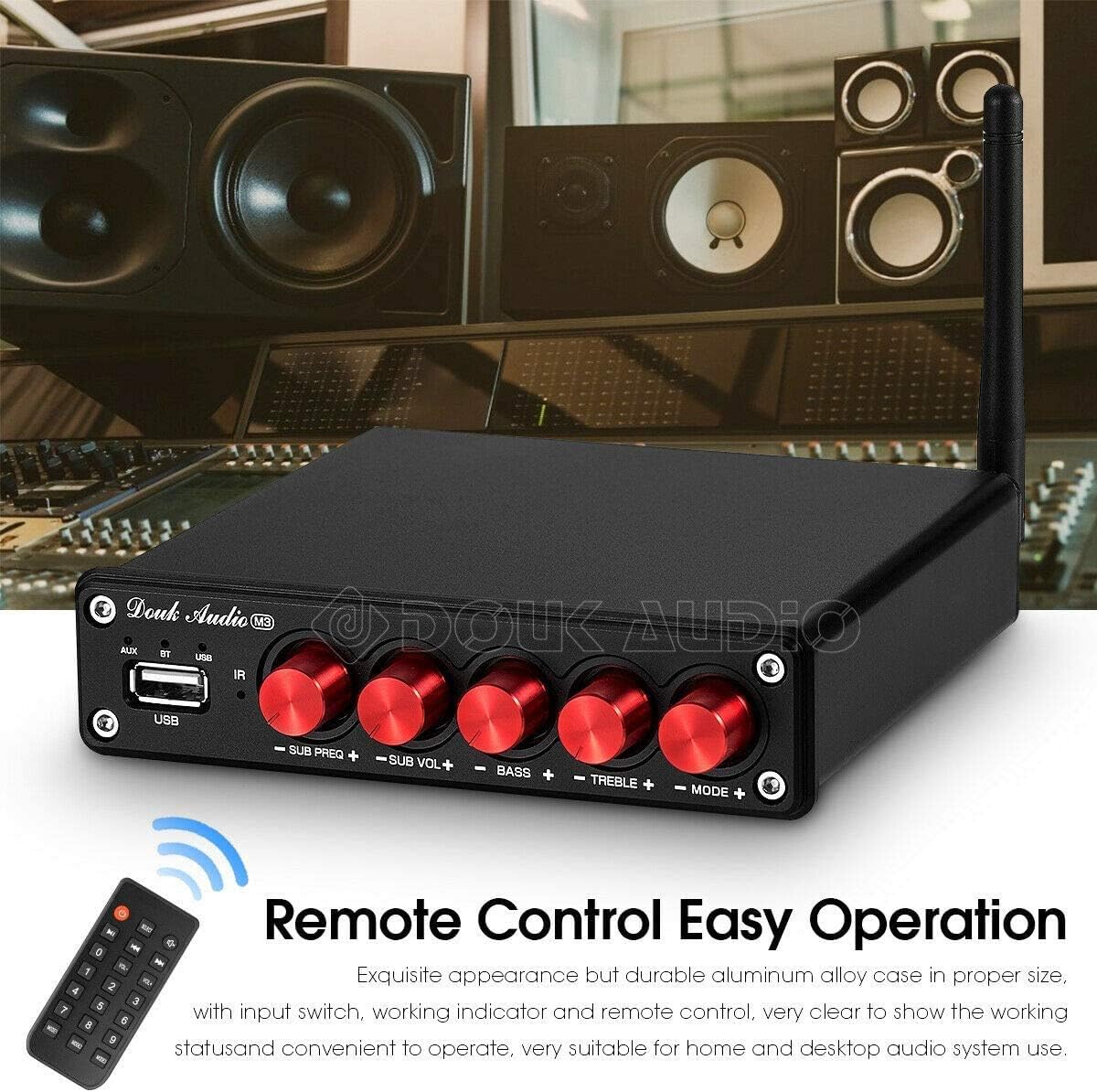
The Douk Audio M3 amplifier with its dedicated remote control.
El comandament a distància inclòs proporciona un accés còmode a diverses funcions:
- Botó d'encesa: Gira el ampactivador/desactivat.
- Botó SELECCIÓ: Cycles through input modes (AUX, BT, USB).
- Botó de silenci: Mutes/unmutes the audio output.
- VOL+/- Buttons: Ajusta el volum mestre.
- Playback Controls (Play/Pause, Previous/Next): For controlling USB U-disk playback.
- Botons numèrics (0-9): May be used for direct track selection on USB (functionality may vary).
- MODE1/MODE2/MODE3 Buttons: May offer preset EQ modes or other functions (refer to specific remote documentation if available).
7. Manteniment
- Neteja: Utilitzeu un drap suau i sec per netejar l'exterior amplificador. No utilitzeu netejadors abrasius, ceres ni dissolvents.
- Emmagatzematge: Si emmagatzema el amplifier for an extended period, disconnect it from the power supply and store it in a cool, dry place.
- Ventilació: Regularly check that the ventilation openings are free from dust and debris to ensure proper airflow.
8. Solució De Problemes
| Problema | Causa possible | Solució |
|---|---|---|
| Sense poder | Power adapter not connected or faulty. Wall outlet not working. | Ensure power adapter is securely connected to the amplifier and a working wall outlet. Try a different outlet. |
| Sense so | Incorrect input selected. Volume too low. Speakers not connected properly. Audio source issue. Mute activated. | Select the correct input mode. Increase volume. Check speaker connections and polarity. Verify audio source is playing. Deactivate mute on remote. |
| Problemes de connexió Bluetooth | Amplifier not in pairing mode. Device too far. Interference. | Ensure BT input is selected and indicator is blinking. Move device closer to amplifier. Avoid obstacles. Try re-pairing. |
| USB U-disk playback issues | USB drive not formatted correctly (FAT32). Unsupported file format. Corromput files. | Ensure USB drive is FAT32. Check if files are MP3, WAV, APE, FLAC, or WMA. Try a different USB drive or files. |
| So distorsionat | Volume too high. Input signal too strong. Speaker impedance mismatch. | Reduce volume. Check audio source output level. Ensure speakers are compatible with ampsortida més elevada. |
9. Especificacions

The Douk Audio M3 amplifier's rear panel, highlighting its power output capabilities.
- Marca: Nobsound (Douk Audio)
- Model: M3
- AmpXip lificador: 2x TPA3116D2
- Potència de sortida: 50W x 2 (Left/Right Channel) + 100W (Subwoofer Output)
- Entrades d'àudio: RCA Stereo, Bluetooth 5.0, USB U-disk
- USB Supported Formats: MP3, WAV, APE, FLAC, WMA
- Sortides d'àudio: Speaker Out (L/R), Sub Out (RCA), Speaker Out (Passive Subwoofer)
- Font d'alimentació: DC 12-24V (24V/4.5A recommended)
- Dimensions del producte (L x A x A): Aproximadament 13 cm x 13 cm x 3 cm (5.12 polzades x 5.12 polzades x 1.18 polzades)
- Pes net: Aproximadament 540 grams (1.19 lliures)
10. Garantia i Suport
This product comes with a standard manufacturer's warranty. For specific warranty terms, duration, and support inquiries, please refer to the documentation included with your purchase or contact the seller/manufacturer directly. Keep your proof of purchase for warranty claims.
For technical assistance or further questions, please reach out to Nobsound customer support through their official channels or the platform where the product was purchased.