
1. Introducció
The EPEVER MT-50 Remote Meter is a versatile accessory designed for EPEVER solar charge controllers, including TracerAN, BN, TRIRON, XTRA, LS-B(P), VS-BN, ETRACER, iTRACER, and TRACER-BPL series. It provides real-time monitoring of operational data, allows for parameter setting, and offers various load control modes. Its large-screen multifunction LCD displays information in digital, graphic, and textual forms, enhancing user convenience and control over the solar system.
2. Característiques clau
- Identificació automàtica: Automatically identifies the connected controller, displaying its type, model, and relevant parameter data.
- Monitorització en temps real: Displays operational data and working status of connected devices in digital, graphic, and textual forms via a large-screen multifunction LCD.
- Alarma d'error: Provides real-time alarms for failure information.
- Interfície fàcil d'utilitzar: Features six navigation function keys for direct, convenient, and rapid operation.
- Extended Communication: Offers longer communication distance based on RS485.
- Diversified Load Control: Supports various load control modes including Manual Control, Light ON/OFF, Light ON+ Timer, and Time Control.
- Selecció del tipus de bateria: Allows selection of battery types such as Gel, Sealed, Flooded, and User-programmable.
- Modificació de paràmetres: Enables real-time data monitoring, remote load switch control, and modification of device parameters, charging control parameters, and load control parameters.
- No es requereix alimentació externa: Both data and power flow on the same lead, eliminating the need for an external power supply.
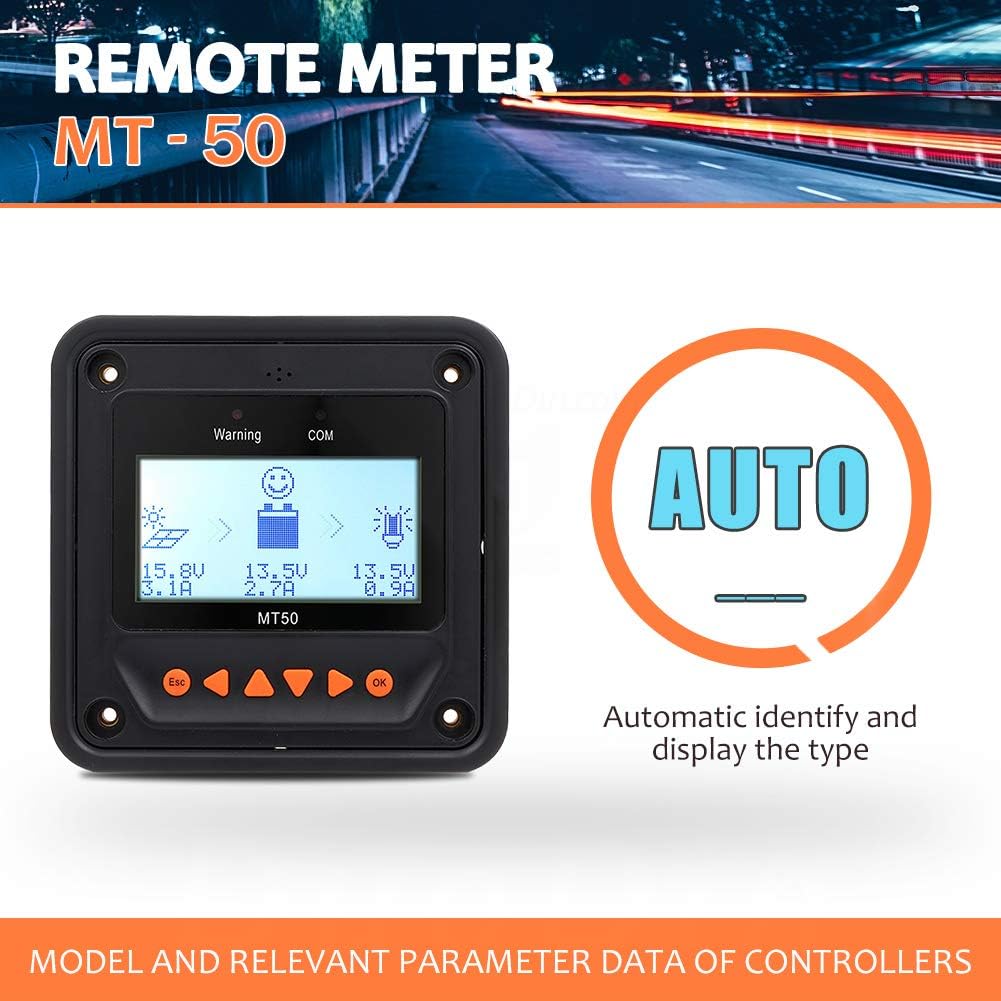
Figure 2.1: The MT-50 Remote Meter automatically identifies and displays the type of connected solar charge controller.
3. Desembalatge i contingut del paquet
Upon opening the package, verify that all components are present and in good condition. The standard package for the EPEVER MT-50 Remote Meter typically includes the following items:
- EPEVER MT-50 Remote Meter Unit
- Suport de muntatge
- Communication Cable (RJ45)
- Cargols de muntatge i tacs de paret
- Manual d'usuari
- Certificate of Quality/Warranty Card

Figura 3.1: Mésview of the EPEVER MT-50 Remote Meter and its included accessories.
Video 3.1: A short clip demonstrating the unboxing of the MT-50 Remote Meter and its components.
4. Configuració i instal·lació
The MT-50 Remote Meter is designed for easy installation and connection to your EPEVER solar charge controller. Follow these steps for proper setup:
- Muntatge: Choose a suitable location for the MT-50, preferably indoors and away from direct sunlight or extreme temperatures. Use the provided mounting bracket and screws to secure the unit to a wall or panel.
- Connexió: Locate the RS485 communication port on the back of the MT-50 unit. This is typically an RJ45 Ethernet-style port. Connect one end of the provided communication cable to this port.
- Connexió del controlador: Connect the other end of the communication cable to the RS485 port on your EPEVER solar charge controller. Ensure a secure connection at both ends. The MT-50 draws power directly from the controller via this cable, so no external power supply is needed.
- Encès: Once connected, the MT-50 display should power on automatically, indicating successful communication with the controller.

Figure 4.1: Connection diagram illustrating how the MT-50 Remote Meter connects to an EPEVER solar charge controller.
Video 4.1: Demonstration of connecting the MT-50 Remote Meter to a compatible EPEVER solar charge controller.
5. Operating the MT-50 Remote Meter
The MT-50 provides a comprehensive interface for monitoring and configuring your solar charge controller. The LCD screen displays various parameters, and the navigation buttons allow you to browse menus and adjust settings.
5.1 Mostra finalview
The main display shows real-time data including solar panel voltage/current, battery voltage/current, and load voltage/current. Indicators for warning and communication status are also present.

Figure 5.1: The main display interface of the MT-50 Remote Meter, showing key operational parameters.
5.2 Botons de navegació
The MT-50 features six buttons for navigation and control:
- Botó ESC: Used to exit the current menu or cancel an operation.
- Botons esquerra/dreta: Used to navigate between different screens or menu options.
- Botons amunt / avall: Used to scroll through options within a menu or adjust parameter values.
- Botó D'acord: Used to confirm a selection or enter a menu.
5.3 Configuració de paràmetres
You can access various settings to customize your solar charge controller's behavior. Key settings include:
- Tipus de bateria: Select the appropriate battery type (e.g., Sealed, Gel, Flooded, User) to ensure correct charging algorithms.
- Modes de control de càrrega: Configure how the load output operates. Options typically include:
- Control manual: Manually turn the load on or off.
- Llum ON/OFF: La càrrega s'encén al capvespre i s'apaga a l'alba.
- Light ON+Timer: Load turns on at dusk and stays on for a set duration.
- Control de temps: Load operates according to a predefined schedule.
- Paràmetres de càrrega: Ajusta el voltage thresholds for over-voltage disconnect, charge limit, boost recovery, and low voltage recuperació.
- Paràmetres de descàrrega: Set baix voltage disconnect and discharge limit.
Video 5.1: Detailed demonstration of navigating the MT-50 menu and setting various parameters, including battery type and load control modes.
6. Especificacions tècniques
| Especificació | Valor |
|---|---|
| Marca | SEMPRE |
| Número de model | MT50-1-FBA |
| Tipus de visualització | LCD |
| Dimensions del producte | 4.49" de llargada x 3.86" d'amplada x 3.86" d'alçada (11.4 x 9.8 x 9.8 cm) |
| Pes de l'article | 12.2 unces (0.35 quilograms) |
| Temperatura de funcionament | -20 °C a 70 °C (-4 °F a 158 °F) |
| Port de comunicació | RS485 (RJ45) |
| Font d'alimentació | Powered directly by the solar charge controller via communication cable |
7. Manteniment
The EPEVER MT-50 Remote Meter requires minimal maintenance to ensure optimal performance and longevity. Follow these guidelines:
- Neteja: Netegeu regularment la pantalla iasing with a soft, dry cloth to remove dust and smudges. Avoid using abrasive cleaners or solvents that could damage the surface.
- Comprovació de la connexió: Periodically inspect the communication cable and its connections to ensure they are secure and free from damage. Loose connections can lead to intermittent communication or inaccurate readings.
- Condicions ambientals: Ensure the meter is operated within its specified temperature range and protected from excessive moisture or direct sunlight, which can degrade performance over time.
8. Solució De Problemes
If you encounter issues with your EPEVER MT-50 Remote Meter, consider the following common troubleshooting steps:
- Sense pantalla/alimentació:
- Check the communication cable connection at both the MT-50 and the solar charge controller. Ensure it is firmly plugged in.
- Verify that the solar charge controller is powered on and functioning correctly. The MT-50 draws power from the controller.
- Inspect the communication cable for any visible damage (cuts, kinks). Try using a different RJ45 cable if available.
- Lectures incorrectes:
- Ensure the MT-50 is connected to the correct RS485 port on your controller.
- Verify that the battery type and other parameters are correctly set on the MT-50 to match your system configuration.
- Check the connections of the solar panels, battery, and load to the solar charge controller for proper wiring.
- Communication Error (COM indicator):
- This indicates a problem with the RS485 communication. Re-check the cable and connections.
- Ensure your solar charge controller is compatible with the MT-50.
- Power cycle the solar charge controller (disconnect and reconnect battery/solar) to reset communication.
- Botons que no responen:
- Ensure the unit is not in a locked state (though the MT-50 typically doesn't have a lock function).
- Try a soft reset by disconnecting and reconnecting the communication cable.
If these steps do not resolve the issue, please refer to the detailed troubleshooting section in your solar charge controller's user manual or contact EPEVER customer support for further assistance.
9. Garantia i Suport
EPEVER products are designed for reliability and performance. For information regarding the warranty period and terms for your MT-50 Remote Meter, please refer to the warranty card included in your product packaging or visit the official EPEVER website. In case of technical issues, product inquiries, or warranty claims, please contact EPEVER customer support through their official channels. Providing your product model number (MT50-1-FBA) and purchase details will help expedite the support process.