
1. Introducció
Thank you for choosing the Massive Audio TX44 Bluetooth Marine Amplifier. This compact Class D amplifier is designed to deliver clean, full-range audio in challenging environments such as boats, UTVs, ATVs, and other outdoor vehicles. This manual provides essential information for proper installation, operation, and maintenance of your ampmés viu.
2. Informació de seguretat
Please read all instructions carefully before installing and operating the amplificador. Si no es segueixen aquestes directrius, es poden produir danys a l'aparell. amplesions personals, de la vida útil o del vehicle.
- Desconnecteu sempre el terminal negatiu de la bateria del vehicle abans de començar qualsevol instal·lació.
- Assegureu-vos una correcta connexió a terra per evitar riscos elèctrics.
- Use appropriate gauge wiring for power and speaker connections as specified.
- Muntar el amplifier securely in a location that allows for adequate ventilation and is protected from direct exposure to extreme elements, although the unit is waterproof.
- Eviteu instal·lar el fitxer amplifier in areas where it may interfere with vehicle safety systems or operation.
- No opereu el amplificador si està malmès o no funciona correctament. Consulteu la secció de resolució de problemes o poseu-vos en contacte amb el servei d'assistència.
- This product is designed for 12-volt DC negative ground systems only.
3. Característiques del producte
The Massive Audio TX44 amplifier offers the following key features:
- 120W RMS Full-Range Power: Compacte Classe D amplifier delivering clean audio.
- Transmissió sense fil Bluetooth: Seamless audio control from smartphones or tablets.
- Waterproof Marine Design: Sealed chassis, corrosion-resistant hardware, and conformal-coated PCB for harsh environments.
- Compact & Efficient: Small footprint for tight spaces, maintaining cool operation.
- Easy Installation & Control: Ampli voltage support and flexible inputs for various audio systems.
4. Configuració i instal·lació
Una instal·lació correcta és crucial per a un rendiment òptim i una major durabilitat del vostre ampinstal·lador. Si no esteu segurs de cap pas, consulteu un instal·lador professional.
4.1 Muntatge del Ampmés viu
Choose a mounting location that is secure, allows for adequate air circulation, and is accessible for wiring. The TX44's compact design allows for installation in various tight spaces. Ensure the mounting surface is flat and stable.

Figura 4.1: Dimensions of the Massive Audio TX44 amplifier. The unit measures approximately 216 mm (8.5 inches) in length, 108 mm (4.3 inches) in width, and 45 mm (1.8 inches) in height. These dimensions are crucial for planning the installation space.
- Col·loca el amplifier in the desired mounting location and mark the positions for the mounting screws.
- Drill pilot holes if necessary, ensuring not to damage any vehicle components behind the mounting surface.
- Assegureu-vos el amplifier using appropriate screws and washers.
4.2 Connexions de cablejat
All wiring should be done with the vehicle's battery disconnected. Use high-quality marine-grade wiring for all connections.
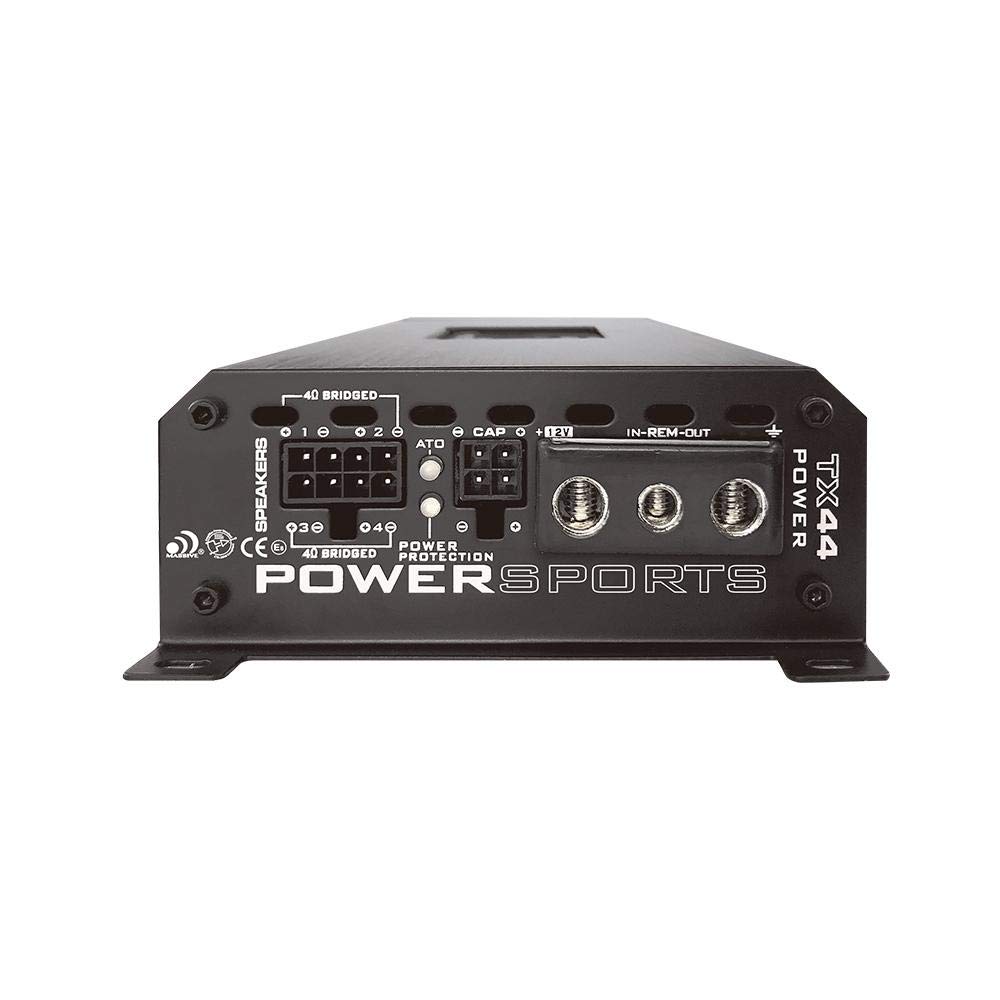
Figura 4.2: posterior view of the Massive Audio TX44 amplifier showing the power, ground, remote, and speaker output terminals. The power input requires a 12V connection, while the speaker outputs are clearly labeled for channel 1, 2, 3, and 4.
4.2.1 Connexions d'alimentació
- Power (BAT+): Connect a fused power cable (minimum 8 AWG recommended) directly from the positive terminal of the vehicle's battery to the "12V" terminal on the amplifier. Install a fuse holder within 18 inches (45 cm) of the battery.
- Terra (GND): Connect a ground cable (same gauge as power) from the "GND" terminal on the amplifier to a clean, unpainted metal surface of the vehicle chassis. Ensure a solid, low-resistance connection.
- Remot (REM): Connect a remote turn-on wire from your head unit's remote output to the "IN-REM-OUT" terminal. This wire signals the amplificador per encendre i apagar amb el sistema d'àudio.
4.2.2 Connexions d'altaveus
Connect your speakers to the "SPEAKERS" terminals. The TX44 is a 4-channel amplifier. Ensure correct polarity (+ to + and - to -) for all speakers.
- Connect Front Left speaker to Channel 1.
- Connect Front Right speaker to Channel 2.
- Connect Rear Left speaker to Channel 3.
- Connect Rear Right speaker to Channel 4.
- El amplifier supports 4 Ohm speaker loads per channel. Refer to the specifications for bridged mode wiring if applicable.
4.2.3 Connexions d'entrada
The TX44 offers both RCA (Line In) and Bluetooth inputs.

Figura 4.3: A dalt view of the Massive Audio TX44 amplifier showing the input connections (RCA) and control knobs for Level, HPF, LPF, and Crossover settings for both Front and Rear channels. The Bluetooth pairing button is also visible.
- Entrades RCA: Connecteu els cables RCA des del pre-emissor de la unitat principalamp outputs to the "FRONT" and "REAR" RCA input jacks on the ampmés viu.
- Automatic Hi-Level Inputs: If your head unit does not have RCA outputs, you can use the automatic hi-level inputs. Connect speaker-level outputs from your head unit directly to the designated hi-level input terminals. The amplifier will automatically detect the signal and turn on.
4.3 Vinculació Bluetooth
To stream audio wirelessly, you need to pair your device with the TX44 ampmés viu.
- Assegureu-vos el ampel lifier està encès.
- Manteniu premut el botó Botó Bluetooth a la amplifier's control panel until the Bluetooth indicator light begins to flash, indicating pairing mode.
- Al teu telèfon intel·ligent o tauleta, vés a la configuració de Bluetooth i busca els dispositius disponibles.
- Select "Massive Audio TX44" (or similar name) from the list.
- Once paired, the Bluetooth indicator light will become solid. You can now stream audio.
5. Funcionament
Once installed and powered, you can begin operating your TX44 ampmés viu.
5.1 Encès/Apagat
El amplifier will automatically turn on when it receives a remote turn-on signal from your head unit or detects an audio signal via the hi-level inputs. It will turn off when the signal is removed.
5.2 Adjusting Input Level (Gain)
The "LEVEL" controls (Front and Rear) adjust the input sensitivity of the amplifier. This should be set to match the output voltage of your head unit. Incorrect gain settings can lead to distortion or reduced dynamic range.
- Start with the head unit volume at about 75% of its maximum.
- Estableix el amplifier's "LEVEL" controls to minimum (fully counter-clockwise).
- Slowly increase the "LEVEL" control until you hear slight distortion, then back it off slightly.
- Repeat for both Front and Rear channels.
5.3 Configuració del crossover
The TX44 features adjustable High-Pass Filter (HPF) and Low-Pass Filter (LPF) for precise sound tuning. These controls allow you to direct specific frequency ranges to your speakers.
- HPF (filtre de pas alt): Permet freqüències a dalt the set point to pass through. Useful for full-range speakers to prevent them from playing low bass, which can cause distortion.
- LPF (filtre de pas baix): Permet freqüències a continuació the set point to pass through. Typically used for subwoofers.
- COMPLET: Eviteu el crossover, permetent que passin totes les freqüències.
Adjust the "CROSSOVER" switch to select HPF, LPF, or FULL mode for the respective channels, then use the corresponding knob to set the desired frequency.
6. Manteniment
The Massive Audio TX44 is designed for durability in harsh environments. Regular, simple maintenance can help ensure its long-term performance.
- Neteja: Netegeu periòdicament el ampexterior del lifer amb un suau, damp cloth to remove dust, dirt, and salt residue. Avoid using harsh chemicals or abrasive cleaners.
- Connexions: Occasionally check all power, ground, and speaker connections to ensure they are secure and free from corrosion. Loose connections can lead to poor performance or damage.
- Ventilació: Assegureu-vos que el ampLes aletes de refrigeració del refrigerador no estan obstruïdes per deixalles o altres objectes per mantenir una dissipació adequada de la calor.
- Impermeabilització: While the unit is waterproof, avoid submerging it or directing high-pressure water jets directly at the connections.
7. Solució De Problemes
If you experience issues with your TX44 amplificador, consulteu els problemes i solucions habituals següents abans de contactar amb el servei d'assistència.
| Problema | Causa possible | Solució |
|---|---|---|
| Sense alimentació / Ampel lifier no s'encén |
|
|
| Sense sortida de so |
|
|
| So distorsionat |
|
|
| Problemes de connexió Bluetooth |
|
|
8. Especificacions
Technical specifications for the Massive Audio TX44 Bluetooth Marine Ampmés viu:
| Característica | Detall |
|---|---|
| Model | TX44 (MA-TX44) |
| Canals | 4-Canals |
| Potència RMS (4Ω) | 120 watts x 4 |
| Potència total de sortida | 960 watts (pic) |
| Voltage | 12 Volts DC |
| Subministrament mínim Voltage | 0.2 Volts |
| Dimensions de l'article (L x A x A) | 9.76 x 4.25 x 1.6 polzades (248 x 108 x 41 mm) |
| Pes de l'article | 4 lliures (1.81 kg) |
| Tipus de material | Alumini |
| Tipus de muntatge | Muntatge en superfície |
| Temperatura de funcionament | Up to 320°F (160°C) - Note: This value seems unusually high for an operating temperature and might refer to a component's maximum tolerance. Normal operating temperatures for amplifiers are much lower. |
| Components inclosos | Massive Audio TX44 Car Ampmés viu |
| GTIN / UPC | 623169631573 |
9. Garantia i assistència
9.1 Garantia del fabricant
This Massive Audio TX44 amplifier is covered by a manufacturer's warranty. Please refer to the warranty card included with your product or visit the official Massive Audio website for detailed terms and conditions regarding coverage, duration, and claim procedures. Keep your proof of purchase for warranty claims.
9.2 Atenció al client
For technical assistance, troubleshooting beyond this manual, or warranty inquiries, please contact Massive Audio customer support. You can typically find contact information on the official Massive Audio weblloc web o a través del vostre distribuïdor autoritzat.
Weblloc: www.massiveaudio.com (Example, please verify official weblloc)