
Introducció
This manual provides detailed instructions for the installation, operation, and maintenance of your Gamemax G503X Elysium Gaming PC Case. Please read this manual thoroughly before beginning installation to ensure proper setup and safe use of your product. Keep this manual for future reference.
Informació de seguretat
- Always disconnect the power supply from the wall outlet before installing or removing any components inside the PC case.
- Manipuleu tots els components amb cura per evitar danys causats per l'electricitat estàtica. Penseu en la possibilitat de fer servir una corretja antiestàtica per al canell.
- Avoid placing the PC case in direct sunlight, near heat sources, or in areas with high humidity.
- Assegureu-vos que hi hagi una ventilació adequada al voltant de la carcassa per evitar el sobreescalfament.
- Mantingueu les peces petites i les eines lluny dels nens.
- No intenteu modificar la carcassa ni els seus components, ja que això podria anul·lar la garantia i suposar un risc per a la seguretat.
Contingut del paquet
Si us plau, comproveu el contingut del vostre paquet. Si falta algun article o hi ha algun malmès, poseu-vos en contacte amb el vostre distribuïdor.
- Gamemax G503X Elysium Mid Tower PC Case
- Pre-installed 120mm RGB Fans (quantity as specified on packaging, typically 3)
- Accessory kit (screws, standoffs, cable ties, etc.)
- Manual d'usuari (aquest document)
Característiques
- Mid Tower design
- Full transparent acrylic side window
- Support for ATX, Micro ATX, and Mini-ITX motherboards
- Front I/O: 1x USB 3.0, 2x USB 2.0, HD Audio (input/output)
- Integrated fan control (High/Off/Low)
- Ample space for cable management behind the motherboard tray
- Support for long graphics cards (up to 380mm)
- Multiple drive bays: 1x 5.25", 2x 3.5" HDD, 2x 2.5" SSD
- Pre-installed RGB fans for enhanced aesthetics and cooling
Configuració i instal·lació
1. Desembalatge de la caixa
Carefully remove the case from its packaging. Inspect for any damage during shipping. Remove any protective films from the acrylic side panel.
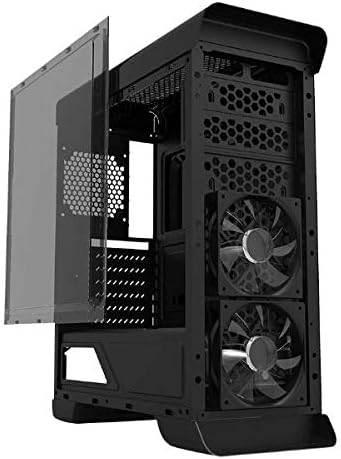
Imatge: Lateral view of the Gamemax G503X Elysium case with the transparent acrylic panel detached, showing the internal structure and front fans.
2. Instal·lació de la placa base
- Lay the case on its side.
- Install the necessary motherboard standoffs into the motherboard tray according to your motherboard's form factor (ATX, Micro ATX, Mini-ITX).
- Col·loca amb cura la placa base sobre els separadors, alineant els forats dels cargols.
- Fixeu la placa base amb els cargols proporcionats.
3. Instal·lació de la unitat
3.1. 5.25" Drive (Optical Drive)
The case features one 5.25" drive bay. Remove the front panel cover, slide the drive into the bay, and secure it with screws or tool-less clips if available.
3.2. 3.5" HDD Drives
Install up to two 3.5" HDDs into the designated drive cages. These typically use trays or direct screw mounting. Ensure they are securely fastened.
3.3. 2.5" SSD Drives
Install up to two 2.5" SSDs onto the dedicated mounting points, usually located behind the motherboard tray or on the PSU shroud. Secure with screws.
4. Instal·lació del refrigerador de CPU
Install your CPU cooler according to its manufacturer's instructions. Ensure the cooler's height does not exceed the maximum supported height of 158mm for this case.
5. Instal·lació de la targeta gràfica (GPU)
- Remove the necessary PCI slot covers from the rear of the case (up to 7 slots available).
- Inseriu la targeta gràfica a la ranura PCIe adequada de la placa base.
- Secure the graphics card with screws. The case supports graphics cards up to 380mm in length.

Imatge: Part posterior view of the Gamemax G503X Elysium case, highlighting the 7 PCI expansion slots and the rear fan mount.
6. Fan Installation and Configuration
The case comes with pre-installed RGB fans. Additional fan mounting options are available:
- Davant: Up to 3x 120mm fans (2 pre-installed, 1 optional)
- posterior: 1x 120mm fan (optional, may be pre-installed)
- A dalt: Up to 2x 120mm fans (optional)
Connect all fan power cables to your motherboard or a fan controller. The case includes an integrated fan controller for speed adjustment.
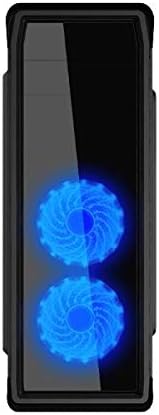
Imatge: Frontal view of the Gamemax G503X Elysium case, showcasing the two illuminated RGB fans visible through the front panel.
7. Gestió de cables
Utilize the space behind the motherboard tray and the provided cable tie points to route and secure cables. This improves airflow and aesthetics.
8. Connecting Front Panel I/O
Connect the following cables from the case's front panel to the corresponding headers on your motherboard:
- Capçalera USB 3.0
- Capçaleres USB 2.0
- HD Audio header (for headphone and microphone jacks)
- Power switch, Reset switch, Power LED, HDD LED headers
Funcionament de la caixa
Encès
Once all components are installed and connected, close the side panel. Connect your monitor, keyboard, mouse, and power cable to the PC. Press the power button on the front panel to start your system.
Control del ventilador
The Gamemax G503X Elysium features an integrated fan controller on the top panel. Use this controller to adjust the speed of the connected case fans to High, Low, or Off, depending on your cooling needs and noise preference.
Il·luminació RGB
The pre-installed fans feature RGB LEDs. The lighting effects are typically controlled via the motherboard's RGB software or a dedicated controller if included with the fans. Refer to your motherboard manual for RGB software instructions.
Manteniment
Neteja
Regular cleaning helps maintain optimal performance and extends the lifespan of your components. Use a can of compressed air to remove dust from inside the case, especially from fans and heatsinks. Wipe exterior surfaces with a soft, damp tela. Eviteu utilitzar productes químics o materials abrasius.
Periodically check and clean any dust filters (if present) to ensure unrestricted airflow.
Resolució de problemes
- El sistema no s'encén: Ensure all power cables (motherboard, CPU, GPU, drives) are securely connected. Check that the power supply switch is in the 'ON' position. Verify front panel power switch connection to the motherboard.
- Els ventiladors no giren: Check fan power connections to the motherboard or fan controller. Ensure the fan controller is set to 'High' or 'Low', not 'Off'.
- Sense sortida de pantalla: Ensure your graphics card is properly seated and connected to the power supply. Verify that your monitor cable is connected to the graphics card, not the motherboard's integrated graphics port (unless using integrated graphics).
- Overheating issues: Ensure all case fans are spinning correctly and oriented for proper airflow (intake/exhaust). Check CPU cooler installation and thermal paste application. Ensure the case is not obstructed.
For further assistance, consult your motherboard and component manuals or contact Gamemax support.
Especificacions
| Característica | Especificació |
|---|---|
| Tipus de cas | Torre mitja |
| Model | G503X Elysium |
| Color | Negre |
| Panell lateral | Full Transparent Acrylic |
| Suport de la placa base | ATX, Micro ATX, Mini-ITX |
| Drive Bays | 1x 5.25", 2x 3.5" HDD, 2x 2.5" SSD |
| Ranures d’expansió PCI | 7 |
| Ports d'E / S frontals | 1x USB 3.0, 2x USB 2.0, HD Audio (Input/Output) |
| Control del ventilador | Integrated (High/Off/Low) |
| Ventiladors preinstal·lats | 3x 120mm RGB Fans (typically 2 front, 1 rear) |
| Optional Fan Support | Front: 3x 120mm; Rear: 1x 120mm; Top: 2x 120mm |
| Alçada màxima del refrigerador de la CPU | 158 mm |
| Longitud màxima de la targeta gràfica | 380 mm |
| Espai de gestió de cables | Yes (behind motherboard tray) |
| Material | Acrylic (side panel) |
| Pes de l'article | 5.75 kg |
Garantia i Suport
Gamemax products come with a limited warranty. Please refer to the warranty information provided with your purchase or visit the official Gamemax website for details on warranty terms and conditions. For technical support or inquiries, please contact your retailer or Gamemax customer service.