
1. Introducció
The OWON HDS1021MN is a versatile handheld device combining the functionalities of a digital storage oscilloscope and a digital multimeter. It is designed for engineers, technicians, and hobbyists requiring portable and accurate measurement capabilities. This manual provides essential information for the safe and effective operation of your device.
Característiques principals:
- Model: HDS1021MN
- Sample Rate (real time): 500 MS/s
- Ample de banda: 20 MHz
- Horizontal Scale (s/div): 5ns/div to 100s/div, step by 1-2.5-5
- Canal: Solter
- Waveform Record & Replay
- FFT Functions
- 3.7 inch color TFT display (640 × 480 pixels)
2. Informació de seguretat
Before using the OWON HDS1021MN, please read and understand all safety instructions. Failure to follow these instructions may result in electric shock, fire, or damage to the device or other equipment.
- Seguretat general: Always operate the device within its specified voltage and current limits. Do not use the device if it appears damaged or is not operating correctly.
- Font d'alimentació: Use only the specified power adapter and battery. Ensure the power source matches the device's requirements.
- Probes and Leads: Use only probes and test leads rated for the voltage and current being measured. Inspect probes and leads for damage before each use.
- Medi ambient: No utilitzeu el dispositiu en mullat o damp conditions, or in explosive atmospheres. Keep the device away from strong electromagnetic fields.
- Manteniment: Refer all servicing to qualified service personnel. Do not attempt to open or repair the device yourself.
3. Components del producte
The standard package for the OWON HDS1021MN typically includes the following items:
- OWON HDS1021MN Handheld Digital Storage Oscilloscope and Digital Multimeter Unit
- Oscilloscope Probe (1X/10X)
- Cables de prova del multímetre
- Adaptador d'alimentació
- Cable USB
- Manual d'usuari (aquest document)
- Soft Carrying Case (may vary by region/retailer)
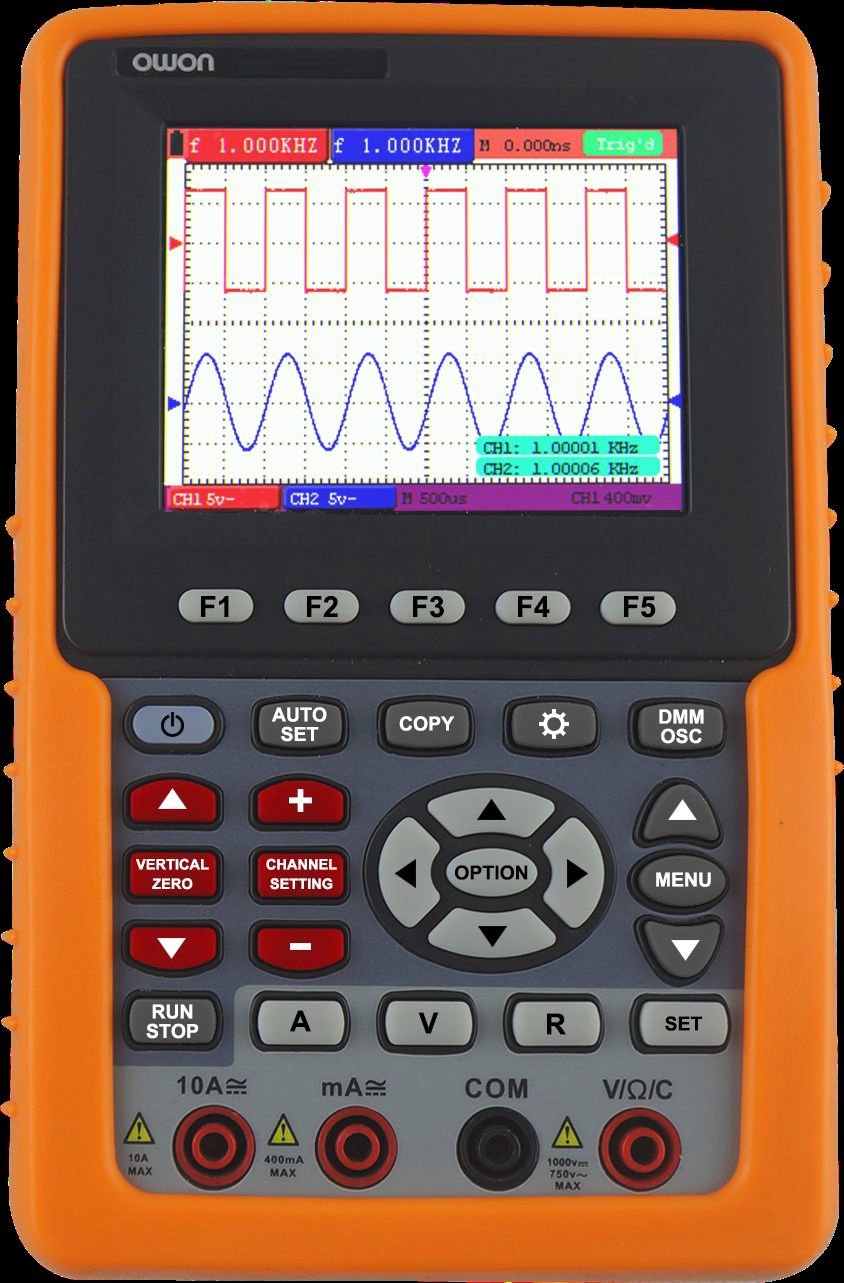
Davant view of the OWON HDS1021MN, showing the display screen, control buttons, and input jacks.
4. Configuració
4.1 Instal·lació i càrrega de la bateria
- Localitzeu el compartiment de la bateria a la part posterior del dispositiu.
- Insert the provided Li-ion battery (7.4V) into the compartment, ensuring correct polarity.
- Tanqueu bé la tapa del compartiment de la bateria.
- Connect the power adapter to the device's charging port and plug it into a suitable AC outlet (100V-240V AC, 50/60Hz). The battery indicator will show charging status.
- Allow the device to charge fully before initial use. A full charge provides approximately 6 hours of operation.
4.2 Connexió de sondes i cables de prova
- Sonda d'oscil·loscopi: For oscilloscope functions, connect the BNC connector of the oscilloscope probe to the BNC input port on the device. Ensure the probe's attenuation setting (e.g., 1X or 10X) matches the setting on the oscilloscope menu.
- Multimeter Test Leads: For multimeter functions, insert the red test lead into the VΩmA input jack and the black test lead into the COM input jack. For high current measurements (e.g., 20A), use the dedicated current input jack if available and switch the function accordingly.
5. Instruccions de funcionament
5.1 Encès/Apagat
Press and hold the power button until the display illuminates to turn on the device. To power off, press and hold the power button again until the display shuts down.
5.2 Funcionament de l'oscil·loscopi
- Select Oscilloscope Mode: Use the function selection buttons to switch to oscilloscope mode.
- Connectar la sonda: Attach the oscilloscope probe to the circuit under test. Ensure the ground clip is connected to the circuit's ground.
- Adjust Vertical Scale (Volts/Div): Use the vertical control knob or buttons to adjust the voltage sensitivity per division, matching the ampmida del senyal d'entrada.
- Adjust Horizontal Scale (Time/Div): Use the horizontal control knob or buttons to adjust the time base per division, suitable for viewing the signal's frequency.
- Estableix el disparador: Use the trigger controls to stabilize the waveform. Common trigger types include Edge, Video, and Alternate. Adjust the trigger level to a point on the waveform to ensure a stable display.
- Acquisition Mode: Seleccioneu Sample, Peak Detect, or Average mode based on measurement needs.
- Waveform Record & Replay: Access the menu to enable waveform recording. Follow on-screen prompts to save and replay captured waveforms.
- Funció FFT: Activate the FFT (Fast Fourier Transform) function from the menu to analyze the frequency components of the signal.
5.3 Funcionament del multímetre
- Select Multimeter Mode: Use the function selection buttons to switch to multimeter mode.
- Select Measurement Function: Rotate the rotary switch or press function buttons to select the desired measurement (e.g., VDC, VAC, Current DC, Current AC, Resistance, Diode, Continuity).
- Connecteu els cables de prova: Connect the red and black test leads to the circuit or component being measured according to the selected function.
- Llegir mesura: The measurement value will be displayed on the screen.
- Prova de díode: Connect leads across the diode. The forward voltagEs mostrarà una gota.
- Prova de continuïtat: Connect leads across the circuit. An audible beep indicates continuity (<50Ω).
6. Manteniment
6.1 Neteja
Per netejar el dispositiu, utilitzeu un drap suau dampened with mild detergent and water. Do not use abrasive cleaners or solvents. Ensure the device is powered off and disconnected from all power sources before cleaning.
6.2 Cura de la bateria
- Carregueu la bateria regularment, fins i tot si el dispositiu no s'utilitza amb freqüència, per mantenir-ne l'estat.
- Eviteu descarregar completament la bateria amb freqüència.
- If storing the device for an extended period, charge the battery to approximately 50% and store in a cool, dry place.
6.3 Emmagatzematge
Store the device in a dry, dust-free environment, away from direct sunlight and extreme temperatures. Use the provided carrying case to protect it from physical damage.
7. Solució De Problemes
This section addresses common issues you might encounter with your OWON HDS1021MN.
| Problema | Causa possible | Solució |
|---|---|---|
| El dispositiu no s'encén | Low or dead battery; Power adapter not connected; Device fault | Charge the battery; Connect power adapter; Contact support if issue persists |
| No waveform displayed (Oscilloscope) | Probe not connected; Incorrect vertical/horizontal scale; Incorrect trigger settings; No input signal | Check probe connection; Adjust Volts/Div and Time/Div; Adjust trigger level/mode; Verify signal source |
| Incorrect multimeter reading | Incorrect function selected; Test leads improperly connected; Damaged test leads; Out of range measurement | Select correct function; Ensure leads are in correct jacks; Replace damaged leads; Check measurement range |
| La pantalla és tènue o parpelleja | Low battery; Environmental factors | Charge battery; Operate in recommended temperature range |
8. Especificacions
Detailed technical specifications for the OWON HDS1021MN.
Oscilloscope Specifications:
- Ample de banda: 20 MHz
- Sample Rate (real time): 500 MS/s
- Horizontal Scale (s/div): 5ns/div to 100s/div, step by 1-2.5-5
- Rise Time (at input, typical): ≤ 17.5ns
- Visualització: 3.7 inch color TFT panel (640 × 480 pixels, 65535 colors)
- Canal: Solter
- Impedància d'entrada: 1MΩ ± 2%, in parallel with 20pF ± 5pF
- Durada del registre: max 6K points on each channel
- Interpolation: sin (x) / x
- Probe Attenuation Factor: 1X, 10X, 100X, 1000X
- Acoblament d'entrada: DC, AC, and GND
- DC Accuracy (average): average >16 : ±(5% reading + 0.05div) for ΔV
- Sensibilitat vertical: 5mV/div to 5V/div (at input)
- Vertical Resolution (A/D): 8 bits (2 canals alhora)
- Vol. d'entrada màximatage: 400V (PK - PK) (DC + AC, PK - PK, 1MΩ input impedance, probe attenuation 10:1), CAT II
- Tipus d'activador: Edge, Video, Alternate
- Mode de commutació: Automàtic, Normal, Individual
- Nivell d'activació: ±6 divisions from screen center
- Acquisition Mode: Sample, Peak Detect, and Average
- Precisió del guany de CC: ±3%
- Mesura automàtica: Vpp, Vavg, Vrms, Freq, Period, Vmax, Vmin, Vtop, Vbase, Vamp, Overshoot, Pre-shoot, Rise Time, Fall Time, +Width, -Width, +Duty, -Duty, Delay A→B, Delay A→B
- Matemàtiques de formes d'ona: +, -, ×, ÷, invert, FFT
- Waveform Storage: 4 waveforms
- Lissajous Figure: Bandwidth full bandwidth, Phase Difference ±3 degrees
Especificacions del multímetre:
- Full Scale Reading: 3 ¾ digit (max 4000-count)
- Díode: 0V-1.5V
- Impedància d'entrada: 10 MΩ
- On / Off Test: <50Ω (± 30Ω) beeping
- Voltage VDC: 400mV, 4V, 40V, 400V, 1000V : ±(1% ± 1 digit); max input : DC 1000V
- Voltagi VAC: 4V, 40V, 400V : ±(1% ± 3 digits), 750V : ±(2% ± 3 digits); Frequency : 40Hz - 400Hz; max input : AC 750V (virtual value)
- Current DC: 40mA, 400mA : ±(1.5% ± 1 digit), 20A : ±(3% ± 3 digits)
- Current AC: 40mA : ±(1.5% ± 3 digits), 400mA : ±(2% ± 1 digit), 20A : ±(5% ± 3 digits)
Especificacions generals:
- Interfície de comunicació: USB
- Font d'alimentació: 100V-240V AC, 50/60Hz
- Bateria Li-ion: 7.4V, 6 hours operation
- Dimensions (L × A × P): 180 × 115 × 40 (mm)
- Color: Taronja
9. Garantia i Suport
OWON products are manufactured to high quality standards. For warranty information, please refer to the warranty card included with your product or visit the official OWON website. For technical support, troubleshooting assistance beyond this manual, or service inquiries, please contact OWON customer support through their official channels.
Fabricant: OWON


