
1. Introducció
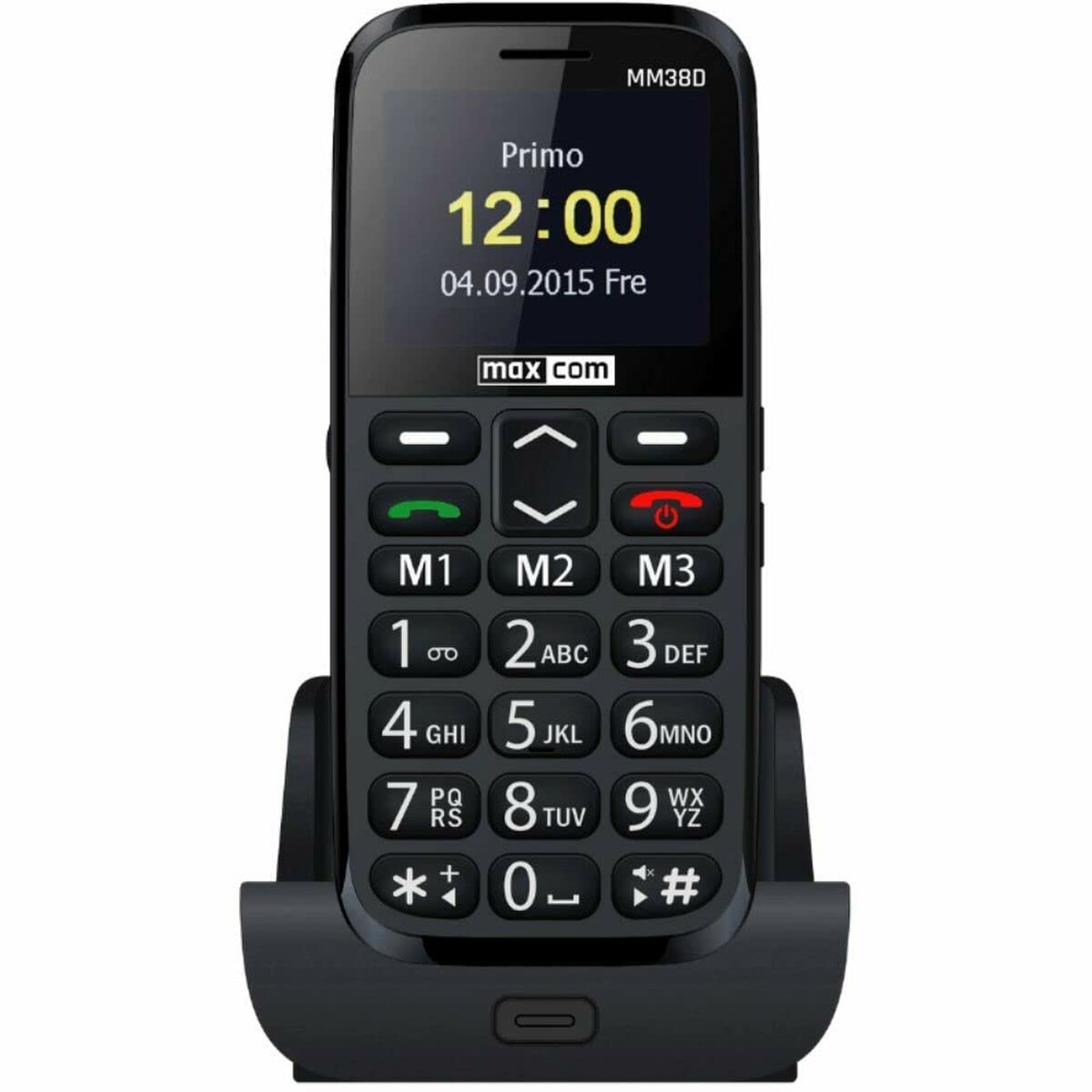
The Maxcom MM38D is a portable senior phone designed for ease of use, featuring large backlit keys, a clear 2.2-inch display, and essential communication functions. This manual provides comprehensive instructions for setting up, operating, and maintaining your device, ensuring you can utilize all its features effectively, including the dedicated SOS button, FM radio, and camera.
2. Informació de seguretat
- No exposeu el telèfon a temperatures extremes, a la llum solar directa ni a la humitat.
- Utilitzeu només bateries i carregadors originals o homologats per evitar danys i garantir la seguretat.
- Avoid dropping or subjecting the phone to severe impacts.
- No intenteu desmuntar ni reparar el dispositiu vosaltres mateixos. Poseu-vos en contacte amb personal de servei autoritzat.
- Desfeu-vos de les piles i del dispositiu de manera responsable d'acord amb la normativa local.
3. Contingut del paquet
Before using your Maxcom MM38D, please verify that all the following items are included in the package:
- Maxcom MM38D Phone
- Bateria
- Carregador
- Manual d'usuari
4. Disseny del dispositiu
Familiarize yourself with the physical components of your Maxcom MM38D phone.
This image displays the rear panel of the Maxcom MM38D phone. Visible components include the camera lens in the upper left, a circular SOS button to its right, and a speaker grille with a grid pattern further to the right. The 'max com' logo is printed at the bottom.
Components clau:
- Pantalla de visualització: 2.2-inch color display for menus and information.
- Teclat alfanumèric: Large, backlit keys for dialing and text input.
- Tecles de navegació: For scrolling through menus and options.
- Call/End Call Buttons: To initiate and terminate calls.
- Botó SOS: Located on the back for emergency calls and messages.
- Càmera: 2-megapixel camera on the rear.
- Llanterna: Font de llum integrada.
- Port de càrrega: Per connectar el carregador.
- Auriculars Jack: For connecting headphones (may also serve as FM antenna).
5. Configuració
5.1. Instal·lació de la targeta SIM
- Traieu la coberta posterior del telèfon.
- Traieu la bateria amb cura.
- Locate the SIM card slot. Insert your 2G compatible SIM card into the slot, ensuring the gold contacts face downwards and the cut corner aligns with the slot's orientation.
- Empenyeu suaument la targeta SIM fins que encaixi al seu lloc.
5.2. Instal·lació de la bateria
- Align the battery's metal contacts with the contacts in the phone's battery compartment.
- Press the battery down gently until it fits securely.
- Replace the back cover, ensuring it snaps firmly into place.
5.3. Carregant la bateria
- Connecteu el cable del carregador al port de càrrega del telèfon.
- Connecteu el carregador a una presa de corrent elèctrica estàndard.
- The battery indicator on the screen will show the charging status. Allow the phone to charge fully before first use.
5.4. Encès / apagat
- Per encendre: Manteniu premut el botó Engegar/Finalitzar trucada botó fins que la pantalla s'il·lumini.
- Per apagar: Manteniu premut el botó Engegar/Finalitzar trucada button until the power-off options appear, then confirm.
6. Instruccions de funcionament
6.1. Navegació bàsica
Utilitza el Tecles de navegació (up, down, left, right) to move through menus and options. Press the central D'acord/Selecciona botó per confirmar una selecció.
6.2. Fer i rebre trucades
- Per fer una trucada: Introduïu el número de telèfon amb el teclat numèric i premeu la tecla Truca botó.
- Per respondre una trucada: Quan soni el telèfon, premeu la tecla Truca botó.
- Per finalitzar una trucada: Premeu el botó Finalitzar la trucada botó.
- Funció mans lliures: Activate the hands-free speaker during a call via the on-screen option.
6.3. Sending and Receiving Messages (SMS)
- Navegueu fins a Missatges menú.
- Seleccioneu Escriu missatge or Nou SMS.
- Escriviu el vostre missatge amb el teclat alfanumèric.
- Introdueix el número del destinatari o selecciona'l dels teus contactes.
- Premeu Enviar.
6.4. Using the SOS Button
The SOS button is a critical safety feature. To use it:
- Ensure emergency contacts are pre-programmed in the phone's settings (usually under SOS settings).
- En cas d'emergència, premeu i manteniu premut el botó Botó SOS a la part posterior del telèfon durant uns segons.
- The phone will automatically call and send a pre-set emergency message to your designated contacts.
6.5. Altres característiques
- Ràdio FM: Access the 'FM Radio' application from the main menu. Connect headphones to serve as an antenna for better reception.
- Llanterna: Activate the flashlight function through the menu or a dedicated shortcut key (refer to your phone's specific key assignments).
- Càmera: Open the 'Camera' application to take photos. The phone is equipped with a 2-megapixel camera.
- Contactes: Store up to 300 contacts. Access the 'Contacts' menu to add, edit, or search for entries.
- Calendar & Alarm: Set reminders and multiple alarms through the 'Calendar' and 'Alarm' applications.
- Bluetooth: Enable Bluetooth in the 'Settings' menu to connect to compatible wireless headsets or other devices.
- Reproductor d'àudio/vídeo: Reprodueix àudio i vídeo files stored on the phone or a Micro SD card.
7. Manteniment
- Neteja: Use a soft, dry, lint-free cloth to clean the phone's screen and body. Avoid using liquid cleaners or aerosols.
- Cura de la bateria: To prolong battery life, avoid fully discharging the battery frequently. Do not leave the phone connected to the charger for extended periods after it is fully charged.
- Emmagatzematge: Store the phone in a cool, dry place when not in use. Avoid dusty environments.
- Resistència a l'aigua: The Maxcom MM38D is not water-resistant. Keep it away from liquids.
8. Solució De Problemes
If you encounter issues with your Maxcom MM38D, refer to the following common problems and solutions:
| Problema | Solució |
|---|---|
| El telèfon no s'encén | Ensure the battery is charged and correctly inserted. Try charging the phone for at least 30 minutes. |
| No puc fer ni rebre trucades | Check if the SIM card is properly inserted and activated. Verify network signal strength. Ensure you have sufficient credit or an active plan. |
| El botó SOS no funciona | Confirm that emergency contacts are set up in the SOS settings menu. Ensure the phone has network coverage. |
| Mala qualitat d'àudio durant les trucades | Check the call volume settings. Ensure the speaker and microphone are not obstructed. Move to an area with better network reception. |
| La bateria s'esgota ràpidament | Redueix la brillantor de la pantalla. Tanca les aplicacions que no fas servir. Limita l'ús de dades en segon pla. Considera la possibilitat de substituir una bateria antiga. |
9. Especificacions
| Característica | Especificació |
|---|---|
| Marca | Maxcom |
| Model | MM38D |
| Sistema operatiu | Android 10.0 |
| Mida de la pantalla | 2.2 polzades |
| Resolució de la càmera | 2 megapíxels |
| Connectivitat | Bluetooth, 2G GSM |
| Emmagatzematge de memòria | 1 GB |
| Color | Negre |
| Característiques especials | SOS button, FM Radio, Flashlight, Calendar, Audio/Video Player, Alarm, Hands-free function, Large backlit keys, 300-contact directory, Micro SD support |
10. Garantia i Suport
For detailed warranty information, terms, and conditions, please refer to the warranty card or documentation included with your purchase. For technical support, product inquiries, or service requests, please visit the official Maxcom weblloc web o poseu-vos en contacte amb el seu departament d'atenció al client mitjançant la informació de contacte que es proporciona a l'embalatge del producte.