
Introducció
Thank you for choosing the QCY T9S TWS True Wireless Earbuds. This manual provides essential information for the safe and efficient use of your new earbuds. Please read it carefully before use and retain it for future reference.

Image: QCY T9S TWS Earbuds and charging case, illustrating key features like Bluetooth 5.0 connectivity, low latency, and integration with the QCY app. Also shows battery life details: 20 hours total with case, 70 hours standby, 4 hours call time, 2 hours quick charge.
Què hi ha a la caixa
En desempaquetar, assegureu-vos que tots els elements que s'enumeren a continuació hi siguin presents i estiguin en bon estat:
- QCY-T9S TWS Earbuds
- Estoig de càrrega
- 3 Pairs of Eartips (S, M, L)
- 3 Pairs of Earwings (S, M, L)
- Cable de càrrega USB
- Manual d'usuari

Image: Contents of the QCY T9S package, showing the earbuds, charging case, various eartips and earwings, a USB cable, and the user manual.
Configuració
1. Càrrega inicial
Before first use, fully charge the earbuds and the charging case. Connect the USB charging cable to the charging case and a compatible USB power source (charger under 5V 2.1A). The indicator lights on the case will show charging status.
Nota: Do not use any flash or quick charger.
2. Emparellament amb el dispositiu
- Assegura't que els auriculars estiguin a l'estoig de càrrega i que l'estoig tingui prou bateria.
- Obre la tapa de la funda de càrrega. Els auriculars entraran automàticament en mode d'emparellament.
- Al dispositiu (telèfon intel·ligent, tauleta, etc.), activeu el Bluetooth.
- Cerca "QCY-T9S" in the list of available Bluetooth devices and select it to connect.
- Un cop connectat, un missatge de veu confirmarà l'emparellament correcte.

Image: QCY T9S earbuds inside their magnetic charging case, highlighting the "Open to pair" functionality and the availability of the QCY exclusive app for enhanced features.
3. QCY Exclusive App
For advanced features and customization, download the QCY exclusive app from your device's app store. The app allows for custom button settings, equalizer adjustments, finding misplaced earbuds, one-tap factory reset, and OTA firmware updates.
Instruccions de funcionament
Controls tàctils
The QCY T9S earbuds feature touch-sensitive controls on each earbud (MFB - Multi-Function Button). Refer to the following table for common operations:
| Acció | Funció |
|---|---|
| Premeu MFB | Reproduir/Pausar música, Respondre/Finalitzar trucada |
| Double press MFB (Right earbud) | Saltar la pista endavant |
| Double press MFB (Left earbud) | Saltar la pista enrere |
| Manteniu premut MFB durant 1 s | Ignore Call, Activate Voice Assistant |

Image: Visual guide to the touch controls on the QCY T9S earbuds, detailing actions for music playback, call management, and voice assistant activation.
Personalització de l'aplicació
The QCY app provides extensive customization options:
- Botó personalitzat: Reassignar les funcions de control tàctil.
- Equalitzador: Ajust d'àudio profiles a la vostra preferència.
- Delete Connecting Records: Manage paired devices.
- Troba auriculars: Localitza els auriculars mal col·locats.
- One-tap Factory Setting: Reset earbuds to default settings.
- OTA Hardware Updating + New Function Push: Keep your earbuds updated with the latest firmware and features.
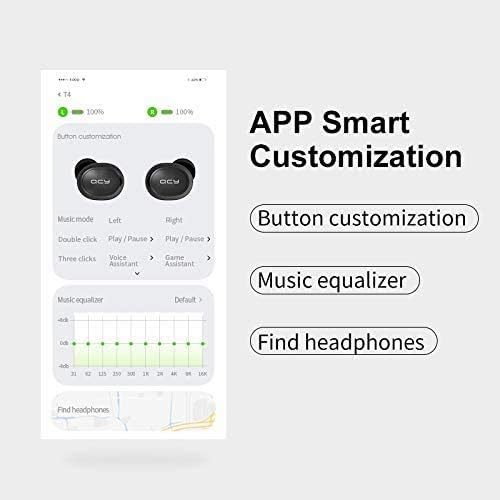
Imatge: Una imatge detallada view of the QCY app's smart customization features, including button remapping, sound equalizer settings, and a function to locate lost earbuds.
Manteniment
- Neteja: Netegeu regularment els auriculars i l'estoig de càrrega amb un drap suau i sec. Eviteu utilitzar líquids o productes de neteja abrasius.
- Emmagatzematge: When not in use, store the earbuds in their magnetic charging case to protect them from dust, damage, and accidental dropping.
- Cura de la bateria: Per allargar la durada de la bateria, evita descarregar completament els auriculars i l'estoig de càrrega amb freqüència. Carrega'ls regularment, fins i tot si no els fas servir constantment.
- Resistència a l'aigua: The earbuds are rated IPX4 waterproof, meaning they are resistant to splashing water from any direction. Do not submerge them in water or expose them to heavy rain.
Resolució de problemes
| Problema | Solució |
|---|---|
| Els auriculars no s'aparellen | Ensure earbuds are charged. Place them back in the case, close the lid, then open it again to re-enter pairing mode. Check your device's Bluetooth settings and try reconnecting. If issues persist, perform a factory reset via the QCY app. |
| Només funciona un auricular | Ensure both earbuds are charged. Place both earbuds back into the charging case, close the lid, and then open it again. This should re-sync them. If not, try a factory reset. |
| Mala qualitat de so o baix volum | Check the earbud fit and try different eartip sizes for a better seal. Clean any debris from the earbud speakers. Adjust volume on both your device and through the earbuds' touch controls. Ensure there are no obstructions between the earbuds and your device. |
| Problemes de càrrega | Ensure the charging cable is securely connected to both the case and the power source. Use a compatible charger (under 5V 2.1A). Clean the charging contacts on both the earbuds and the case. |
| El micròfon no funciona | Ensure the earbuds are properly connected to your device. Check your device's privacy settings to ensure microphone access is granted to the earbuds. Test in a quiet environment. |
Especificacions
| Característica | Detall |
|---|---|
| Versió Bluetooth | 5.0 |
| Sensibilitat al so | 104 ± 3 dB |
| Capacitat de la bateria dels auriculars | 43 mAh |
| Caixa de càrrega Capacitat de la bateria | 380 mAh |
| Impedància | 16 ohms ±15% |
| Interval d'operació | Over 10 meters (in open space) |
| Chipset | PAU1603 |
| Temps d'espera | 70 hores |
| Temps de càrrega | Aproximadament 2 hores |
| Temps de conversa | Aproximadament 4 hores |
| Temps de Música | Approximately 4.5 hours (with charging case: 20 hours) |
| Resposta de freqüència | 20 Hz ~ 20 kHz |
| Dimensions (caixa) | 66 × 40 × 30 mm |
| Pes | 40 g |
| Classificació impermeable | IPX4 |
| Mètode de control | Toca |
| Dispositius compatibles | All Bluetooth-enabled devices (Android 5.1 or above for app compatibility) |
Image: A visual summary of the QCY T9S earbuds' technical parameters and included accessories.
Garantia i Suport
For warranty information, please refer to the warranty card included with your purchase or contact your retailer. For technical support, frequently asked questions, and further assistance, please visit the official QCY weblloc o poseu-vos en contacte amb el seu servei d'atenció al client.
Fabricant: QCY