
Introducció
This manual provides comprehensive instructions for the ALLIMITY DR0337 replacement remote control. It is designed for use with various Sharp Aquos 3D TV models. Please read this manual carefully before using the remote control to ensure proper setup and operation.
1. Configuració
1.1 Instal·lació de la bateria
El comandament a distància requereix dues piles AAA (no incloses).
- Localitzeu la tapa del compartiment de la bateria a la part posterior del comandament a distància.
- Feu lliscar la tapa cap avall per obrir-la.
- Introduïu dues piles AAA, assegurant-vos de la polaritat correcta (+ i -) tal com s'indica a l'interior del compartiment.
- Feu lliscar la coberta al seu lloc fins que faci clic de manera segura.
Nota: Always replace both batteries at the same time. Do not mix old and new batteries or different types of batteries.
1.2 Initial Pairing (First-Time Installation)
If the remote control does not function with your TV during first-time installation, it may need to be paired.
- Assegureu-vos que el televisor estigui encès.
- Al comandament a distància, manteniu premut el botó GROC i BLAU buttons simultaneously for a few seconds.
- The power light on the remote control will blink 5 times to confirm successful pairing.

Image: ALLIMITY DR0337 Remote Control showing the location of the YELLOW and BLUE buttons for pairing. The image also contains text instructions for pairing and troubleshooting.
2. Instruccions de funcionament
This remote control provides full functionality for your Sharp Aquos 3D TV. Point the remote control directly at the TV's infrared sensor.
2.1 Funcions dels botons
- Botó d'engegada (
 ): Encén o apaga el televisor.
 - Botons numèrics (0-9): Selecciona els canals directament.
- NETFLIX: Accés directe a l'aplicació Netflix.
- YouTube: Direct access to the YouTube application.
- NET+: Accesses additional network services.
- GUIA DE TV: Mostra la guia electrònica de programes.
- TV: Switches to TV input.
- VOL +/-: Adjusts volume up or down.
- CH +/-: Canvia els canals amunt o avall.
- FAV: Accesses favorite channels.
- INFO: Displays information about the current program.
- MENÚ: Opens the TV's main menu.
- TORNAR: Torna a la pantalla o al menú anterior.
- Sortida: Surt del menú o de l'aplicació actual.
- OK / Navigation Buttons: Confirms selections and navigates through menus (Up, Down, Left, Right).
- Controls de reproducció (
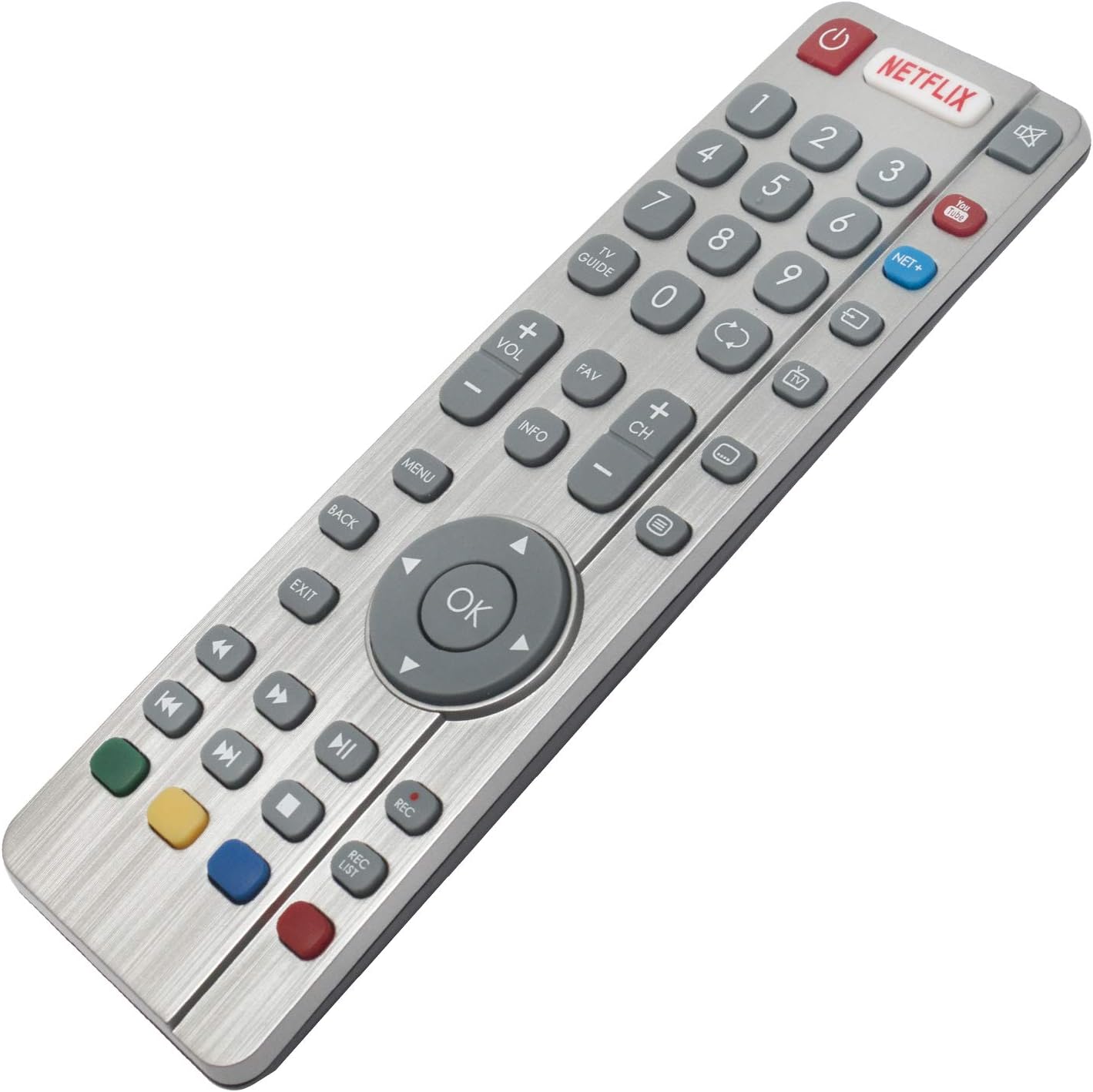 ): Rewind, Play/Pause, Fast Forward, Stop, Record (REC), Record List (REC LIST).
 - Botons de colors (vermell, verd, groc, blau): Functionality varies depending on the TV menu or application.

Imatge: Frontal view of the ALLIMITY DR0337 Remote Control, highlighting all buttons and their layout.
3. Manteniment
3.1 Neteja
To clean the remote control, gently wipe it with a soft, dry cloth. Do not use liquid cleaners, sprays, or abrasive materials, as these can damage the remote.
3.2 Substitució de la bateria
If the remote control's range decreases or it becomes unresponsive, the batteries may need to be replaced. Follow the battery installation steps in Section 1.1.
Avís: Dispose of used batteries according to local regulations. Do not expose batteries to excessive heat or fire.
4. Solució De Problemes
4.1 Remote Control Not Working (First-Time Installation)
If the remote control does not function with the TV during initial setup, it may require pairing.
- Assegureu-vos que el televisor estigui encès.
- Manteniu premut el botó GROC i BLAU buttons on the remote control for a few seconds.
- The power light will blink 5 times, indicating successful pairing.
4.2 Remote Control Not Powering On the TV
If the remote control fails to turn on the TV:
- Switch the TV on manually using the standby button on the TV set itself (not the remote control).
- Once the TV is on, press the standby button on the TV set again. This action should prompt a 'pairing menu' to appear on the screen.
- Scroll through the menu and highlight 'Pair your remote' by pressing the CH+ or CH- TV button (this is for navigating the TV's menu, not the remote's).
- Confirm your selection by pressing the TV set's standby button (which acts as an OK function in the menu).
- With the remote control, press and hold the GROC i BLAU botons durant uns segons.
- The power light on the remote control will blink 5 times to confirm that the TV and remote control are paired.
4.3 General Troubleshooting Tips
- Comproveu les bateries: Ensure batteries are inserted correctly and are not depleted. Replace them if necessary.
- Línia de visió: Assegureu-vos que no hi hagi cap obstacle entre el comandament a distància i el sensor d'infrarojos del televisor.
- Remote Control Reset: Remove batteries, press all buttons a few times to discharge any residual power, then reinsert batteries.
5. Especificacions
| Característica | Detall |
|---|---|
| Número de model | DR0337 (QH-SHW-RMC-0116-O) |
| Marca | ALLIMITAT |
| Tecnologia de connectivitat | infrarojos |
| Font d'alimentació | 2 piles AAA (es recomanen alcalines) |
| Interval màxim | 10 metres |
| Característica especial | Lleuger |
| Models de televisors compatibles | LC-32CFG6022E, LC-32CFG6241K, LC-32CFG6451K, LC-32CHG6022K, LC-32CHG6451K, LC-40CFG6022E, LC-40CFG6352K, LC-43CFG6021K, LC-43CFG6352E, LC-43CUG8062K, LC-49CFG6021K, LC-49CFG6352E, LC-49CUG8062K, LC-55CFG6021E, LC-55CFG6351K, LC-32CFG6021E, LC-32CFG6352E, LC-32CHG6021K, LC-32CHG6352E, LC-40CFG6021E, LC-40CFG6351K, LC-40CUG8052K, LC-43CFG6242K, LC-43CFG6452K, LC-43CUG8462KS, LC-49CFG6242K, LC-49CFG6452K, LC-49CUG8462KS, LC-55CFG6241K, LC-55CFG6452E, LC-32CFG6032E, LC-32CFG6352K, LC-32CHG6022E, LC-32CHG6352K, LC-40CFG6021K, LC-40CFG6352E, LC-43CFG6021E, LC-43CFG6351K, LC-43CUG8052K, LC-49CFG6021E, LC-49CFG6351K, LC-49CUG8052K, LC-55CFG6022E, LC-55CFG6352K, LC-24DHG6131K, LC-32CFG6351K, LC-32CHG6021E, LC-32CHG6351K, LC-32DHG6021K, LC-40CFG6242K, LC-40CFG6452K, LC-43CFG6241K, LC-43CFG6452E, LC-43CUG8461KS, LC-49CFG6241K, LC-49CFG6452E, LC-49CUG8461KS, LC-55CFG6022K, LC-55CFG6451K, LC-32CFG6022K, LC-32CFG6452E, LC-32CHG6241K, LC-32CHG6452E, LC-40CFG6022K, LC-40CFG6451K, LC-43CFG6022E, LC-43CFG6352K, LC-43CUG8361KS, LC-49CFG6022E, LC-49CFG6352K, LC-49CUG8361KS, LC-55CFG6021K, LC-55CFG6352E, LC-32CFG6021K, LC-32CFG6242K, LC-32CFG6452K, LC-32CHG6242K, LC-32CHG6452K, LC-40CFG6241K, LC-40CFG6452E, LC-43CFG6022K, LC-43CFG6451K, LC-43CUG8362KS, LC-49CFG6022K, LC-49CFG6451K, LC-49CUG8362KS, LC-55CFG6242K |
6. Informació de la garantia
Specific warranty information for the ALLIMITY DR0337 remote control is not provided in the product details. Please refer to the seller's return policy or contact the seller directly for warranty details.
7. Atenció al client
For further assistance or inquiries regarding your ALLIMITY DR0337 remote control, please contact the seller directly through the platform where the purchase was made.
Seller: MAXCONTROL INC (ID: A1WPNK9E5ZIVMG)
For general product information, you may visit the ALLIMITY brand page.