
Znewtech ZNT-ZT-X2P
Znewtech Hexagon Productivity Timer User Manual
Model: ZNT-ZT-X2P | Brand: Znewtech
Introducció
Welcome to the Znewtech Hexagon Productivity Timer user manual. This innovative digital timer and alarm clock is designed to enhance your time management, whether for work, study, cooking, or exercise. Its intuitive design allows for quick and easy setup of preset countdowns, helping you stay focused and productive.

Image: Znewtech Hexagon Productivity Timer promotional banner.
Característiques clau
- Funcionament intuïtiu: Start and stop countdowns by simply rotating the timer to the desired preset time.
- Pantalla digital: Clear LCD screen displays countdown time remaining and current clock time.
- Volum ajustable: Four volume levels (High, Mid, Low, Silent) to suit any environment.
- Alerta visual: Flashing LCD backlit visual alert for silent mode or additional notification.
- Horaris preestablerts: Includes common preset durations for quick use (5, 10, 15, 20, 30 minutes for this model).
Guia de configuració
1. Instal·lació de la bateria
The Znewtech Hexagon Productivity Timer requires 2 AAA batteries (not included). Follow these steps to install them:
- Locate the battery compartment cover on the underside of the timer.
- Feu lliscar o desenganxeu suaument la tapa per obrir el compartiment.
- Introduïu dues piles AAA, assegurant-vos de la polaritat correcta (+ i -) tal com s'indica a l'interior del compartiment.
- Torneu a col·locar la tapa del compartiment de la bateria fins que sentiu un clic i quedi ben fixada al seu lloc.
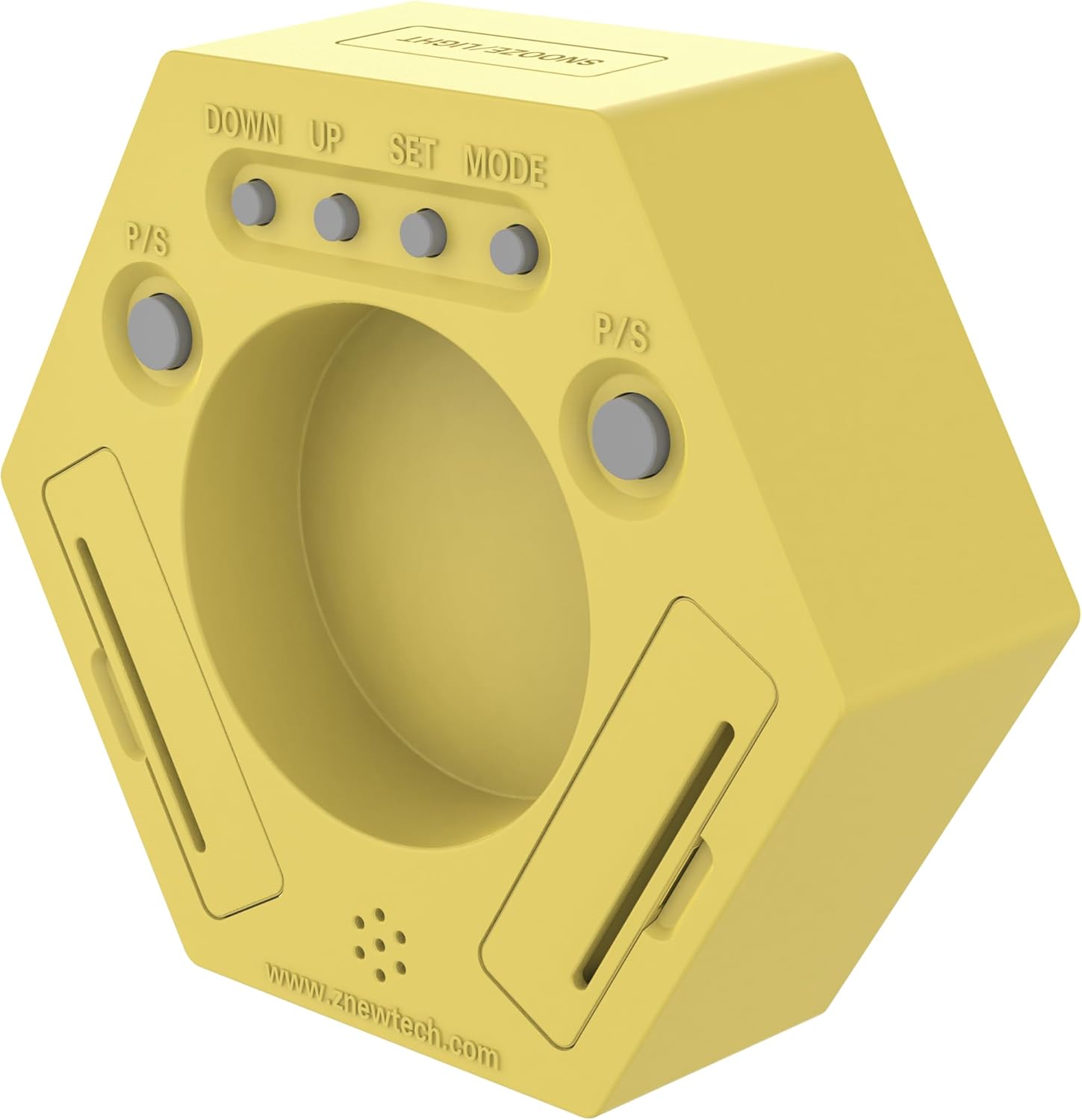
Imatge: Part posterior view of the timer, highlighting the battery compartment and control buttons.
2. Initial Power-On and Clock Setting
Upon successful battery installation, the timer will power on and display the current time (default 12:00 AM). To set the correct time:
- Ensure the timer is in 'Clock' mode (the side with the 'Clock' icon facing up).
- On the back of the timer, locate the 'SET' button. Press and hold it until the hour digits begin to flash.
- Use the 'UP' and 'DOWN' buttons to adjust the hour. Press 'SET' again to confirm and move to minutes.
- Adjust the minutes using 'UP' and 'DOWN'. Press 'SET' one more time to save the time.
Instruccions de funcionament
Ús del temporitzador de compte enrere
The Znewtech Hexagon Productivity Timer features pre-set countdown times on each of its six sides. To activate a timer:
- Identify the desired preset time (5, 10, 15, 20, or 30 minutes) on one of the timer's sides.
- Rotate the timer so that the desired time is facing directly upwards. The timer will automatically begin counting down from that preset.
- When the countdown reaches zero, the alarm will sound (if not in silent mode) and the LCD will flash.
- To stop the alarm, simply rotate the timer to any other side, or press the 'SNOOZE/LIGHT' button on top.

Imatge: Frontal view of the timer, showing the digital display and preset time labels on each side.
Funció de pausa/reprèn
During an active countdown, you can pause and resume the timer:
- To pause: Press the 'P/S' (Pause/Start) button located on the back of the timer. The countdown will freeze.
- To resume: Press the 'P/S' button again. The countdown will continue from where it left off.
Ajust de volum
Adjust the alarm volume to High, Mid, Low, or Silent:
- Locate the 'Volume' button on the back of the timer.
- Press the 'Volume' button repeatedly to cycle through the four volume levels. The current volume level will be indicated on the display.
Funció de repetició/llum
The button on the top of the timer serves two purposes:
- Dormitar: When the alarm sounds, press this button to activate snooze (if applicable, typically 5-10 minutes).
- Il·luminació de fons: Press this button at any time to briefly illuminate the LCD display for better visibility in low light conditions.
Manteniment
Neteja
Netegeu el temporitzador amb un drap suau i sec. No utilitzeu productes de neteja abrasius ni submergiu el dispositiu en aigua.
Canvi de bateria
When the display dims or the timer functions become erratic, it's time to replace the batteries. Follow the 'Battery Installation' steps in the Setup Guide.
Resolució de problemes
| Problema | Causa possible | Solució |
|---|---|---|
| Timer not turning on/display is blank. | Les bateries estan esgotades o instal·lades incorrectament. | Canvieu les piles, assegurant-vos de la polaritat correcta. |
| Timer not starting countdown when rotated. | Timer is not placed on a flat, stable surface; internal mechanism issue. | Ensure the timer is on a flat surface. If issue persists, contact customer support. |
| Alarm is too loud/quiet or not sounding. | La configuració del volum és incorrecta. | Press the 'Volume' button on the back to adjust the sound level. Check if it's set to 'Silent'. |
| La pantalla és tènue o difícil de llegir. | Low battery power or viewangle de ing. | Replace batteries. Adjust viewing angle or use the 'SNOOZE/LIGHT' button for temporary illumination. |
Especificacions
- Marca: Znewtech
- Model: ZNT-ZT-X2P
- Color: groc
- Material: Plàstic
- Dimensions del producte: 1.5 "P x 4.75" W x 4.25" H
- Pes de l'article: 11.4 unces (322 grams)
- Nombre de configuracions: 5 (5, 10, 15, 20, 30 Minute Presets)
- Mida de la pantalla: 2.25 polzades
- Bateries: Necessites 2 piles AAA (no incloses)
- País d'origen: Xina
Garantia i Suport
For warranty information or technical support, please refer to the documentation included with your product packaging or visit the official Znewtech weblloc web. Les dades de contacte del servei d'atenció al client normalment es proporcionen al lloc web del fabricant. website or within the product's retail packaging.
Ask a question about this manual
Ask about setup, troubleshooting, compatibility, parts, safety, or missing instructions. Manuals+ will review the question and use this page’s manual context to help answer it.