
Eonon P4
Eonon P4 9.33-Inch IPS Touchscreen Car Radio User Manual
Model: P4 | Brand: Eonon
Introducció
This manual provides detailed instructions for the installation, operation, and maintenance of your Eonon P4 9.33-inch IPS Touchscreen Car Radio. This device integrates wireless CarPlay and Android Auto, a dual camera system (4K front, 1080P rear), GPS navigation, Bluetooth, FM, and AUX connectivity to enhance your driving experience. Please read this manual thoroughly before using the product to ensure proper function and safety.

Figura 1: The Eonon P4 main unit displaying a CarPlay interface, along with the included 4K front camera, 1080P reversing camera, and 64GB MicroSD card.
Contingut del paquet
Verifiqueu que tots els elements que s'enumeren a continuació s'inclouen al vostre paquet:
- 1 x Head Unit (Eonon P4 Car Radio)
- 1 x suport base
- 1 x Suport de ventosa
- 1 cable d'alimentació de l'encenedor de cigarrets
- 1 x Backup Camera (Rear Lens)
- 1 x cable AUX
- 1 x Pry Bar
- 4 x Cable Clips (Wire Frame)
- 1 targeta MicroSD de 64 GB
- 1 x Manual d'usuari

Figura 2: Illustration of all components included in the Eonon P4 package. This image displays the main unit, mounting brackets, power cable, cameras, and accessories.
Configuració i instal·lació
The Eonon P4 offers two primary installation methods: via a base bracket or a suction cup bracket. Choose the method that best suits your vehicle's dashboard and your preference.
Mètodes de muntatge

Figura 3: Demonstrates the two available mounting options: a suction cup mount for windshield or smooth surfaces, and a dashboard base mount for a more permanent fixture.
- Base Bracket Installation:
- Attach the base bracket to the rear of the main unit.
- Remove the protective film from the adhesive on the bottom of the base bracket.
- Place the bracket firmly onto a clean, flat surface on your dashboard. Apply pressure for a few seconds to ensure a secure bond.
- Suction Cup Bracket Installation:
- Attach the suction cup bracket to the rear of the main unit.
- Clean the desired mounting surface (windshield or smooth dashboard area).
- Press the suction cup firmly against the surface and engage the locking mechanism to secure it.
Connexió d'alimentació

Figura 4: Illustrates the three main steps for quick installation: attaching the bracket, securing it to the dashboard, and connecting the power cable to the cigarette lighter socket.
After mounting the unit, connect the cigarette lighter power cable:
- Insert one end of the cigarette lighter power cable into the "Power In" port on the Eonon P4 unit.
- Insert the other end into your vehicle's cigarette lighter socket.
- The unit should power on automatically or after pressing the power button.
Instal·lació de la càmera
The Eonon P4 includes a 4K front camera (integrated) and a 1080P reversing camera. The reversing camera requires external installation.

Figura 5: Shows the 1080P backup camera, its IP68 waterproof rating, and examples of backup camera guidelines and a real-time interior view.
- Càmera frontal: Integrated into the main unit. Ensure its view està sense obstacles.
- Càmera de marxa enrere:
- Mount the 1080P reversing camera at the rear of your vehicle, typically near the license plate light or trunk handle.
- Route the camera cable to the main unit and connect it to the "Camera In" port.
- Connect the camera's power wire to your vehicle's reverse light circuit so it activates automatically when shifting into reverse.
Instruccions de funcionament
Pantalla i interfície

Figura 6: Highlights the 9.33-inch IPS display with 1600x600 resolution, showcasing its vibrant colors and responsive capacitive touchscreen. It also shows the detachable screen feature.
The Eonon P4 features a 9.33-inch IPS touchscreen with a resolution of 1600x600 pixels. The capacitive touchscreen provides a responsive user experience. The screen is detachable for security.
Wireless Connectivity (CarPlay & Android Auto)

Figura 7: Illustrates the wireless connectivity options including Apple CarPlay, Android Auto, Apple AirPlay, and Android Cast, showing how a smartphone screen can be mirrored or integrated.
The unit supports wireless Apple CarPlay and Android Auto. To connect your smartphone:
- Assegureu-vos que el Bluetooth i la Wi-Fi estiguin activats al vostre telèfon intel·ligent.
- On the Eonon P4, navigate to the CarPlay or Android Auto application.
- Follow the on-screen prompts to pair your phone via Bluetooth. Once paired, the Wi-Fi connection will be established automatically for wireless CarPlay/Android Auto functionality.
- You can now use voice commands (Siri/Google Assistant) for navigation, calls, music, and other supported applications.
Screen Mirroring (Apple AirPlay & Android Cast)
The Eonon P4 supports screen mirroring from your smartphone via Apple AirPlay and Android Cast. This allows you to display your phone's screen directly on the unit.
- To use AirPlay or Android Cast, ensure your phone and the P4 unit are connected to the same Wi-Fi network (or directly via the unit's Wi-Fi hotspot if available).
- Select the AirPlay or Android Cast option on the P4 and follow your phone's instructions to mirror the screen.
- Nota: Some streaming services (e.g., Netflix, Prime Video) may restrict screen mirroring due to content protection.
Dual Camera System and Loop Recording
The unit features an integrated 4K front camera (with WDR and 140° wide angle) and a 1080P rear camera (100° wide angle). Both cameras support loop recording and real-time display.
- Enregistrament en bucle: Vídeo footage is recorded in segments (1, 3, or 5 minutes). When the MicroSD card is full, the oldest fileLes s se sobreescriuen automàticament.
- Reversing Camera Display: When your vehicle is shifted into reverse, the unit will automatically display the 1080P rear camera feed.
- Visualització en temps real: Tu pots view both front and rear camera feeds simultaneously on the screen.
- Targeta MicroSD: The included 64GB MicroSD card is used for DVR recording. It supports cards from 32GB to 256GB, Class 10 or higher.
Pantalla dividida
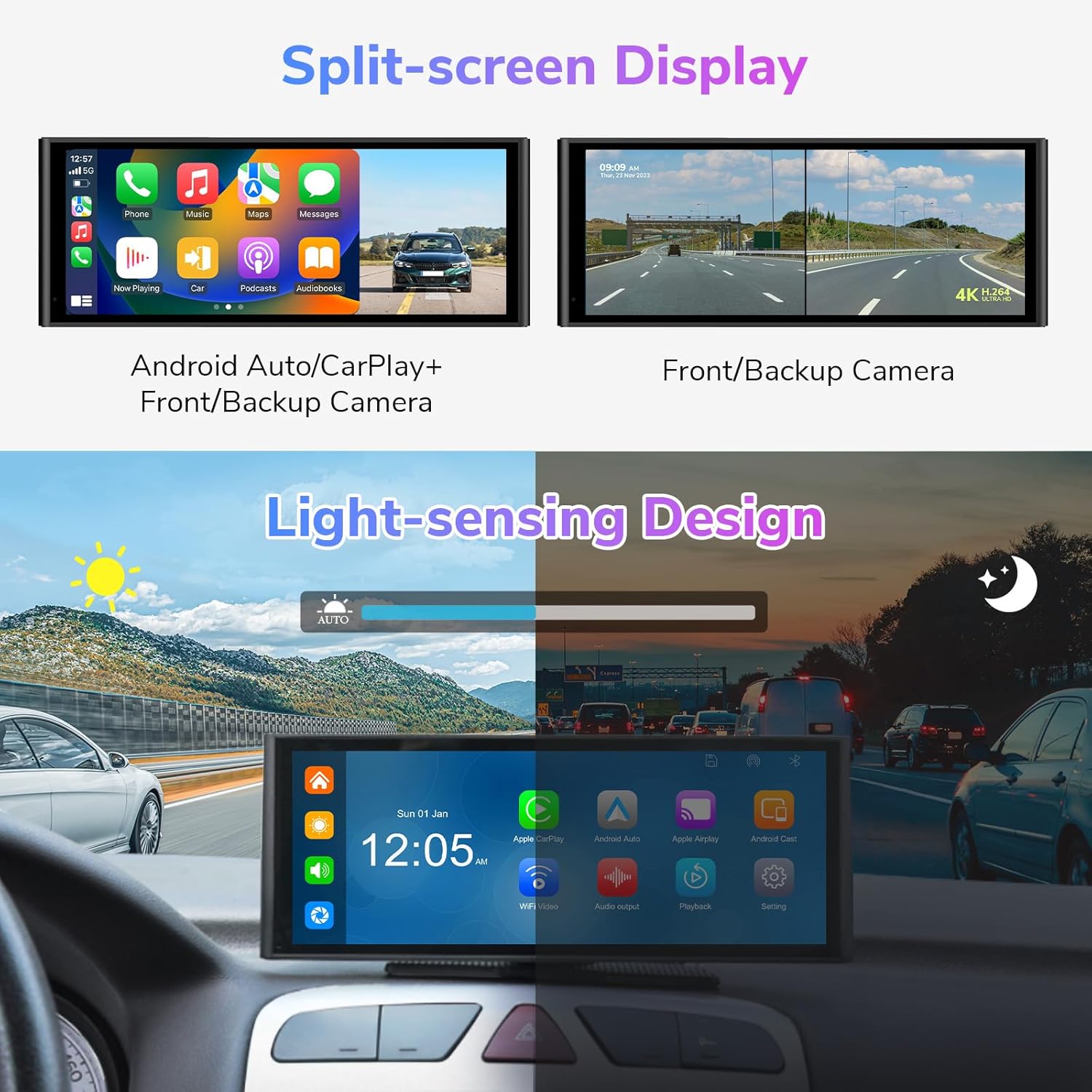
Figura 8: Illustrates the split-screen capability, showing combinations like CarPlay with camera view, Android Auto with camera view, and simultaneous front and backup camera views.
The split-screen function allows you to view two applications simultaneously. Supported combinations include:
- CarPlay + Front/Backup Camera
- Android Auto + Front/Backup Camera
- Front Camera + Backup Camera
Opcions de sortida d'àudio

Figura 9: Displays the four audio output methods: Bluetooth out, AUX out, FM transmit, and the built-in speaker, allowing users to choose how audio is played through their car's sound system.
The Eonon P4 offers four ways to output audio to your vehicle's sound system:
- Altaveu integrat: Per a la reproducció d'àudio directa des de la unitat.
- Transmissió FM: Transmit audio to your car's FM radio by tuning both devices to the same FM frequency.
- Sortida AUX: Connect the provided AUX cable from the P4's AUX output to your car's AUX input for a wired audio connection.
- Sortida Bluetooth: Pair the P4 with your car's Bluetooth system to stream audio wirelessly.
Light-Sensing Design
Figura 10: Illustrates the light-sensing design, showing how the screen brightness automatically adjusts between day and night modes based on ambient light conditions for optimal visibility.
The unit features a light-sensing design that automatically adjusts screen brightness based on ambient light conditions, ensuring optimal visibility during both day and night driving.
Manteniment
- Neteja de la pantalla: Feu servir un drap suau i sense borrissol per netejar suaument la pantalla tàctil. Per a taques difícils, fregueu lleugeramentampNetegeu el drap amb aigua o un netejador de pantalles. Eviteu productes químics agressius.
- Objectius de càmera: Keep the front and rear camera lenses clean for clear recordings. Use a soft cloth to remove dust or dirt.
- Targeta MicroSD: Periodically format the MicroSD card (e.g., monthly) to maintain optimal recording performance and prevent data corruption. Back up any important footage abans de formatar.
- Actualitzacions de firmware: Check the official Eonon webConsulteu el lloc web periòdicament per obtenir actualitzacions de firmware disponibles per assegurar-vos que el dispositiu tingui les funcions i correccions d'errors més recents.
Resolució de problemes
| Problema | Causa possible | Solució |
|---|---|---|
| La unitat no s'encén. | Power cable not connected properly; vehicle's cigarette lighter socket is not receiving power. | Ensure the cigarette lighter power cable is securely plugged into both the unit and the vehicle's socket. Check the vehicle's fuse for the cigarette lighter. |
| El CarPlay/Android Auto sense fil no es connecta. | Bluetooth/Wi-Fi not enabled on phone; incorrect pairing process; interference. | Ensure Bluetooth and Wi-Fi are active on your phone. Forget previous pairings on both devices and try pairing again. Ensure no other devices are interfering with the Wi-Fi signal. |
| Screen mirroring (AirPlay/Android Cast) not working for certain apps. | Content protection restrictions; Wi-Fi connectivity issues. | Some streaming services restrict mirroring. Ensure both devices are on the same Wi-Fi network. Try mirroring with a different app to isolate the issue. |
| La càmera de marxa enrere no es mostra. | Camera cable loose; power not connected to reverse light; camera malfunction. | Check all camera cable connections. Verify the camera's power wire is correctly connected to the reverse light circuit. Test the camera in another vehicle if possible. |
| Poor audio quality via FM transmit or Bluetooth. | FM interference; Bluetooth signal degradation. | For FM transmit, try a different, clear FM frequency. For Bluetooth, ensure the P4 is close to your car's Bluetooth receiver. Using the AUX cable often provides the best audio quality. |
| Screen brightness stuck in day mode. | Light sensor obstructed or software glitch. | Ensure the light sensor on the unit is not covered. Restart the unit. Check for firmware updates that might address this issue. |
Especificacions
| Característica | Detall |
|---|---|
| Model | P4 |
| Sistema | Linux |
| CPU | Allwinner V536 |
| Vol. Operatiutage | DC 7-32 V |
| Corrent de funcionament | ≤ 3 A |
| Mida de la pantalla | 9.33 inches (250mm x 97mm x 13mm) |
| Resolució de pantalla | 1600 x 600 |
| Càmera frontal | 4K, WDR, 140° Wide Angle |
| Càmera de marxa enrere | 1080P, 100° Wide Angle, IP68 Waterproof |
| Connectivitat | Wireless CarPlay, Android Auto, Bluetooth 5.0, USB, AUX |
| Compatibilitat amb targetes MicroSD | 32GB to 256GB (Class 10 or higher) |
| Sortida d'àudio | Built-in Speaker, FM Transmit, AUX Out, Bluetooth Out |
| Tipus de muntatge | Base Bracket, Suction Cup Bracket |
| Idiomes | English, Japanese, German, French, Korean, Spanish, Chinese, Russian |
| Pes de l'article | 0.5 kg (net), 1.4 kg (brut) |
Garantia i Suport
For warranty information, technical support, or service inquiries, please refer to the warranty card included with your product or visit the official Eonon weblloc web. Conserveu el rebut de compra com a comprovant de compra per a reclamacions de garantia.
Ask a question about this manual
Ask about setup, troubleshooting, compatibility, parts, safety, or missing instructions. Manuals+ will review the question and use this page’s manual context to help answer it.