
1. Informació important de seguretat
Llegiu atentament totes les instruccions abans del muntatge i l'ús. Si no seguiu aquestes instruccions, podeu patir lesions o danys al producte.
- Aquest escriptori està dissenyat només per a ús interior.
- Ensure all screws are tightened securely before use. Periodically check and re-tighten all fasteners.
- Do not overload the desk. The maximum weight recommendation is 176 pounds (80 kg).
- Mantingueu els nens i les mascotes allunyats de l'escriptori durant el funcionament.
- Avoid placing the desk in direct sunlight or in damp ambients.
- Do not disassemble or modify the desk's electrical components. Contact customer support for service.
Warning: The product will arrive in two separate packages and may be shipped separately. Do not discard any packaging until assembly is complete and the desk is fully functional.
2. Contingut del paquet
Your FLEXISPOT EN2 Electric Standing Desk is shipped in two packages. Please ensure you have received both packages before beginning assembly.
- Paquet 1: Desktop (48" Mahogany Top)
- Paquet 2: Desk Frame (Gray Frame), Motor, Control Panel, Power Strip, Cable Management Tray, Hardware, and User Manual.

Figure 2.1: The FlexiSpot EN2 desk components are shipped in two separate packages for safe delivery.
3. Muntatge i muntatge
Assembly typically requires one person and approximately 30-60 minutes. An electric drill (not included) may be helpful for certain steps.
- Desempaquetar components: Carefully remove all parts from both packages and lay them out on a soft, clean surface to prevent scratches. Verify all components are present against the packing list.
- Muntar el marc de l'escriptori: Attach the lifting columns to the feet. Ensure the crossbeam is correctly oriented.
- Attach Crossbeam: Secure the crossbeam to the lifting columns. Note that while some holes are pre-drilled for legs, the center holes for the crossbeam and cable tray may require self-tapping screws. Apply firm pressure with an electric drill for easy installation.
- Install Motors and Control Box: Follow the manual to connect the motor cables to the control box and secure the control box to the frame.
- Adjunta l'escriptori: Carefully place the desktop onto the assembled frame. Align the pre-drilled holes on the desktop with the frame and secure with screws.
- Instal·leu el tauler de control i el reglet d'endolls: Mount the 6-button digital control panel and the clamp-on power strip to the desired location on the desktop. The power strip can be clipped to the back or side.
- Gestió de cables: Utilize the included cable management device to organize and secure all power and data cables underneath the desk. This helps prevent cables from snagging during height adjustments.

Figure 3.1: Assembled FLEXISPOT EN2 Electric Standing Desk.

Figure 3.2: Effective cable management keeps your workspace tidy and safe.
4. Instruccions de funcionament
The desk features a 6-button digital controller for easy height adjustment and memory presets.
4.1 Ajust d'alçada
- Pujar escriptori: Press and hold the 'Up' arrow button (▲) to raise the desk. The LED display will show the current height.
- Escriptori inferior: Press and hold the 'Down' arrow button (▼) to lower the desk. The LED display will show the current height.
- The motorized system adjusts smoothly from 28.1 inches to 45.7 inches. The motor operates quietly at less than 50 dB.
4.2 Preajustos de memòria
The controller features 4 programmable memory presets to quickly switch between your preferred sitting and standing heights.
- Ajusteu l'escriptori a l'alçada desitjada amb els botons de fletxa amunt/avall.
- Press the 'M' button (Memory). The display will show 'S-'.
- Press one of the number buttons (1, 2, 3, or 4) within 3 seconds. The display will show 'S-1', 'S-2', etc., indicating the height is saved to that preset.
- Per recuperar una alçada desada, simplement premeu el botó numèric corresponent (1, 2, 3 o 4). L'escriptori es mourà automàticament a la posició desada.
4.3 Integrated Power Strip and USB Ports
The desktop is equipped with a removable power strip for convenient device charging and power access.
- The power strip includes 3 AC outlets (125V/12A) and 2 USB charging ports (5V/2A).
- It can be clipped to the back or side of your desk to suit your setup.

Figure 4.1: Digital control panel for height adjustment and memory presets.

Figure 4.2: Integrated power strip with AC outlets and USB charging ports.
4.4 Timer Function (if available on your model)
Some models may include a timer function to remind you to switch between sitting and standing positions. Refer to your specific model's manual for details on setting and using this feature.
5. Característiques
- Escriptori de peça sencera: The 1-inch eco-friendly desktop provides a seamless and spacious work surface, offering enhanced stability compared to multi-piece desktops.
- Construcció duradora: Constructed with an industrial-grade steel frame and solid tabletop, the desk can support up to 176 pounds (80 kg). Each frame undergoes rigorous testing for performance and durability.
- Cantonades arrodonides: The desktop features rounded corners for safety and to prevent accidental bumps or damage.
- Funcionament silenciós: The motor operates at less than 50 dB, ensuring a quiet work environment during height adjustments.

Figure 5.1: The whole-piece desktop offers enhanced stability and a smooth surface.

Figure 5.2: The desk operates with a quiet motor, producing less than 50 dB of noise.

Figure 5.3: The desk's robust construction supports up to 176 lbs.
6. Manteniment
- Neteja: Netegeu l'escriptori i el marc amb un drap suauamp tela. Eviteu netejadors abrasius o productes químics durs que puguin danyar l'acabat.
- Inspecció: Reviseu periòdicament tots els cargols i perns per assegurar-vos que estiguin ben ajustats. Torneu a apretar-los si cal.
- Gestió de cables: Assegureu-vos que els cables estiguin ben organitzats i que no quedin pinçats ni tensats durant els ajustos d'alçada.
7. Solució De Problemes
- L'escriptori no es mou: Check all cable connections, especially the power cord and motor cables. Ensure the power outlet is functional.
- Moviment desigual: Perform a reset procedure (refer to the full user manual for specific steps). Ensure the desk is not overloaded or obstructed.
- Codis d'error: If an error code appears on the LED display, consult the comprehensive user manual for specific troubleshooting steps related to that code.
8. Especificacions
| Característica | Detall |
|---|---|
| Marca | FLEXISPOT |
| Número de model | EN2 |
| Mida d'escriptori | 48"D x 24"W (Dimensions may vary slightly by 0 to 1") |
| Material d'escriptori | Wood (Mahogany Top) |
| Material del marc | Alloy Steel (Gray Frame) |
| Interval d'ajust d'altura | 28.1" a 45.7" |
| Mecanisme d'elevació | Elèctric |
| Nivell de soroll del motor | Menys de 50 dB |
| Capacitat de càrrega màxima | 176 lliures (80 kg) |
| Tauler de control | 6-button digital controller with 4 memory presets |
| Endoll | 3 endolls de corrent altern (125 V/12 A) |
| Ports de càrrega USB | 2 ports USB (5V/2A) |
| Muntatge obligatori | Sí |
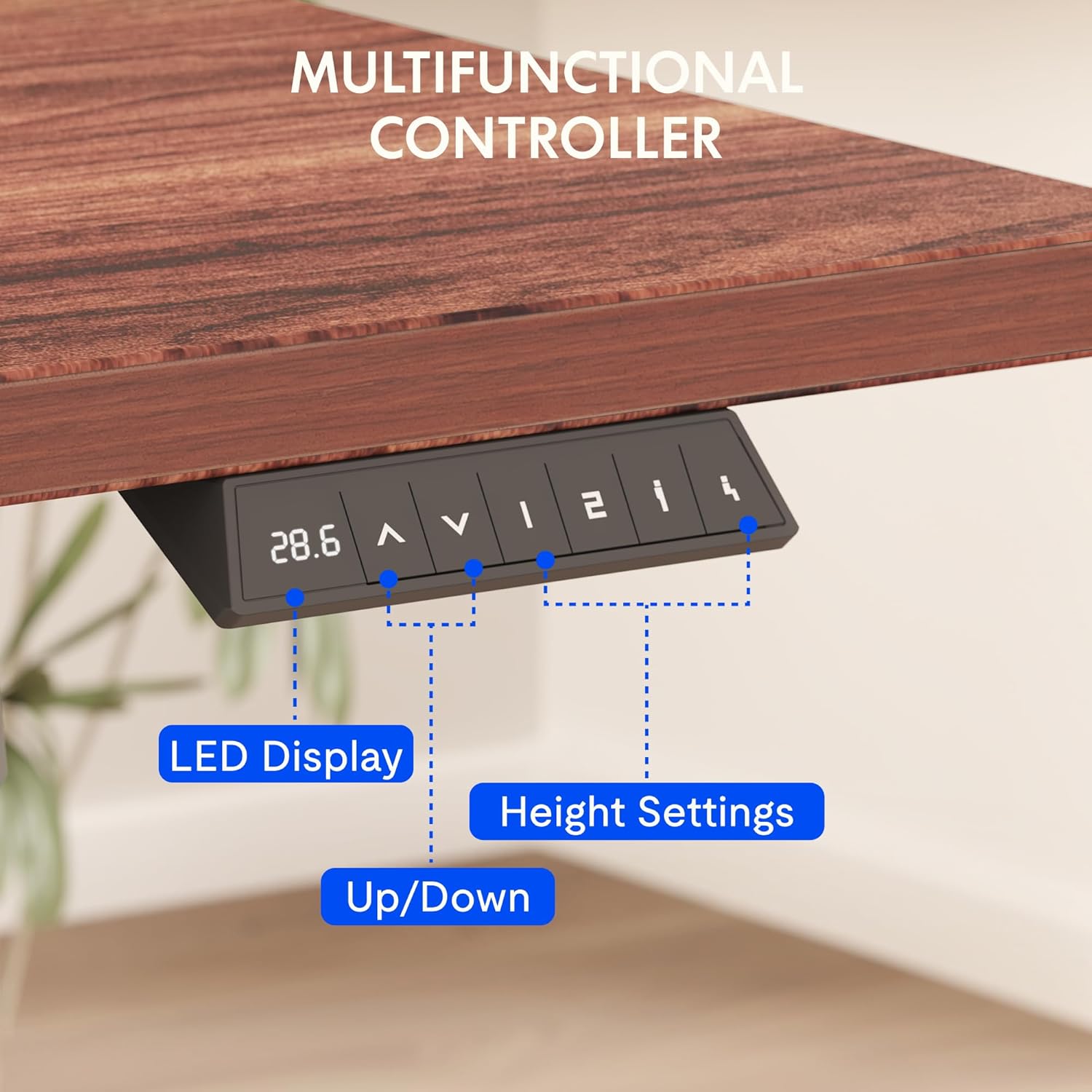
Figure 8.1: Key dimensions and features of the FLEXISPOT EN2 desk.
9. Garantia i Suport
FLEXISPOT provides comprehensive warranty coverage for your EN2 Electric Standing Desk:
- 5 any de garantia: Applies to frames, motors, and other mechanical devices.
- 2 any de garantia: Applies to controllers, switches, and electronics.
For customer support, troubleshooting assistance, or warranty claims, please visit the official FLEXISPOT weblloc web o contacteu directament amb el seu departament d'atenció al client.
10. Vídeos oficials de productes
10.1 Computer Workstation Table Test
Video 10.1: A demonstration of the FLEXISPOT EN2 desk's stability and functionality as a computer workstation.
10.2 Flexispot Classic Height Adjustable Standing Desk Series
Vídeo 10.2: Un overview of the FlexiSpot Classic Height Adjustable Standing Desk Series, highlighting key features and design.
10.3 FLEXISPOT Brand Introduction
Video 10.3: A brief introduction to the FLEXISPOT brand and its commitment to ergonomic solutions.