
1. Introducció
The Walfront FY8300S-20M is a high-performance 3-channel arbitrary waveform generator that integrates multiple functions including a function generator, arbitrary waveform generator, pulse generator, 4-channel TTL generator, frequency counter, and meter. Utilizing Direct Digital Synthesis (DDS) technology, it produces accurate, stable, and low-distortion output signals. This manual provides essential information for the safe and efficient operation of your device.
2. Informació de seguretat
Si us plau, llegiu i comprengui totes les instruccions de seguretat abans de fer servir el dispositiu. Si no segueix aquestes instruccions, es poden produir descàrregues elèctriques, incendis o danys al producte.
- Font d'alimentació: Assegureu-vos que el dispositiu estigui connectat a una font d'alimentació que coincideixi amb el volum especificattage (240 Volts AC Mains).
- Posada a terra: Always connect the device to a properly grounded power outlet.
- Medi ambient: Feu funcionar el dispositiu en un lloc sec i ben ventilat, allunyat de la llum solar directa, les altes temperatures, la humitat i els gasos corrosius.
- Ventilació: Do not block ventilation openings. Adequate airflow is necessary to prevent overheating.
- Manteniment: No intenteu reparar el dispositiu vosaltres mateixos. Demaneu tot el servei a personal qualificat.
- Protecció de sortida: The device includes output short-circuit protection. However, avoid prolonged short-circuit conditions to prevent potential damage.
3. Producte acabatview
3.1 Característiques clau
- Alt rendiment: Combines function, arbitrary waveform, pulse, and 4-channel TTL generation with frequency counting.
- DDS Technology: Utilizes Direct Digital Synthesis for accurate, stable, and low-distortion output signals.
- Three Independent Channels: Features three completely independent output channels that can work synchronously with adjustable phase differences.
- Funcionament intuïtiu: Quick saving of current instrument parameters via the OK key, with automatic loading on startup.
- Protecció integral: Includes output short-circuit protection and standard channel tracking.
- Expandabilitat: Supports up to 98 function/arbitrary waveforms and an open communication protocol for secondary development.
3.2 Components i controls
The FY8300S-20M features a clear display, control buttons, a rotary encoder, and multiple output ports. Familiarize yourself with the layout for efficient operation.

Figura 1: Davant view of the Walfront FY8300S-20M, highlighting its Direct Digital Synthesis (DDS) capabilities, arbitrary waveform memory, adjustable pulse width, pulse frequency, and independent duty cycle control for both channels.
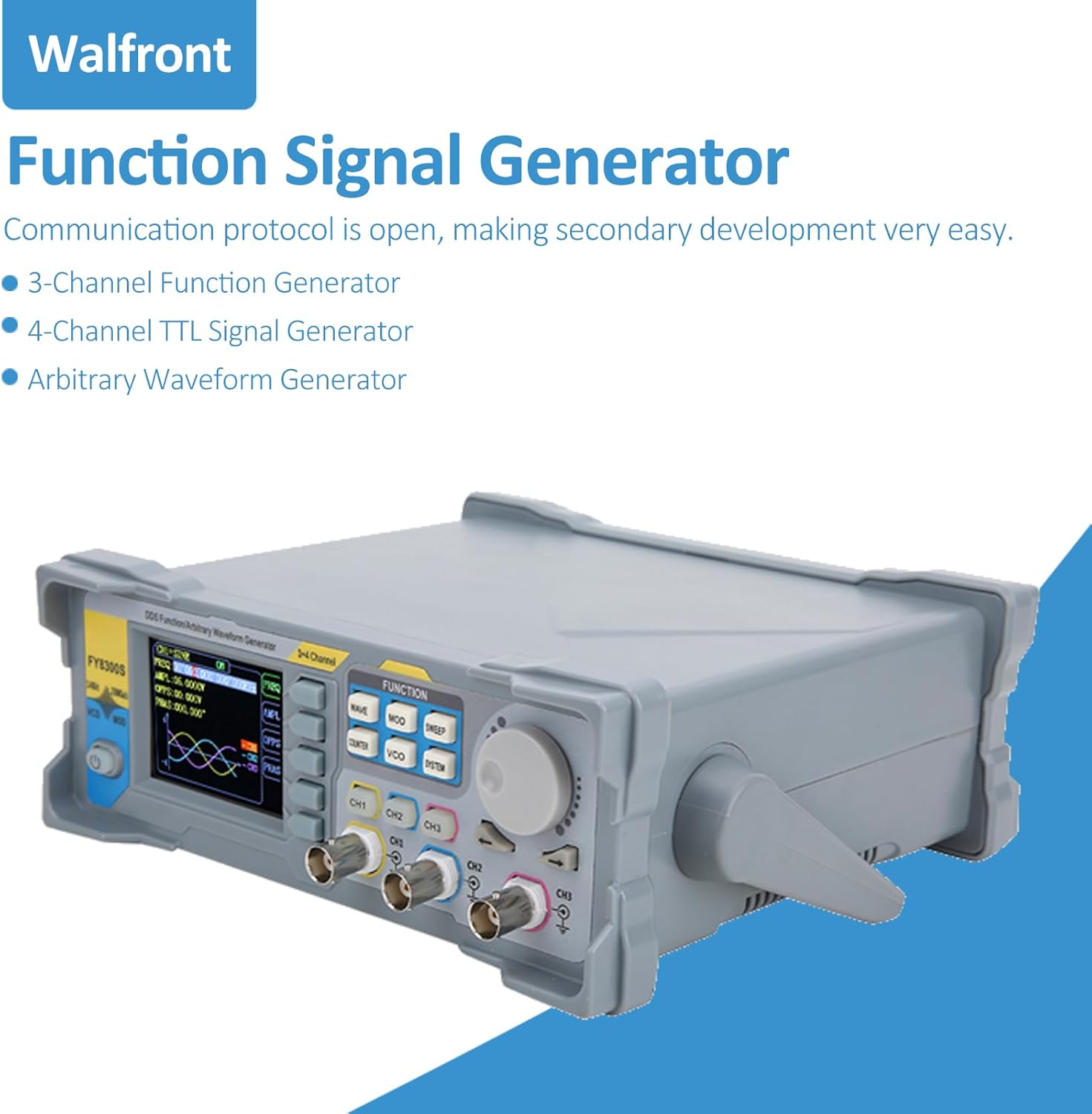
Figura 2: En angle view of the Walfront FY8300S-20M Function Signal Generator, illustrating its design and the open communication protocol for secondary development, along with its capabilities as a 3-channel function generator, 4-channel TTL signal generator, and arbitrary waveform generator.

Figura 3: Davant view of the Walfront FY8300S-20M, emphasizing its large-scale integrated circuit design, output short-circuit protection, and completely independent three-channel output capabilities.
3.3 Contingut del paquet
Verifiqueu que tots els elements siguin presents al paquet:
- 1 x Generator Host (Walfront FY8300S-20M)
- 1 x Host Power Cord
- 3 x Clip Line
- 3 x BNC-BNC Cable
- 1 x cable USB

Figura 4: The Walfront FY8300S-20M generator shown with its included accessories: power cord, clip lines, BNC-BNC cables, and USB cable. Accompanying text details key specifications such as display type, maximum output frequency, sampling rate, frequency accuracy, and output ampla latitud.
4. Configuració
- Desembalatge: Carefully remove the generator and all accessories from the packaging. Inspect for any signs of damage.
- Col·locació: Place the generator on a stable, level surface with adequate ventilation around the unit.
- Connexió d'alimentació: Connect the provided power cord to the AC input on the rear panel of the generator and then to a grounded AC mains outlet.
- Encesa inicial: Press the power button on the front panel to turn on the device. The display should illuminate.
- Connexió de sortides: Use the BNC-BNC cables or clip lines to connect the desired output channels (CH1, CH2, CH3) to your test circuit or measurement device.
- Connexió USB (opcional): For PC control and secondary development, connect the USB cable from the generator to your computer.
5. Instruccions de funcionament
The FY8300S-20M offers a user-friendly interface for generating various waveforms. The main controls include function buttons, a rotary encoder for value adjustment, and channel-specific output controls.
5.1 Basic Waveform Generation
- Seleccioneu el canal: Premeu el botó CH1, CH2, o CH3 button to select the desired output channel.
- Selecciona la forma d'ona: Premeu el botó ONADA button to cycle through available waveforms (Sine, Square, Triangle, Pulse, Arbitrary, etc.).
- Ajust de freqüència: Use the rotary encoder to adjust the frequency. Press the encoder to switch between coarse and fine adjustment.
- Ajustar Amplatitud: Premeu el botó AMPL button and use the rotary encoder to set the desired peak-to-peak ampla latitud.
- Adjust Offset: Premeu el botó OFFS button and use the rotary encoder to set the DC offset.
- Habilita la sortida: Ensure the selected channel's output is enabled (usually indicated by an LED or on-screen icon).
5.2 Funcions avançades
- Arbitrary Waveform: The device supports up to 98 arbitrary waveforms. Refer to the detailed software manual for creating and loading custom waveforms.
- Pulse Generation: For pulse waveforms, adjust pulse width and pulse frequency independently. The pulse amplitude can also be set.
- Ajust de fase: For multi-channel synchronous operation, adjust the phase difference between channels (0 to 359.99°).
- Comptador de freqüència: Utilitza el CONTADOR function to measure external frequencies.
- Desar la configuració: Manteniu premut el botó OK key to save the current instrument parameters. These settings will be automatically loaded upon the next startup.

Figura 5: A split image showing the top-front of the Walfront FY8300S-20M, illustrating its user-friendly interface with shortcut keys for simplified operation. The bottom part shows the rear panel, emphasizing the stable and low-distortion output signal achieved through DDS technology.
6. Manteniment
- Neteja: Feu servir un drap suau i sec per netejar l'exterior del dispositiu. No utilitzeu productes de neteja abrasius ni dissolvents.
- Apagar: Always turn off and unplug the device before cleaning or when not in use for extended periods.
- Emmagatzematge: Store the generator in a cool, dry place, away from dust and extreme temperatures.
- Inspecció: Periodically inspect cables and connectors for wear or damage. Replace if necessary.
7. Solució De Problemes
If you encounter issues with your Walfront FY8300S-20M, refer to the following common problems and solutions:
| Problema | Causa possible | Solució |
|---|---|---|
| El dispositiu no s'encén | No power supply; Faulty power cord; Power button not pressed. | Check power cord connection; Ensure outlet has power; Press power button firmly. |
| Sense senyal de sortida | Output channel not enabled; Incorrect waveform parameters; Faulty cable connection. | Ensure channel output is enabled; Verify frequency/amplitude settings; Check cable connections. |
| La pantalla està en blanc o congelada | Software error; Device malfunction. | Restart the device; If problem persists, contact customer support. |
| Inaccurate frequency/ampla latitud | Incorrect settings; Calibration required. | Double-check all parameter settings; If consistently inaccurate, contact customer support for calibration information. |
Si el problema persisteix després d'intentar aquestes solucions, poseu-vos en contacte amb el servei d'atenció al client de Walfront per obtenir més ajuda.

Figura 6: The Walfront FY8300S-20M generator and its accessories in a laboratory environment, illustrating its robust short-circuit protection feature, which allows signal output terminals to operate safely under load short-circuit conditions for up to 60 seconds.
8. Especificacions
The following are the technical specifications for the Walfront FY8300S-20M 3-Channel Arbitrary Waveform Generator:
- Visualització: 2.4 inches (320 x 240) color LCD
- Maximum Output Frequency: 60MHz (Sine wave)
- SampTarifa de ling: 250MSa / s
- Resolució vertical: 14 bits
- Precisió de freqüència: Fins a 10-6 ordre
- Resolució de freqüència: 1uHz (0.000001Hz)
- Sortida Amplatitud: Up to 24Vpp, resolution up to 1mV (0.001V)
- DC Bias Function: -12V ~ +12V (for frequencies <20MHz), resolution up to 1mV
- Duty Cycle Adjustment: Independent for two channels, accuracy up to 0.01%
- Pulse Width & Frequency: Continuously adjustable, range 20ns-1S
- Pols Amplatitud: Continuously adjustable between 0-12V, accuracy 0.001V
- Ajust de fase: 0 ~ 359.99°, accuracy 0.01° (for three channels)
- Digital Output Function: Any CMOS level with amplitude of 0 ~ 12V
- Font d'alimentació: AC Mains (240 Volts)
- Característica especial: Protecció contra curtcircuits
9. Garantia i Suport
For warranty information and technical support, please refer to the documentation provided with your purchase or visit the official Walfront website. If you require assistance with troubleshooting or repairs, please contact Walfront customer service. Ensure you have your model number (FY8300S-20M) and purchase details available when contacting support.
Botiga Walfront: Visita la botiga Walfront a Amazon