
1. Producte acabatview
The Cimetech Wireless Ergonomic Mouse (Model TM-004) is designed for comfortable and efficient computer navigation. It features 2.4G wireless connectivity, adjustable DPI settings, and a silent click design.

Imatge 1.1: Part superior view of the Cimetech Wireless Ergonomic Mouse, showing the scroll wheel and DPI button.
2. Contingut del paquet
Si us plau, verifiqueu que tots els elements siguin presents al paquet:
- Ratolí sense fil
- Receptor USB
- Manual d'usuari
3. Instruccions de configuració
3.1 Instal·lació de la bateria
- Localitzeu el compartiment de la bateria a la part inferior del ratolí.
- Obriu la tapa del compartiment de la bateria.
- Introduïu una pila AA (no inclosa) al compartiment, assegurant-vos de la polaritat correcta (+/-).
- Tanqueu bé la tapa del compartiment de la bateria.
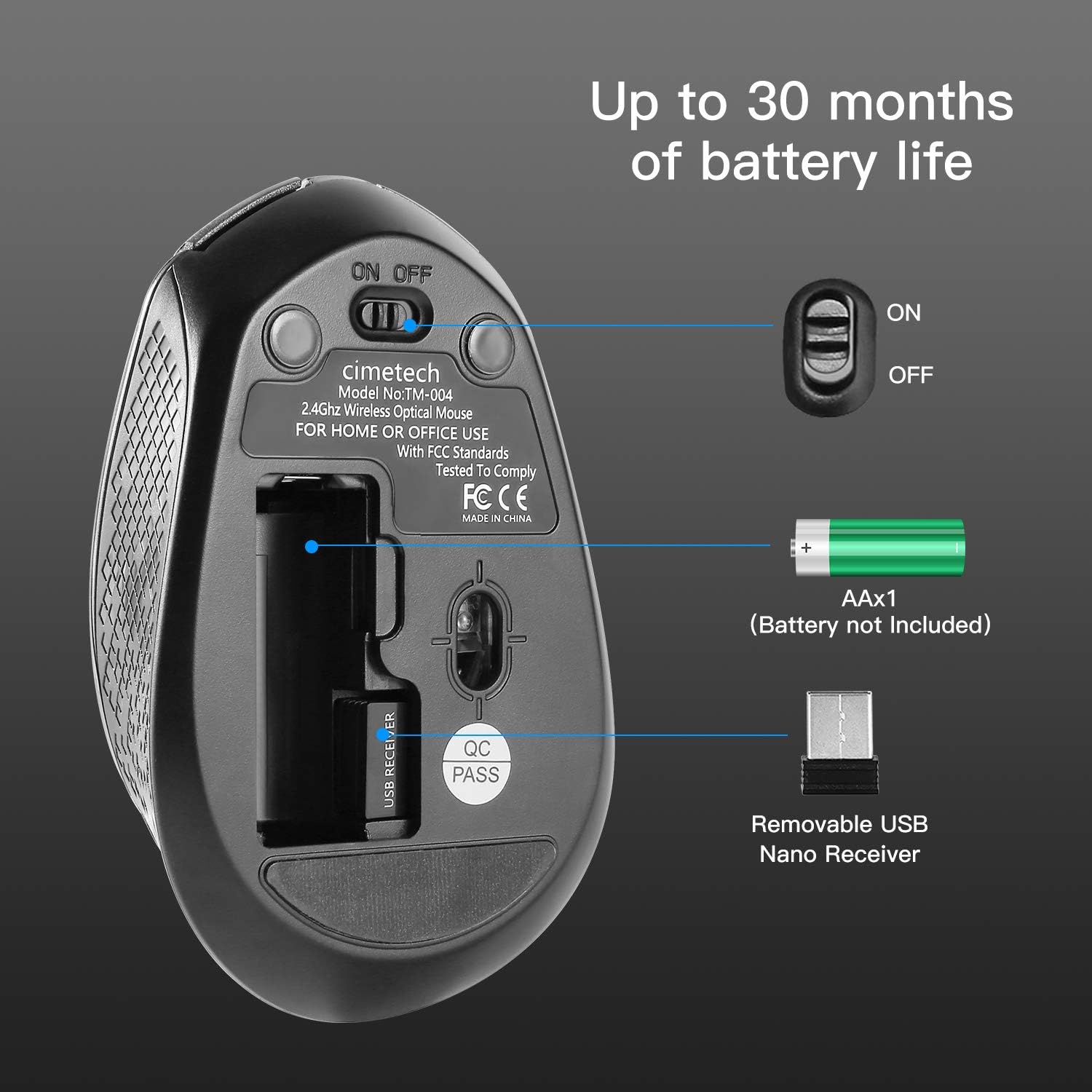
Image 3.1: Underside of the mouse, illustrating the battery compartment, ON/OFF switch, and USB receiver storage.
3.2 Connexió del receptor USB
- Remove the USB receiver from its storage slot on the underside of the mouse.
- Plug the USB receiver into an available USB port on your computer (laptop, desktop, Mac, or PC).
- El ratolí és plug-and-play; normalment no calen controladors addicionals.
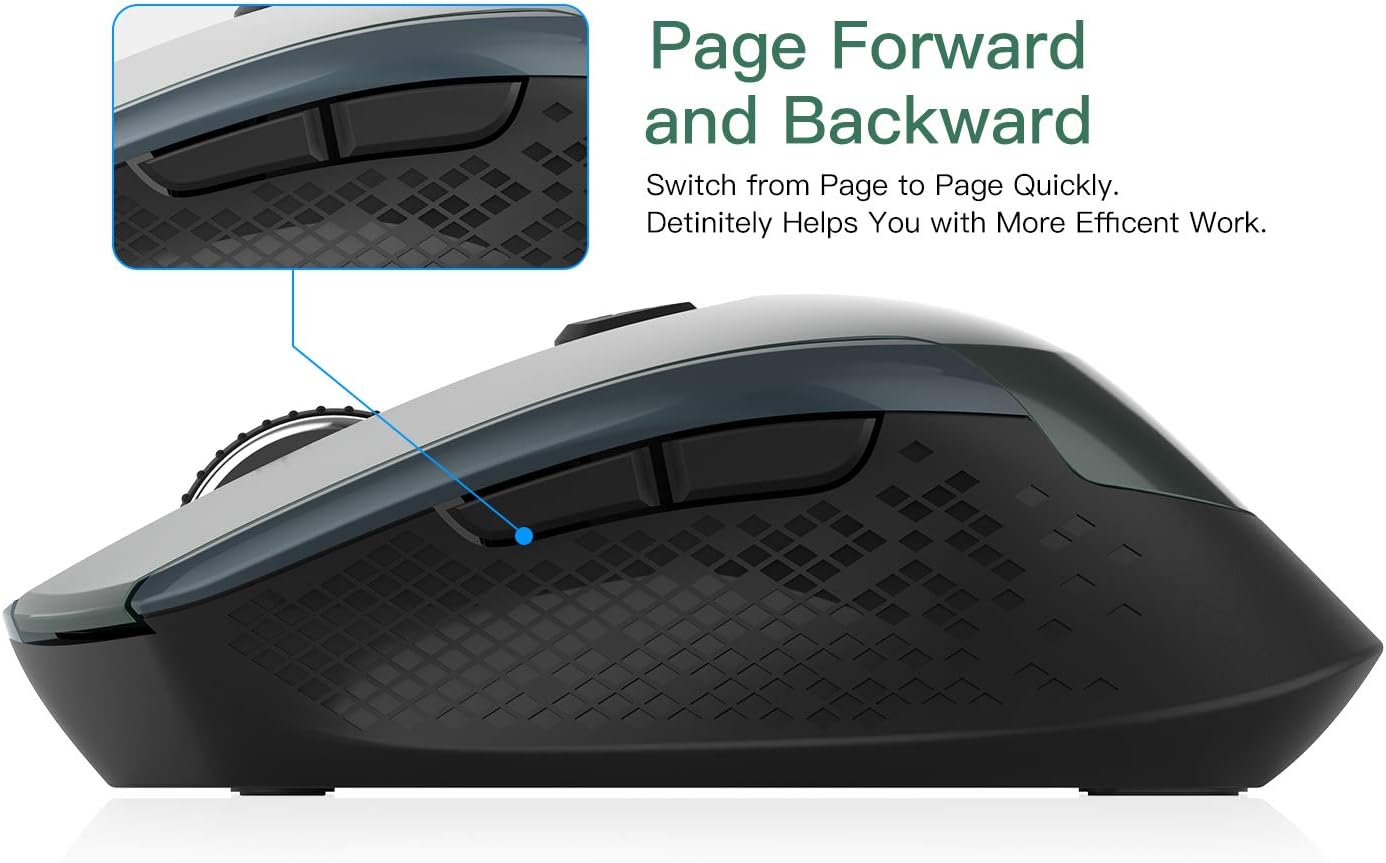
Image 3.2: The USB receiver connected to a laptop, demonstrating the wireless setup.
4. Instruccions de funcionament
4.1 Engegada/apagada
Locate the ON/OFF switch on the underside of the mouse (refer to Image 3.1). Slide the switch to the 'ON' position to power on the mouse. Slide it to 'OFF' when not in use to conserve battery life.
4.2 Ajust de la sensibilitat dels DPI
The mouse features 3 adjustable DPI levels (800/1200/1600). To change the DPI, press the DPI button located behind the scroll wheel. Each press cycles through the available DPI settings, allowing for real-time adjustment of cursor speed and precision.
4.3 Funcions dels botons
The mouse is equipped with 6 buttons:
- Botó esquerre de clic: Selecció i activació estàndard.
- Botó dret: Accedeix als menús contextuals.
- Roda de desplaçament: Scrolls content vertically. Can also be pressed for middle-click functionality.
- Botó DPI: Ajusta la sensibilitat del cursor (DPI).
- Botó Endavant: Navega cap endavant web navegadors o file exploradors.
- Botó enrere: Navega cap enrere web navegadors o file exploradors.

Imatge 4.1: Lateral view of the mouse, indicating the location of the page forward and backward buttons.
4.4 Ergonomic Design and Silent Clicking
The mouse features an ergonomic design with a soft rubber grip, shaped to fit comfortably in your hand for extended use. Its silent click mechanism reduces operational noise, making it suitable for quiet environments.
4.5 Auto Sleep Function
To conserve battery power, the mouse will automatically enter a sleep mode after 15 minutes of inactivity. To wake the mouse, simply move it or click any button.
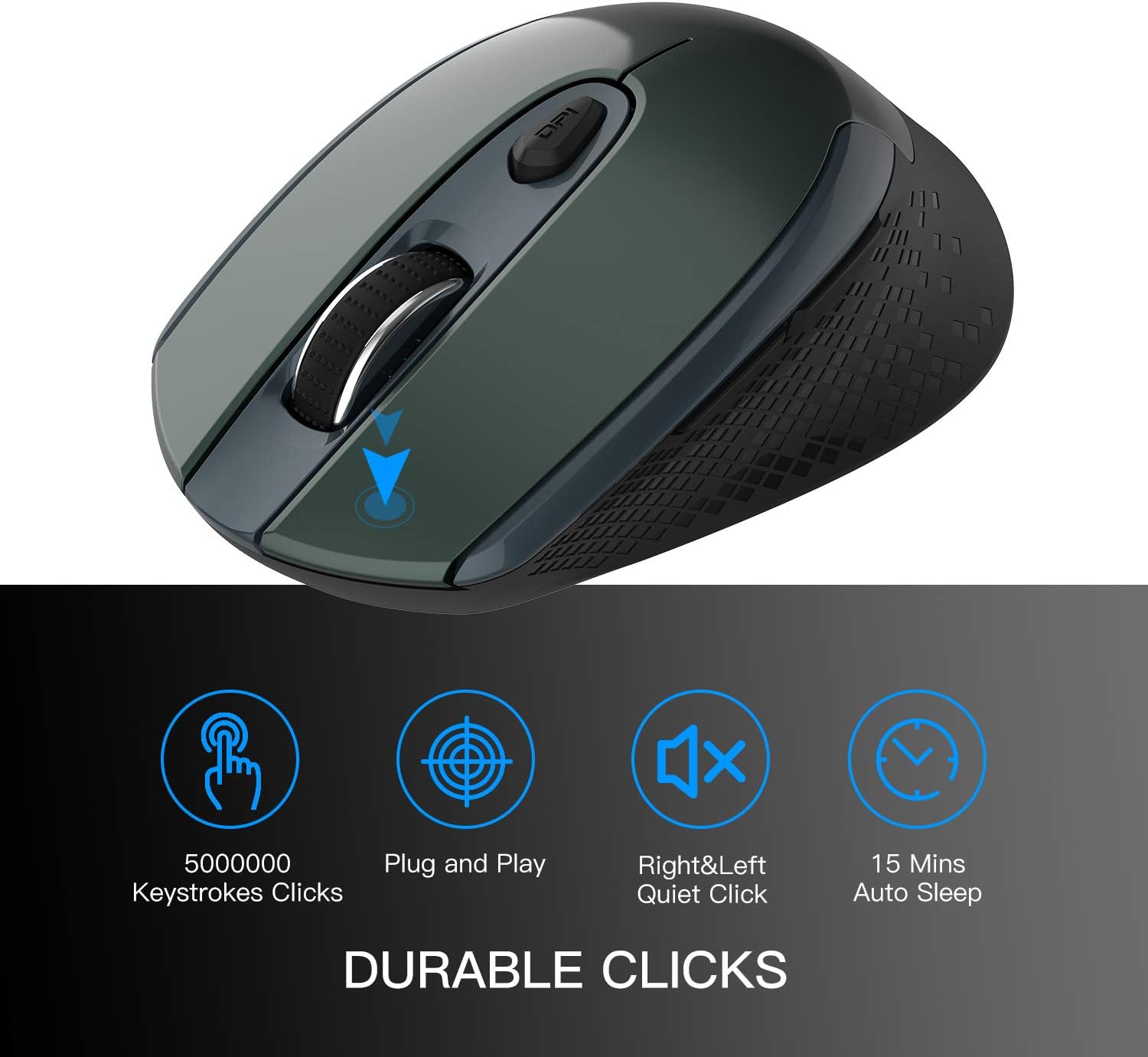
Image 4.2: Visual representation of key features including durable clicks, plug and play, quiet operation, and auto sleep.
5. Manteniment
5.1 Neteja
To clean the mouse, gently wipe its surface with a soft, dry cloth. Avoid using harsh chemicals or abrasive materials, as these can damage the finish.
5.2 Substitució de la bateria
When the mouse's performance degrades or the cursor becomes erratic, it may indicate a low battery. Replace the AA battery as described in Section 3.1. The mouse is designed for up to 30 months of battery life, depending on usage.
6. Solució De Problemes
- El ratolí no respon:
- Assegureu-vos que el ratolí estigui encès.
- Comproveu si la bateria està instal·lada correctament i té prou càrrega. Substituïu-la si cal.
- Verify that the USB receiver is securely plugged into a working USB port on your computer.
- Proveu de connectar el receptor USB a un port USB diferent.
- Move the mouse closer to the USB receiver to ensure it is within the 50-foot wireless range.
- Moviment erràtic del cursor:
- Assegureu-vos que el sensor òptic de la part inferior del ratolí estigui net i lliure d'obstruccions.
- Use the mouse on a suitable surface; highly reflective or transparent surfaces may affect tracking. A mouse pad is recommended.
- Substitueix la bateria si està baixa.
- Botons que no funcionen:
- Assegureu-vos que el ratolí estigui encès i connectat.
- Test the mouse on a different computer to rule out software or system issues.
If you encounter issues not covered here, please contact customer support for assistance.
7. Especificacions
| Característica | Descripció |
|---|---|
| Número de model | TM-004 |
| Connectivitat | Sense fil 2.4G (receptor USB) |
| Configuració de DPI | 800 / 1200 / 1600 (Ajustable) |
| Botons | 6 (Esquerra, Dreta, Roda de desplaçament, DPI, Endavant, Enrere) |
| Detecció de moviment | Òptic |
| Característiques especials | Ergonomic Design, Portable, Silent Click, Auto Sleep |
| abast sense fils | Fins a 50 peus |
| Tipus de bateria | 1 x AA (no inclòs) |
| Durada de la bateria | Fins a 30 mesos (aproximadament) |
| Compatibilitat | Windows 7/8/10/XP, Vista 7/8, Linux, Mac OS (Desktop, Laptop, PC, MacBook) |
| Pes de l'article | 2.89 unces |
| Dimensions (L x A x A) | 4.1 x 2.6 x 1.2 polzades (aproximadament) |

Image 7.1: Approximate dimensions of the mouse.
8. Garantia i Suport
For warranty information or technical support, please refer to the contact details provided with your purchase or visit the official Cimetech weblloc web. Si us plau, conserveu el comprovant de compra per a qualsevol reclamació de garantia.