
1. Introducció
This manual provides comprehensive instructions for the proper use, setup, and maintenance of your SMARTEK SW-832 Smartwatch. Please read this manual thoroughly before operating the device to ensure optimal performance and longevity.
The SMARTEK SW-832 is a versatile smartwatch designed to integrate with your mobile communication and activity tracking needs. It features Bluetooth connectivity, a touchscreen interface, and the capability to function as a standalone mobile device with a Micro-SIM card.
2. Contingut del paquet
Verifiqueu que tots els elements siguin presents al paquet del producte:
- SMARTEK SW-832 Smartwatch
- Cable de càrrega
- Manual d'usuari (aquest document)
- 32GB Micro SD Card (if included in your specific package)
3. Dispositiu acabatview
Familiarize yourself with the physical components of your SMARTEK SW-832 Smartwatch.
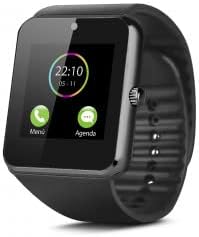
This image displays the SMARTEK SW-832 Smartwatch from the front. The square touchscreen shows a digital clock (22:10) and two icons labeled 'Menú' (Menu) and 'Agenda' (Calendar). A circular physical button is visible on the right side of the watch casing. The watch features a black silicone strap.
- Pantalla tàctil: Interfície principal per a la interacció.
- Power Button/Home Button: Typically located on the side, used for powering on/off and returning to the home screen.
- Micròfon: For calls and voice input.
- Ponent: For call audio and notifications.
- Port de càrrega: Per connectar el cable de càrrega.
- Ranura per a targeta SIM: For inserting a Micro-SIM card.
- Ranura per a targetes Micro SD: Per ampliar l'emmagatzematge.
- Càmera: Integrated camera for capturing images.
4. Configuració
4.1 Càrrega del dispositiu
- Connect the charging cable to the smartwatch's charging port.
- Connecteu l'altre extrem del cable a un adaptador de corrent USB compatible o al port USB d'un ordinador.
- Allow the device to charge fully before first use. A full charge typically takes approximately 2-3 hours. The battery indicator on the screen will show charging status.
4.2 Inserting SIM Card (Optional)
To use the smartwatch as a standalone phone, insert a Micro-SIM card.
- Ensure the smartwatch is powered off.
- Locate the SIM card slot, usually on the side or under the back cover. Refer to the device diagram for exact location.
- Carefully open the SIM card slot cover.
- Insert a Micro-SIM card with the gold contacts facing down and the notched corner aligned correctly.
- Empenyeu suaument la targeta SIM fins que encaixi al seu lloc.
- Tanqueu bé la tapa de la ranura de la targeta SIM.
4.3 Inserting Micro SD Card (Optional)
To expand storage for photos, music, and other files, insert a Micro SD card (up to 32GB supported).
- Ensure the smartwatch is powered off.
- Locate the Micro SD card slot, often adjacent to the SIM card slot.
- Carefully open the Micro SD card slot cover.
- Insert the Micro SD card with the gold contacts facing down.
- Empènyer suaument la targeta fins que encaixi al seu lloc.
- Close the Micro SD card slot cover securely.
4.4 Engegada/apagada
- Per encendre: Premeu i manteniu premut el botó d'engegada fins que la pantalla s'il·lumini.
- Per apagar: Press and hold the Power button until a power-off menu appears. Select "Power Off" or similar option on the screen.
4.5 Emparellament amb un telèfon intel·ligent (Bluetooth)
To extend functionality and receive notifications from your smartphone, pair the smartwatch via Bluetooth.
- Ensure Bluetooth is enabled on both your smartwatch and your smartphone.
- On your smartwatch, navigate to the Bluetooth settings menu.
- Al telèfon intel·ligent, cerqueu els dispositius Bluetooth disponibles.
- Select "SW-832" or a similar device name from the list on your smartphone.
- Confirm the pairing request on both devices if prompted.
- For full functionality, you may need to install a companion application on your smartphone. Refer to the smartwatch's on-screen instructions or packaging for app details.
5. Funcionament del rellotge intel·ligent
5.1 Navegació bàsica
- Pantalla tàctil: Tap to select items, swipe left/right/up/down to navigate through menus and screens.
- Botó d'engegada/inici: Press once to return to the home screen.
5.2 Fer i rebre trucades
- With SIM Card: Access the Dialer application to make calls directly from the smartwatch.
- Via Bluetooth (Paired with Smartphone): When paired, you can answer incoming calls or initiate calls through the smartwatch, which will route audio through its speaker and microphone.
5.3 Enviament i recepció de missatges
- With SIM Card: Use the Messaging application to send and receive SMS messages.
- Via Bluetooth (Paired with Smartphone): Receive notifications for incoming messages from your smartphone. Some functionality may allow for quick replies or viewing full messages.
Funcionalitat de càmera 5.4
Access the Camera application from the main menu. Tap the screen to take a photo. Images are saved to the internal memory or the inserted Micro SD card.
5.5 Control de música
When paired with your smartphone, the smartwatch can control music playback (play, pause, skip tracks) on your phone. If a Micro SD card with music files is inserted, the smartwatch can play music directly.
5.6 Seguiment d'activitats
The smartwatch includes an activity tracker to monitor steps, distance, and calories. Access the dedicated application to view your daily activity data.
5.7 Notificacions
When paired with your smartphone, the smartwatch will display notifications for calls, messages, and other applications. Manage notification settings through the companion app on your smartphone.
5.8 Internet Browsing (with SIM)
If a SIM card with data connectivity is inserted, you can access basic internet browsing functionality through the built-in browser application.
6. Manteniment
6.1 Neteja
- Wipe the screen and body of the smartwatch with a soft, lint-free cloth.
- Eviteu utilitzar productes químics agressius, netejadors abrasius o aerosols.
- No submergiu el dispositiu en aigua.
6.2 Cura de la bateria
- Eviteu les temperatures extremes, ja que poden afectar la durada de la bateria.
- Carregueu la bateria regularment, però eviteu deixar-la completament descarregada durant períodes prolongats.
- Feu servir només el cable de càrrega proporcionat o un carregador compatible certificat.
6.3 Emmagatzematge
When storing the smartwatch for an extended period, ensure it is partially charged (around 50%) and stored in a cool, dry place.
7. Solució De Problemes
| Problema | Possible solució |
|---|---|
| El dispositiu no s'encén. | Assegureu-vos que la bateria estigui carregada. Connecteu-la al carregador i torneu-ho a provar. |
| No es pot emparellar amb el telèfon intel·ligent. |
|
| No s'ha detectat la targeta SIM. |
|
| La pantalla no respon. | Perform a soft reset by pressing and holding the Power button until the device restarts. If unresponsive, allow the battery to fully discharge and then recharge. |
| Poca durada de la bateria. |
|
8. Especificacions
| Característica | Detall |
|---|---|
| Model | SMARTEK SW-832 |
| Processador | MTK626111D |
| Mostra | 1.54 inch IPS LCD, 240 x 240 pixels |
| Bandes GSM | 850/900/1800/1900 MHz |
| Versió Bluetooth | 4.0 |
| Bateria | 380 mAh 3.7V Lithium-Polymer |
| Temps d'ús | Up to 72 hours (normal use) |
| RAM | 64 MB |
| Emmagatzematge intern (ROM) | 64 MB |
| Emmagatzematge ampliable | Up to 32 GB via Micro SD card |
| Tipus de targeta SIM | Micro-SIM |
| Càmera | 1.3 megapíxels |
| Pes | 65 grams |
| Dimensions (L x A x A) | 46 x 42 x 11.5 mm |
| Sistema operatiu | Proprietary OS with smartphone connectivity features |
| Dispositius compatibles | Smartphones, Tablets (Android/iOS via Bluetooth) |
9. Garantia i Suport
For warranty information, please refer to the warranty card included with your purchase or visit the official SMARTEK website. Support contact details are typically provided with your product documentation or on the manufacturer's weblloc.
Conserveu el vostre comprovant de compra per a reclamacions de garantia.