
Introducció
This manual provides detailed instructions for the installation, operation, and maintenance of your XVIM 8CH 1080P Home Security Camera System. Please read this manual thoroughly before using the product to ensure proper setup and functionality. Keep this manual for future reference.
Producte acabatview
The XVIM 8CH 1080P Home Security Camera System includes an 8-channel Digital Video Recorder (DVR) with a 1TB hard drive and four 2MP HD outdoor IP66 waterproof cameras. The system is designed for reliable surveillance with features such as night vision and remote access capabilities.

Imatge: Més deview of the XVIM 1080P HD Security Camera System, showing a camera and a smartphone displaying live view.
Característiques de la càmera
- IP66 Metal Housing: Durable and weatherproof construction.
- 3.6mm HD Lens: Provides a 75° viewangle de ing.
- Filtre de tall d'infrarojos: Ensures clear day and night vision.
- 24 LED: Offers up to 65ft night vision range.

Image: Diagram highlighting key camera features: IP66 metal housing, 3.6mm HD lens, IR-cut filter, and 24 LEDs.
Day and Night Monitoring
The cameras are equipped with an IR-Cut filter and infrared LEDs to provide clear surveillance both during the day and at night. During the day, images are colorful and high definition. At night, the cameras automatically switch to infrared mode for clear black and white vision in low-light conditions.
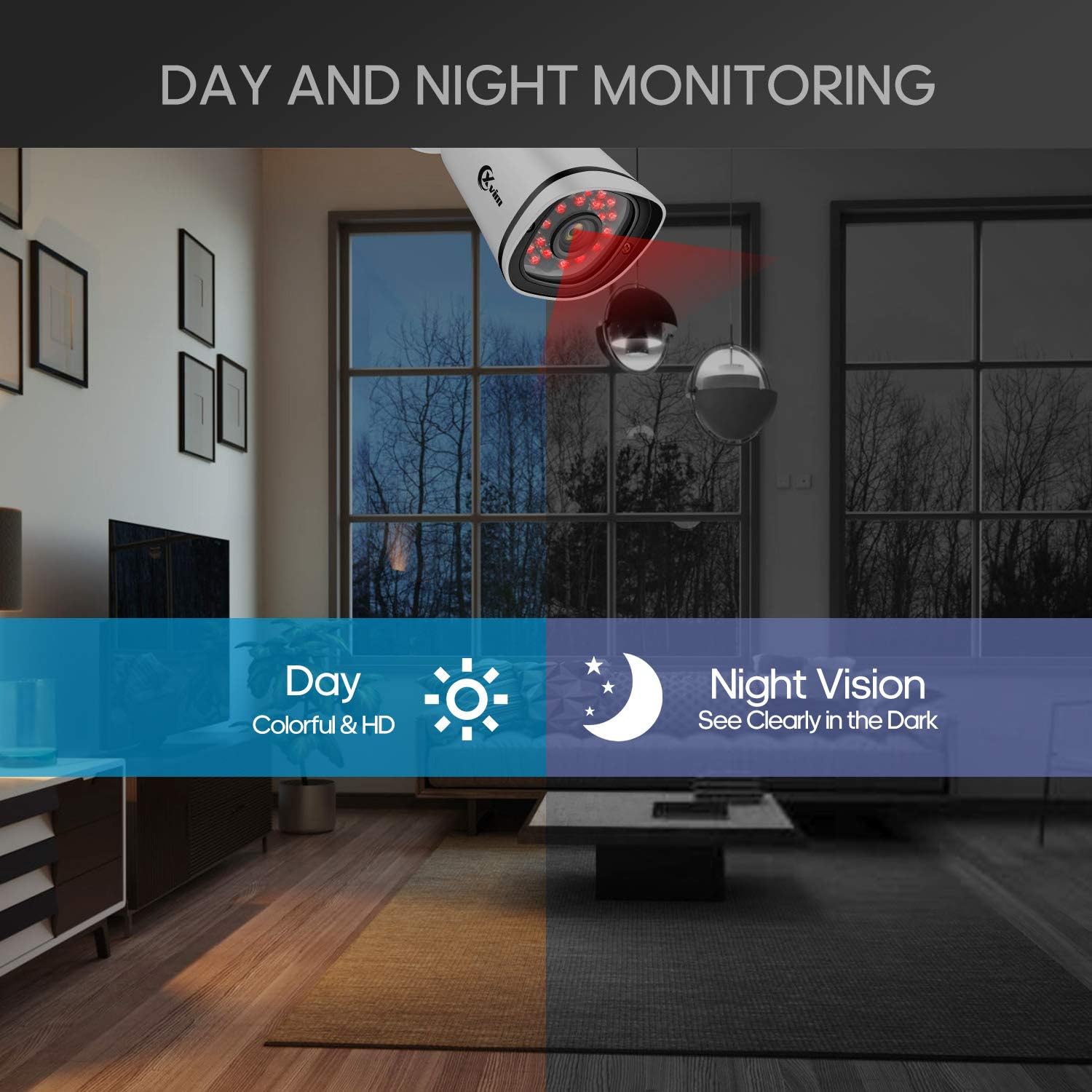
Image: Illustration showing the camera's ability to monitor both during the day (colorful HD) and at night (clear vision in the dark).
Disseny impermeable
The cameras feature an IP66-rated metal housing, ensuring they are protected against dust and powerful water jets, making them suitable for outdoor installation in various weather conditions.
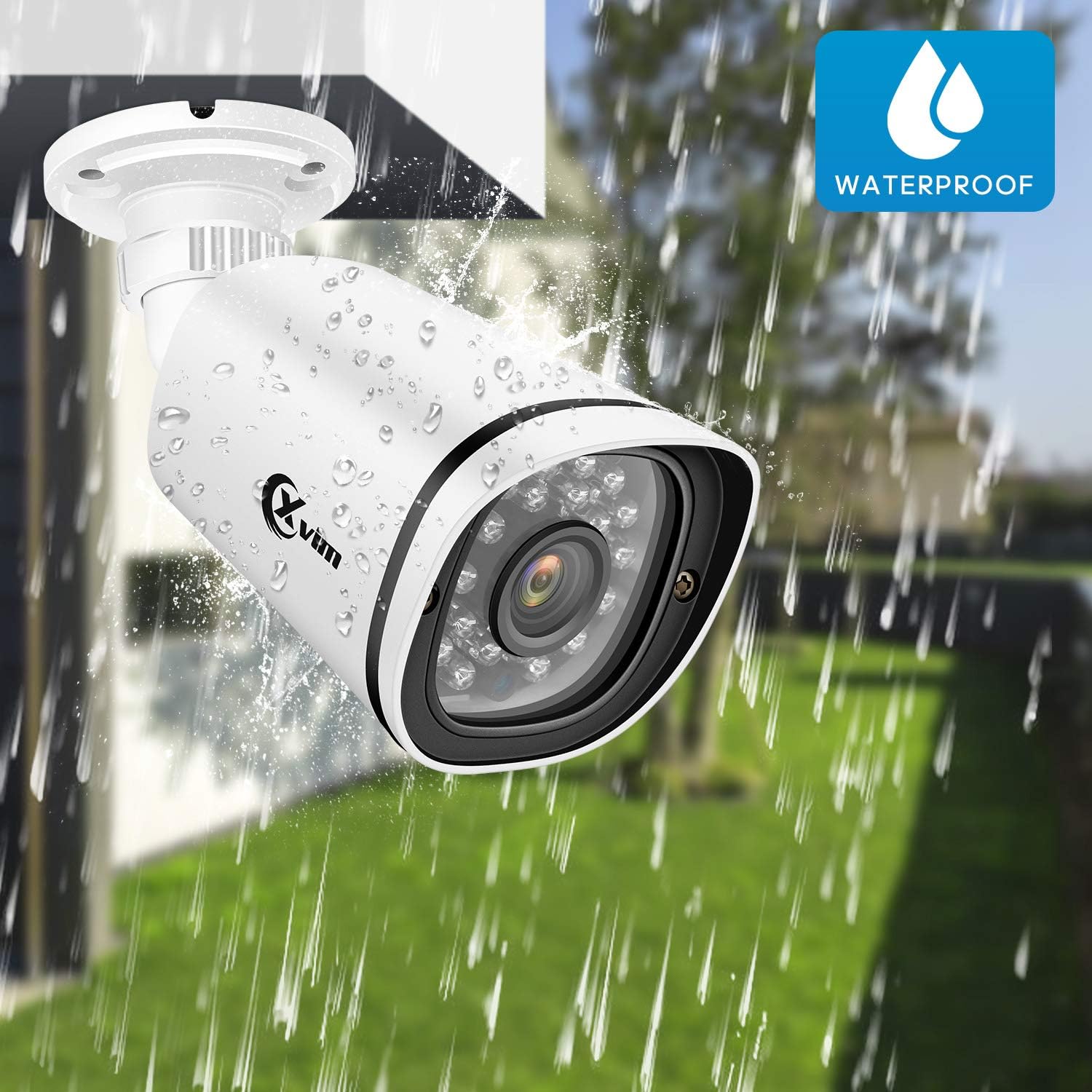
Image: An XVIM camera being sprayed with water, illustrating its waterproof design.
DVR Back Panel Overview
The DVR unit provides multiple ports for connecting cameras, a monitor, audio input/output, and network connectivity. Familiarize yourself with the ports before installation.
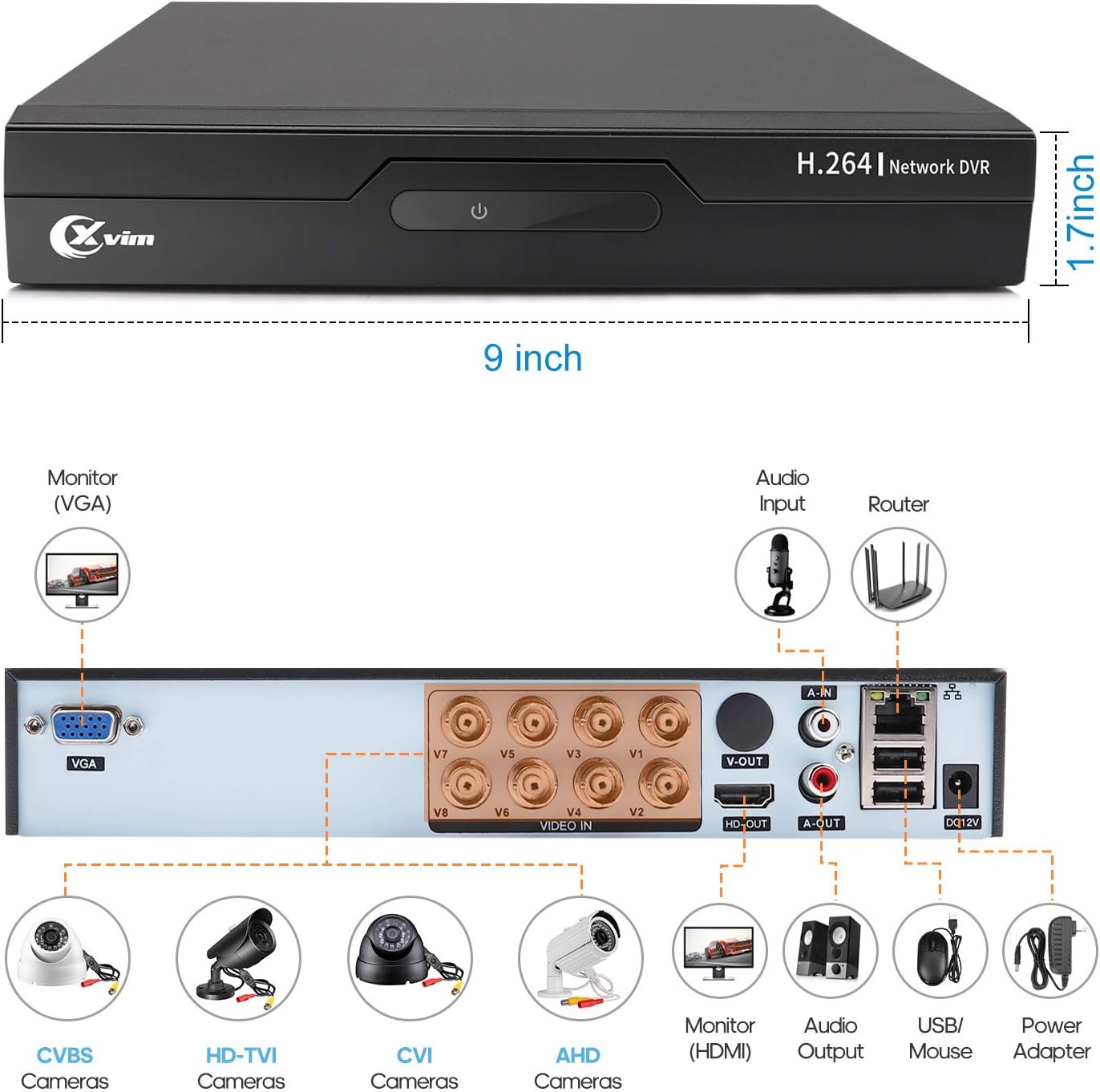
Image: Diagram of the DVR's back panel, showing ports for VGA, HDMI, video input (BNC), audio input/output, USB, and power.
Instruccions de configuració
- Connecteu les càmeres al DVR: Connect each camera to the corresponding video input (BNC) port on the DVR using the provided cables. Ensure secure connections.
- Connecteu el DVR al monitor: Connect the DVR to a monitor using either the VGA or HDMI port.
- Connect DVR to Network: For remote access, connect the DVR to your router using an Ethernet cable.
- Connectar l'alimentació: Connect the power adapters to the cameras and the DVR, then plug them into a power outlet. The system will power on automatically.
- Configuració inicial: Follow the on-screen prompts on your monitor to complete the initial DVR setup, including setting up a password and configuring basic settings.
- Configuració de l'aplicació mòbil:
- Download the "XVR Pro" app from your smartphone's app store.
Descarrega per a Android
Descarrega per a iOS - Register for an account within the app.
- Add your DVR device by scanning the QR code displayed on the DVR's monitor or by manually entering the device ID.
- Un cop afegit, podeu view your cameras remotely from anywhere.
- Download the "XVR Pro" app from your smartphone's app store.

Image: Step-by-step guide for connecting the system components and setting up the XVR Pro mobile application.
Instruccions de funcionament
Viu View
After successful setup, you can view viu footage from your cameras on the connected monitor or through the XVR Pro mobile app. The DVR interface allows you to switch between single-camera view i una graella multicàmera view.
Modes d'enregistrament
The system supports various recording modes:
- Enregistrament manual: Start and stop recording manually via the DVR interface.
- Gravació de detecció de moviment: Configure the system to record automatically when motion is detected in specified areas. This helps conserve hard drive space.
- Enregistrament programat: Set specific times for continuous recording.
Refer to the DVR's on-screen menu for detailed configuration of recording schedules and motion detection zones.
Accés remot
The XVR Pro app enables you to:
- View imatges de càmera en directe des de qualsevol lloc amb connexió a Internet.
- Reproducció gravada footage stored on the DVR.
- Rebre alertes de detecció de moviment.
- Control certain DVR settings remotely.
Camera Mode Switching (OSD Menu)
Each camera features an OSD (On-Screen Display) button on its cable, allowing you to switch between different video modes (Analog, AHD, TVI, CVI) to ensure compatibility with various DVRs. To access the OSD menu and switch modes:
- Analog (CVBS) Mode: Premeu el botó OSD Cap amunt durant 5 segons.
- AHD Mode: Premeu el botó OSD Cap a l'esquerra durant 5 segons.
- TVI Mode: Premeu el botó OSD Cap a la dreta durant 5 segons.
- CVI Mode: Premeu el botó OSD Cap avall durant 5 segons.
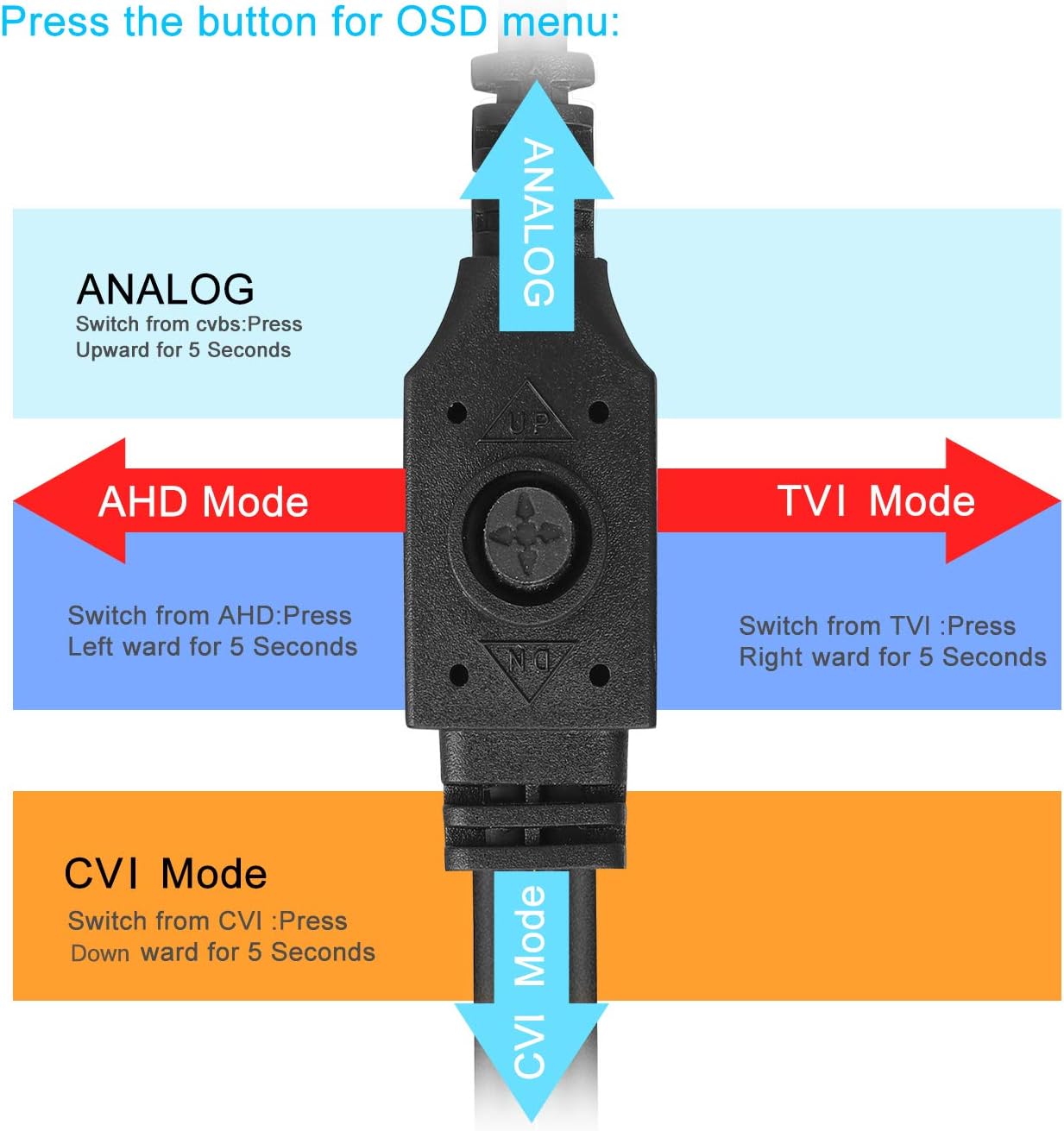
Image: Diagram illustrating how to use the OSD button on the camera cable to switch between Analog, AHD, TVI, and CVI video modes.
Manteniment
- Neteja de la càmera: Netegeu regularment les lents de la càmera amb un drap suau iamp drap per garantir una qualitat d'imatge nítida. Eviteu productes de neteja abrasius.
- Inspecció del cable: Periodically check all cables and connections for wear, damage, or loose connections.
- Ventilació del DVR: Ensure the DVR unit has adequate ventilation to prevent overheating. Keep vents clear of obstructions.
- Gestió del disc dur: The 1TB hard drive will automatically overwrite the oldest footage when full. Regularly back up important recordings if needed.
- Actualitzacions de firmware: Check the XVIM official weblloc web per obtenir actualitzacions de firmware disponibles per al vostre DVR per garantir un rendiment i una seguretat òptims.
Resolució de problemes
No Video Display
- Check all power connections for the DVR and cameras.
- Verify that the monitor is correctly connected to the DVR via VGA or HDMI and is set to the correct input source.
- Ensure camera cables are securely connected to the DVR's video input ports.
- If a specific camera has no video, try switching its video mode using the OSD button (refer to "Camera Mode Switching" section).
Remote Access Issues
- Confirm the DVR is connected to your router and has internet access.
- Check your router's internet connection.
- Ensure the XVR Pro app is updated to the latest version.
- Verify that the device ID is correctly added in the app and your login credentials are correct.
Mala visió nocturna
- Assegureu-vos que la lent de la càmera estigui neta i lliure d'obstruccions.
- Check for strong light sources near the camera that might interfere with the infrared LEDs.
DVR Not Recording
- Check the hard drive status in the DVR's system settings. Ensure it is detected and functioning.
- Verify that recording schedules or motion detection settings are correctly configured.
- Ensure there is sufficient hard drive space (though the system typically overwrites old footagi).
If you encounter persistent issues not covered here, please contact XVIM customer support for assistance.
Especificacions
| Marca | XVIM |
| Número de model | US-D8-4AHD7-1T-203 |
| Tecnologia de connectivitat | Amb cable |
| Resolució de captura de vídeo | 1080p |
| Característiques especials | Imatge, Sensor de moviment, Visió nocturna, Resistent a l'aigua |
| Nombre de canals | 4 (cameras included, DVR supports 8 channels) |
| Capacitat d'emmagatzematge de memòria | 1 TB (disc dur) |
| Font d'alimentació | Elèctric amb cable |
| Dimensions de l'article (L x A x A) | 13.94 x 11.85 x 6.93 polzades |
| Gamma de visió nocturna | 85 peus |
| Mode d'enregistrament | Manual, Motion Detection |
| Interfície del maquinari | USB 3.0 tipus B |
| Tipus de lent | Arreglat |
| Entrada de vídeo | BNC, RCA (CVBS) |
| Viewangle ing | 81 graus |
Garantia i Suport
XVIM products are designed for reliability and performance. For specific warranty details, please refer to the warranty card included with your product or visit the official XVIM website. For technical support, troubleshooting assistance, or any inquiries, please contact XVIM customer service through their official channels.
Recursos en línia: For additional support, FAQs, and software downloads, please visit the XVIM Store on Amazon or the official XVIM weblloc.
