
Fanvil H2U-W
Fanvil H2U Compact IP Phone
Manual d'usuari
Model: H2U-W
1. Introducció
The Fanvil H2U Compact IP Phone is a stylish and powerful communication device designed for various scenarios, including hotels, campuses, hospitals, and retail environments. It offers essential features for efficient communication in a compact form factor.
Les característiques clau inclouen:
- 2 SIP Lines for flexible call handling.
- HD Audio with wideband codecs (G.722, Opus) for clear voice quality.
- 10 speed dial keys for quick access to frequently called numbers.
- 1 programmable DSS Key for custom functions.
- 3-way conference capability.
- Support for both desk and wall-mounted installations.
- Handset and hands-free operation modes.
- 10/100 Mbps Ethernet port.
- Power over Ethernet (PoE) or power adapter support.

Figure 1: Fanvil H2U Compact IP Phone (White)
This image displays the Fanvil H2U Compact IP Phone in white, featuring its sleek design, integrated speaker, and coiled handset cord. A small green LED indicator is visible on the phone's body.
2. Guia de configuració
Follow these steps to set up your Fanvil H2U IP Phone:
- Desempaquetar la caixa: Carefully remove all components from the packaging. You should find the Fanvil H2U phone unit and a coiled handset cord. Note: A power adapter is not typically included and may need to be purchased separately if PoE is not available.
- Connecteu el telèfon: Plug one end of the coiled handset cord into the port labeled with a handset icon on the side of the phone unit. Plug the other end into the corresponding port on the handset.
- Connectar-se a la xarxa/alimentació:
- Ús de PoE (alimentació a través d'Ethernet): Connect an Ethernet cable from your PoE-enabled network switch or router to the LAN port on the back of the phone. The phone will receive both power and network connectivity through this single cable.
- Using a Power Adapter (if PoE is not available): Connect an Ethernet cable from your network switch or router to the LAN port on the back of the phone. Then, connect a compatible 5V/1A DC power adapter (not included) to the power port on the back of the phone and plug it into a power outlet.
- Col·locació: The Fanvil H2U can be placed on a desk or mounted on a wall. For wall mounting, use the integrated mounting holes on the back of the phone. Ensure the phone is placed in a stable location with good ventilation.

Figure 2: Fanvil H2U Side View with Wall Mount Option
Aquesta imatge mostra un pro lateralfile of the Fanvil H2U IP Phone, highlighting the design that allows for both desk placement and wall mounting. The recessed area for wall mounting is visible.
3. Instruccions de funcionament
This section covers the basic operation of your Fanvil H2U IP Phone.
3.1 Funcions de trucada bàsiques
- Fer una trucada: Lift the handset or press the speakerphone button. Dial the desired number using the keypad and wait for the call to connect.
- Respondre una trucada: Quan soni el telèfon, aixequeu l'auricular o premeu el botó de l'altaveu per contestar.
- Finalització d'una trucada: Place the handset back on the phone unit or press the speakerphone button again.
3.2 Speed Dial Keys
The Fanvil H2U features 10 dedicated speed dial keys (0-9) located on the phone's keypad. These keys can be programmed to quickly dial frequently used numbers or services.
- Per utilitzar: Simply press and hold the desired speed dial key (0-9) for a few seconds to dial the pre-programmed number.
- Programació: Refer to your IP PBX system's administration guide or contact your system administrator for instructions on how to program these speed dial keys.
3.3 Programmable DSS Key
The phone includes one programmable DSS (Direct Station Select) key, which can be configured for various functions such as BLF (Busy Lamp Field), intercom, or speed dial. The specific function depends on your system's configuration.
- Per utilitzar: Press the programmable DSS key to activate its assigned function.
- Configuració: Contact your system administrator to configure the function of this key.
3.4 3-Way Conference
To initiate a 3-way conference call:
- Make a call to the first party.
- While on the call, press the Conferència button (if available and configured, or follow your system's specific conference initiation method).
- Dial the number of the second party.
- Quan la segona part respongui, premeu el botó Conferència button again to join all three parties into a conference call.
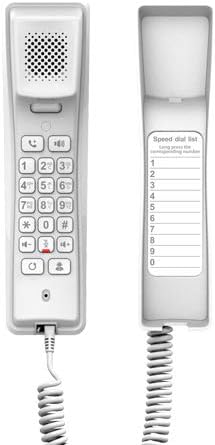
Figure 3: Fanvil H2U Keypad and Speed Dial Area
Aquesta imatge proporciona una clara view of the Fanvil H2U IP Phone's keypad, including the numeric keys, function buttons, and the dedicated area for the speed dial list, which can be customized by the user.
4. Manteniment
Proper maintenance ensures the longevity and optimal performance of your Fanvil H2U IP Phone.
- Neteja: Feu servir un drap suau, sec i sense borrissol per netejar la superfície del telèfon. Per a marques difícils, netegeu lleugerament.ampRenta el drap amb aigua. Evita utilitzar productes químics agressius, netejadors abrasius o dissolvents, ja que poden danyar l'acabat del telèfon.
- Medi ambient: Keep the phone away from excessive heat, direct sunlight, and moisture. Ensure it is placed in a well-ventilated area.
- cables: Periodically check all connected cables (Ethernet, handset cord) for any signs of wear or damage. Replace damaged cables immediately.
- Emmagatzematge: If storing the phone for an extended period, disconnect all cables and store it in a cool, dry place, preferably in its original packaging.
5. Solució De Problemes
This section addresses common issues you might encounter with your Fanvil H2U IP Phone.
| Problema | Causa possible | Solució |
|---|---|---|
| El telèfon no s'encén. | No power supply; PoE not active; faulty power adapter/cable. | Ensure Ethernet cable is connected to a PoE-enabled port, or a compatible power adapter is securely connected and plugged into a working outlet. Verify the power source. |
| Sense to de marcatge. | Network connectivity issue; SIP registration failure; incorrect configuration. | Check Ethernet cable connection. Verify network status. Contact your system administrator to check SIP registration and phone configuration. |
| Mala qualitat de trucada (eco, estàtica). | Network congestion; faulty handset cord; environmental interference. | Check your network connection and bandwidth. Try replacing the handset cord. Ensure the phone is not near devices causing electromagnetic interference. |
| No puc fer/rebre trucades. | SIP account not registered; network firewall issues; incorrect dialing plan. | Confirm SIP account status with your administrator. Check firewall settings. Verify the dialing procedure. |
If the problem persists after trying these solutions, please contact your IT support or system administrator for further assistance.
6. Especificacions tècniques
| Característica | Especificació |
|---|---|
| SIP Lines | 2 |
| Còdecs d'àudio | G.722, Opus (HD Audio) |
| Speed Dial Keys | 10 |
| Programmable DSS Key | 1 |
| Capacitat de trucades de conferència | 3 vies |
| Interfície de xarxa | Ethernet de 10/100 Mbps |
| Font d'alimentació | PoE / Power Adaptor (5V/1A DC) |
| Color | White (also available in Black) |
| Tipus de telèfon | Cordat |
| Tipus de marcador | Teclat únic |
| Dimensions del producte (L x A x A) | 5.91 x 5.91 x 3.15 polzades (15 x 15 x 8 cm) |
| Pes de l'article | 10.6 unces (0.3 quilograms) |
| Dispositius compatibles | Computer systems, VoIP services, SIP devices, and various networks |
7. Garantia i Suport
For detailed warranty information regarding your Fanvil H2U Compact IP Phone, please refer to the official Fanvil website or the warranty card included with your product. Warranty terms and conditions may vary by region and retailer.
For technical support, product inquiries, or assistance with advanced configurations, please contact your vendor, system administrator, or Fanvil's official customer support channels. You can typically find contact information on the Fanvil weblloc web o a la documentació de la compra.
Ask a question about this manual
Ask about setup, troubleshooting, compatibility, parts, safety, or missing instructions. Manuals+ will review the question and use this page’s manual context to help answer it.