
1. Introducció
Thank you for choosing the CHWARES FG260RB Smart Body Fat Scale. This digital scale is designed to provide accurate body composition analysis, helping you track 13 essential body metrics. Featuring high-precision sensors, a durable tempered glass platform, and USB rechargeability, this scale offers a convenient way to monitor your health and fitness progress. This manual will guide you through the setup, operation, and maintenance of your new smart scale.
2. Informació important de seguretat
Please read all safety instructions before using the device. Failure to follow these instructions may result in injury or damage to the device.
- ADVERTIMENT: Do not use this scale if you have a pacemaker or any other internal medical device.
- PRECAUCIÓ: Body composition data measurements may be inaccurate if you are wearing an ECG or any other internal medical device.
- This smart scale is not intended for use by children under the age of 18.
- Do not use this scale to diagnose or treat any medical condition. Always consult your physician or medical professional to determine what is suitable for you.
- Keep the scale dry. Do not immerse in water.
- Place the scale on a hard, flat surface for accurate readings. Avoid carpets or soft surfaces.
- No salteu a l'escala.
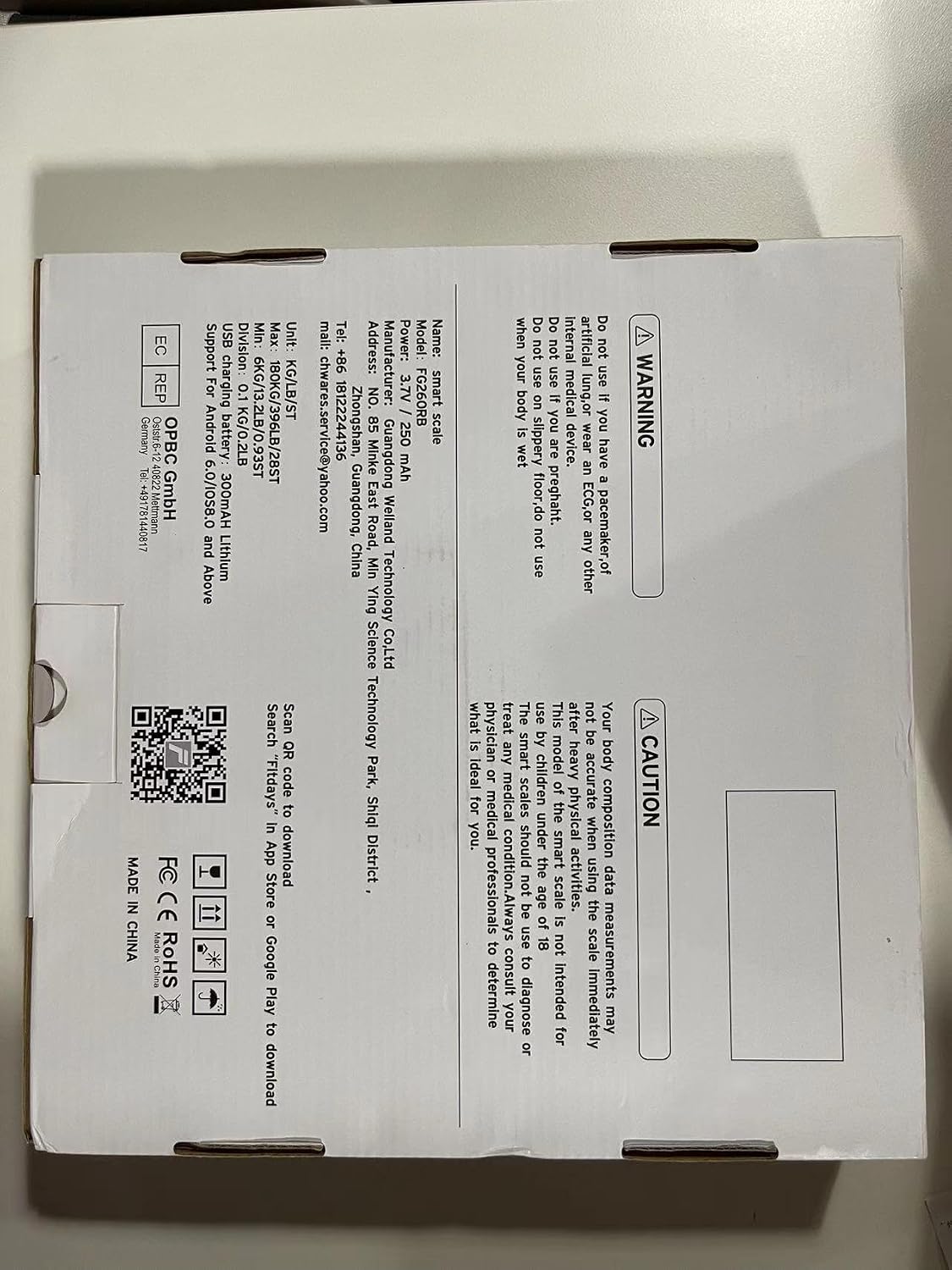
3. Contingut del paquet
Si us plau, comproveu el paquet per veure si hi ha els elements següents:
- CHWARES FG260RB Smart Body Fat Scale
- Cable de càrrega USB
- Manual d'usuari (aquest document)

4. Producte acabatview
The CHWARES FG260RB Smart Body Fat Scale is equipped with advanced technology to provide comprehensive body data. Key features include:
- Pesatge d'alta precisió: 4 high-precision sensors and 4 sensitive electrodes ensure accurate measurements with 0.2lbs/0.1kg increments and a 400lbs/180kg capacity.
- Disseny durador: Features a 6mm thick tempered glass plate for safety and comfort.
- Full Biometric Analysis: Measures 13 important body metrics including body weight, BMI, body fat, body water, muscle mass, bone mass, and more.
- Bateria recarregable: Built-in rechargeable battery eliminates the need for disposable batteries, offering approximately three months of use on a full charge.
- Pantalla LCD: Clear digital display for easy weight readings.
- Integració d'aplicacions intel·ligents: Syncs with the FITDAYS app via Bluetooth for detailed data tracking and analysis.


5. Configuració
5.1 Càrrega inicial
Before first use, ensure the scale is fully charged. Connect the provided USB charging cable to the scale's charging port and to a standard USB power adapter (not included) or a computer USB port.

5.2 Download the FITDAYS App
The CHWARES Smart Body Fat Scale works with the FITDAYS app to provide detailed body composition analysis. Download the app from your device's app store:
- For iOS devices: Search 'FITDAYS' in the Apple App Store.
- For Android devices: Search 'FITDAYS' in the Google Play Store.
- Alternatively, you can visit the official FITDAYS weblloc: http://www.fitfeel.cn/fitdays/

5.3 App Setup and Bluetooth Pairing
- Open the FITDAYS app and create your user profile. Enter accurate personal information (gender, age, height) as this is crucial for precise body composition calculations.
- Assegureu-vos que el Bluetooth estigui habilitat al vostre telèfon intel·ligent.
- Step onto the scale barefoot. The scale will automatically turn on and display your weight.
- The app will automatically detect and connect to the scale via Bluetooth. Once connected, your weight and other body composition data will sync to the app.
6. Instruccions de funcionament
6.1 Prendre una mesura
- Col·loqueu l'escala sobre una superfície dura i plana.
- Assegureu-vos que els vostres peus estiguin nets i secs.
- Step onto the scale barefoot, placing your feet on the four metal electrodes. Stand still until the weight reading stabilizes on the LCD display.
- If the app is open and connected via Bluetooth, your data will automatically sync.

6.2 Using the FITDAYS App
The FITDAYS app provides a comprehensive overview of your body data and progress.
- Tauler de control: View your current weight and other key metrics.
- Gràfiques: Track changes in your body data over days, weeks, months, and years with detailed graphs. This is ideal for monitoring progress towards fitness goals.
- Gestió d'usuaris: The scale supports unlimited user profiles (up to 24 users) within the app, making it suitable for families. Each user can track their data independently.
- Sincronització de dades: Easily sync your data with other popular fitness apps like Apple Health, Google Fit, Fitbit, and Samsung Health.


7. Understanding Your Body Data
The CHWARES FG260RB scale measures 13 key body composition metrics:
| mètrica | Descripció |
|---|---|
| Pes | Your total body mass. |
| IMC (índex de massa corporal) | Una mesura del greix corporal basada en l'alçada i el pes. |
| Taxa de greix corporal | El percentatgetage of fat in your body. |
| Massa muscular | El pes total de la massa muscular del teu cos. |
| Greix subcutani | Greix emmagatzemat directament sota la pell. |
| Greix visceral | Greix emmagatzemat al voltant dels òrgans interns. |
| Aigua corporal | The total amount of fluid in your body. |
| Múscul esquelètic | Muscle attached to bones, responsible for movement. |
| Pes corporal sense greixos | Your total body weight minus body fat. |
| Missa òssia | El pes total dels ossos del teu cos. |
| Proteïna | The amount of protein in your body. |
| BMR (taxa metabòlica basal) | El nombre de calories que el teu cos necessita per dur a terme les funcions bàsiques que sustenten la vida. |
| Edat corporal | An estimation of your body's biological age based on your metrics. |
8. Manteniment
8.1 Neteja
Per netejar la bàscula, netegeu la superfície amb aiguaamp cloth and a mild detergent. Do not use abrasive cleaners or immerse the scale in water.
8.2 Emmagatzematge
Guardeu la bàscula en un lloc fresc i sec. Eviteu temperatures extremes i la llum solar directa. No col·loqueu objectes pesats a sobre de la bàscula quan no l'utilitzeu.
9. Solució De Problemes
If you encounter issues with your CHWARES Smart Body Fat Scale, refer to the following common problems and solutions:
- L'escala no s'activa: Ensure the scale is charged. Connect it to a USB power source using the provided cable.
- "Lo" displayed: Indicates low battery. Recharge the scale.
- "Err" displayed: Indicates an error during measurement. Step off the scale, wait a few seconds, and then step back on. Ensure you are standing still and your feet are properly placed on the electrodes.
- Lectures inexactes: Ensure the scale is on a hard, flat surface. Avoid carpets. Make sure your feet are clean and dry. Check your profile information in the FITDAYS app for accuracy (gender, age, height).
- No data sync to app: Ensure Bluetooth is enabled on your smartphone and the FITDAYS app is open. Make sure the scale is charged and within Bluetooth range. Try restarting both the scale (by stepping off and on) and the app.
- Body composition data not showing: Ensure you are stepping on the scale barefoot with your feet making good contact with all four electrodes. Body composition analysis requires bioelectrical impedance, which needs skin contact.
10. Especificacions
| Característica | Detall |
|---|---|
| Número de model | FG260RB |
| Dimensions | 26 x 26 x 2.3 cm (10.2 x 10.2 x 0.9 polzades) |
| Límit de pes | 180 kg (400 lliures) |
| Read-out Accuracy | 0.1 kg (0.2 lliures) |
| Material | Vidre temperat |
| Tipus de visualització | LCD amb pantalla retroil·luminada |
| Font d'alimentació | USB Rechargeable (3.7V / 250 mAh Lithium Battery) |
| Connectivitat | Bluetooth |
| Compatibilitat d'aplicacions | FITDAYS (iOS 8.0+ / Android 6.0+) |
| Característiques especials | 13 Body Data Metrics, Auto On/Off, Low Battery Indicator |
11. Garantia i Suport
For warranty information or technical support, please refer to the documentation included with your purchase or contact CHWARES customer service directly. Contact details can typically be found on the product packaging or the official CHWARES weblloc.