
Introducció
This manual provides instructions for the proper installation, operation, and maintenance of the Tilta Nucleus-Nano Run/Stop Cable (Model: RS-WLC-T04-SYA). This cable enables run/stop functionality between the Tilta Nucleus-Nano motor and compatible Sony a6, a7, and a9 series camera systems.
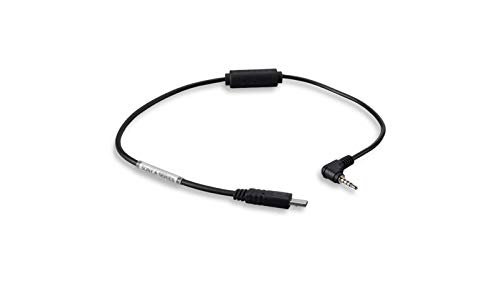
Figura 1: Tilta Nucleus-Nano Run/Stop Cable. This image displays the black cable with a micro-USB connector on one end and a 2.5mm TRS (Tip-Ring-Sleeve) connector on the other, designed for connecting the Nucleus-Nano motor to Sony cameras for remote run/stop control.
Configuració
- Identificació de connectors: Locate the micro-USB connector and the 2.5mm TRS connector on the cable.
- Connect to Nucleus-Nano Motor: Insert the micro-USB end of the cable into the designated run/stop port on your Tilta Nucleus-Nano motor. Ensure a secure connection.
- Connect to Sony Camera: Insert the 2.5mm TRS end of the cable into the remote control port (typically labeled 'REMOTE' or 'MULTI') on your compatible Sony a6, a7, or a9 series camera. Refer to your camera's manual for the exact port location.
- Encès: Ensure both the Nucleus-Nano motor and the Sony camera are powered on.
Instruccions de funcionament
Once the cable is correctly connected and both devices are powered on, the Nucleus-Nano motor's run/stop button will control the recording function of the connected Sony camera.
- Initiate Recording: Press the run/stop button on the Nucleus-Nano motor once to start recording on the Sony camera.
- Atura la gravació: Press the run/stop button on the Nucleus-Nano motor again to stop recording on the Sony camera.
- Verificació de la funcionalitat: Always verify that the camera's recording indicator light responds correctly to the run/stop commands from the Nucleus-Nano motor.
Manteniment
- Neteja: Use a soft, dry cloth to gently wipe the cable and connectors. Avoid using liquid cleaners or solvents.
- Emmagatzematge: Store the cable in a cool, dry place, away from direct sunlight and extreme temperatures. Avoid sharp bends or kinks in the cable.
- Inspecció: Periodically inspect the cable for any signs of wear, fraying, or damage to the connectors. Discontinue use if damage is observed.
Resolució de problemes
Issue: Run/Stop function is not working.
- Comproveu les connexions: Ensure both the micro-USB and 2.5mm TRS connectors are fully and securely inserted into their respective ports on the Nucleus-Nano motor and the Sony camera.
- Estat de l'alimentació: Verify that both the Nucleus-Nano motor and the Sony camera are powered on and have sufficient battery life.
- Compatibilitat de la càmera: Confirm that your Sony camera model is compatible with the Nucleus-Nano run/stop system and that the remote port is enabled in the camera settings, if applicable.
- Integritat del cable: Inspect the cable for any visible damage. A damaged cable may prevent proper communication.
- Motor Functionality: Test the Nucleus-Nano motor's run/stop button independently, if possible, to rule out issues with the motor itself.
Especificacions
| Característica | Detall |
|---|---|
| Número de model | RS-WLC-T04-SYA |
| Marca | Tilta |
| Compatibilitat | Tilta Nucleus-Nano Motor, Sony a6/a7/a9 series cameras |
| Connector Type 1 | Micro-USB (for Nucleus-Nano motor) |
| Connector Type 2 | 2.5mm TRS (for Sony camera remote port) |
| Funció | Run/Stop control |
| Tipus de cable | AUX |
| Característica especial | Sense enredos |
| Pes de l'article | 3.2 unces |
Informació de la garantia
This product is covered by Tilta's standard limited warranty. For detailed information regarding warranty terms, conditions, and duration, please refer to the official Tilta website or contact their customer support. Proof of purchase may be required for warranty claims.
Atenció al client
For further assistance, technical support, or inquiries regarding the Tilta Nucleus-Nano Run/Stop Cable, please visit the official Tilta website or contact their customer service department. Contact information can typically be found on the Tilta websecció de suport del lloc.
Recursos en línia: www.tilta.com


