
1. Introducció
This manual provides instructions for the KONNWEI KW600 Battery Tester and the KONNWEI KW310 OBD2 Scanner. The KW600 is designed for comprehensive 12V battery testing, including health, cranking, and charging system analysis. The KW310 is an OBD2/EOBD scanner for diagnosing engine fault codes and monitoring vehicle performance data.
2. KONNWEI KW600 Battery Tester
2.1. Característiques i funcions
The KW600 features a color screen and provides accurate data for 12V automotive batteries. Key functions include:
- Prova d'estat de la bateria: Analyzes the battery's State of Health (SOH), internal resistance, and Cold Cranking Amps (CCA) capability.
- Prova d'arrencada: Evaluates the starting system, including cranking voltage i el temps.
- Prova de càrrega: Checks the vehicle's charging system, including generator output and rectifier diode status.
- Voltage Graphing: Mostra el volum en temps realtage changes graphically to identify potential issues.
- Compatibilitat amb diversos vehicles: Suitable for 12V batteries in cars, SUVs, light trucks, motorcycles, and boats.
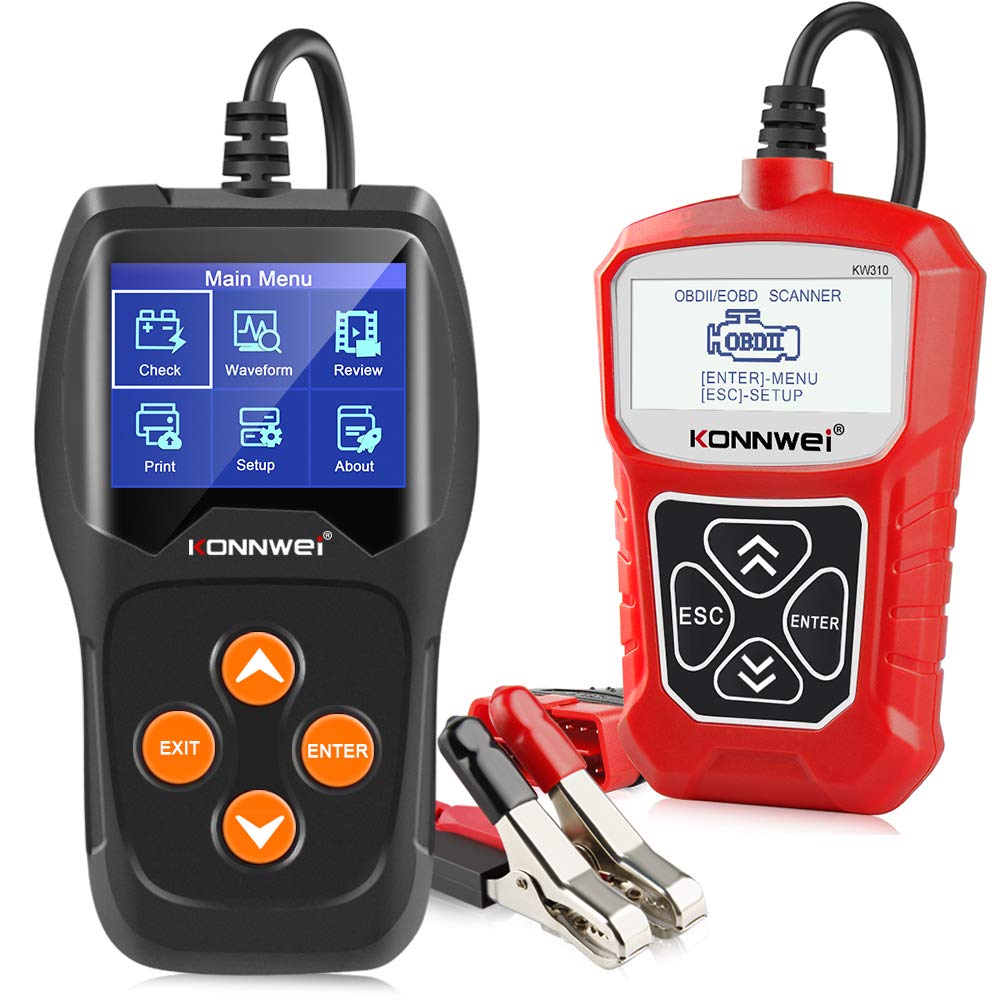
Figure 1: KONNWEI KW600 Battery Tester main menu and function overview.

Figure 2: KW600 displaying detailed battery analysis results and additional functions.
2.2. Setup and Connection (KW600)
- Assegureu-vos que el contacte del vehicle estigui apagat.
- Connecteu el cl vermellamp of the KW600 to the positive (+) terminal of the 12V battery.
- Connecteu el cl negreamp of the KW600 to the negative (-) terminal of the 12V battery.
- El dispositiu s'encendrà automàticament.
2.3. Funcionament del KW600
Navigate the menu using the 'UP', 'DOWN', 'ENTER', and 'EXIT' buttons.
- Comprovar: Initiates a battery test. Select 'In-Vehicle' or 'Out-of-Vehicle' based on the battery's location. Input battery specifications (e.g., CCA, AH) as prompted.
- Forma d'ona: Mostra el volum en temps realtage readings in a graphical format. This helps in observing voltage stability during cranking or charging.
- Review: Accesses previously saved test results.
- Imprimeix: Allows printing of test data (requires connection to a computer with KONNWEI software).
- Configuració: Configures device settings such as language, unit of measurement, and sound.

Figure 3: KW600 displaying voltage waveform for diagnostic analysis.

Figure 4: KW600 compatibility with various 12V vehicle types.
3. KONNWEI KW310 OBD2 Scanner
3.1. Característiques i funcions
The KW310 is a professional car computer fault code reader that supports all OBD2 modes. Its features include:
- Llegir/Esborrar codis: Retrieves generic and manufacturer-specific Diagnostic Trouble Codes (DTCs) and clears them, turning off the Check Engine Light.
- Dades en directe: Displays real-time sensor data from the vehicle's engine control unit (ECU).
- Congela les dades del fotograma: Captures a snapshot of operating conditions at the moment a fault code is set.
- Preparació I/M: Checks the status of emission-related monitors to ensure the vehicle is ready for an emissions test.
- Prova del sensor d'O2: Recupera els resultats de la prova del monitor del sensor d'O2.
- On-board Monitoring Test: Recupera els resultats de les proves de components i sistemes del tren motriu relacionats amb les emissions.
- Prova del sistema EVAP: Inicia una prova de fuites per al sistema d'emissions evaporatives del vehicle.
- Informació del vehicle: Recupera el número d'identificació del vehicle (VIN), l'ID de calibratge (CALID) i el número de verificació de calibratge (CVN).
- Compatibilitat àmplia de vehicles: Works on most 1996 and newer USA-based, European, and Asian gasoline or diesel vehicles (OBDII & CAN compliant).

Figure 5: KONNWEI KW310 OBD2 Scanner main display.

Figure 6: KW310 OBD2 functions overview.
3.2. Setup and Connection (KW310)
- Locate the vehicle's 16-pin Data Link Connector (DLC), usually under the dashboard on the driver's side.
- Ensure the vehicle's ignition is in the 'ON' position (engine can be off or running).
- Connecteu el cable OBD2 del KW310 al DLC del vehicle.
- El dispositiu s'encendrà automàticament.
3.3. Funcionament del KW310
Navigate the menu using the 'UP', 'DOWN', 'ESC', and 'ENTER' buttons.
- Diagnòstic: Accesses the main diagnostic functions like Read Codes, Erase Codes, Live Data, Freeze Frame, I/M Readiness, O2 Monitor Test, On-Board Monitor Test, EVAP System Test, and Vehicle Information.
- Cerca DTC: Allows you to manually enter a DTC to view la seva descripció.
- Review Dades: Views previously recorded diagnostic data.
- Configuració del sistema: Configures device settings such as language and unit of measurement.
- Informació de l'eina: Displays device details like software version.

Figure 7: KW310 compatibility with various OBD2 protocol vehicles.
4. Manteniment
- Neteja: Utilitzeu un suau, damp drap per netejar el dispositiu. No utilitzeu productes de neteja abrasius ni dissolvents.
- Emmagatzematge: Store the device in a dry, cool environment away from direct sunlight and extreme temperatures.
- Actualitzacions de programari: Consulteu periòdicament el registre oficial de KONNWEI website for software updates to ensure optimal performance and compatibility. The KW600 supports updates as indicated in its menu.
5. Solució De Problemes
- El dispositiu no s'encén:
- For KW600: Ensure battery clamps are securely connected to the correct terminals of a 12V battery.
- For KW310: Ensure the OBD2 connector is fully plugged into the vehicle's DLC and the vehicle's ignition is 'ON'.
- Link Error / Communication Error:
- Verify the vehicle is OBD2 compliant (most 1996 and newer vehicles).
- Check for loose connections at the OBD2 port or battery terminals.
- Ensure the vehicle's ignition is 'ON'.
- Try testing on a different vehicle to rule out a vehicle-specific issue.
- Inaccurate Readings (KW600):
- Assegureu-vos que els terminals de la bateria estiguin nets i sense corrosió.
- Verify the correct battery type and CCA/AH values are entered into the device.
6. Especificacions
6.1. KONNWEI KW600 Battery Tester
- Aplicació: 12V lead-acid batteries (Flooded, AGM, GEL, EFB)
- Interval de prova: 100-2000 CCA, 30-220 AH
- Voltage Rang: 8V-16V
- Visualització: LCD color
6.2. KONNWEI KW310 OBD2 Scanner
- Protocols: OBDII, EOBD, CAN
- Compatibilitat: Most 1996 and newer vehicles (USA, European, Asian)
- Visualització: LCD retroil·luminat
- Potència: Directly from vehicle's OBD2 port
7. Garantia i Suport
Per obtenir informació sobre la garantia, assistència tècnica o consultes de servei, consulteu el lloc web oficial de KONNWEI. website or contact KONNWEI customer service directly. Keep your purchase receipt for warranty claims.


