
Introducció
This manual provides detailed instructions for the setup, operation, and maintenance of your HXSJ J800 Wired Gaming Mouse. Please read this manual thoroughly to ensure proper use and to maximize your gaming and productivity experience.
Contingut del paquet
- 1 x HXSJ J800 Wired Gaming Mouse
- 1 x Manual d'usuari
Configuració
- Connecteu el ratolí: Insert the USB connector of the HXSJ J800 mouse into an available USB port on your computer.
- Instal·lació del controlador: The mouse is plug-and-play. Your operating system will automatically detect and install the necessary drivers. No additional software installation is required for basic functionality.
- Ús inicial: Once connected, the mouse is ready for immediate use.

Image: The HXSJ J800 mouse with its braided USB cable, ready for connection to a computer.
Instruccions de funcionament
1. Mode Switching (Office Mode / Game Mode)
The HXSJ J800 mouse features two operational modes: Office Mode and Game Mode.
- Mode predeterminat: The mouse defaults to Office Mode upon connection.
- Canvi de modes: To switch between Office Mode and Game Mode, press and hold the Scroll Wheel button i el Botó dret del ratolí simultàniament durant 3 segons.
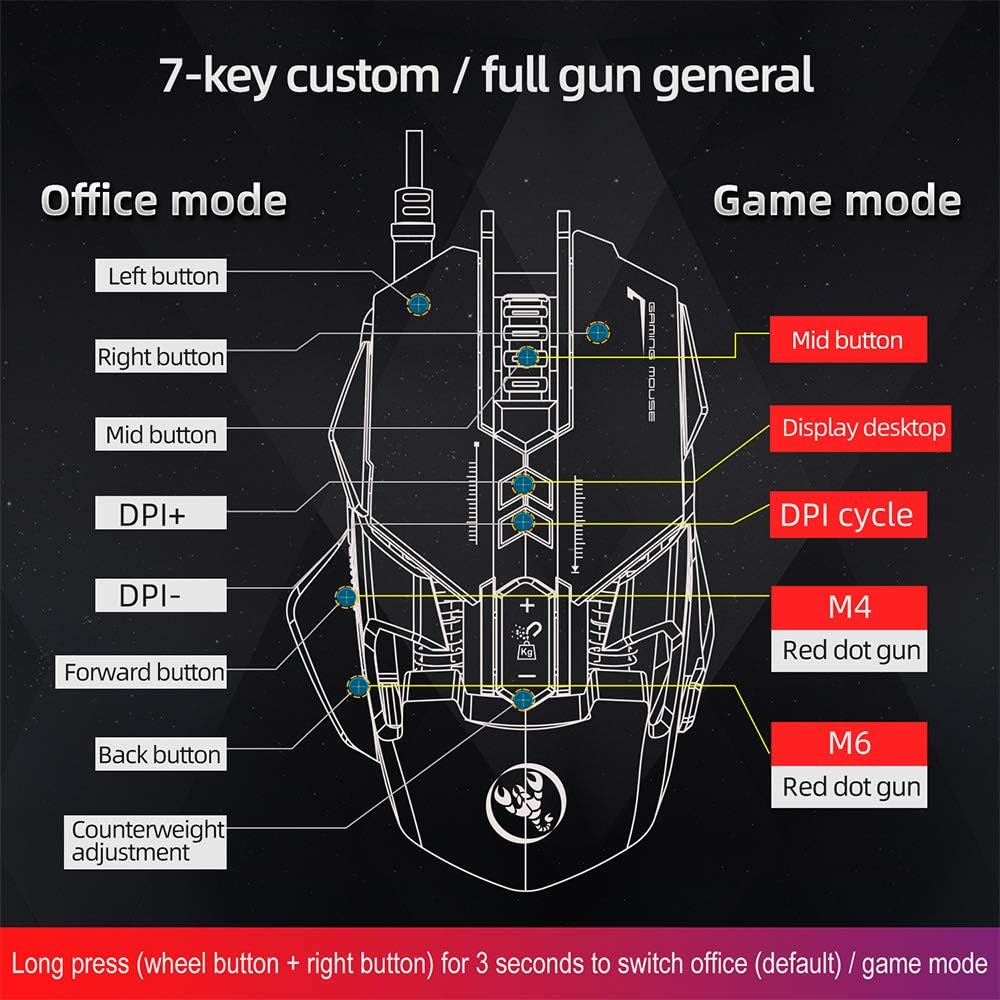
Image: A diagram illustrating the different button assignments for Office Mode (left) and Game Mode (right), including the mode switching instruction.
2. Ajust de DPI
The mouse supports six adjustable DPI settings for varying cursor sensitivity.
- Nivells de DPI: 800, 1600, 2400, 3200, 4800, 6400 DPI.
- Canvi de DPI: Use the dedicated DPI+ and DPI- buttons located on the top of the mouse to cycle through the available DPI settings.
- Indicador visual: The RGB lighting will flash with a corresponding color when the DPI setting is changed.
3. Programació de macros
The HXSJ J800 features an A6653 E-sports Game Chip with onboard storage for hardware macro definition.
- Funcionalitat: Record and write macro definition commands directly to the mouse.
- Funcionament sense programari: Once macros are recorded, no additional software is required for their execution, making it convenient for use across different computers.

Imatge: Una imatge detallada view of the A6653 E-sports Game Chip, highlighting its role in hardware macro definition.
4. RGB Light Effect
The mouse features 16.8 million color RGB backlight modes.
- Personalització: The RGB lighting provides various color effects.
- Indicador DPI: The light of the corresponding gear will flash every time the DPI changes.

Image: The HXSJ J800 mouse illuminated with vibrant RGB lighting, showcasing its aesthetic features.
5. Removable Weight Adjustment
Customize the mouse's weight for enhanced stability and accuracy.
- Weight System: The mouse incorporates a suction magnet design with two 5g removable weights.
- Ajust: The weights can be easily inserted into or removed from the weight chamber. The magnetic design ensures the weights are securely held and not easily lost.

Image: A user adjusting the removable 5g weights in the HXSJ J800 mouse's magnetic weight chamber.
Funcions acabadesview
- Seven-Key Macro Programming: Supports recording and writing macro definition commands for personalized control.
- Six Adjustable DPI Levels: Easily switch between 800-1600-2400-3200-4800-6400DPI to suit various tasks and games.
- E-sports Game Chip (A6653): Features onboard storage for true hardware macro definition, eliminating the need for software after initial setup.
- Cool RGB Light Effect: 16.8 million color RGB backlight modes with dynamic effects and DPI change indicators.
- Removable Weight Design: Two 5g magnetic weights allow for customization of mouse weight for optimal feel and precision.
- Interruptors duradors: Rated for 20 million cycles.
- Aluminum Alloy Roller: Provides a high-grade feel and comfortable damping.

Imatge: Una imatge interna view of the HXSJ J800 mouse, highlighting key components such as the A6653 chip, aluminum alloy roller, and weight counterweights.

Image: A close-up of the HXSJ J800 mouse, focusing on the aluminum alloy scroll wheel and its textured design.
Manteniment
- Neteja: Feu servir un drap suau i sec per netejar la superfície del ratolí. Per a la brutícia persistent, netegeu lleugeramentampRenta el drap amb aigua. Evita utilitzar productes químics agressius o materials abrasius.
- Cura del sensor: Mantingueu el sensor òptic de la part inferior del ratolí net i lliure de pols o restes per garantir un seguiment precís.
- Gestió de cables: Eviteu doblegar bruscament o estirar excessivament el cable USB per evitar danys.
- Emmagatzematge: Guardeu el ratolí en un entorn net i sec quan no l'utilitzeu.
Resolució de problemes
- El ratolí no respon:
- - Ensure the USB cable is securely connected to your computer's USB port.
- - Try connecting the mouse to a different USB port.
- - Reinicieu l'ordinador.
- L'ajust de DPI no funciona:
- - Ensure you are pressing the correct DPI+ or DPI- buttons.
- - Check if the mouse is in a mode that supports DPI adjustment (both Office and Game modes support it).
- RGB lighting not functioning:
- - Verify the mouse is properly connected and receiving power.
- - The lighting should activate automatically. If not, ensure no software is overriding the mouse's default lighting settings (though this mouse is designed to be software-free for basic functions).
- Macros not executing:
- - Ensure the macros were correctly recorded and saved to the mouse's onboard memory.
- - Confirm the mouse is in Game Mode if the macros are assigned to Game Mode specific buttons.
Especificacions
| Item | Especificació |
|---|---|
| Model | J800 |
| Color | Gris |
| Nombre de claus | 7 |
| Configuració de DPI | 800-1600-2400-3200-4800-6400DPI |
| Interfície | USB |
| Canvia la vida | 20 milions de cicles |
| Voltage / Actual | DC 5 V/100 mA |
| Sistema suportat | Windows 2000/XP/Win7/Win8/Win10 Vista 32bit, iOS or latest |
| Mida de l'article | 13 x 8 x 4 cm (L x A x A) |
| Pes de l'article | Aprox. 154 g |
| Xip | A6653 E-sports Game Chip |
| Característiques especials | Programmable Buttons, Adjustable DPI, RGB Lighting, Removable Weights |
Garantia i Suport
For warranty information or technical support, please refer to the retailer where you purchased the HXSJ J800 Wired Gaming Mouse or visit the official HXSJ weblloc web. Si us plau, conserveu el comprovant de compra per a reclamacions de garantia.