
1. Introducció
Thank you for choosing the Dylect 80 cm (32 Inches) HD Ready LED TV, Model 32IPS30H. This manual provides essential information for the safe and efficient operation of your television. Please read these instructions thoroughly before use and retain them for future reference.

Figure 1.1: Dylect 32IPS30H TV with key display features.
2. Informació de seguretat
Per garantir un funcionament segur i evitar danys, observeu les precaucions següents:
- Font d'alimentació: Connect the TV only to an AC 220-240V, 50Hz power source.
- Ventilació: Assegureu-vos que hi hagi una ventilació adequada al voltant del televisor. No bloquegeu les obertures de ventilació.
- Aigua i humitat: No exposeu el televisor a la pluja ni a la humitat. Eviteu col·locar objectes plens de líquids a sobre del televisor.
- Fonts de calor: Keep the TV away from heat sources such as radiators, heat registers, stoves, or other heat-producing appliances.
- Neteja: Desendolleu el televisor abans de netejar-lo. Feu servir un drap suau i sec. No utilitzeu netejadors líquids ni aerosols.
- Manteniment: No intenteu atendre aquest producte vosaltres mateixos. Consulteu tots els serveis a personal de servei qualificat.
3. Contingut del paquet
Verifiqueu que tots els elements siguin presents a la caixa:
- 1 x Dylect 80 cm (32 Inches) HD Ready LED TV
- 1 x Comandament a distància (requereix 2 piles AAA, incloses)
- 1 x Table Stand
- 2 x Base Stands (for table stand assembly)
- 1 x Manual d'usuari (aquest document)
- 1 x Targeta de garantia
4. Configuració
4.1 Instal·lació de l'estand
If you are placing the TV on a table, attach the base stands as follows:
- Col·loqueu amb cura el televisor cap per avall sobre una superfície suau i plana per evitar que es faci malbé la pantalla.
- Alineeu els suports de la base amb els forats dels cargols de la part inferior del televisor.
- Secure each stand with the provided screws. Ensure they are tightened firmly.
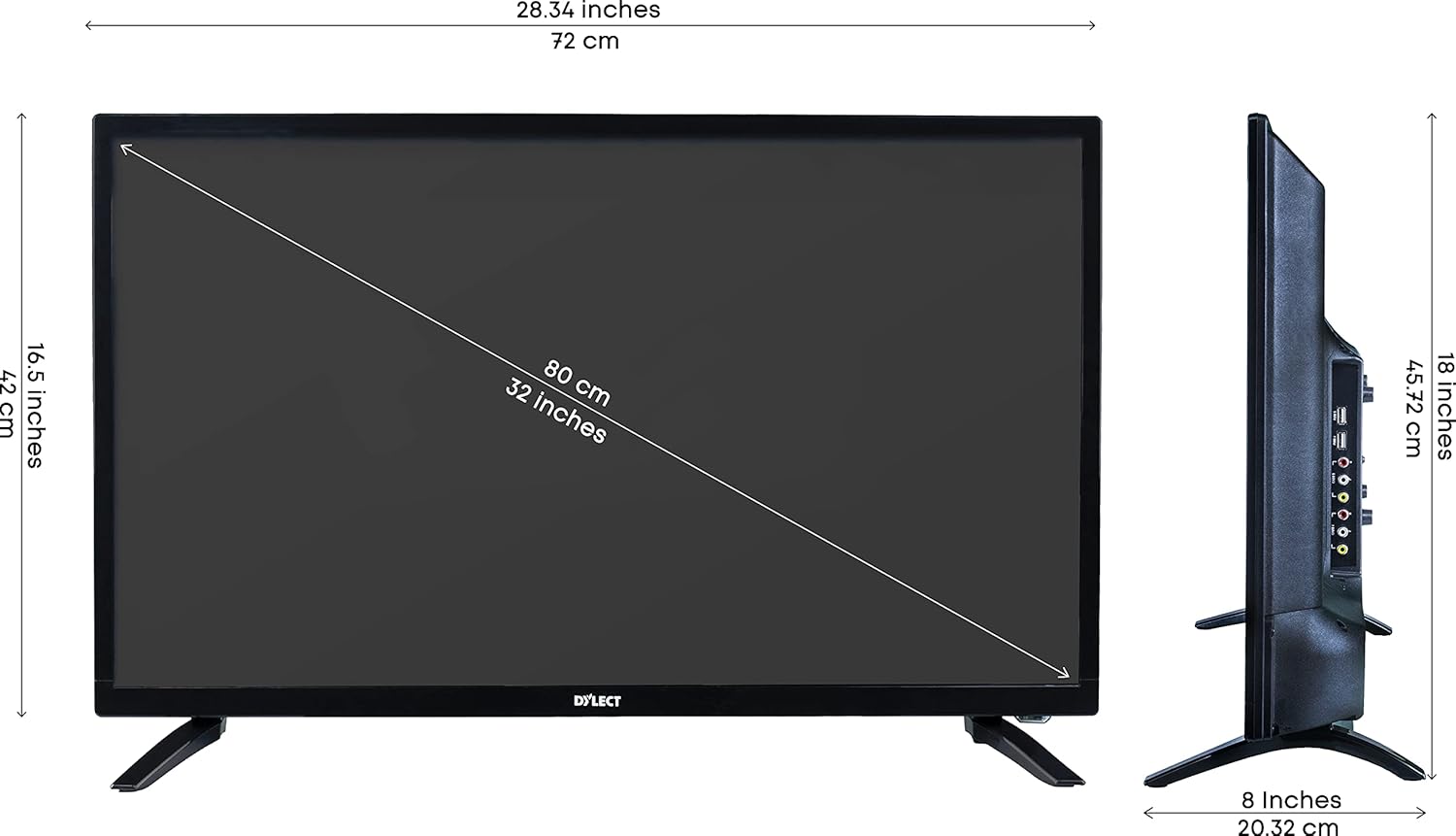
Figure 4.1: TV with table stands and dimensions.
4.2 Muntatge a la paret
The Dylect 32IPS30H TV is compatible with wall mounts. A wall mount kit is included with your purchase. For detailed installation instructions, please refer to the specific manual provided with your wall mount kit. Ensure the wall mount is suitable for the TV's weight and size, and that installation is performed by qualified personnel if you are unsure.

Figure 4.2: Wall mount kit information.
4.3 Connexió de dispositius externs
El televisor ofereix diverses opcions de connectivitat:
- Ports HDMI (x2): Connecteu descodificadors, reproductors de Blu-ray, consoles de jocs o altres dispositius compatibles amb HDMI.
- Ports USB (x2): Connecteu dispositius d'emmagatzematge USB per a la reproducció de contingut multimèdia.
- VGA Slot (x1): Connecteu un ordinador portàtil o un PC.
- AV Input Slots (x2): Connecteu dispositius antics mitjançant cables de vídeo compost i àudio estèreo.
- RF Slot (x1): Connect an antenna for terrestrial broadcast reception.
- Presa per a auriculars (x1): Connecteu els auriculars per a una escolta privada.

Figure 4.3: Rear connectivity ports.

Figure 4.4: Side connectivity ports.
4.4 Connexió d'alimentació
Després de connectar tots els dispositius necessaris, connecteu el cable d'alimentació a l'entrada d'alimentació del televisor i després a una presa de corrent.
5. Instruccions de funcionament
5.1 Control remot
Insert the two AAA batteries into the remote control, observing the correct polarity. The remote control allows you to access all TV functions.

Figure 5.1: Remote Control Layout.
5.2 Funcions bàsiques
- Encès/apagat: Premeu el botó Poder button on the remote or the physical power button on the TV.
- Control de volum: Utilitza el VOL+ i VOL- botons.
- Selecció de canals: Utilitza el CH+ i CH- botons per canviar de canal.
- Font d'entrada: Premeu el botó FONT button to cycle through available input sources (HDMI1, HDMI2, AV1, AV2, VGA, TV).
- Navegació del menú: Feu servir les tecles de fletxa i OK button to navigate the on-screen menu.

Figure 5.2: Physical control buttons on the TV.
5.3 Configuració de la imatge
Access the Picture menu to adjust settings such as Brightness, Contrast, Color, and Sharpness. The TV features an IPS Grade Panel with a 178-degree viewing angle and a 60 Hz refresh rate for clear visuals.

Figura 5.3: Ampla Viewangle ing.
5.4 Configuració de so
Adjust audio settings through the Sound menu. The TV is equipped with in-built dual speakers providing 24 Watts of output. You can also utilize the 5-band equalizer for customized audio profiles.

Figure 5.4: 5 Band Equalizer.
6. Manteniment
Per mantenir el rendiment i l'aspecte del televisor:
- Neteja de pantalla: Netegeu suaument la pantalla amb un drap suau i sense borrissol. Per a marques difícils, netegeu lleugerament.ampNetegeu el drap amb aigua o un netejador de pantalles especialitzat (apliqueu-lo al drap, no directament a la pantalla).
- Neteja d'armaris: Netegeu l'armari amb un drap suau i sec.
- Eviteu productes químics: No utilitzeu netejadors abrasius, ceres ni dissolvents, ja que poden danyar l'acabat del televisor.
7. Solució De Problemes
Si teniu problemes, consulteu les solucions habituals següents:
| Problema | Possible solució |
|---|---|
| Sense poder | Comproveu si el cable d'alimentació està ben connectat al televisor i a la presa de corrent. Assegureu-vos que la presa de corrent funciona. |
| No hi ha imatge, però hi ha so | Verifiqueu que s'ha seleccionat la font d'entrada correcta. Comproveu les connexions dels cables als dispositius externs. |
| No hi ha so, però hi ha imatge | Comproveu el nivell de volum i assegureu-vos que el televisor no estigui silenciat. Verifiqueu les connexions del cable d'àudio per a dispositius externs. |
| El control remot no funciona | Substituïu les piles del comandament a distància. Assegureu-vos que no hi hagi cap obstacle entre el comandament a distància i el sensor d'infrarojos del televisor. |
| Mala qualitat d'imatge | Adjust picture settings (brightness, contrast, sharpness). Check antenna or cable connections for signal strength. |
8. Especificacions
| Característica | Especificació |
|---|---|
| Mida de la pantalla | 80 cm (32 polzades) |
| Tecnologia de visualització | LED, IPS Grade Panel |
| Resolució | HD Ready (1366 x 768) / 720p |
| Freqüència d'actualització | 60 Hz |
| Viewangle ing | 178 graus |
| Sortida de so | 24 Watts (In-Built Dual Speakers) |
| Ports HDMI | 2 |
| Ports USB | 2 |
| VGA Slot | 1 |
| AV Input Slots | 2 |
| RF Slot | 1 |
| Conector d'auriculars | 1 |
| Consum d'energia | 45 watts |
| Voltage | 220 VAC 50 Hz |
| Any model | 2020 |
| Tipus de muntatge | Wall Mount (compatible) |

Figure 8.1: Energy Efficiency Rating.
9. Garantia i Suport
Your Dylect 32IPS30H LED TV comes with a Garantia estàndard del fabricant d'1 any des de la data de compra. Aquesta garantia cobreix els defectes de fabricació.
For any assistance, technical support, or warranty claims, please contact Dylect customer service:
- Número gratuït: 1800-258-6618
- Correu electrònic: support@bhagwatiproductsltd.com
When contacting support, please provide your product's model name (32IPS30H) and details from your purchase invoice. The service center will assist you with scheduling service if required.