
1. Producte acabatview
The MUSETEX Phantom Black ATX Mid-Tower Case 907-N6 is designed for PC enthusiasts and gamers, offering a blend of aesthetics and functionality. It features two tempered glass panels for showcasing internal components and comes equipped with six pre-installed RGB fans for optimal cooling and vibrant lighting effects. The case supports various motherboard form factors and provides ample space for high-performance components.
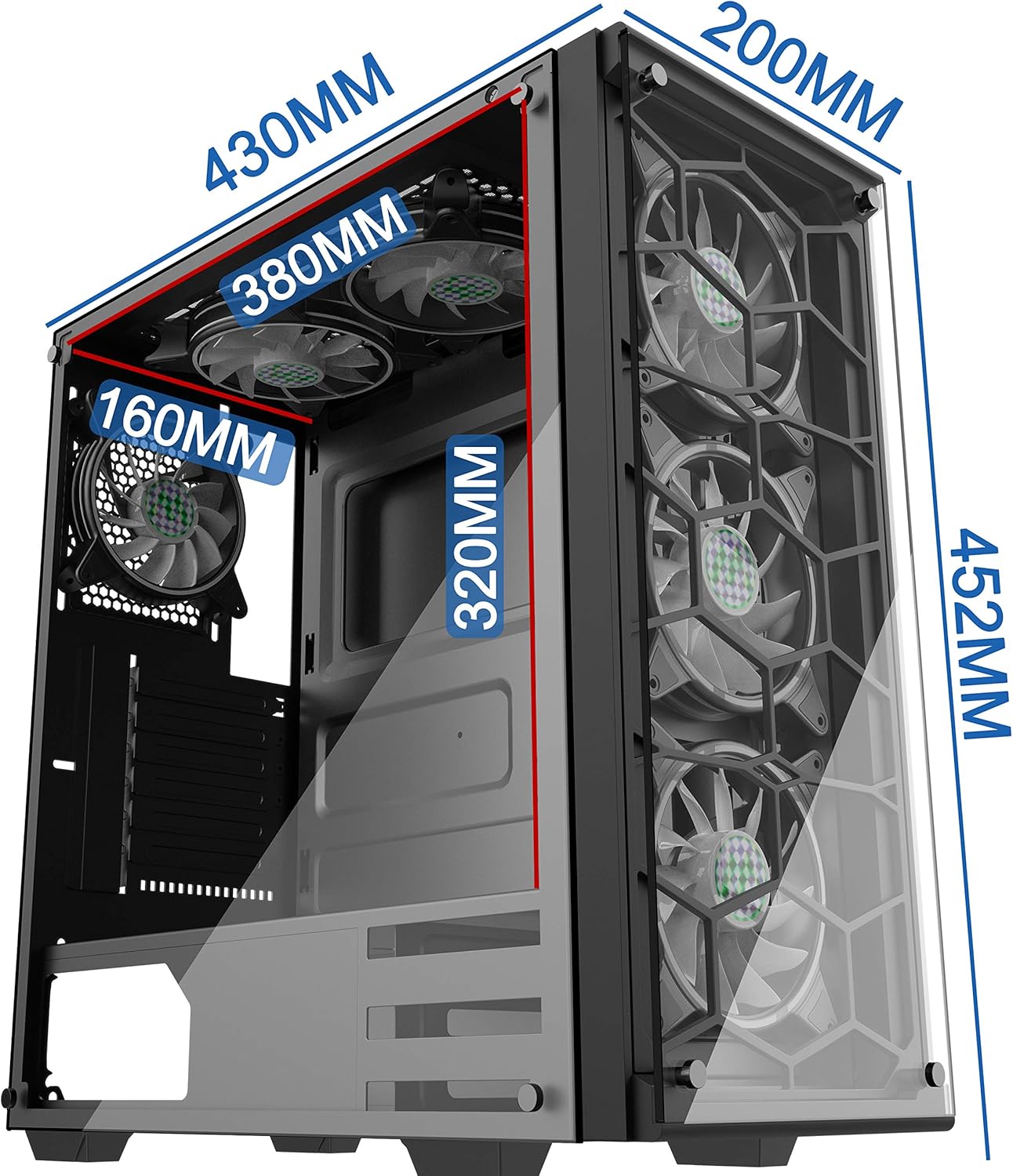
Figure 1: MUSETEX Phantom Black ATX Mid-Tower Case with key dimensions (430mm depth, 200mm width, 452mm height).
2. Característiques del producte
- Panells de vidre temperat: Two durable tempered glass panels provide a clear view dels components interns del teu PC.
- Ventiladors RGB preinstal·lats: Six 120mm RGB fans are pre-installed to ensure efficient cooling and customizable lighting.
- Interior espaiós: Designed to accommodate Extended ATX, ATX, Micro-ATX, and Mini-ITX motherboards, along with large GPUs and CPU coolers.
- Flux d'aire optimitzat: Mesh panels and multiple fan mounting options facilitate excellent air circulation.
- E/S frontal convenient: Easy access to essential ports and controls on the top panel.

Figura 2: Explotat view illustrating the case components, including tempered glass panels, frame, and fans.
3. Configuració i instal·lació
3.1 Precaucions generals de seguretat
- The tempered glass panels are fragile. Handle with extreme care.
- Always lay the case flat on a stable surface when removing side panels.
- Ensure the system is powered off and unplugged before performing any installation or maintenance.
3.2 Accés a l'interior
To access the interior of the case, locate the thumb screws on the rear of the tempered glass side panel. Unscrew these and carefully slide the panel off. For the solid metal side panel, unscrew the thumb screws and slide the panel backward to remove it. The front glass panel is secured by screws and can be removed if necessary for specific builds, but it is generally not required for standard component installation.
3.3 Instal·lació de la placa base
The case supports Extended ATX, ATX, Micro-ATX, and Mini-ITX motherboards. Install your motherboard onto the pre-installed standoffs. Ensure all necessary power and data cables are routed through the designated cutouts.

Figura 3: Intern view showing motherboard compatibility (Mini-ITX, M-ATX, ATX, E-ATX) and designated areas for SSDs, HDDs, and PSU.
3.4 Instal·lació de la unitat d'alimentació (PSU).
The power supply mounts at the bottom of the case. The maximum supported PSU length is 200mm. Secure the PSU using screws from the rear of the case.
3.5 Graphics Processing Unit (GPU) Installation
Install your graphics card into the appropriate PCIe slot on your motherboard. The case supports GPUs with a maximum length of 400mm.
3.6 Instal·lació del dispositiu d'emmagatzematge
The case includes a drive cage in the rear, supporting two 3.5-inch HDDs or two 2.5-inch SSDs. Additional SSD mounting points may be available on the motherboard tray.
4. Panell d'E/S frontal
The front I/O panel is conveniently located on the top of the case, providing easy access to essential ports and controls:
- 1 & 2: HD Audio: Headphone and Microphone jacks.
- 3 & 4: 2x USB 2.0: Per connectar dispositius USB 2.0.
- 5: Power Button: Per encendre/apagar el sistema.
- 6: USB 3.0: Per connectar dispositius USB 3.0 d'alta velocitat.
- 7: RGB Light Button: To cycle through different RGB lighting modes for the pre-installed fans.
- 8: Reset Button: Per reiniciar el sistema.

Figura 4: Detallada view of the front I/O panel with labeled ports and buttons.
5. Cooling Options
The MUSETEX Phantom Black 907-N6 case offers versatile cooling configurations to maintain optimal system temperatures:
- Ventiladors preinstal·lats: 6x 120mm RGB fans (3 front, 2 side, 1 rear).
- Top Cooling: Supports 3x 120mm fans or 2x 140mm fans. Radiator support up to 360mm or 280mm.
- Side Cooling: Supports 2x 120mm fans. Radiator support up to 240mm. (Note: No 140mm fan support on the side).
- Bottom Cooling: Supports 3x 120mm fans or 2x 140mm fans. (Note: It is not recommended to install a radiator on the bottom as it may make the pump the highest part of the loop, potentially affecting performance and longevity).
- Rear Cooling: Supports 1x 120mm fan or 1x 140mm fan. Radiator support for 120mm or 140mm.

Figura 5: Davant i darrere views of the case, highlighting mesh panels for airflow and fan mounting locations.
6. Gestió de cables
The case features dedicated channels and velcro straps on the rear side of the motherboard tray to facilitate clean and efficient cable management. This generous space helps to keep cables tidy, improving airflow and the overall aesthetic of your build.
7. Manteniment
To maintain optimal performance and longevity of your PC, regular cleaning is recommended:
- Filtres de pols: The case includes magnetic dust filters on the top and bottom panels. These can be easily removed for cleaning. Gently wipe or rinse the filters to remove accumulated dust.
- Fans: Periodically clean the fan blades with compressed air to prevent dust buildup, which can impede airflow and increase noise.
- Panells de vidre: Clean tempered glass panels with a soft, lint-free cloth and a glass cleaner. Avoid abrasive materials that could scratch the surface.
8. Especificacions
| Característica | Descripció |
|---|---|
| Nom del model | Phantom (907-N6) |
| Tipus de cas | Torre mitja |
| Compatibilitat amb la placa base | ATX estesa, ATX, Micro-ATX, Mini-ITX |
| Material | Vidre temperat |
| Ventiladors preinstal·lats | 6x 120mm RGB Fans |
| Ports d'E / S frontals | 2x USB 2.0, 1x USB 3.0, HD Audio (Mic/Headphone), Power, Reset, RGB Light Button |
| Longitud màxima de la GPU | 400 mm |
| Alçada màxima del refrigerador de la CPU | 175 mm |
| Longitud màxima de la PSU | 200 mm |
| Badies d'emmagatzematge | 2 x HDD de 3.5" / 2 x SSD de 2.5" |
| Cooling Support (Top) | 3x 120mm fans / 2x 140mm fans; Radiator up to 360mm/280mm |
| Cooling Support (Side) | 2x 120mm fans; Radiator up to 240mm |
| Cooling Support (Bottom) | 3x 120mm fans / 2x 140mm fans |
| Cooling Support (Rear) | 1x 120mm fan / 1x 140mm fan; Radiator 120mm/140mm |
| Pes de l'article | 18.96 lliures |
| Dimensions del paquet | 17.16 x 17.13 x 8.07 polzades |
9. Solució De Problemes
- Sense energia: Ensure all power cables are securely connected to the motherboard, PSU, and wall outlet. Check the power button connection to the motherboard.
- Els ventiladors no giren/RGB no funciona: Verify that all fan power cables and RGB cables are correctly connected to the motherboard or the RGB controller. Use the RGB light button on the front I/O to cycle modes.
- Sobreescalfament: Check fan orientation for proper airflow (intake/exhaust). Ensure dust filters are clean and not obstructing airflow. Verify CPU cooler and GPU fans are functioning correctly.
- Panells solts: Ensure all thumb screws are tightened for side panels.
10. Vídeo oficial del producte
Watch the official MUSETEX product video for a visual guide on features and installation:
Video 1: This official MUSETEX video showcases the Phantom Black ATX Mid-Tower Case, highlighting its 6 pre-installed RGB fans and tempered glass panels. It provides a visual overview of the case's design and features.
11. Garantia i assistència
For warranty information, technical support, or further assistance, please refer to the official MUSETEX weblloc web o contacteu directament amb el servei d'atenció al client. Conserveu el rebut de compra com a comprovant de compra per a reclamacions de garantia.