
Introducció
The JOBY Smart Stabilizer is a 3-axis smartphone gimbal designed for vloggers and content creators. It provides smooth, shake-free video recording with your smartphone, enhancing the quality of your mobile videography. This manual provides essential information for setting up, operating, maintaining, and troubleshooting your device.
Configuració
1. Desembalatge i contingut del paquet
Carefully unpack your JOBY Smart Stabilizer and verify all components are present. The package should contain:
- Gimbal
- Bossa de transport
- Corretja de canell
- Trípode
- Cable de càrrega micro USB
- Micro to Micro cable
- Micro to Lightning cable
- Micro to Type C cable
- Manual d'usuari
- Targeta de configuració ràpida

Figure 1: All components included in the JOBY Smart Stabilizer package.
2. Càrrega de l'estabilitzador
Before first use, fully charge the stabilizer's internal Lithium Ion battery using the provided Micro USB charging cable. Connect the cable to the gimbal's charging port and a suitable USB power source. The charging indicator light will show the charging status.
3. Muntatge del telèfon intel·ligent
Allargar la clavilla del telèfonamp and securely place your smartphone in the holder. Ensure the phone is centered and balanced. It may be necessary to remove your phone case for proper fit and balance.
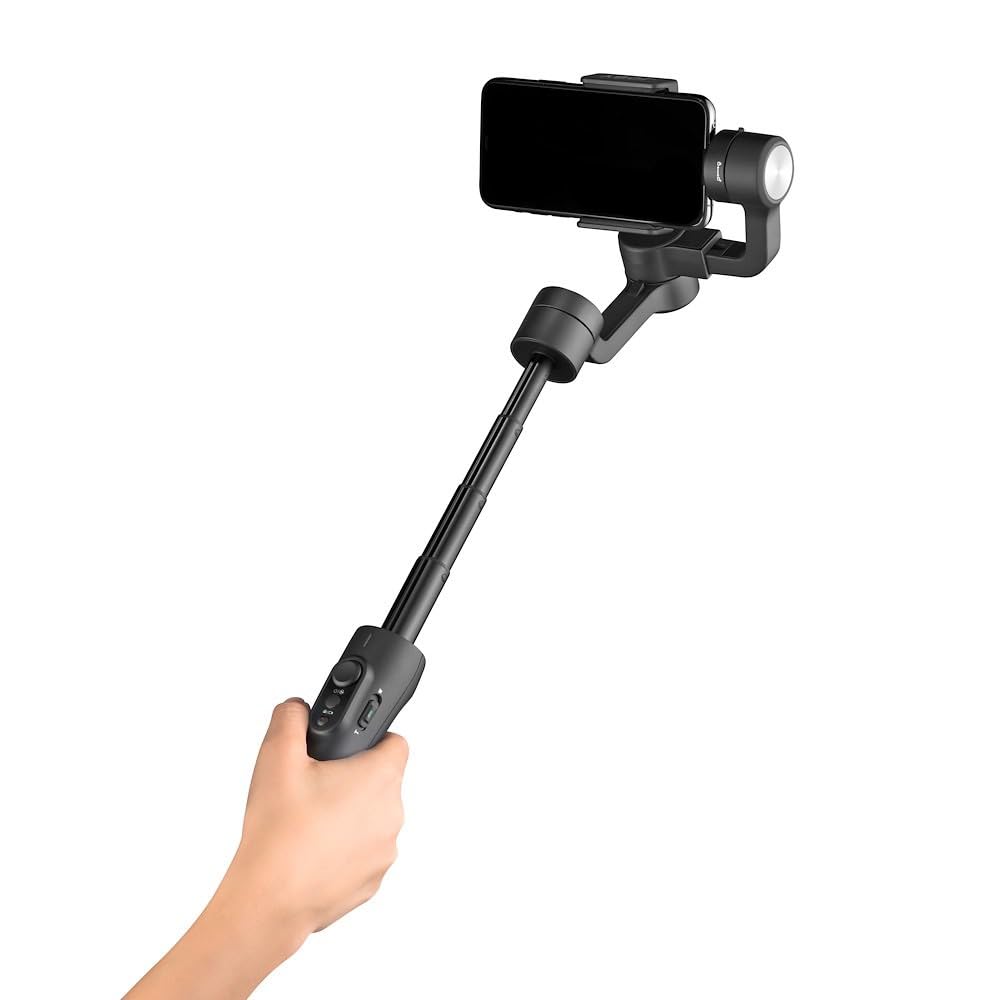
Figure 2: Smartphone mounted on the stabilizer with the telescopic handle extended.
4. Instal·lació i connexió de l'aplicació
Download the dedicated 'Smart Stabilizer' App from your smartphone's app store. Follow the in-app instructions to connect your smartphone to the gimbal via Bluetooth. This app enables advanced features like face/object tracking.
5. Equilibri del cardan
Proper balancing is crucial for optimal performance and battery life. After mounting your phone, adjust its position in the clamp until it remains level when the gimbal is powered off. This reduces strain on the motors.
Instruccions de funcionament
1. Encendre/apagar
Press and hold the power button for a few seconds to turn the stabilizer on or off. The indicator lights will confirm the power status.
2. Selecció de mode
The stabilizer supports both landscape and portrait modes. Refer to the Quick Setup Card or the app for specific instructions on switching between modes.
3. Using the Telescopic Handle and Tripod
The integrated telescopic handle can extend up to 7 inches, allowing for wider shots or higher angles. For stable, hands-free recording, attach the included mini tripod to the base of the stabilizer.

Figure 3: Stabilizer extended and placed on the mini tripod for stationary recording.
4. Advanced Features (via App)
Utilize the 'Smart Stabilizer' app for features such as face tracking and object tracking, which automatically keep your subject in frame. Explore other settings and shooting modes available within the app.
Manteniment
1. Neteja
Wipe the stabilizer with a soft, dry cloth. Avoid using harsh chemicals or abrasive materials that could damage the finish or internal components.
2. Emmagatzematge
When not in use, store the stabilizer in its carrying bag in a cool, dry place, away from direct sunlight and extreme temperatures. Ensure the device is powered off before storage.
3. Cura de la bateria
To prolong the life of the Lithium Ion battery, avoid fully discharging it frequently. Recharge the battery periodically even if the device is not in regular use.
Resolució de problemes
- Gimbal not balancing correctly: Ensure your smartphone is properly centered in the clamp. If using a phone case, try removing it. Re-calibrate the gimbal if necessary via the app.
- Problemes de connectivitat de l'aplicació: Verify Bluetooth is enabled on your smartphone and the gimbal is powered on. Ensure the 'Smart Stabilizer' app is updated to the latest version. Try restarting both your phone and the gimbal, then re-pairing.
- Gimbal motors vibrating or making unusual noises: This often indicates improper balancing or an overloaded motor. Ensure the phone is balanced correctly. If the issue persists, power off the device and contact support.
- Device overheating or unresponsive: Power off the device immediately and allow it to cool down. Ensure proper ventilation during use. If the problem continues, discontinue use and contact customer support.
- Autonomia curta de la bateria: Ensure the gimbal is fully charged before use. Improper balancing can cause motors to work harder, leading to faster battery drain.
Especificacions
| Característica | Detall |
|---|---|
| Marca | Joby |
| Número de model | JB01656-BWW |
| Dimensions del producte | 11.1 x 11.8 x 32.3 cm |
| Pes de l'article | 428 g |
| Bateries | 1 A Lithium Ion battery (included) |
| Dispositius compatibles | Telèfon mòbil |
| Image Stabilization Technology | Sí |
| Telescopic Handle Extension | Fins a 7 polzades |
| Modes | Paisatge i Retrat |
| UPC | 817024016562 |
Informació de la garantia
The JOBY Smart Stabilizer is covered by a manufacturer's warranty. Please refer to the warranty card included in your package or visit the official Joby weblloc web per obtenir els termes i condicions detallats sobre la cobertura de la garantia i les reclamacions.
Atenció al client
For technical assistance, troubleshooting, or service inquiries, please contact Joby customer support. You can find contact information on the official Joby website or through the 'Smart Stabilizer' app.
Visita el Joby Store for more information on Joby products.