
Temtop LKC-1000S+
Temtop LKC-1000S+ 2nd Air Quality Monitor User Manual
Model: LKC-1000S+ 2nd
1. Introducció
The Temtop LKC-1000S+ 2nd is a professional air quality monitor designed to measure various indoor and outdoor air pollutants. This device provides real-time data for PM2.5, PM10, Formaldehyde (HCHO), Total Volatile Organic Compounds (TVOC), Air Quality Index (AQI), temperature, and humidity. It features a histogram function for PM2.5 trends and a data export capability for detailed analysis. This manual provides essential information for the proper use and maintenance of your air quality monitor.
2. Producte acabatview
The Temtop LKC-1000S+ 2nd air quality monitor is equipped with advanced sensors for accurate readings and a clear TFT display for easy data interpretation.

Image 2.1: The Temtop LKC-1000S+ 2nd Air Quality Monitor, showing its sleek design and digital display.
2.1 Característiques clau
- Measures PM2.5, PM10, HCHO, TVOC, AQI, Temperature, and Humidity.
- Advanced 3rd generation laser particle sensor with a lifespan of up to 20,000 hours.
- Factory-calibrated electrochemical sensors for high-precision formaldehyde detection.
- New bar graph function displays PM2.5 changes over the past 12 hours.
- Data export function via USB.
- Large TFT screen for clear readability.

Imatge 2.2: acabatview of the Temtop LKC-1000S+ 2nd's measurement capabilities, including PM2.5, PM10, particles, temperature, humidity, AQI, TVOC, formaldehyde, histogram, and data export.
2.2 Components del dispositiu

Image 2.3: Diagram illustrating the main components of the monitor: Air Outlet, Air Inlet, LCD Screen, and control buttons for AQI/Temp/Humi, PM2.5/PM10/Particles, and HCHO/TVOC.
- Entrada d’aire: Where air samples are drawn into the device.
- Sortida d'aire: Where processed air exits the device.
- Pantalla LCD: Displays all measurement data and device status.
- Botons de control: For navigating menus and selecting measurement parameters.
- Port USB: For charging and data export.

Imatge 2.4: Desplegada view showing the internal sensors: DART Electrochemical HCHO Sensor, Sensirion Temp & Humi Sensor, and Temtop Laser PM2.5 Sensor (3rd Gen).
3. Configuració
3.1 Desembalatge i inspecció inicial
Upon receiving your Temtop LKC-1000S+ 2nd, carefully unpack all components. The package should include:
- Temtop LKC-1000S+ 2nd Air Quality Monitor
- Cable de càrrega USB
- Manual d'usuari
- Caixa d'emmagatzematge

Image 3.1: Contents of the Temtop LKC-1000S+ 2nd package, including the monitor, USB charging cable, and manual.
Inspect the device for any signs of damage. If any components are missing or damaged, contact customer support.
3.2 Càrrega del dispositiu
The monitor is powered by a built-in 3000mAh rechargeable Lithium-ion battery. Before first use, fully charge the device.
- Connect the provided USB charging cable to the monitor's USB port.
- Connecteu l'altre extrem del cable USB a un adaptador de corrent USB compatible (no inclòs) o al port USB d'un ordinador.
- The battery indicator on the screen will show the charging status. A full charge typically takes several hours.
- Un cop estigui completament carregat, desconnecteu el cable de càrrega.

Image 3.2: The monitor connected via USB cable, illustrating both charging and data export capabilities.
4. Instruccions de funcionament
4.1 Engegada/apagada
- To power on: Press and hold the power button (usually the central button) until the screen illuminates.
- To power off: Press and hold the power button until the screen turns off.
4.2 Comprensió de la pantalla
The large TFT screen displays real-time measurements for various air quality parameters. The main screen typically shows PM2.5, PM10, and particle count, along with an overall air quality indicator (e.g., "Good").
- PM2.5 (µg/m³): Particulate matter less than 2.5 micrometers in diameter.
- PM10 (µg/m³): Particulate matter less than 10 micrometers in diameter.
- HCHO (mg/m³): Formaldehyde concentration.
- TVOC (mg/m³): Total Volatile Organic Compounds concentration.
- AQI: Air Quality Index, an overall indicator of air quality.
- Temperatura (°C/°F): Temperatura ambient.
- Humitat (%): Humitat relativa.
4.3 Navigating Measurements and Functions
Use the dedicated buttons to switch between different measurement displays and access functions:
- Botó PM2.5: Feu un sol clic a view the pollutant index for PM2.5.
- HCHO/TVOC Button: Feu un sol clic a view HCHO and TVOC readings. Double-click to view the corresponding histogram.
- AQI Button: Feu un sol clic a view AQI, temperature, and humidity.
- Botó d'engegada/menú: Press to power on/off, or short press to enter/exit menu options.
4.4 Interpreting Air Quality Levels (EPA Standards)
The device provides a visual indication of air quality based on EPA standards, often using color codes:
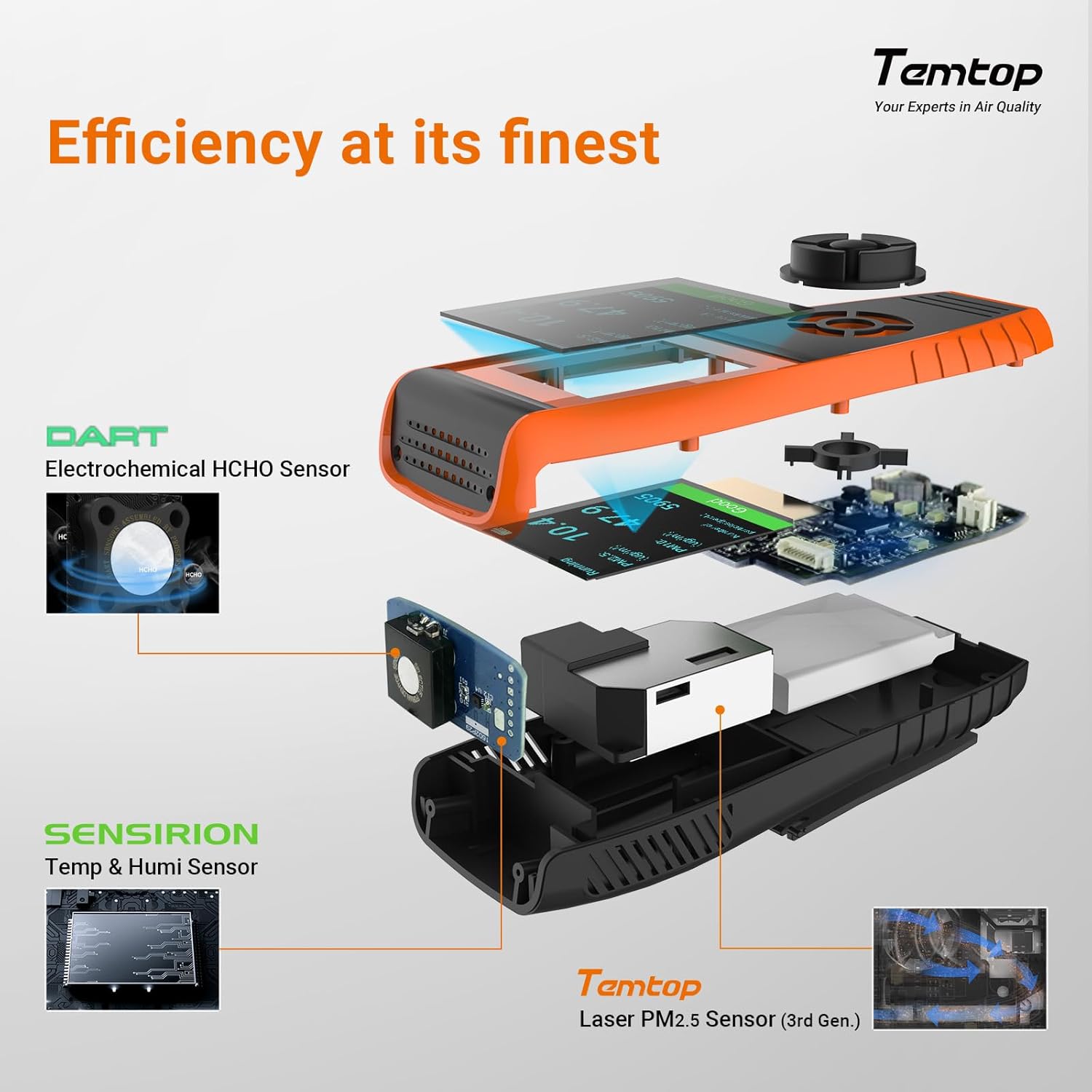
Image 4.1: The monitor's display showing air quality levels categorized by color, referencing EPA standards for Good/Safe, Moderate, Unhealthy for Sensitive Groups, Unhealthy, Very Unhealthy, and Hazardous.
- Verd: Good/Safe
- groc: Moderat
- Taronja: Poc saludable per a grups sensibles
- Vermell: Poc saludable
- Lila: Molt poc saludable
- granat: Perillós
4.5 Exportació de dades
The monitor supports data export via its USB port, allowing for detailed analysis of recorded measurements.
- Connect the monitor to a computer using the provided USB cable.
- El dispositiu hauria d'aparèixer com a dispositiu d'emmagatzematge extraïble.
- Access the stored data files (e.g., CSV format) and copy them to your computer for analysis.
The device's memory allows for at least 3 months of continuous data recording.
5. Manteniment
5.1 Neteja
To clean the device, use a soft, dry cloth. Do not use abrasive cleaners, solvents, or immerse the device in water. Keep the air inlet and outlet free from dust and obstructions.
5.2 Cura del sensor
The advanced laser particle sensor has a long lifespan of up to 20,000 hours. The electrochemical sensors are factory-calibrated for accuracy. Avoid exposing the device to extreme temperatures, high humidity, or corrosive gases, as this can affect sensor performance and lifespan.
5.3 Cura de la bateria
Per allargar la durada de la bateria, eviteu descarregar-la completament amb freqüència. Carregueu el dispositiu regularment, sobretot si l'emmagatzemareu durant un període prolongat.
6. Solució De Problemes
If you encounter issues with your Temtop LKC-1000S+ 2nd, refer to the following common problems and solutions:
| Problema | Causa possible | Solució |
|---|---|---|
| El dispositiu no s'encén. | Bateria baixa o mal funcionament del dispositiu. | Charge the device for at least 2 hours. If it still doesn't power on, contact support. |
| Lectures inexactes. | Sensor obstruction, environmental factors, or calibration issue. | Ensure air inlets/outlets are clear. Move the device to a stable environment. Allow 5-10 minutes for readings to stabilize. If issues persist, contact support. |
| Cannot export data. | Connexió USB incorrecta o problema amb el controlador. | Ensure the USB cable is securely connected to both the device and the computer. Try a different USB port or computer. |
| La pantalla està en blanc o congelada. | Error de programari. | Premeu i manteniu premut el botó d'engegada durant 10-15 segons per forçar un reinici. |
For problems not listed here or if solutions do not resolve the issue, please contact Temtop customer support.
7. Especificacions
| Paràmetre | Valor |
|---|---|
| Número de model | LKC-1000S+2nd |
| Fabricant | Elitech (Brand: Temtop) |
| Dimensions del producte | 6.55 x 3.2 x 17.55 cm |
| Pes | 408.23 g |
| Tipus de bateria | 1 bateria d'ions de liti (inclosa) |
| Capacitat de la bateria | 3000mAh (recyclable) |
| Font d'alimentació | Bateria |
| Voltage | 5 Volts |
| Tipus de sensor | Electrochemical (HCHO), Laser (PM2.5/PM10), Sensirion (Temp/Humi) |
| PM2.5 Sensor Lifespan | Fins a 20,000 hores |
| Mides | PM2.5, PM10, HCHO, TVOC, AQI, Temperature, Humidity |
| Exportació de dades | Sí, via USB |
| UPC | 757233346244 |
8. Garantia i Suport
8.1 Informació de la garantia
Specific warranty details for the Temtop LKC-1000S+ 2nd Air Quality Monitor are not provided in this manual. Please refer to the warranty card included with your product or visit the official Temtop weblloc web per consultar la política de garantia més actualitzada.
8.2 Atenció al client
For technical assistance, troubleshooting, or any questions regarding your device, please contact Temtop customer support. Contact information can typically be found on the product packaging, the official Temtop weblloc web o la targeta de garantia.
Ask a question about this manual
Ask about setup, troubleshooting, compatibility, parts, safety, or missing instructions. Manuals+ will review the question and use this page’s manual context to help answer it.