
1. Introducció
Gràcies per la compraasing the Eonon GA2187J 10.1-inch Android 10 Car Navigation System. This manual provides essential information for the safe and efficient use of your device. Please read it thoroughly before installation and operation, and keep it for future reference.
The Eonon GA2187J is a 2-DIN car multimedia system featuring a 10.1-inch IPS touchscreen display, Android 10 operating system, GPS navigation, Bluetooth, Wi-Fi connectivity, and various multimedia functions.
2. Informació de seguretat
- Instal·lació professional recomanada: Installation of this product requires technical expertise. It is strongly recommended to have the unit installed by a qualified professional to prevent damage to the product or your vehicle.
- Font d'alimentació: This unit operates on a DC 12V power supply. Ensure correct voltage connections to avoid damage.
- Seguretat de conducció: No feu funcionar el sistema de manera que us distregui de la conducció. Prioritzeu sempre la seguretat viària.
- Temperatura: Eviteu exposar la unitat a temperatures extremes o a la llum solar directa durant períodes prolongats.
- Humitat: Mantingueu la unitat allunyada de l'aigua i de la humitat excessiva.
- Neteja: Utilitzeu un drap suau i sec per netejar. No utilitzeu netejadors abrasius ni dissolvents.
3. Producte acabatview
3.1 Característiques clau
- Sistema operatiu Android 10
- 10.1-inch IPS Full Touch Capacitive Screen (1024x600 resolution)
- Quad-Core CPU (MTK 8227L 1.2GHz ARM A7)
- 2GB RAM, 16GB Internal Storage
- Built-in GPS Navigation
- Bluetooth 4.0 per a trucades de mans lliures i reproducció de música en streaming
- Wi-Fi (2.4G) Connectivity
- USB and MicroSD Card Support (up to 64GB)
- Compatibilitat amb el control del volant
- Multi-language Support (85 languages including English and Japanese)
3.2 Contingut del paquet
Verifiqueu que tots els elements siguin presents al paquet:
- Eonon GA2187J Head Unit x1
- Cable d'alimentació x1
- GPS Antenna x1 (3m)
- Wi-Fi Antenna x1 (1.5m)
- Cable AV x2
- USB Cable x2 (1m)
- Microphone x1 (3m)
- Fusible 15A x1
- Disassembly Tool x1
- Cargols de muntatge x4
- Manual d'usuari x1

Image: Included accessories for the Eonon GA2187J car navigation system, showing cables, antennas, microphone, and tools.
4. Configuració i instal·lació
4.1 Llista de comprovació prèvia a la instal·lació
- Assegureu-vos que el contacte del vehicle estigui apagat i que la bateria estigui desconnectada.
- Confirm compatibility with your vehicle's dashboard and wiring harness.
- Reuneix totes les eines necessàries per a la instal·lació.
4.2 Dimensions d'instal·lació
The unit has the following dimensions:
- Mida del panell: 252 mm (amplada) x 147 mm (alçada)
- Mida de la instal·lació: 178 mm (Width) x 125 mm (Length) x 100 mm (Height)
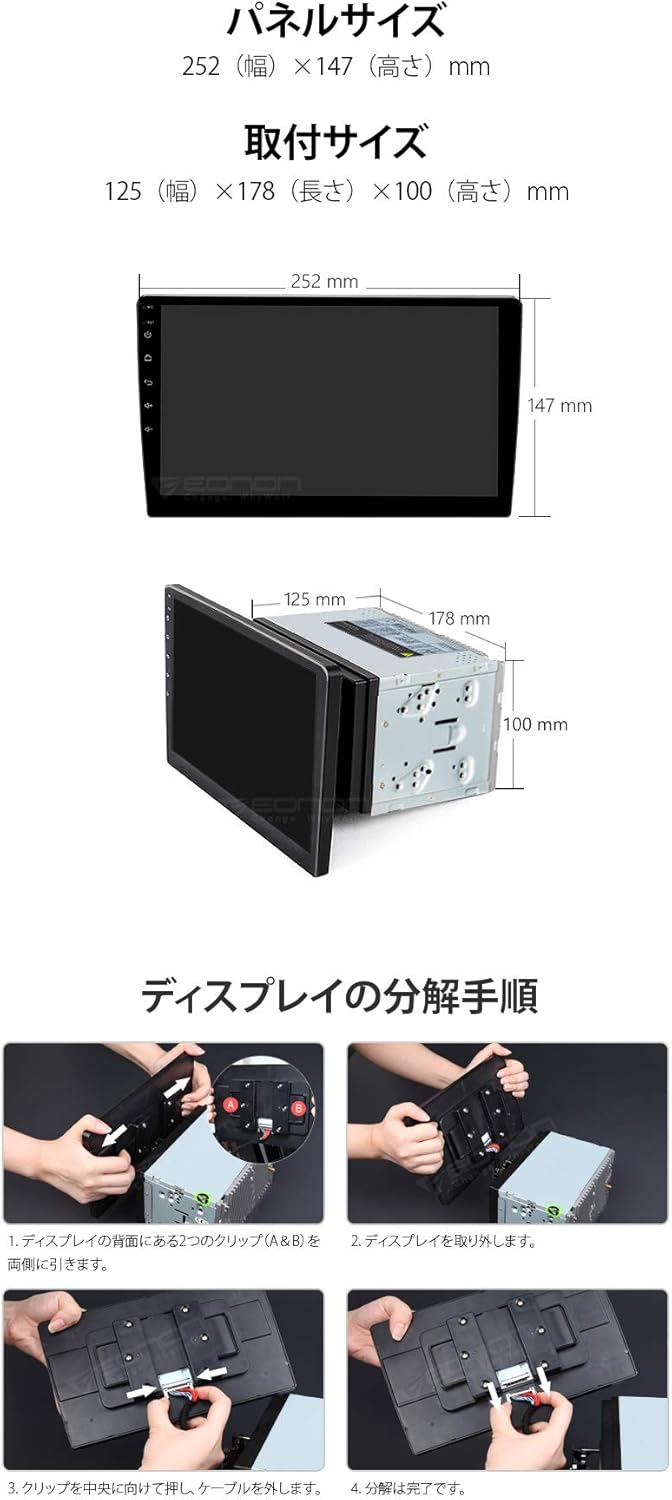
Image: Diagram showing the panel size, installation size, and steps for disassembling the display from the main unit.
4.3 Esquema de cablejat
Refer to the detailed wiring diagram for proper connection of all components. Incorrect wiring can cause damage to the unit or vehicle.
Image: Comprehensive wiring diagram illustrating connections for power, speakers, antennas, USB, and other input/output ports.
Connexions clau:
- Cable de corrent: Connect to vehicle's power supply (DC 12V).
- Antena GPS: Muntar en un lloc amb claredat view del cel.
- Antena Wi-Fi: Connect for wireless network access.
- Cables USB: Per connectar dispositius USB.
- Micròfon extern: For improved call quality.
- Sortides RCA: For connecting external displays or ampaixecadors.
- ENTRADA DE LA CAM: Per connectar una part posteriorview camera (sold separately).
5. Instruccions de funcionament
5.1 Funcionament bàsic
- Encès/apagat: The unit powers on with the vehicle's ignition.
- Pantalla tàctil: Navigate the interface using the 10.1-inch IPS full touch screen.
- Il·luminació del botó: Customize the 7-color button backlight to match your vehicle's interior.
- Visualització del rellotge: The unit features a built-in clock display function.
- Power Status Memory: The system remembers its last state when powered off.
5.2 Android 10 System
The unit runs on Android 10, offering a familiar smartphone-like experience. You can install various applications from the app store.

Image: Screenshot of the Android 10 interface on the Eonon GA2187J, highlighting key features like CPU, RAM, and ROM specifications.
5.3 Navegació
The unit comes with built-in GPS navigation. You can use pre-installed map applications or download others from the app store. Online maps require an internet connection.
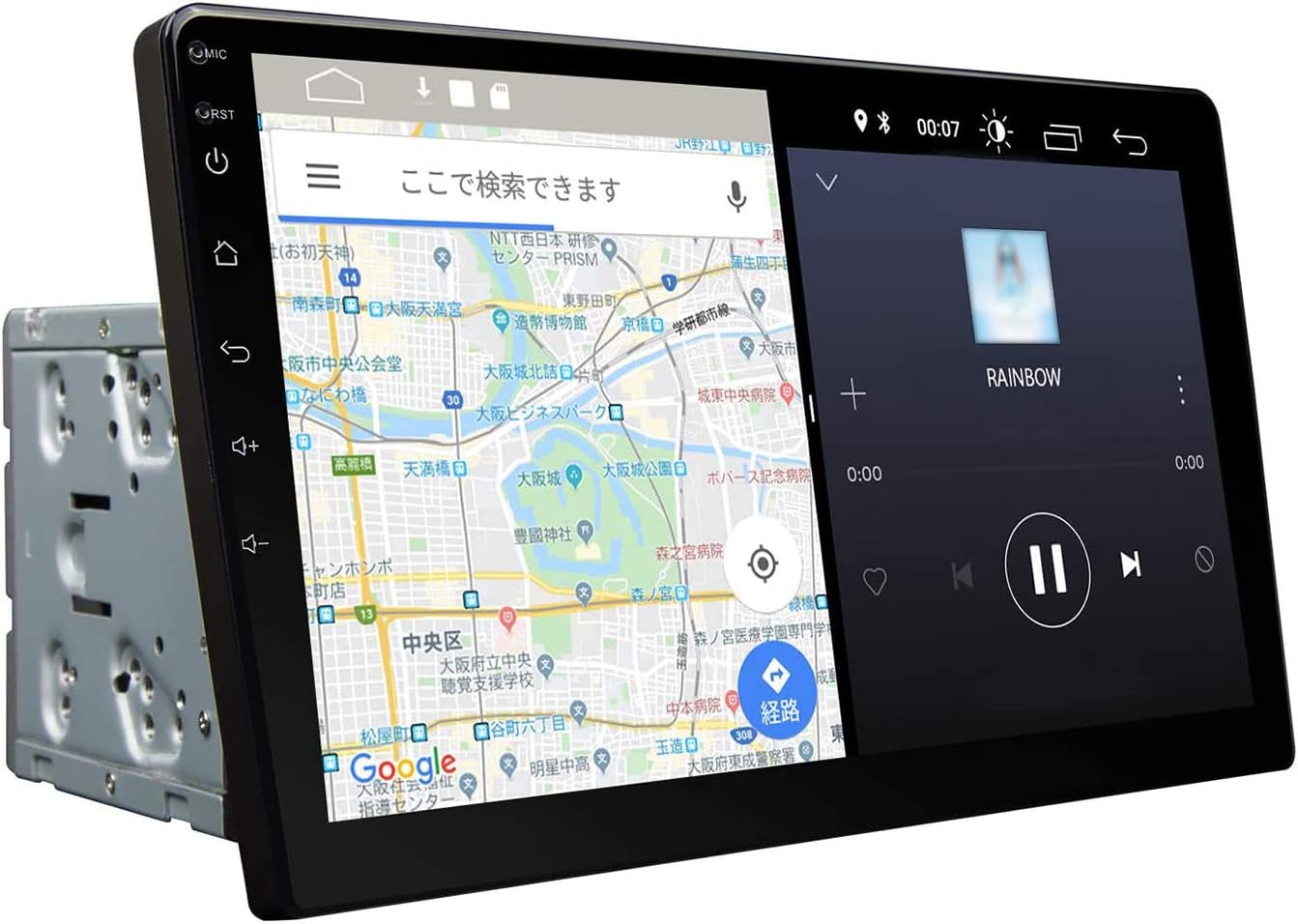
Image: The Eonon GA2187J display showing a navigation map on one side and a media player on the other, demonstrating multi-window functionality.
5.4 Connectivitat
- Bluetooth 4.0:
- Pairing Password: 5802
- Nom del dispositiu: EONON
- Supports hands-free calling, phonebook synchronization, and Bluetooth music playback.
- Features a built-in microphone and supports an external microphone for clearer calls.
- Wi-Fi (2.4G): Connect to available Wi-Fi networks for internet access, app downloads, and online services.
- 4G Dongle Support: The unit supports an external 4G dongle (sold separately) for mobile internet connectivity.
- iPhone Connection (PhoneLink): Connect your iPhone for integrated features.
- Android Smartphone Connection: For Android Auto functionality, a CarPlay USB dongle (EONON A0585, sold separately) may be required.
- Enllaç de mirall: Supports screen mirroring from compatible smartphones.
5.5 Reproducció multimèdia
- USB / MicroSD: Supports USB flash drives and MicroSD cards up to 64GB.
- Formats de vídeo: AVI, MKV, MP4, WMV, RMVB, MPG, and other Android video formats. Supports network streaming and 1080p video playback.
- Formats d'àudio: MP3, WMA, WAV, AC3, OGG, FLAC, and other audio formats. Supports network audio playback.
- Formats d'imatge: JPEG, BMP, PNG, TIFF.
- Sintonitzador de ràdio: Built-in radio tuner with 30 preset stations (FM18, AM12).
5.6 Funcions avançades
- Multi-Window Display: Split the screen to display two applications simultaneously.
- RCA Full Screen Share: Output video from any mode to headrest monitors or flip-down monitors.
- Control del volant: Compatible with existing steering wheel controls for convenient operation.
- DSP (Digital Sound Field Processing): Enhances audio quality with a 30-band graphic equalizer and optimal sound stage selecció.
- Suport OBD2: Compatible with EONON V0056 OBD2 dongle (sold separately) to display vehicle data.
- Backup Camera Linkage: Automatically switches to the backup camera view when reversing (camera sold separately, EONON A0119N A0121N A0130N compatible).
- TV Viewing: Supports external TV tuners (EONON V003S V0050, sold separately).

Image: Visual representation of iPhone connectivity, Digital Sound Field Processing (DSP), and the 30-band graphic equalizer interface.
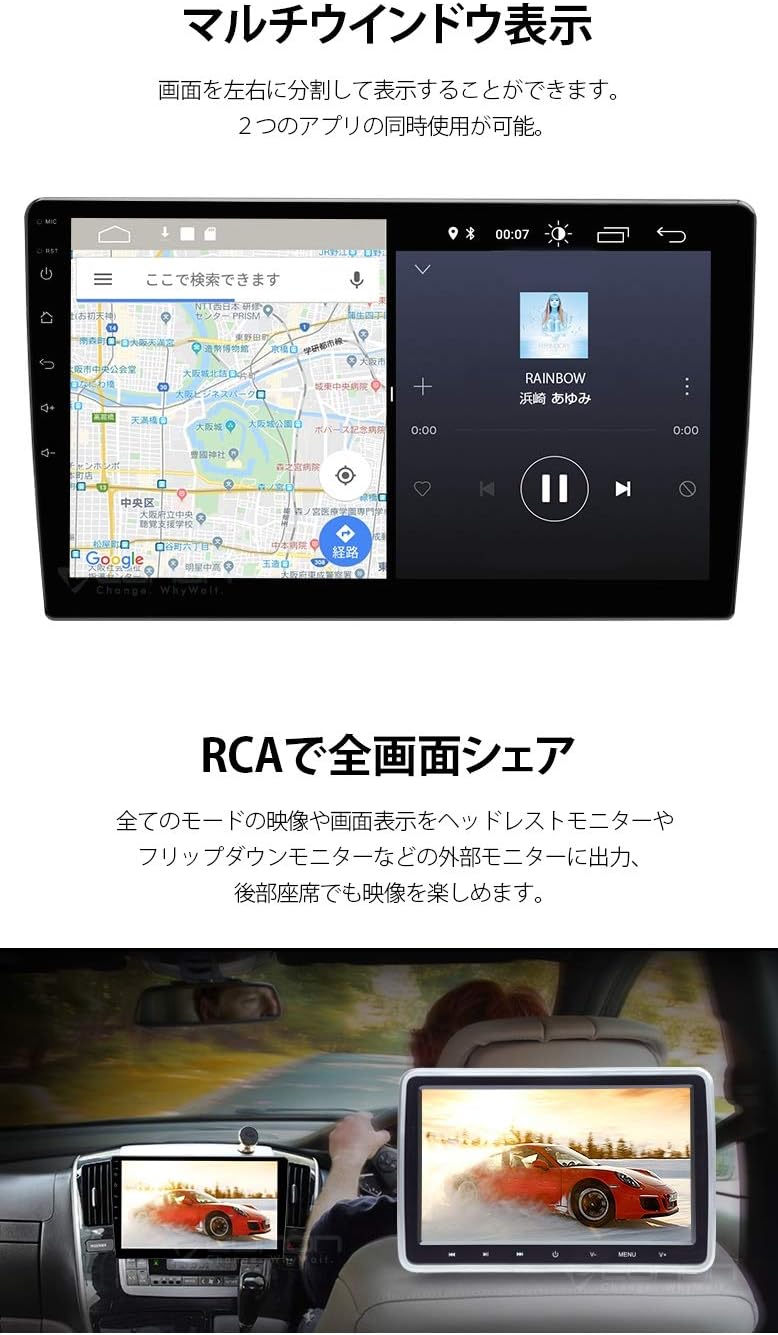
Image: The Eonon GA2187J display demonstrating multi-window functionality with navigation and media player, and an example of RCA full screen sharing to a rear monitor.

Imatge: Més deview of various connectivity options and optional features including navigation, Wi-Fi/4G, TV viewing, OBD2, CarPlay, and backup camera integration.
6. Manteniment
- Neteja de pantalla: Feu servir un drap suau i sense borrissol per netejar suaument la pantalla. Per a taques difícils, fregueu lleugeramentampen the cloth with water or a screen-safe cleaner. Do not spray liquid directly onto the screen.
- Neteja general: Mantingueu la unitat neta de pols i deixalles. Feu servir un raspall suau o aire comprimit per netejar les reixetes de ventilació i els ports.
- Actualitzacions de programari: Periodically check for software updates to ensure optimal performance and access to new features. Updates may be available through the system settings or the manufacturer's weblloc.
- Eviteu productes químics durs: Do not use strong detergents, solvents, or abrasive cleaners, as they can damage the unit's finish or screen.
7. Solució De Problemes
| Problema | Causa possible | Solució |
|---|---|---|
| La unitat no s'encén. | Incorrect power connection, blown fuse, vehicle battery issue. | Check power cable connections. Inspect the 15A fuse. Ensure vehicle battery is charged. Consult a professional if issues persist. |
| Sense so. | Volume too low, mute activated, incorrect speaker wiring. | Increase volume. Check if mute is active. Verify speaker connections according to the wiring diagram. |
| Senyal GPS perdut o inexacte. | Antena GPS no instal·lada correctament o obstruïda. | Assegureu-vos que l'antena GPS estigui muntada en un lloc clar i sense obstacles. Comproveu la connexió de l'antena. |
| Error d'emparellament Bluetooth. | Incorrect pairing password, device not in pairing mode, interference. | Ensure correct password (5802). Put your device in pairing mode. Try pairing in a different location to avoid interference. |
| La pantalla tàctil no respon. | Error temporal de programari, danys a la pantalla. | Restart the unit. If the problem persists, contact support. |
For issues not listed here, or if troubleshooting steps do not resolve the problem, please contact customer support.
8. Especificacions
| Característica | Detall |
|---|---|
| Sistema operatiu | Android 10 |
| CPU | MTK 8227L 1.2GHz ARM A7 Quad-Core |
| RAM | 2 GB |
| Memòria interna | 16 GB |
| Mida de la pantalla | 10.1 polzades |
| Resolució de visualització | 1024 x 600 |
| Tipus de visualització | IPS Full Touch Capacitive Screen |
| Versió Bluetooth | 4.0 |
| Wi-Fi | 2.4 GHz |
| USB/MicroSD Support | Fins a 64 GB |
| Vol. Operatiutage | DC 12V |
| Corrent màxim de funcionament | ≤10A |
| Pes de la unitat | 1.95 kg |
| Pes brut | 2.60 kg |
| Installation Dimensions (WxLxH) | 178 x 125 x 100 mm |
| Panel Dimensions (WxH) | 252 x 147 mm |
| Idiomes admesos | 85 types (including Japanese, English, Spanish, French, German, Portuguese, Italian, Russian, Turkish, Norwegian) |
Note: Specifications are subject to change without prior notice due to product improvements.
9. Garantia i Suport
9.1 Garantia del fabricant
Aquest producte ve amb un Garantia del fabricant de 1 anys. To claim warranty service, the serial number displayed on the outer packaging (which cannot be reissued) is required. Initial defects are handled according to the manufacturer's warranty policy.
For detailed warranty information, please refer to the official Eonon weblloc:
9.2 Suport tècnic
Please note that direct support for installation or usage methods is not provided by the manufacturer. It is highly recommended to consult a professional for installation in your vehicle.
For general inquiries or product information, please visit the Eonon official website or contact their customer service channels if available.