
1. Introducció
Welcome to the user manual for your new Samsung Galaxy A21S smartphone. This guide provides essential information to help you set up, operate, maintain, and troubleshoot your device. Please read this manual carefully to ensure proper use and to maximize the performance of your phone.
2. Informació de seguretat
Before using your device, please read all safety warnings and precautions to prevent injury or damage. Keep the device away from water and extreme temperatures. Use only Samsung-approved chargers and accessories. Do not attempt to disassemble or repair the device yourself.
3. Contingut del paquet
Verifiqueu que la caixa del producte contingui els elements següents:
- Samsung Galaxy A21S Smartphone
- Adaptador d'alimentació
- Cable USB
- Eina expulsora de SIM
- Guia d'inici ràpid
The actual items supplied with the device may vary depending on the region and service provider.
4. Disseny del dispositiu
Familiarize yourself with the physical features and button locations of your Samsung Galaxy A21S.
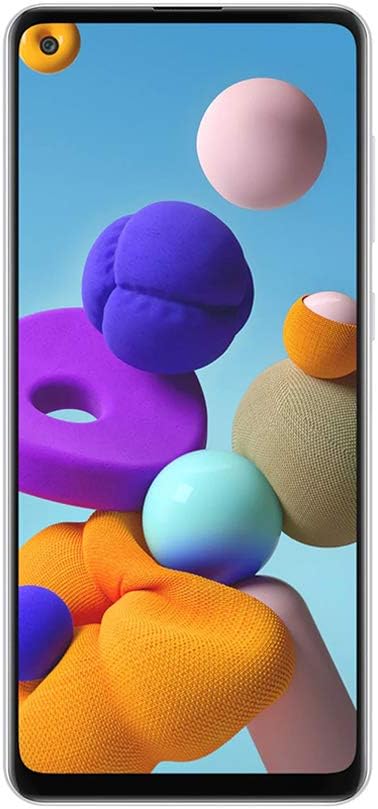
Figura 4.1: Frontal view of the Samsung Galaxy A21S, highlighting the 6.5-inch display and the punch-hole front camera.

Figura 4.2: posterior view of the Samsung Galaxy A21S, featuring the quad camera array and the rear-mounted fingerprint sensor.

Figura 4.3: lateral view of the Samsung Galaxy A21S, illustrating the placement of the volume rocker and power button.
5. Configuració
5.1. Installing the SIM and microSD Card
- Localitza la safata de la targeta SIM al lateral del dispositiu.
- Introduïu l'eina d'expulsió de la SIM al forat petit que hi ha al costat de la safata per obrir-la.
- Place your Nano-SIM card(s) and/or microSD card (up to 64GB) into the tray with the gold contacts facing down. Ensure they are correctly seated.
- Empenyeu suaument la safata cap enrere a la ranura fins que encaixi al seu lloc.
5.2. Engegada inicial
Press and hold the Power button (located on the side of the device) until the Samsung logo appears. Follow the on-screen prompts to complete the initial setup, including language selection, Wi-Fi connection, Google account setup, and security settings (fingerprint recognition).
6. Funcionament del vostre dispositiu
6.1. Navegació bàsica
Your Galaxy A21S uses a touchscreen interface. Swipe to navigate between screens, tap to open apps, and pinch to zoom. Use the navigation bar at the bottom of the screen or gesture navigation for Home, Back, and Recent Apps functions.
6.2. Fer trucades i enviar missatges
To make a call, open the Phone app, enter the number, and tap the call icon. To send a message, open the Messages app, tap the new message icon, enter the recipient and your message, then tap send.
6.3. Ús de la càmera
The Galaxy A21S features a versatile quad-camera system. Open the Camera app to capture photos and videos. Tap the shutter button to take a picture. Swipe left or right to switch between modes like Photo, Video, and Macro. The front camera is 8 MP, and the main rear camera is 48 MP.
6.4. Connectivitat
- Wi-Fi: Connecteu-vos a xarxes sense fil per accedir a Internet. Aneu a Configuració > Connexions > Wi-Fi.
- Bluetooth: Pair with other Bluetooth devices like headphones or speakers. Go to Settings > Connections > Bluetooth.
- Dades mòbils (LTE): Enable mobile data for internet access when Wi-Fi is unavailable. Go to Settings > Connections > Data usage.
6.5. Funcionalitat de doble SIM
Your device supports two SIM cards, allowing you to manage two phone numbers or data plans simultaneously. You can set a preferred SIM for calls, messages, and mobile data in Settings > Connections > SIM card manager.
7. Manteniment
7.1. Cura de la bateria
The device is equipped with a 5000 mAh Lithium-Ion battery. To prolong battery life, avoid fully discharging the battery frequently. Charge your device using the provided adapter and cable. Avoid exposing the device to extreme heat or cold during charging.
7.2. Actualitzacions de programari
Keep your device's software up to date to ensure optimal performance and security. Go to Settings > Software update to check for and install available updates. Ensure your device is connected to Wi-Fi and has sufficient battery before starting an update.
7.3. Neteja del dispositiu
Use a soft, lint-free cloth to clean the screen and body of your phone. Avoid using harsh chemicals or abrasive materials, as these can damage the device's finish.
8. Solució De Problemes
8.1. Problemes comuns
- El dispositiu no s'encén: Ensure the battery is charged. If not, connect the charger and wait a few minutes before attempting to power on.
- Aplicacions que es bloquegen o es bloquegen: Tanca l'aplicació problemàtica i torna-la a obrir. Si el problema persisteix, reinicia el dispositiu.
- Problemes de connectivitat de xarxa: Check if Airplane mode is off. Restart your device or reset network settings in Settings > General management > Reset > Reset network settings.
8.2. Restabliment de dades de fàbrica
If your device experiences persistent issues, a factory data reset can resolve many software-related problems. Avís: Això esborrarà totes les dades del dispositiu. Fes una còpia de seguretat de les dades importants abans de continuar. Aneu a Configuració > Gestió general > Restablir > Restablir dades de fàbrica.
9. Especificacions
Below are the key technical specifications for the Samsung Galaxy A21S (A217M/DS):
| Característica | Especificació |
|---|---|
| Nom del model | Galaxy A21s (A217M/DS) |
| Sistema operatiu | Android 10.0 |
| Mida de la pantalla | 6.5 polzades |
| Resolució de visualització | 720 x 1600 píxels |
| Memòria RAM | 4 GB |
| Capacitat d'emmagatzematge | 64 GB |
| Memòria ampliable | microSD up to 64 GB (Flash Memory Supported Size Maximum) |
| Càmera posterior | 48 MP (Main) + 8 MP + 2 MP + 2 MP (Quad Camera) |
| Càmera frontal | 8 MP |
| Capacitat de la bateria | 5000 mAh (ió de liti) |
| Ranura per a targeta SIM | Dual SIM (Nano) |
| Connectivitat | Wi-Fi, LTE, GSM, UMTS, Bluetooth |
| Seguretat biomètrica | Reconeixement d'empremtes digitals |
| Conector d'auriculars | 3.5 mm |
| Dimensions de l'article | 6 x 4 x 2 polzades |
10. Garantia i Suport
Your Samsung Galaxy A21S is covered by a manufacturer's warranty. For detailed warranty information, please refer to the warranty card included in your product packaging or visit the official Samsung website. For technical support, software updates, or service inquiries, please contact Samsung customer service or visit an authorized service center. You can find more information and support resources on the Botiga Samsung.


