
Introducció
This manual provides comprehensive instructions for the installation, operation, and maintenance of your Walfront AC200-240V WiFi Fan Coil Unit Thermostat. This digital thermostat is designed for controlling central air conditioners and fan coil units, offering precise temperature regulation and convenient control via its LCD display or a connected Wi-Fi application.
Les característiques clau inclouen:
- LCD display showing room temperature, heating/cooling status, fan speed, and clock.
- Four fan speed modes: automatic, high, medium, and low.
- Integrated sensor with a temperature range of 5°C to 35°C for high accuracy.
- Strong anti-interference capabilities.
- Wi-Fi connectivity for remote control via a smartphone application.
Informació de seguretat
Please read all safety warnings and instructions carefully before installing or operating this device. Failure to follow these instructions may result in electric shock, fire, or damage to the product.
- Risc elèctric: Installation must be performed by a qualified electrician. Disconnect power at the circuit breaker before installation or servicing.
- Voltage: Ensure the power supply matches the thermostat's rated voltage (AC200-240V).
- Col·locació: Install the thermostat in a location away from direct sunlight, drafts, or heat sources that could affect temperature readings.
- Neteja: Do not use liquid cleaners or aerosols directly on the thermostat. Clean with a soft, dry cloth.
Producte acabatview
The Walfront WiFi Fan Coil Unit Thermostat features a clear LCD display and touch controls for easy interaction. It is designed to seamlessly integrate into your central air conditioning system.
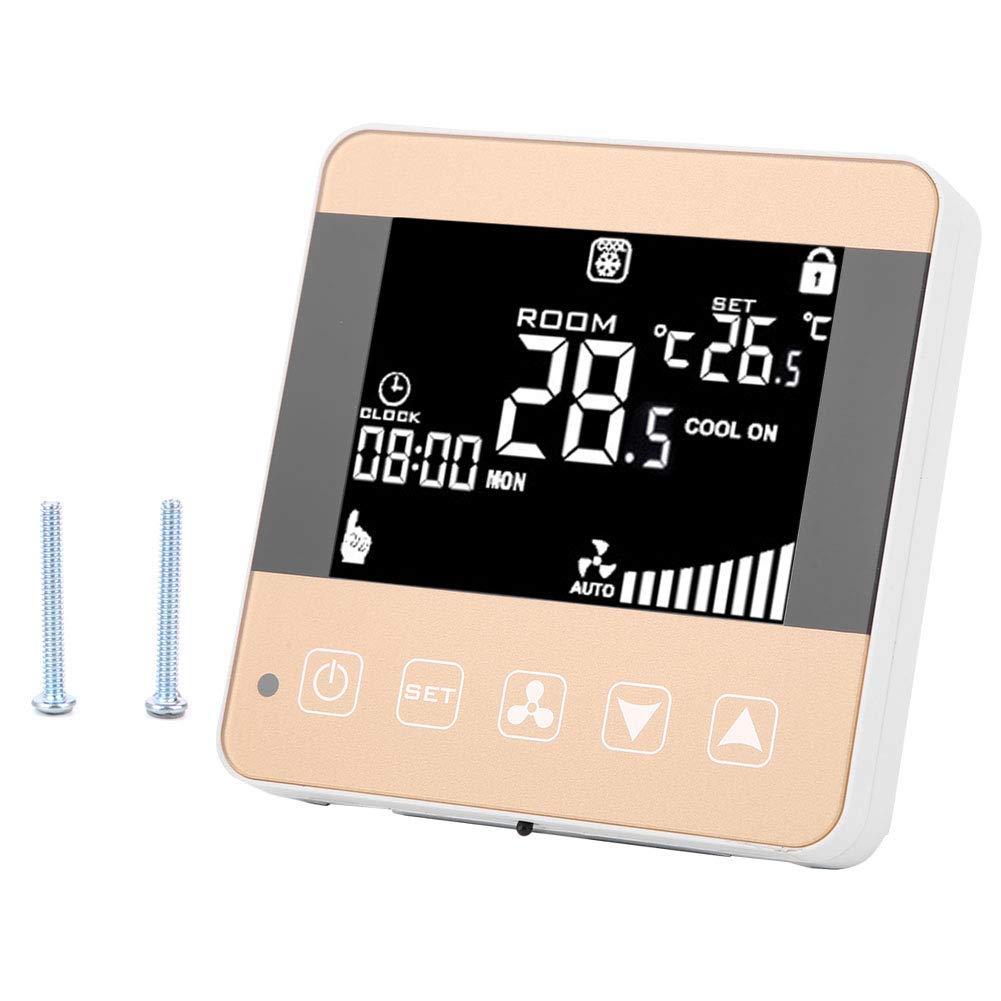
The thermostat's display provides real-time information, including the current room temperature, the set temperature, the operating mode (heating or cooling), fan speed, and the current time. The touch buttons below the screen allow for manual adjustments.

The device is designed for wall mounting and connects directly to your fan coil unit's wiring. Its compact and modern design blends well with various interior decors.

Configuració
Instal·lació
- Desconnexió d'alimentació: Before beginning installation, ensure the main power supply to the fan coil unit and the thermostat's circuit is turned off at the circuit breaker.
- Muntatge: Mount the thermostat to a standard electrical wall box using the provided screws. Ensure it is securely fastened.
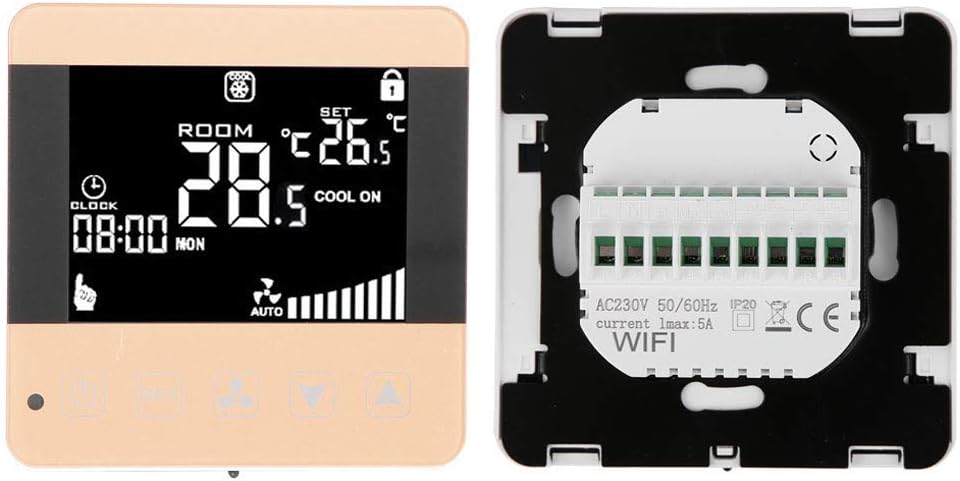
- Cablejat: Connect the electrical wires from your fan coil unit to the corresponding terminals on the back of the thermostat. Refer to the wiring diagram below and your fan coil unit's manual for specific connections. Common connections include Live (L), Neutral (N), High Fan Speed (H), Medium Fan Speed (Med), Low Fan Speed (Low), and Valve control wires.

Initial Power-Up and Wi-Fi Connection
- Restaura l'alimentació: Once wiring is complete and secure, restore power at the circuit breaker. The thermostat display should illuminate.
- Vinculació Wi-Fi: Follow the instructions in the dedicated smartphone application (refer to the app's guide for download and pairing process) to connect your thermostat to your home Wi-Fi network. This will enable remote control and advanced scheduling features.
Instruccions de funcionament
Funcionament bàsic
- Botó d'encesa: Press the power button (usually indicated by a circle with a vertical line) to turn the thermostat on or off.
- Ajust de temperatura: Use the Up (▲) and Down (▼) arrow buttons to increase or decrease the desired set temperature. The temperature range is 5°C to 35°C.
- Selecció del mode: Press the 'SET' button to cycle through operating modes (e.g., Heating, Cooling, Fan Only).
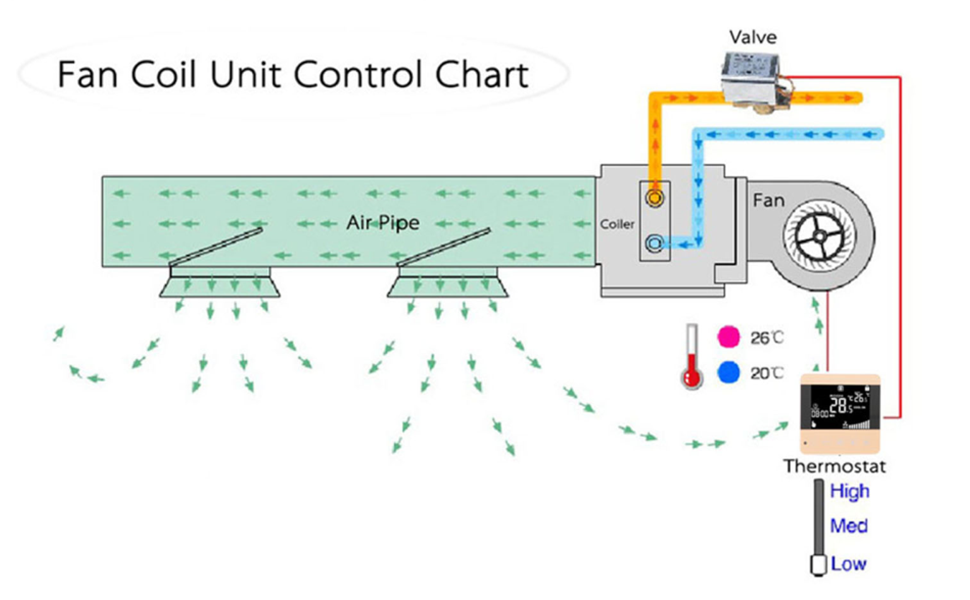
- Control de velocitat del ventilador: Press the fan icon button to select the desired fan speed: Automatic, High, Medium, or Low. In Automatic mode, the fan speed adjusts based on the temperature difference.
- Visualització del rellotge: The current time is displayed on the LCD screen. Time settings can typically be adjusted via the smartphone application.
Wi-Fi i control d'aplicacions
Once connected to Wi-Fi, the thermostat can be controlled remotely using the dedicated smartphone application. This allows for:
- Ajust remot de la temperatura.
- Scheduling and programming of temperature settings.
- Monitoring of room temperature and system status.
- Advanced settings configuration.
Refer to the smartphone application's help section for detailed instructions on using its features.
Manteniment
The Walfront WiFi Fan Coil Unit Thermostat requires minimal maintenance to ensure optimal performance.
- Neteja: Periodically wipe the thermostat's screen and casing with a soft, dry, lint-free cloth. Do not use abrasive cleaners, solvents, or chemical sprays, as these can damage the surface or internal components.
- Cura del sensor: Ensure the temperature sensor (located within the unit) is not obstructed by dust or debris, which could affect temperature accuracy.
- Actualitzacions de firmware: Check the smartphone application periodically for any available firmware updates for your thermostat. Updates can improve performance and add new features.
Resolució de problemes
Si teniu problemes amb el termòstat, consulteu els problemes i solucions més comuns següents:
| Problema | Causa possible | Solució |
|---|---|---|
| La pantalla del termòstat està en blanc. | Sense font d'alimentació. | Comproveu l'interruptor i assegureu-vos que s'hagi restablert l'alimentació. Verifiqueu les connexions del cablejat. |
| Lectura de temperatura incorrecta. | Sensor obstruction or improper placement. | Ensure the sensor is clear of debris. Relocate the thermostat if it's in direct sunlight or a draft. |
| No es pot connectar a la Wi-Fi. | Incorrect Wi-Fi password, weak signal, or router issue. | Verify Wi-Fi password. Move the thermostat closer to the router or check router settings. Restart the router. |
| Fan coil unit not responding. | Incorrect wiring or unit malfunction. | Double-check wiring connections. Consult a qualified technician if the issue persists. |
Especificacions
| Característica | Especificació |
|---|---|
| Marca | Walfront |
| Número de model | WLF-XXX |
| Font d'alimentació | Câble électrique (Wired) |
| Voltage | 240 Volts (AC200-240V) |
| Tecnologia de connectivitat | Wi-Fi |
| Tipus de control | Tàctil, Aplicació |
| Tipus de control de temperatura | Digital |
| Interval de temperatura | 5°C - 35°C (Internal Sensor) |
| Tipus de visualització | LCD |
| Llum de fons | Sí |
| Tipus de muntatge | Dltage mural (Wall Mount) |
| Pes de l'article | 183 grams |
| Usos específics | Climatiseur (Air Conditioner) |
Informació de la garantia
For detailed warranty information, please refer to the product packaging or contact Walfront customer support. Typically, products come with a standard manufacturer's warranty covering defects in materials and workmanship under normal use.
Suport
If you require further assistance or have questions not covered in this manual, please contact Walfront customer support. Contact details can usually be found on the product packaging, the official Walfront weblloc web o a través del vostre distribuïdor.