
PowerPac PPFS212B 2-in-1 Dual-Usage Stand Fan Instruction Manual
Model: PPFS212B
1. Informació important de seguretat
Llegiu atentament totes les instruccions abans d'utilitzar aquest aparell i conserveu-les per a futures consultes. Si no seguiu aquestes instruccions, podeu patir descàrregues elèctriques, incendis o lesions greus.
- Assegureu-vos que el voltagEl voltatge indicat a l'etiqueta de classificació coincideix amb el volum de la xarxa elèctricatage.
- No submergiu el ventilador, l'endoll ni el cable en aigua ni en altres líquids.
- Unplug the fan from the power outlet before cleaning, assembling, or disassembling parts.
- Keep fingers, pencils, or any other objects out of the fan grille when it is running.
- No feu funcionar el ventilador amb un cable o endoll danyats. Poseu-vos en contacte amb personal de servei qualificat per a la reparació.
- This appliance is equipped with thermal fuse protection against overheating. If the fan stops working unexpectedly, unplug it and allow it to cool before attempting to restart.
- Aquest aparell no està pensat per ser utilitzat per persones (inclosos nens) amb capacitats físiques, sensorials o mentals reduïdes, o amb manca d'experiència i coneixements, tret que hagin rebut la supervisió o instruccions sobre l'ús de l'aparell per una persona responsable de la seva seguretat. .
2. Producte acabatview
The PowerPac PPFS212B is a versatile 2-in-1 dual-usage stand fan designed for efficient cooling in indoor environments. It features 7 blades for maximum airflow, 3-speed settings, and an oscillation function for wider air distribution. The fan is equipped with thermal fuse protection for enhanced safety.
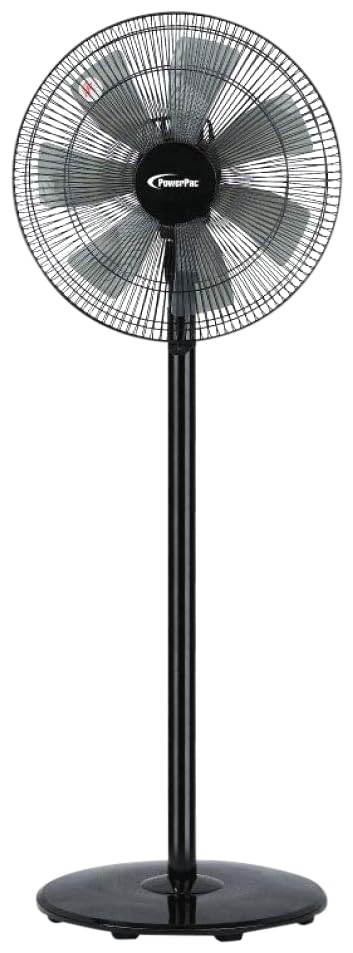
Image: PowerPac PPFS212B 2-in-1 Dual-Usage Stand Fan, showcasing its black finish and stand configuration.
3. Contingut del paquet
Si us plau, comproveu el contingut del paquet en obrir-lo per assegurar-vos que totes les peces hi són i no estan danyades:
- 1 x PowerPac PPFS212B Stand Fan (includes fan head, stand pole, and base)
4. Instruccions de muntatge
Follow these steps to assemble your PowerPac PPFS212B fan:
- Desembaleu amb cura tots els components de l'embalatge.
- Attach the stand pole to the fan base. Ensure it is securely fastened according to the markings or locking mechanism.
- Mount the fan head assembly onto the top of the stand pole. Align the connection points and secure it firmly.
- Ensure all screws and fasteners are tightened to prevent wobbling during operation.
- Place the assembled fan on a stable, flat surface.
Image: Illustrative diagram of the PowerPac PPFS212B fan assembly, showing the base, stand, and fan head components.
5. Instruccions de funcionament
To operate your PowerPac PPFS212B fan:
- Connecteu el cable d'alimentació a una presa de corrent adequada.
- Encès/apagat: Press the 'ON/OFF' button (or corresponding button) on the control panel to turn the fan on or off.
- Ajust de velocitat: Press the 'SPEED' button repeatedly to cycle through the 3 available speed settings (Low, Medium, High).
- Funció d'oscil·lació: Press the 'OSC' button (or corresponding button) to activate or deactivate the oscillation feature, which allows the fan head to sweep from side to side.
- When finished, press the 'ON/OFF' button to turn off the fan and unplug it from the power outlet.
6. Manteniment i Neteja
Regular cleaning and maintenance will help ensure optimal performance and longevity of your fan:
- Desconnecteu sempre el ventilador de la font d'alimentació abans de netejar-lo.
- Utilitzeu un suau, damp cloth to wipe the exterior surfaces of the fan. Do not use abrasive cleaners, solvents, or harsh chemicals.
- To clean the fan blades, carefully remove the front grille (if detachable) according to the product design. Wipe the blades with a soft cloth. Ensure all parts are dry before reassembling.
- No deixeu que l'aigua degoti a la carcassa del motor.
- Store the fan in a cool, dry place when not in use for extended periods.
7. Solució De Problemes
Si teniu problemes amb el ventilador, consulteu la taula següent per veure els problemes i les solucions més habituals:
| Problema | Causa possible | Solució |
|---|---|---|
| El ventilador no s'encén. | Sense font d'alimentació. Thermal fuse activated. | Comproveu si l'endoll està ben inserit a la presa de corrent. Assegureu-vos que la presa de corrent funcioni. Unplug and allow the fan to cool down for 30 minutes before restarting. |
| Flux d'aire feble o nul. | Velocitat del ventilador massa baixa. Les aspes del ventilador estan brutes. | Augmenta la configuració de la velocitat del ventilador. Unplug the fan and clean the blades as per maintenance instructions. |
| El ventilador no oscil·la. | La funció d'oscil·lació està desactivada. | Press the 'OSC' button to activate oscillation. |
| Soroll inusual durant el funcionament. | Parts soltes. Obstrucció. | Unplug the fan and check for any loose components or obstructions around the blades or motor. Tighten any loose parts. |
Si el problema persisteix després d'intentar aquestes solucions, poseu-vos en contacte amb l'atenció al client.
8. Especificacions
| Característica | Especificació |
|---|---|
| Marca | PowerPac |
| Número de model | PPFS212B |
| Tipus | 2-in-1 Dual-Usage Stand Fan |
| Nombre de fulles | 7 |
| Nombre de velocitats | 3 |
| Font d'alimentació | Elèctric amb cable |
| Wattage | 50 watts |
| Mètode de control | Pulsador |
| Característiques especials | Oscillating, Thermal Fuse Protection |
| Material | Plàstic |
| Ús interior/exterior | Interior |
| Color | Negre |
9. Garantia i Suport
This PowerPac PPFS212B fan comes with a 2 any de garantia des de la data de compra. Aquesta garantia cobreix els defectes de fabricació en condicions d'ús normals.
For warranty claims, technical support, or any inquiries regarding your product, please contact PowerPac customer service. Keep your proof of purchase for warranty validation.