
GOKOO B08FMBHSWD
GOKOO Smart Watch B08FMBHSWD User Manual
Introducció
This manual provides essential information for the proper setup, operation, and maintenance of your GOKOO Smart Watch B08FMBHSWD. Please read it thoroughly before using the device to ensure optimal performance and longevity.
The GOKOO Smart Watch is a versatile fitness tracker and smartwatch designed to monitor various health metrics and assist with daily activities. It features a full touch screen, heart rate and blood oxygen monitoring, sleep tracking, multiple sports modes, and notification capabilities.
Producte acabatview
The GOKOO Smart Watch B08FMBHSWD is equipped with advanced features to support your active lifestyle and health monitoring needs.
- All-day Activity Tracking: Records steps, calories, and mileage. Supports 10 sports modes including walking, running, yoga, and swimming.
- Vigilància integral de la salut: Continuously monitors heart rate and blood oxygen levels. Features automatic sleep tracking, breathing training, and sedentary reminders.
- Disseny durador i impermeable: IP68 waterproof rating suitable for daily use and swimming.
- Pantalla personalitzable: 1.3-inch round high-definition screen with personalized UI interfaces.
- Notificacions intel·ligents: Synchronizes messages and allows management of incoming calls.
- Llarga vida útil de la bateria: Up to 10 days of usage on a single charge (200MA battery).
- Àmplia compatibilitat: Works with Android 5.0+ and iOS 9.0+ devices.

Figure 1: GOKOO Smart Watch highlighting its design and core functionalities.
Configuració
1. Càrrega del dispositiu
Before initial use, fully charge your GOKOO Smart Watch. Connect the magnetic charging cable to the charging contacts on the back of the watch and plug the USB end into a power adapter (not included) or a computer's USB port. The watch display will indicate charging status.
A full charge typically takes approximately 2 hours and provides up to 10 days of usage, depending on individual use patterns.

Figure 2: Illustration of the watch's IP68 waterproof capability and its extended battery life.
2. Instal·lació i emparellament de l'aplicació
- Descarrega l'aplicació: Cerca the official GOKOO companion app in your smartphone's app store (Apple App Store for iOS, Google Play Store for Android).
- Instal·lació i registre: Instal·leu l'aplicació i seguiu les instruccions que apareixen a la pantalla per crear un compte o iniciar la sessió.
- Activa el Bluetooth: Assegureu-vos que el Bluetooth estigui habilitat al vostre telèfon intel·ligent.
- Emparellar el rellotge: Open the GOKOO app, navigate to the device pairing section, and select your GOKOO Smart Watch from the list of available devices. Confirm the pairing request on both your phone and the watch if prompted.
- Concedir permisos: Allow necessary permissions (e.g., notifications, location, health data) for the app to function correctly.
The watch will synchronize its language with your phone upon successful connection.
Instruccions de funcionament
1. Navegació bàsica
- Pantalla tàctil: The watch features a full touch screen for interaction.
- Llisca cap amunt/avall: Desplaça't pels menús i les notificacions.
- Llisca cap a l'esquerra/dreta: Accedeix a diferents widgets o funcions ràpides.
- Toca: Selecciona un element o confirma una acció.
- Botó lateral: Typically used to return to the home screen or activate/deactivate the display.

Figure 3: The watch interface displaying multiple functions and touch screen interaction methods.
2. Seguiment d'activitat
The watch automatically tracks your daily steps, calories burned, and distance traveled. For specific activities, you can select from 10 sports modes:
- Caminant
- Córrer
- Ioga
- Natació
- Ciclisme
- Escalada
- Bàsquet
- Futbol
- Bàdminton
- Saltant
To start a workout, navigate to the 'Sports' menu on your watch, select the desired activity, and tap to begin. The watch will record your exercise data, which can be revieweditat a l'aplicació complementària.

Figure 4: The watch interface showing available sports monitoring modes.

Figure 5: The watch tracking an outdoor run, displaying distance, calories, and a trajectory map.
3. Monitorització de la salut
- Freqüència cardíaca: El rellotge controla contínuament la teva freqüència cardíaca. View real-time data on the watch or detailed historical data in the app.
- Oxigen en sang (SpO2): Controla els nivells d'oxigen a la sang durant tot el dia.
- Seguiment del son: The watch automatically records your sleep quality, including deep sleep, light sleep, and wake times. Review sleep patterns in the app to help adjust your habits.
- Entrenament de la respiració: Access guided breathing exercises on the watch to help reduce stress and improve relaxation.
- Recordatoris de sedentarisme: Set reminders in the app to prompt you to move after periods of inactivity.

Figure 6: The watch displaying real-time heart rate and blood oxygen data during exercise.
4. Notificacions i funcions intel·ligents
Once paired with your smartphone, the GOKOO Smart Watch can display notifications for incoming calls, messages, and various app alerts. You can read messages directly on your wrist and manage incoming calls (answer/reject) without reaching for your phone.
- Gestió de trucades: Swipe on the watch screen to accept or reject incoming calls.
- Message Display: View text messages and app notifications.
- Pronòstic del temps: Access current weather information.
- Control de música: Controla la reproducció de música al teu telèfon intel·ligent.
- Comandament a distància de la càmera: Feu servir el rellotge com a disparador remot per a la càmera del telèfon.
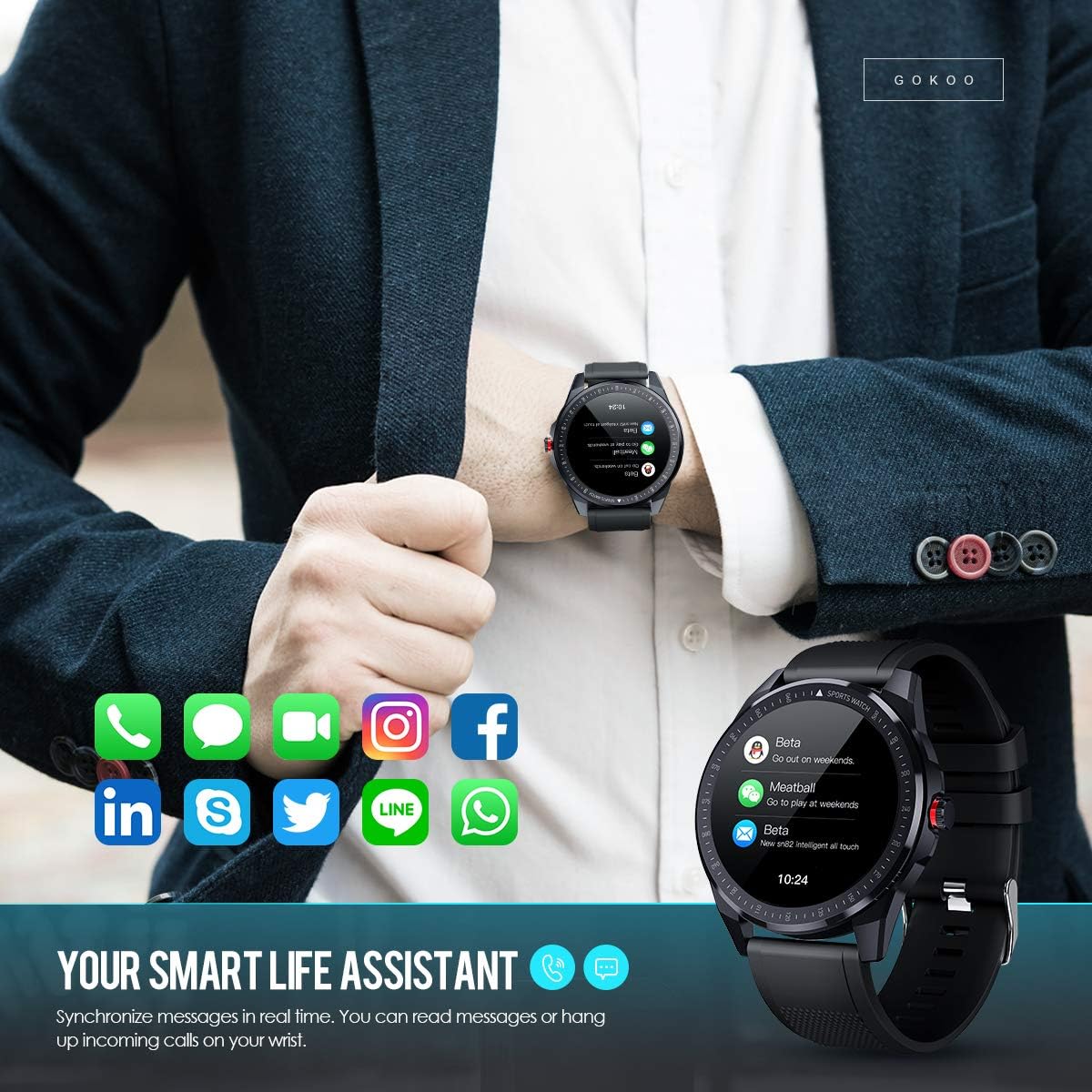
Figure 7: The watch showing synchronized notifications from a smartphone.
5. Personalització
The GOKOO Smart Watch allows for personalization of its interface. You can select from various pre-installed watch faces or download additional styles through the companion app to match your preference.
Manteniment
1. Neteja
Regularly clean your watch and strap to prevent skin irritation and maintain device hygiene. Use a soft, lint-free cloth. If necessary, slightly dampen the cloth with water. Avoid using harsh chemicals, abrasive cleaners, or aerosol sprays.
2. Pautes de resistència a l'aigua
The GOKOO Smart Watch has an IP68 waterproof rating, meaning it is resistant to dust and can withstand immersion in water up to 1.5 meters for 30 minutes. It is suitable for daily use, hand washing, rain, and swimming.
Important: Do not use the watch in hot water baths, saunas, or during diving. High temperatures and high pressure can compromise the waterproof seals and cause damage.
3. Cura de la bateria
- Eviteu descarregar completament la bateria amb freqüència.
- Charge the watch using the provided magnetic charging cable.
- Guardeu el rellotge en un lloc fresc i sec quan no l'utilitzeu durant períodes prolongats.
Resolució de problemes
- El rellotge no s'encén: Assegura't que el rellotge estigui completament carregat. Connecta'l al carregador durant almenys 30 minuts.
- No es pot emparellar amb el telèfon:
- Assegureu-vos que el Bluetooth estigui habilitat al vostre telèfon.
- Assegureu-vos que el rellotge estigui dins de l'abast del Bluetooth del telèfon.
- Reinicia tant el telèfon com el rellotge.
- Comproveu si l'aplicació té els permisos necessaris.
- Dades de salut inexactes: Assegureu-vos de portar el rellotge ben ajustat al canell, aproximadament a l'amplada d'un dit per sobre de l'os del canell. Netegeu el sensor de la part posterior del rellotge.
- Notificacions que no apareixen:
- Verify that notification permissions are granted in the app and your phone's settings.
- Assegureu-vos que el rellotge estigui connectat per Bluetooth.
- Comproveu si el mode "No molestar" està actiu al rellotge o al telèfon.
- Autonomia curta de la bateria: Reduce screen brightness, disable continuous heart rate monitoring if not needed, and limit the number of active notifications.
Especificacions
| Característica | Detall |
|---|---|
| Marca | GOKOO |
| Model | B08FMBHSWD |
| Mida de la pantalla | 1.3 polzades |
| Sistema operatiu | Android 5.0 o superior, iOS 9.0 o superior |
| Dispositius compatibles | Smartphone |
| Durada de la bateria | Fins a 10 dies (segons l'ús) |
| Tipus de bateria | Polímer de liti |
| Resistència a l'aigua | IP68 |
| Connectivitat sense fil | Bluetooth |
| Entrada de la interfície humana | Pantalla tàctil |
| Dimensions del producte | 27 x 5 x 1.08 cm; 168 g |

Figure 8: Detailed product dimensions of the GOKOO Smart Watch.
Garantia i Suport
For warranty information or technical support, please refer to the contact details provided with your purchase or visit the official GOKOO website. If you require a copy of this manual or have any questions regarding your GOKOO Smart Watch B08FMBHSWD, please contact customer service.
Ask a question about this manual
Ask about setup, troubleshooting, compatibility, parts, safety, or missing instructions. Manuals+ will review the question and use this page’s manual context to help answer it.