
Introducció
This manual provides detailed instructions for the installation, operation, and maintenance of your Walfront HY08AC-2 Wi-Fi Programmable Thermostat. This intelligent central climate thermostat is designed for precise temperature control in heating, air conditioning, and ventilation systems, excluding electric baseboards. Its high-reliability microcomputer ensures anti-interference performance, and the Wi-Fi capability allows for convenient remote access via smartphone or computer.
The thermostat features an intuitive LCD display that shows ambient temperature, heating or cooling status, fan speed, and time. Constructed from high-quality fireproof ABS material, it is designed for durability and reliable performance.
Contingut del paquet
Si us plau, verifiqueu que tots els elements siguin presents al paquet:
- 1 x Walfront HY08AC-2 Thermostat Unit
- 2 x cargols de muntatge
- 1 x Manual d'usuari (aquest document)
Producte acabatview
The Walfront HY08AC-2 thermostat features a clear LCD display and easy-to-use buttons for controlling your climate system. Below are images illustrating the thermostat's components and design.

Figura 1: Davant view of the Walfront HY08AC-2 Thermostat, showing the LCD screen displaying temperature, time, and mode, along with the power, set, fan, and arrow buttons below.
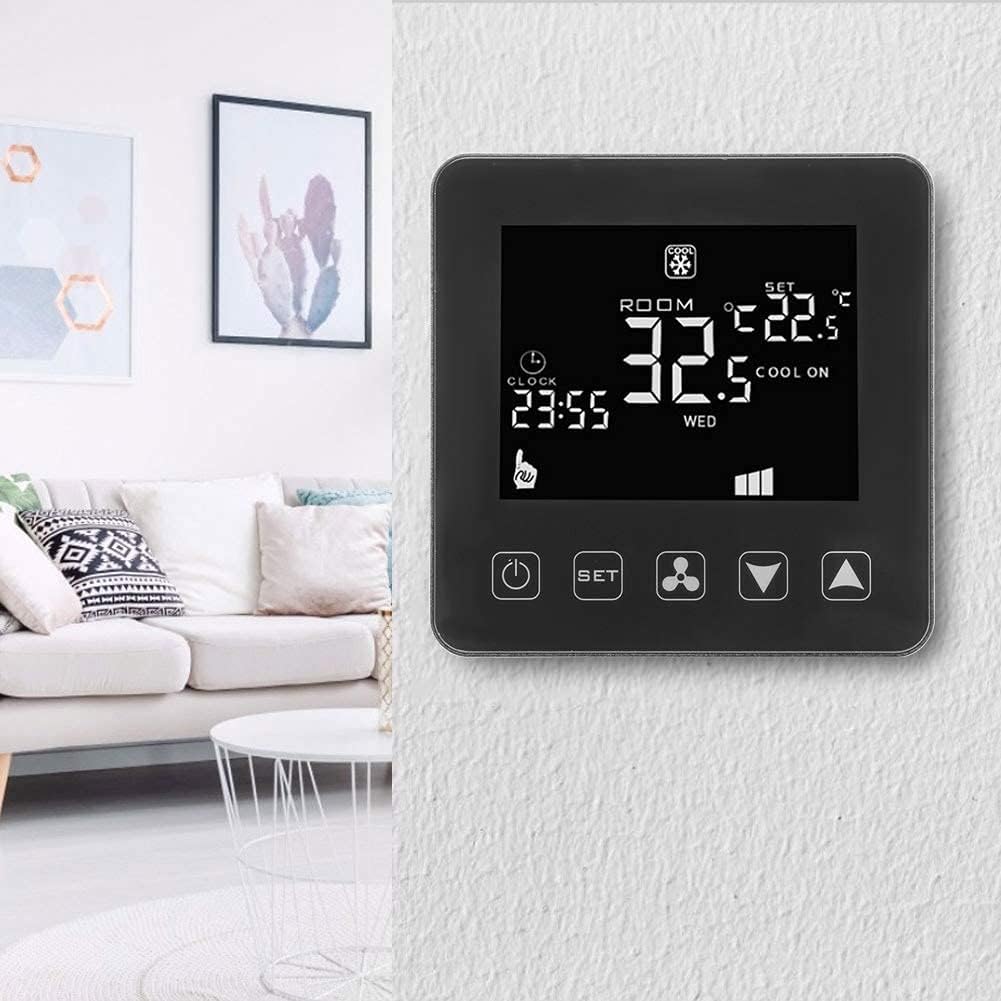
Figura 2: The Walfront HY08AC-2 Thermostat installed on a wall, demonstrating its compact and modern appearance within a home environment.

Figura 3: posterior view of the thermostat's base plate, highlighting the clearly labeled wiring terminals for electrical connections.

Figura 4: Un va explotar view of the thermostat, separating the main display unit from its wall-mounted base, illustrating the two primary components.
Configuració i instal·lació
Proper installation is crucial for the thermostat's optimal performance. It is recommended that installation be performed by a qualified electrician.
1. Instal·lació física
- Apagar: Before beginning installation, ensure that the main power supply to your HVAC system is turned off at the circuit breaker to prevent electrical shock.
- Lloc de muntatge: Choose a central location on an interior wall, away from direct sunlight, drafts, or heat sources that could affect temperature readings.
- Placa base separada: Gently separate the front display unit from the back mounting plate.
- Cablejat: Connect the electrical wires from your HVAC system to the corresponding terminals on the back mounting plate. Refer to Figure 3 for terminal layout. Ensure all connections are secure. The thermostat operates on AC 200-240V.
- Muntatge: Secure the back mounting plate to the wall using the provided screws.
- Connecteu el termòstat: Carefully reattach the front display unit to the mounted back plate, ensuring it clicks securely into place.
- Encès: Restore power to your HVAC system at the circuit breaker. The thermostat display should illuminate.
2. Configuració inicial i connexió Wi-Fi
After powering on, the thermostat will be ready for initial configuration and Wi-Fi connection for remote control.
- Descarregar l'aplicació: For smartphone control, download the "Tuya Smart" app.
- For Android devices, search "Tuya Smart" on Google Play Store.
- For iOS devices, search "Tuya Smart" on the Apple App Store.
- Registra't/Inici de sessió: Obre l'aplicació i registra un compte nou o inicia la sessió si ja en tens un.
- Afegeix un dispositiu: Follow the in-app instructions to add your new thermostat. This typically involves putting the thermostat into pairing mode (refer to the thermostat's on-screen prompts or a quick press of the Wi-Fi button if available) and connecting it to your home Wi-Fi network.
- Configura la configuració: Once connected, you can configure various settings through the app, including time, temperature units, and programming schedules.
Instruccions de funcionament
The Walfront HY08AC-2 thermostat offers both manual and smart control options.
Manual Operation (Thermostat Buttons)
- Botó d'encendre (ⓘ): Press to turn the thermostat ON or OFF.
- Botó Defineix (SET): Press to cycle through different modes (e.g., Heating, Cooling, Fan Only) or to enter programming settings.
- Botó de ventilador (⚙): Controls the fan speed or mode (e.g., Auto, Low, Medium, High).
- Fletxes amunt/avall (▼ / ▲): Adjust the desired temperature setting or navigate through menu options.
Informació de la pantalla LCD
La pantalla LCD proporciona informació en temps real:
- ROOM Temperature: Mostra la temperatura ambient actual.
- SET Temperature: Mostra la configuració de temperatura desitjada.
- Indicador de mode: Icons for Heating (e.g., flame), Cooling (e.g., snowflake), or Fan Only.
- Rellotge: Mostra l'hora actual.
- Estat de la Wi-Fi: An icon indicating Wi-Fi connection status.
- Velocitat del ventilador: Indicates the current fan speed setting.
Smart Control (Tuya Smart App)
Once connected to the Tuya Smart app, you can:
- Remotely adjust temperature settings from anywhere.
- Change operating modes (Heating/Cooling/Fan).
- Set and manage programmable schedules for energy efficiency.
- Monitor current room temperature and system status.
- Rebre notificacions i alertes.
Manteniment
The Walfront HY08AC-2 thermostat requires minimal maintenance to ensure long-term performance.
- Neteja: Periodically wipe the thermostat's surface with a soft, dry cloth. Do not use abrasive cleaners, solvents, or chemical sprays, as these can damage the display or casing.
- Eviteu les obstruccions: Ensure that the thermostat's vents (if any) are not blocked by furniture, curtains, or other objects, as this can affect accurate temperature readings.
- Actualitzacions de programari: Keep the Tuya Smart app updated to the latest version to ensure optimal performance and access to new features. Firmware updates for the thermostat may also be available through the app.
Resolució de problemes
If you encounter issues with your Walfront HY08AC-2 thermostat, refer to the following common problems and solutions:
| Problema | Causa possible | Solució |
|---|---|---|
| La pantalla del termòstat està en blanc. | Sense font d'alimentació. | Check the circuit breaker for your HVAC system. Ensure the thermostat is properly wired and connected to a 200-240V AC supply. |
| No es pot connectar a la Wi-Fi. | Incorrect Wi-Fi password, weak signal, or thermostat not in pairing mode. | Verify your Wi-Fi password. Ensure the thermostat is within range of your Wi-Fi router. Put the thermostat into Wi-Fi pairing mode as per app instructions. Restart your router if necessary. |
| La lectura de temperatura sembla inexacta. | Thermostat location affected by external factors (direct sunlight, drafts, heat sources). | Ensure the thermostat is not exposed to direct sunlight, drafts from windows/doors, or heat from appliances. Relocate if necessary. |
| El sistema de climatització no respon al termostat. | Incorrect wiring, system fault, or thermostat mode setting. | Double-check wiring connections. Ensure the thermostat is set to the correct mode (Heating/Cooling). If the issue persists, consult a qualified HVAC technician. |
Especificacions
Detailed technical specifications for the Walfront HY08AC-2 Thermostat:
| Tipus de producte | Termòstat programable per Wi-Fi |
| Número de model | HY08AC-2 (Walfront28tgsh7n5f) |
| Marca | Walfront |
| Material | ABS ignífug |
| Vol. Operatiutage | AC 200-240V |
| Corrent de càrrega | 3A |
| Classificació IP | IP20 |
| Precisió | ± 0.5 °C |
| Interval de visualització de temperatura | 0 - 70 °C |
| Interval de configuració | 5 °C - 35 °C |
| Sensor | NTC (10K) 1 % |
| Entorn de treball | -10 a 60 °C |
| Pes de l'article | Aprox. 235 g |
| Tipus de controlador | iOS, Android (via Tuya Smart App) |
Informació de suport
For further assistance or technical support, please refer to the following resources:
- Tuya Smart App: The primary source for managing your thermostat and accessing smart features. Ensure your app is always updated.
- Recursos en línia: Check the Walfront brand store on Amazon or the Tuya Smart app's help section for FAQs and additional support documentation.
- Assistència professional: For complex installation or system issues, it is recommended to contact a qualified HVAC professional.
Note: No specific warranty information was provided with this product. Please refer to your purchase documentation for any applicable warranty details.